Working with a background assistant: a consultant handoff
This page helps a consultant prepare and assess a background assistant supplied by an integration team. Running the platform's agent workers is a developer/operator responsibility. There is no worker-control screen that every consultant must configure.
A run is one attempt to carry out a defined piece of work. For example, “prepare a summary of this leave request” is one run. A run can finish, fail or wait for information. That status is different from the leave request's own business status.
Inspect an unfinished Agent Task draft before handoff
A workflow designer may encounter an Agent Task in a state's flow. Its authoring controls are different from the integration owner's worker operations and from a manager's ordinary task. The two pictures below are a reading exercise using a separate fictional draft, CF3 Agent task preparation, in People Operations. They show preparation that still needs specialist review. Do not copy this incomplete diagram as a working leave process.
The draft was created with Nothing — variables only, so it is not bound to an employee record or document. Its Start state contains two disconnected shapes, Start and Agent Task, with no connecting flow or End. The visible publication banner reports one blocking error; these pictures do not identify that finding's cause. The header says Editing draft v1, Not published yet and All changes saved. Saved draft work is useful to preserve, but it is not a publication or execution result.
Separate the saved brief from displayed defaults
Open the unchanged native 2560×1440 unfinished Agent Task screenshot
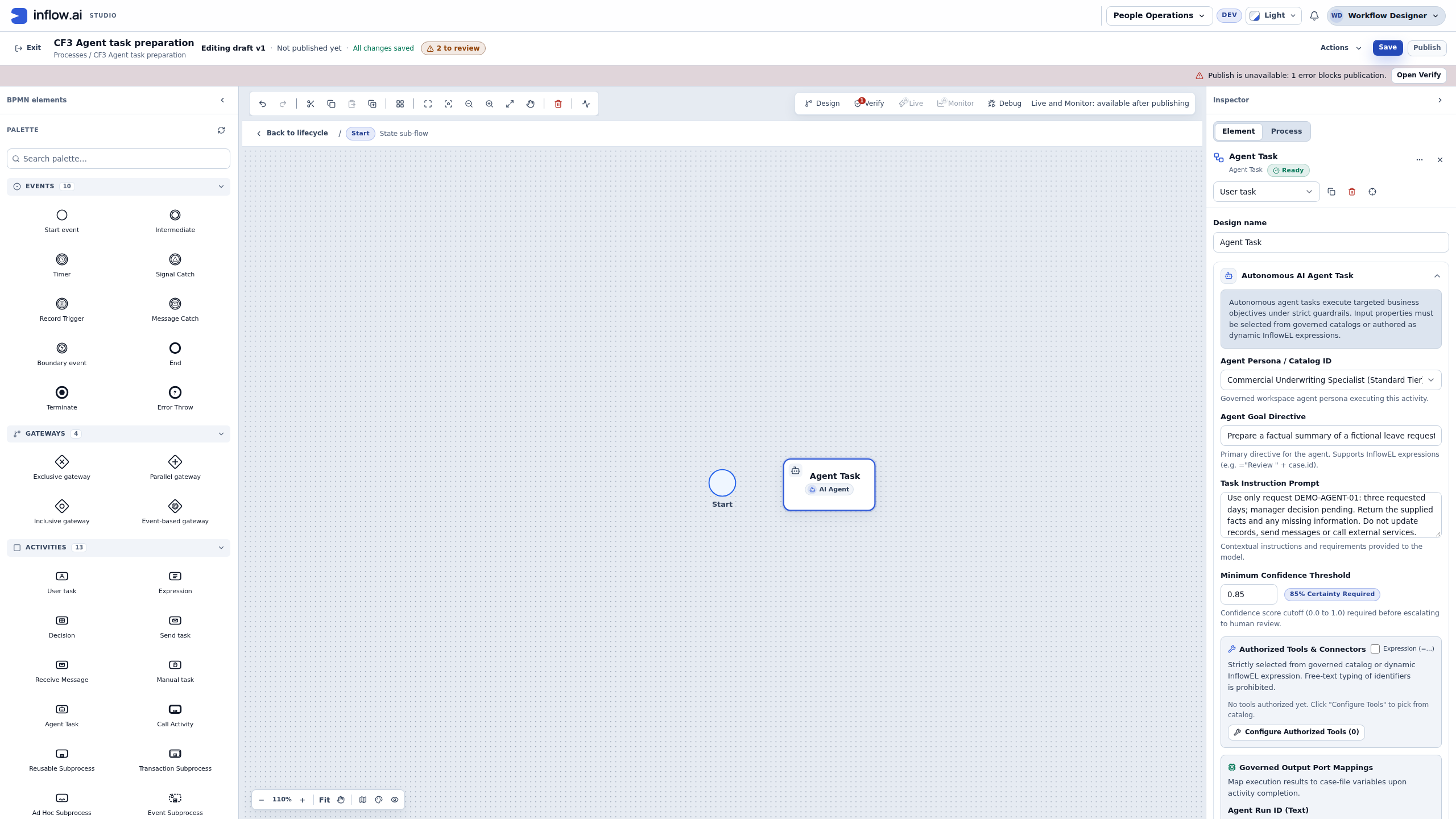
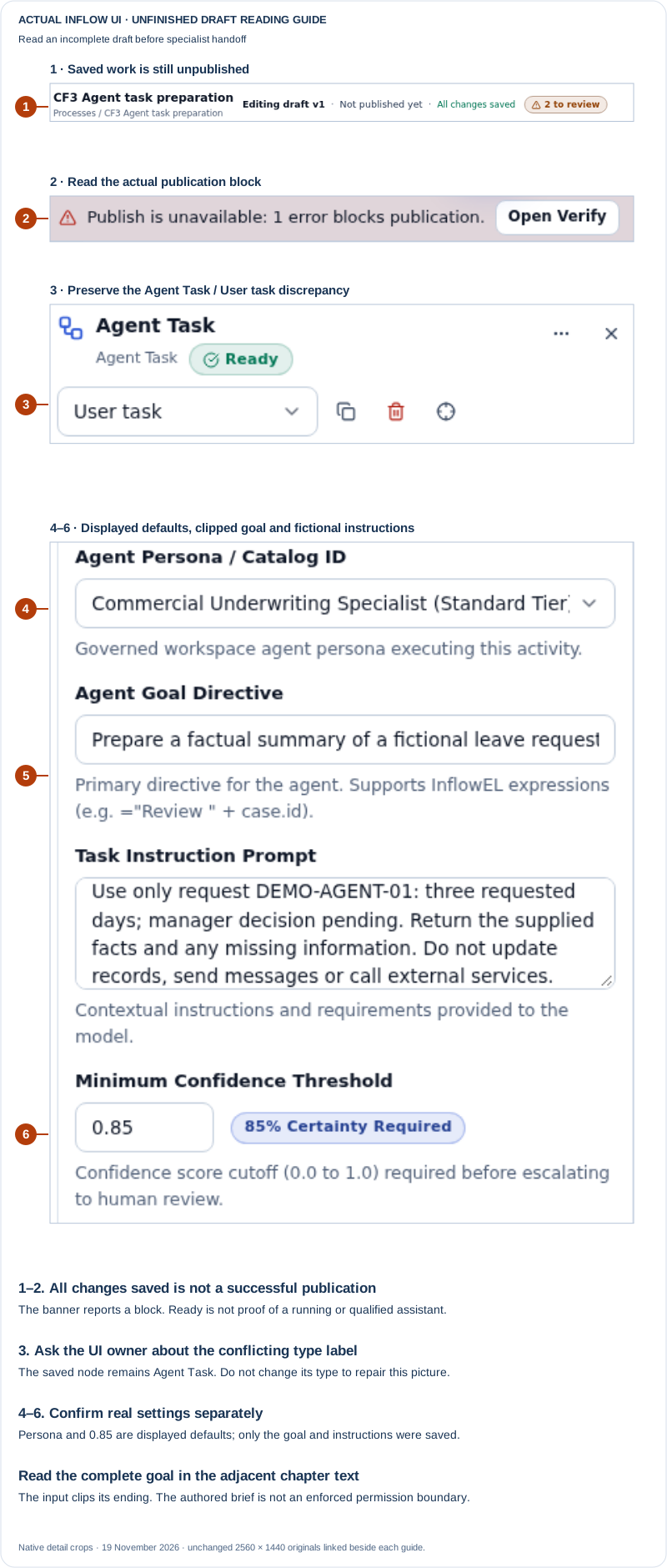
Unfinished-draft warning: publication is blocked despite Ready. The type picker displays User task, although this saved node is an Agent Task; that inconsistency remains unresolved in this training build. Only the goal and instructions were saved for this node. The displayed persona and confidence defaults are unconfirmed settings, the goal line is clipped, and all six output mappings remain blank. No assistant run or business result is shown.
Nadia reads the picture with the integration owner rather than treating a green badge as acceptance:
- Check the workspace, draft and intended step. This is a new training draft, not the published leave workflow or Sara's assigned task. All changes saved describes the draft. Not published yet and the publication block remain visible. The owner must review the actual finding before deciding how to complete the design; these pictures do not establish that it is ready to run.
- Keep the type discrepancy intact for its owner. The canvas and inspector identify Agent Task, while the compact type picker reads User task. The saved draft was checked and still contains an Agent Task. Nadia preserves that observation and asks the UI owner to investigate. She does not choose a different type to make the labels agree, or claim that the mismatch was fixed by saving.
- Read the exact business brief. The single-line Agent Goal Directive does not display its entire value. The saved value was checked separately and is reproduced below. The multiline Task Instruction Prompt provides the fictional reference and permitted facts. This example supplies three requested days and a pending manager decision, but no date range. Those missing dates should remain missing in the brief until the owner supplies approved information.
- Ask the owner to establish the actual agent and settings. The visible persona is an underwriting option, not evidence of a suitable leave-summary assistant. This draft has not saved that displayed persona as its agent selection. Similarly, 0.85 / 85% Certainty Required is a displayed threshold default, not an observed confidence score, a measured accuracy guarantee or a saved threshold for this node. Do not accept those defaults for the leave exercise on the strength of the picture.
The complete saved goal, including the part clipped by the input, is:
Prepare a factual summary of a fictional leave request. Do not approve or decline it.
The saved fictional instructions are:
Use only request DEMO-AGENT-01: three requested days; manager decision pending.
Return the supplied facts and any missing information.
Do not update records, send messages or call external services.
This is a different brief from the five-day example later in the chapter. DEMO-AGENT-01 is fictional text in the instructions, not a created leave request, case or run identifier. The instructions were stored as one paragraph; the line breaks above make the same wording easier to read. Telling an assistant not to take an action is a useful brief, but it does not establish an enforced permission boundary. The integration owner must verify the actual agent, model, allowed operations and current access before any separately approved execution.
Output labels are questions to settle, not returned results
Open the unchanged native 2560×1440 unmapped-output screenshot
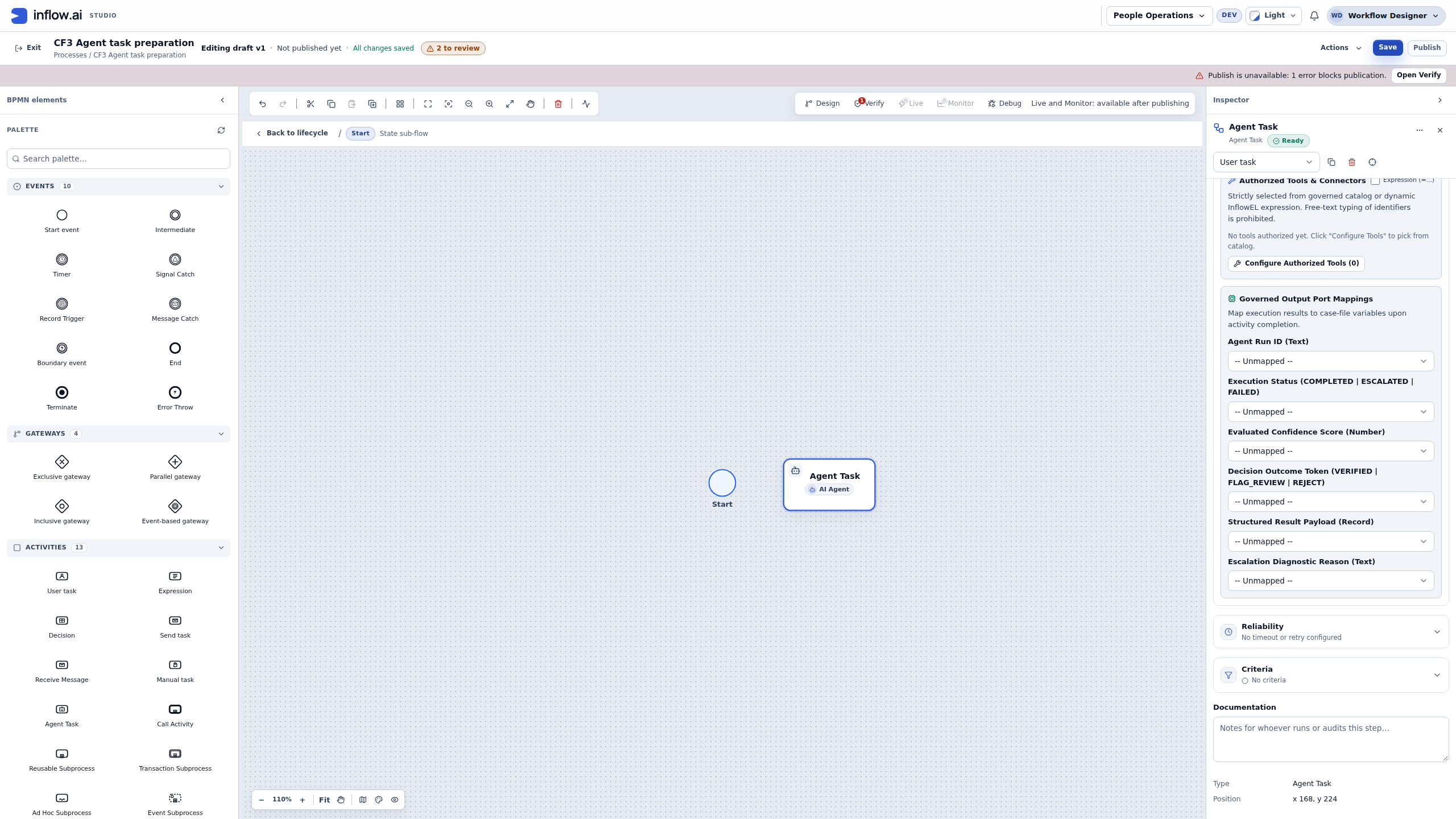
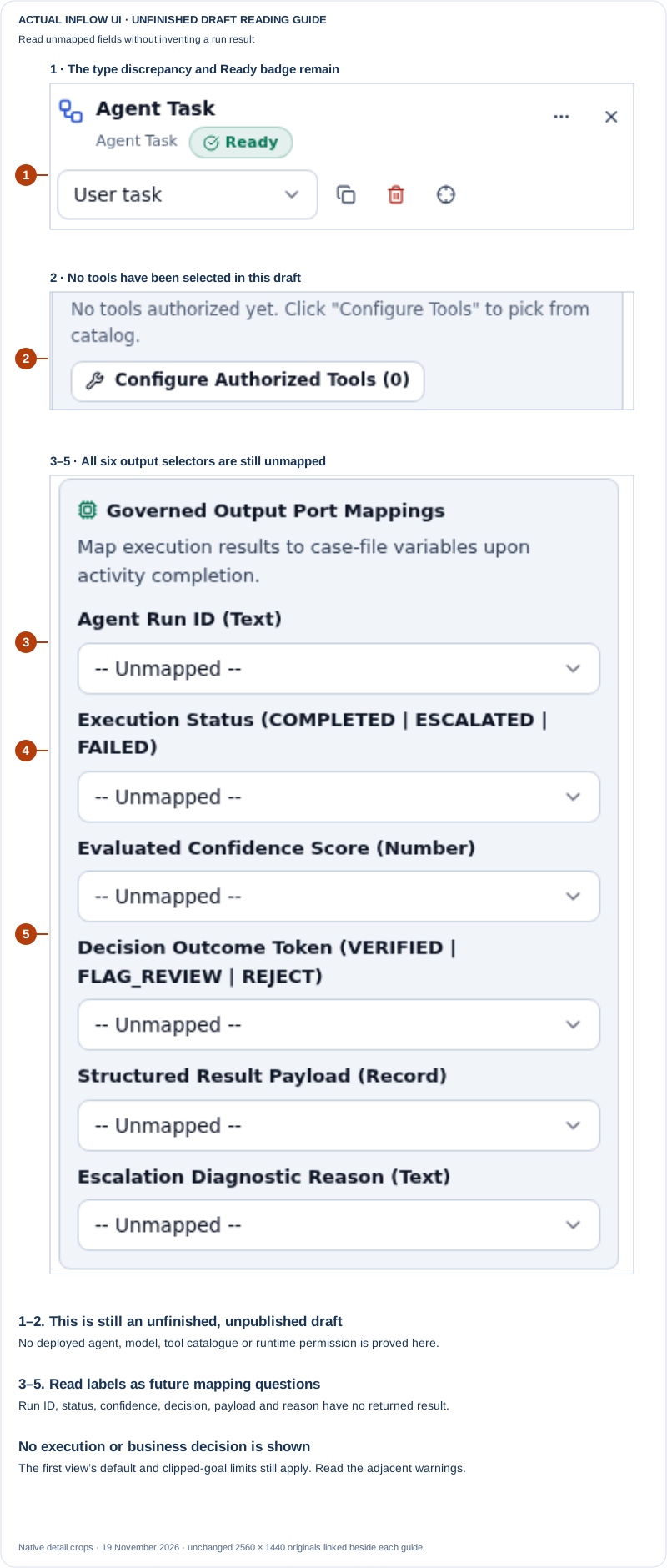
The same unfinished-draft limits apply here: Ready does not clear the publication block or the Agent Task / User task discrepancy. The first view's persona and threshold defaults are not established saved settings, and its clipped goal needs the complete wording above. Every output below is -- Unmapped --. The enum words in the labels are not returned statuses or decisions, and no run, approval or provider result has occurred in this exercise.
Configure Authorized Tools (0) and No tools authorized yet show that no tools have been selected in this authoring example. They do not demonstrate a deployed tool catalogue or prove what a future runtime will permit. Nadia has not opened the picker, selected a connector or invoked an operation. She asks the integration owner to establish the real permitted catalogue and the saved policy for the intended assistant; she does not add an unrelated tool to make the count increase.
Read each mapping with a separate question for the owner:
| Visible mapping | Question to settle before an approved demonstration | What the blank field does not show |
|---|---|---|
| Agent Run ID (Text) | Where will the original assistant attempt's reference be available for review? | A created run, the business request reference or a case identifier |
| Execution Status | Which supported result will be recorded, and where can the reviewer inspect that same attempt? | A completed, escalated or failed run; the words are label examples here |
| Evaluated Confidence Score (Number) | What does the reported score mean for this integration, and how must a person assess it? | An observed score or evidence that the answer is correct |
| Decision Outcome Token | What do these values mean for this specific integration, separately from the business process? | Sara's approval or decline, a completed manager task, or platform verification |
| Structured Result Payload (Record) | What exact output shape and destination will the integration owner support? | A returned record, a saved employee change or a finished summary |
| Escalation Diagnostic Reason (Text) | Who will read an actual explanation and decide the permitted next step? | A created human task, a notification or authority to change a request |
The current draft has no case variables to select for these mappings. No timeout or retry configured and No criteria are also visible. A specialist must define the appropriate configuration and recovery contract for the real integration; the picture does not establish default retries, cancellation, rollback or delivery guarantees.
Expected handoff: Nadia can show the preserved draft, the exact fictional brief, the type-picker discrepancy and the settings or mappings that still need an owner decision. The owner must complete and qualify the actual design and demonstrate the original run and result through the intended permitted view. Until then, keep this exercise as unfinished preparation. No model or provider was invoked, and Mohammad's leave and Sara's real task were not changed by this draft exercise.
Example 1: ask for a factual leave summary
Nadia's business brief says that Mohammad requests five days, 14–18 December 2026, and Sara has not yet decided. A useful assistant result states those facts and lists missing information. It should not approve the vacation or change the employee's record.
Before the integration team runs this example, agree on the permitted information, the reviewer and the visible place where the team will inspect results. For a simple reusable summary configured entirely in Studio, prefer the AI Task lesson. Use a background integration when its additional work is actually needed.
Prepare the run brief before execution
Give the integration owner a bounded request rather than an instruction such as “let the assistant handle leave.” Agree on each part before the owner starts:
| Brief item | Leave-summary example | Why it matters |
|---|---|---|
| Purpose | Prepare a summary for request leave-2026-014 |
A clear purpose helps the owner select the right admitted integration. |
| Allowed input | The fictional dates, requested days and current business status | The assistant should receive only the information approved for this task. |
| Expected output | A short factual summary plus any missing information | The reviewer can compare the result with the source rather than judging tone alone. |
| Prohibited decision/effect | Do not approve or decline leave; do not change the request | A summary run is not authority to perform a separate business decision. |
| Reviewer | Sara reviews the summary in the integration's supported result view | A named person and visible result path make it possible to catch errors. |
| Completion evidence | The run result is visible and its facts match the allowed input | “The worker ran” or “the run completed” does not establish a correct summary or business outcome. |
Use fictional data while learning. If the integration needs a real record, a provider or an action outside its stated purpose, pause and ask the information or system owner to approve that separate scope before the run.
Read a run result without turning it into a business result
Ask the integration owner to show the original run and its supported result/log view. Record what the owner can actually observe:
| Observation | What it establishes | What it does not establish |
|---|---|---|
| Run is waiting | The integration has not reported a final assistant result | That the business request is waiting for a manager or that no external request was sent |
| Run failed | The integration reported a failed attempt | That an outside system made no change before the failure |
| Run completed | The integration reported completion | That the summary is factually correct or a separate business action happened |
| Result is not visible to the consultant | The consultant cannot confirm the result in their current view | That the run failed, succeeded or is safe to repeat |
Compare the summary with the permitted source facts. For “Mohammad requested five days, 14–18 December 2026,” check the name/reference, number of days, dates and the statement that Sara has not yet decided. If a field is missing or conflicts with the source, ask the owner to correct or explain the run result; do not edit the real employee record to fit the summary.
If the configured assistant can send a message or change an external system, the owner must show the original action's outcome through its supported receipt or receiving-system view. A timeout, failed attempt or expired worker lease is not proof that the outside effect did not happen. Reconcile that same action before any retry.
Use this safe handoff:
Workspace/integration:
Original run reference and approximate time:
Requested purpose:
Allowed source/input (describe; do not paste private payload):
Run state shown by the owner:
Result or safe error text:
Facts compared with source:
Possible external effect: none intended / present / unknown
Owner checking next:
Retry or replacement request: none while outcome is unknown
Example 2: the result has not arrived
An operator says Nadia's factual-summary run has not appeared in the review view yet. Mohammad's leave request remains pending; the missing assistant response does not transfer the decision to Sara or Nadia.
- Ask the integration owner to inspect the original run in its supported status/result view. Keep its actual run reference, requested purpose and observed state; do not start a replacement run just to make a result appear.
- If the state is waiting, ask which specifically approved input is missing and provide only that information through the integration's supported continuation path. Do not take over a worker account or edit a run record.
- If the state is failed, completed or unknown, have the owner read the same attempt's safe result or action receipt. A failure or timeout does not prove that an external message or change did not occur.
- Compare any returned summary with the original permitted facts: name/reference, dates, requested days and the current business status. If a fact is missing or conflicts, ask the owner to explain the result rather than changing the employee record to match it.
- Only after the owner reconciles the original outcome may they decide whether another run is useful and permitted. A repeated run must have its own clearly stated purpose; it must not replace an unresolved original attempt.
Expected result: the team can say whether the original assistant run is waiting, failed, complete or still unknown without implying that the leave request or Sara's task changed. Until Sara completes her separate authorized task, the business request remains pending.
Example 3: a waiting assistant is not a pending approval
The integration owner says the summary run is waiting for additional information about a fictional date. Mohammad's leave request is still pending, and Sara has not received a manager task decision request.
- Ask the integration owner which information the run is waiting for and which supported view shows the original run. Do not infer that Sara must approve the business request.
- Have the owner supply only the missing approved input through that integration's supported continuation path. A consultant should not take over a worker identity or edit a run record.
- Read the eventual assistant result in the agreed review view and compare its dates, requested days and stated business status with the original fictional input.
- If the run remains waiting or its result is unavailable, report that result as waiting or unknown. Do not create a second run or a second leave request to make something appear in the review queue.
Expected result: the background run either returns a factual summary or remains an integration follow-up. The business request stays pending until Sara completes the separate authorized manager task.
What a good handover includes
Ask the integration owner to demonstrate where your team can see the result, who receives failures and how someone resumes work after a question. Agree what “finished” means. A summary run may finish successfully while Sara's approval task is still waiting, which is perfectly reasonable.
For an uncertain result, keep the original business request and explain the uncertainty to the reviewer. Do not replace it with an invented success message. If the work is no longer useful, ask the owner about the supported stop or cancellation behavior; closing a page alone is not proof that background work stopped.
Read four separate outcomes
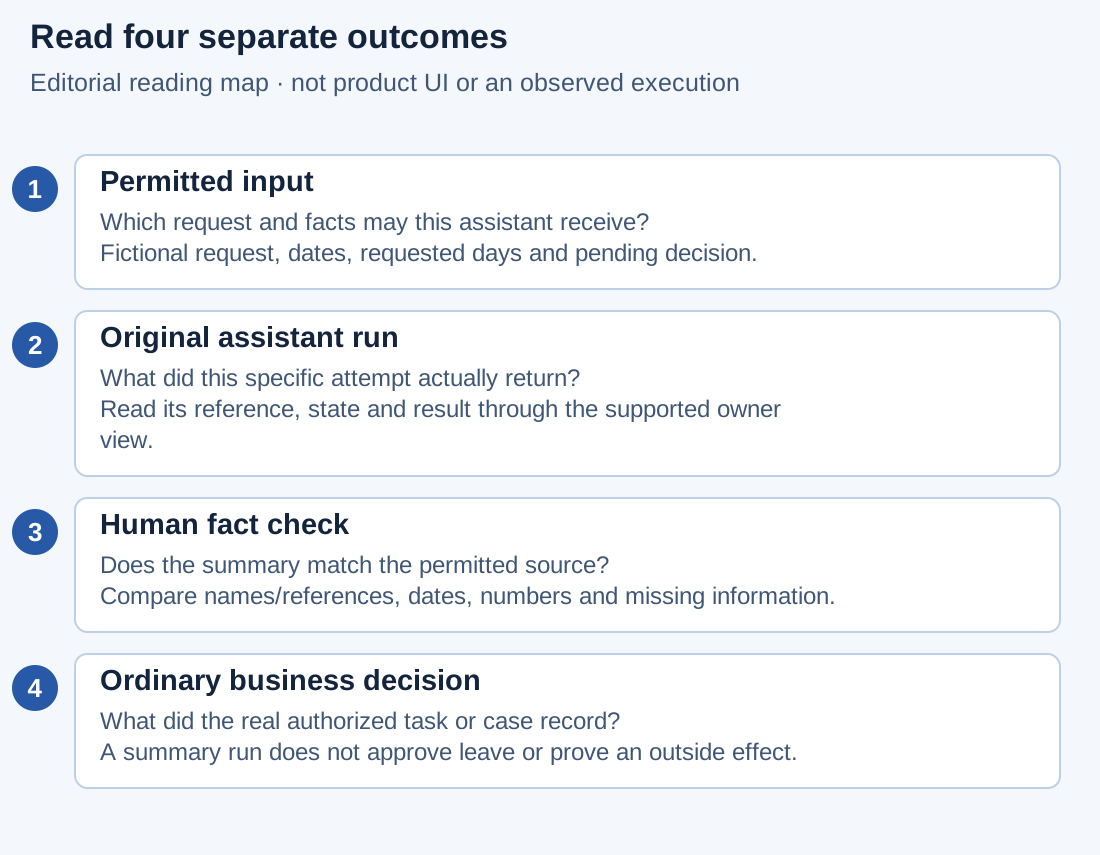
This is a reading map, not an Inflow screen, recorded run or automatic sequence. Each numbered checkpoint needs its own evidence.
Nadia wants a summary she can trust. She checks four things separately: what the assistant was allowed to receive, what the run actually returned, whether the returned facts are right, and what the ordinary business process did afterward. Keep the run reference and the business request reference together in your notes, with different labels.
| Checkpoint | Fictional evidence to compare | Question it answers |
|---|---|---|
| Permitted input | leave-2026-014; five requested days; 14–18 December 2026; decision pending |
What information was this assistant supposed to summarize? |
| Run result | The integration owner shows the original run and its returned summary | What did this attempt report? |
| Human fact check | Nadia compares every date, number and decision statement with the permitted source | Is the summary fit for the agreed purpose? |
| Business decision | Sara's separate authorized manager-task result, if she has actually decided | Was the leave request approved or declined? |
If the assistant result is visible but Sara has not decided, the last checkpoint remains pending. A successful summary can still be useful while the business decision is outstanding. Conversely, Sara may finish her task while an optional summary remains unavailable; ask the process owner which dependency the actual workflow requires rather than inventing one from this example.
Worked review: catch a confident but incorrect summary
This exercise uses two invented answers for comparison. Neither is an observed provider response. The approved input contains only the request reference, five requested days, the dates above and a pending decision. Do not infer working-day, holiday or entitlement calculations from those dates: five days is the supplied request value for this exercise.
Answer A: “Mohammad's five-day leave for 14–18 December has been approved. His balance is sufficient.”
Answer B: “Request leave-2026-014 asks for five days, 14–18 December 2026. A manager decision is still pending. The supplied information does not include an entitlement check.”
- Read the request reference first. Confirm that the result belongs to the original request, not another employee's similar request or an older summary.
- Compare the requested days and both dates. If a value is absent from the allowed input, mark it as missing; do not fill it from memory.
- Examine the decision claim. Answer A invents an approval. The source says pending, so the answer must not be used as evidence that Sara acted.
- Examine the entitlement claim. Answer A also invents a sufficient balance. The exercise provided no balance or entitlement calculation.
- Prefer the factual structure of Answer B for this brief. It distinguishes a supplied fact from a missing check and keeps the manager decision separate. Still verify its values; a useful style is not a substitute for checking the content.
- Give the integration owner the discrepancies through the agreed support route. Ask which prompt, input mapping or result-handling step needs correction before a replacement attempt. Preserve the original run and its observed output so that the explanation remains traceable.
Expected result: Nadia can explain precisely why Answer A failed the brief. She does not approve leave, edit an entitlement or change the request to make the summary true. A replacement run, if useful and permitted, is a new attempt with its own result to inspect.
A result-review worksheet
Use a small table instead of a vague “looks good” comment. Copy only approved fictional or nonconfidential values into shared notes.
| Review item | Source says | Result says | Review decision |
|---|---|---|---|
| Request identity | leave-2026-014 |
Record the matching reference or note its absence | Same request / mismatch / unknown |
| Dates | 14–18 December 2026 | Record the actual returned dates | Match / correction needed |
| Requested days | Five, as supplied | Record the actual returned quantity | Match / correction needed |
| Decision | Pending | Record the actual decision wording | Factual / unsupported claim |
| Entitlement | Not supplied | Record whether the answer invents a check | Missing correctly stated / unsupported claim |
| Extra information | None authorized by this brief | Note unexpected details without republishing private content | Ask owner to investigate |
Agree the acceptable result before testing. “Correct facts with missing information clearly stated” is useful for this exercise. “Persuasive wording,” “completed run” and “no error message” do not answer the same question.
What to ask when the run waits, fails or is cancelled
The integration owner may use technical run states such as Pending, Running, Waiting for human, Completed, Failed and Cancelled. Your own application may present different friendly wording. Ask the owner what the actual state and supported continuation mean; this manual does not introduce a universal consultant run-control screen.
| Observation about the original run | Useful next question | Keep separate |
|---|---|---|
| Pending or running | Is this the expected attempt, and where will its result be reviewed? | The leave request's business status |
| Waiting for human | What exact information or decision is needed, and who may supply it through the integration? | A real manager task must still be performed through its own authorized route |
| Completed | Where is the output, and which facts/effects have actually been checked? | Completion is not a factual-quality verdict |
| Failed | What failed, and is any outside action's outcome still uncertain? | Failure does not undo an already completed outside effect |
| Cancelled | What was cancelled, and which outside work may already have happened? | Cancellation is not proof of rollback |
| State or result unavailable | Who can inspect the same attempt in the supported owner view? | Unavailable evidence remains unknown |
Resuming a waiting run means giving that integration its permitted continuation input. It does not inherently complete Sara's business task. For example, the owner might resume a summary after receiving a missing fictional date. If the integration asks for an actual business approval, the process owner must explain how that requirement connects to the ordinary authorized task; a note in an assistant context is not a substitute for the task result.
When reporting a possible duplicate effect, identify the original run and the receiving-system receipt if available. Say “the run failed; the message outcome is unknown” when that is all you know. Do not turn it into “the message was not sent.” The owner needs the distinction to decide what can safely happen next.
Prepare the owner handoff before the demonstration
Ask the integration owner to agree four practical responsibilities: who prepares the permitted input, who starts the admitted integration, who compares the result and who checks a possible outside effect. One person may hold several responsibilities, but the evidence should still distinguish them.
For the fictional leave summary, Nadia supplies the approved sample and performs the fact check; the integration owner operates the background integration and explains failures; Sara retains her ordinary manager decision. Record the actual responsibilities for your project rather than copying these names as permissions.
Before handing the lesson to end users, require a demonstration through their intended permitted view. An operator's ability to inspect a run does not establish that Mohammad can see its result in the produced application. If the result destination has not been connected, keep that item open and describe the actual available handoff instead of promising a new inbox.
Continue in the right guide
Use Ask Inflow for Studio conversations and proposed changes. Use the workflow tutorial for real manager tasks. Operators and integration developers have the optional agent execution technical reference.