Build, test and publish an integration
An Integration is one named action an application can ask an outside system to perform. “Look up an employee” is an integration. “Create an invoice” is another, with a different risk because it changes the outside system.
This guide builds a read-only employee lookup. You define the request, test it, choose which returned fields the application needs, and publish a checked version.
Before you begin
You need a published Connected System, permission to work with it, and a safe sample the external-system owner allows you to use. See connection setup if the connection is not ready.
Agree the business question first:
| Question | Example answer |
|---|---|
| What do we provide? | An employee number such as M014 |
| What do we need back? | Employee name and manager name |
| Does this action change anything? | No; this example only reads |
| What means no match? | No employee was found, not a blank invented employee |
| Who owns the outside service? | The directory support team |
An input is a value the action receives. Mapping means choosing where an input goes in the request, or where a returned field goes in the application's result.
Read the connection before building the operation
Nadia is preparing an employee lookup. Her first question is whether she has the intended published connection, with the right scope for that operation. A green connection status alone cannot answer whether the lookup returns the right employee or whether the application user may see that employee's details.
The three figures below use the existing Training PostgreSQL connection from the data-model lesson. They teach how to read connection states. The employee lookup later in this guide uses a separate, owner-approved REST service: its address, sign-in method and operation must come from that service's owner. Do not copy the PostgreSQL address or database settings into the REST example.
These are retained native 2560×1440 screenshots from 15 November 2026, captured at source 6311724154. Each marked figure enlarges details from its one unchanged original. The full original is available below it. They show connection preparation only; the integration request, employee response, mapping and integration publication are separate procedures later in this guide.
1. Recognize a draft before treating it as ready
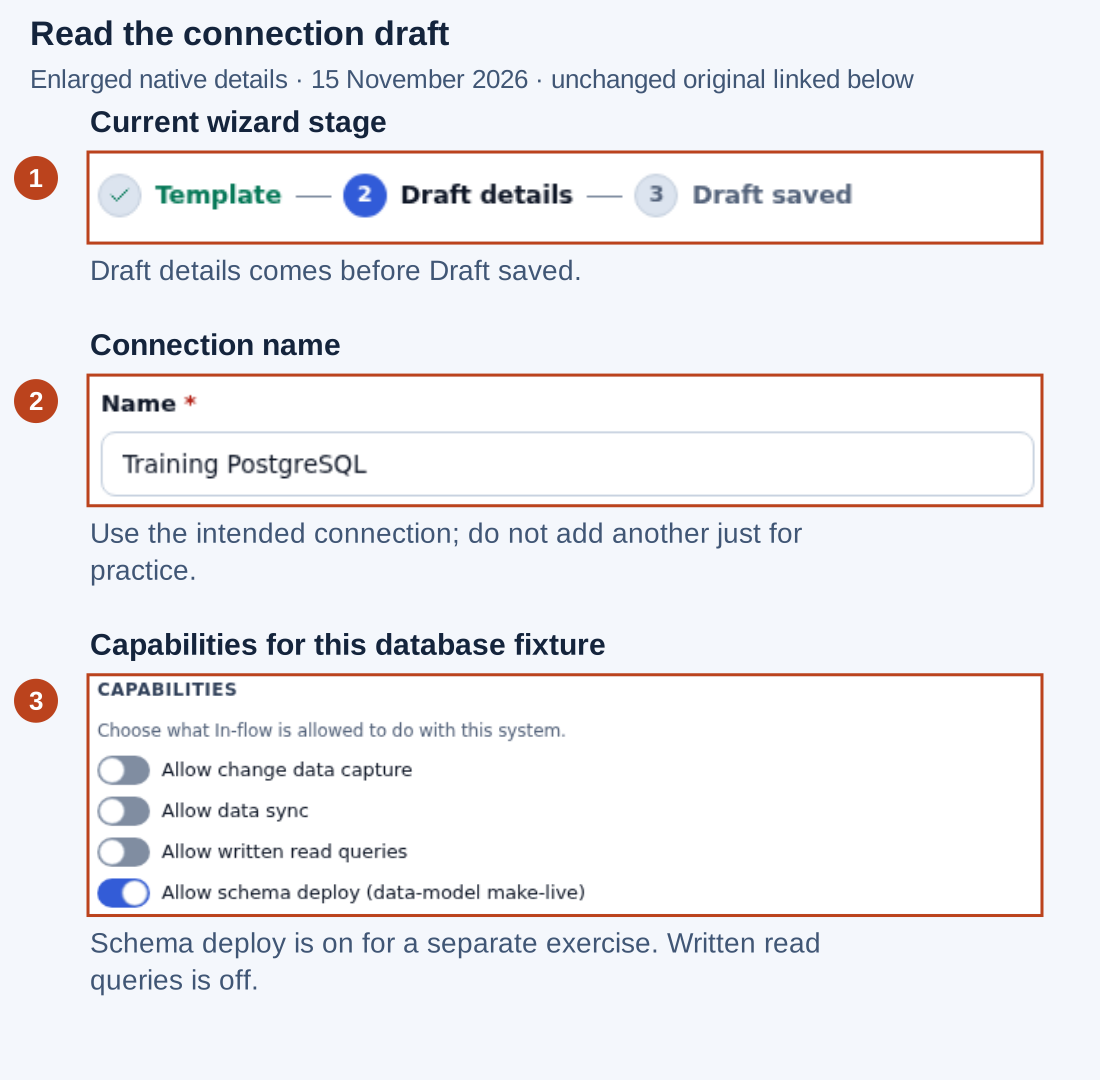
Open the unchanged native 2560×1440 screenshot
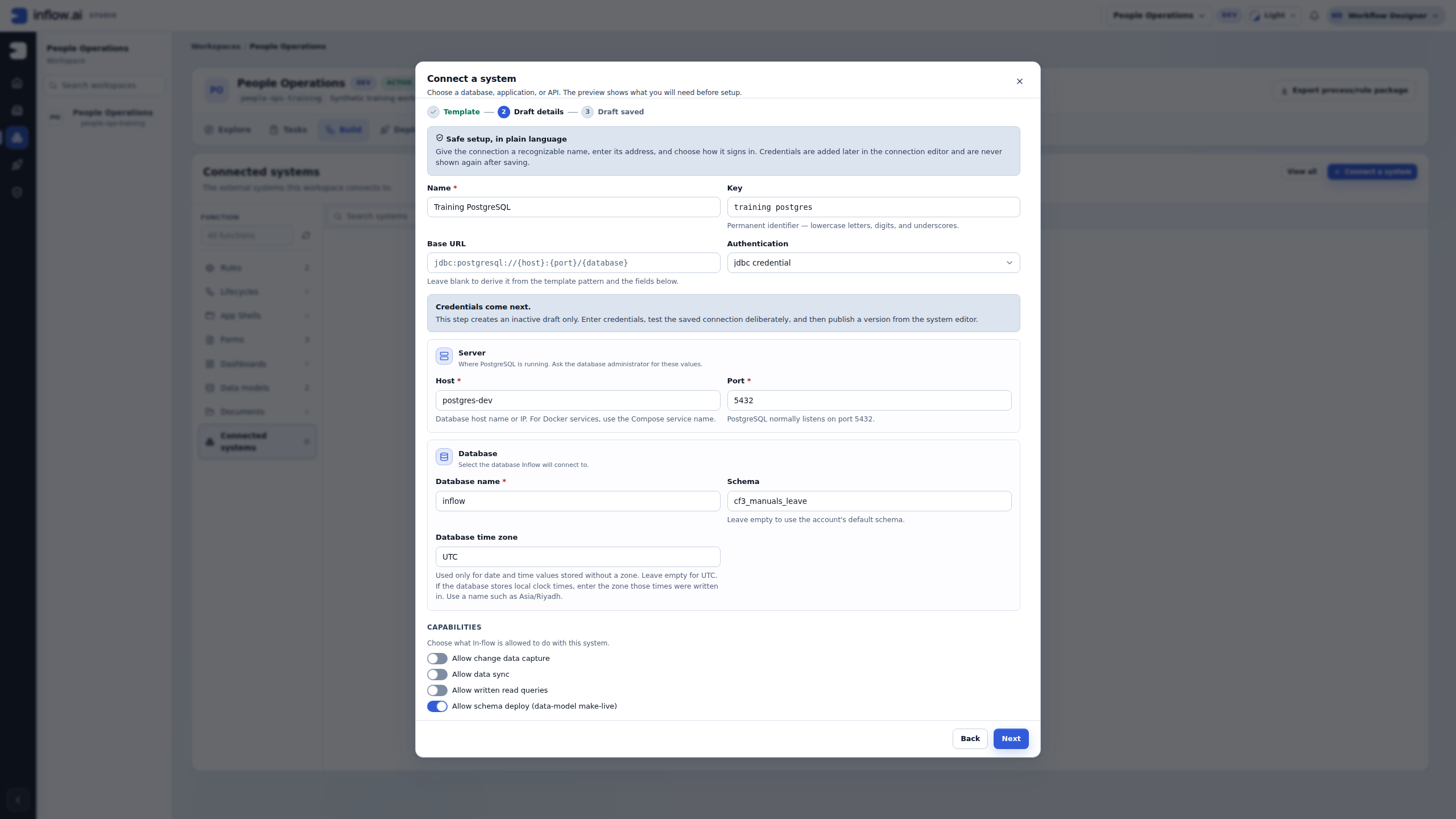
- Read the stage indicator. Draft details is the current step; Draft saved is still ahead. A filled name is not evidence that a connection has been saved, tested or published.
- Check the name and stable key against the intended connection. Here the name is Training PostgreSQL, and the key is
training_postgres. In a workspace with several connections, a similar display name is not sufficient to identify the correct destination. Reuse an existing matching connection rather than creating another for practice. - Read the capability choices with the connection owner. This database fixture has Allow schema deploy (data-model make-live) on for the separate data-model exercise; Allow written read queries is off. Schema deployment is not a prerequisite for the REST lookup. Do not enable it, data sync or change data capture merely to follow this integration lesson.
The wizard explains that credentials come next and that setup creates an inactive draft. The illustrated Base URL field shows a template pattern, with host and database fields below; the pattern is not a ready-to-use directory URL. Ask the system owner for the correct destination and approved sign-in arrangement. Keep secret values out of screenshots, sample requests and your handoff notes.
Check your understanding: Nadia sees a useful name and a filled database host, but the wizard is still at Draft details. She records “draft configuration being prepared,” not “employee lookup ready.” If she only needs to inspect an existing connection, she leaves its saved settings unchanged.
2. Read what a successful connection test actually tested
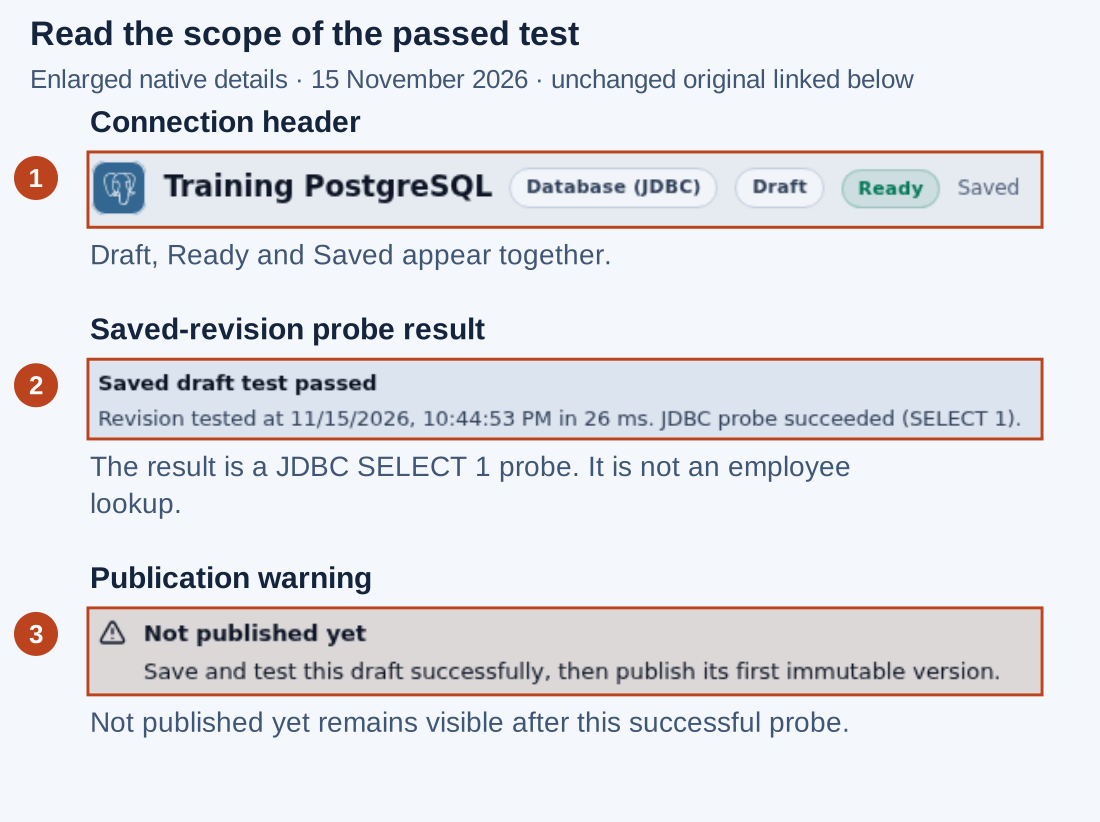
Open the unchanged native 2560×1440 screenshot
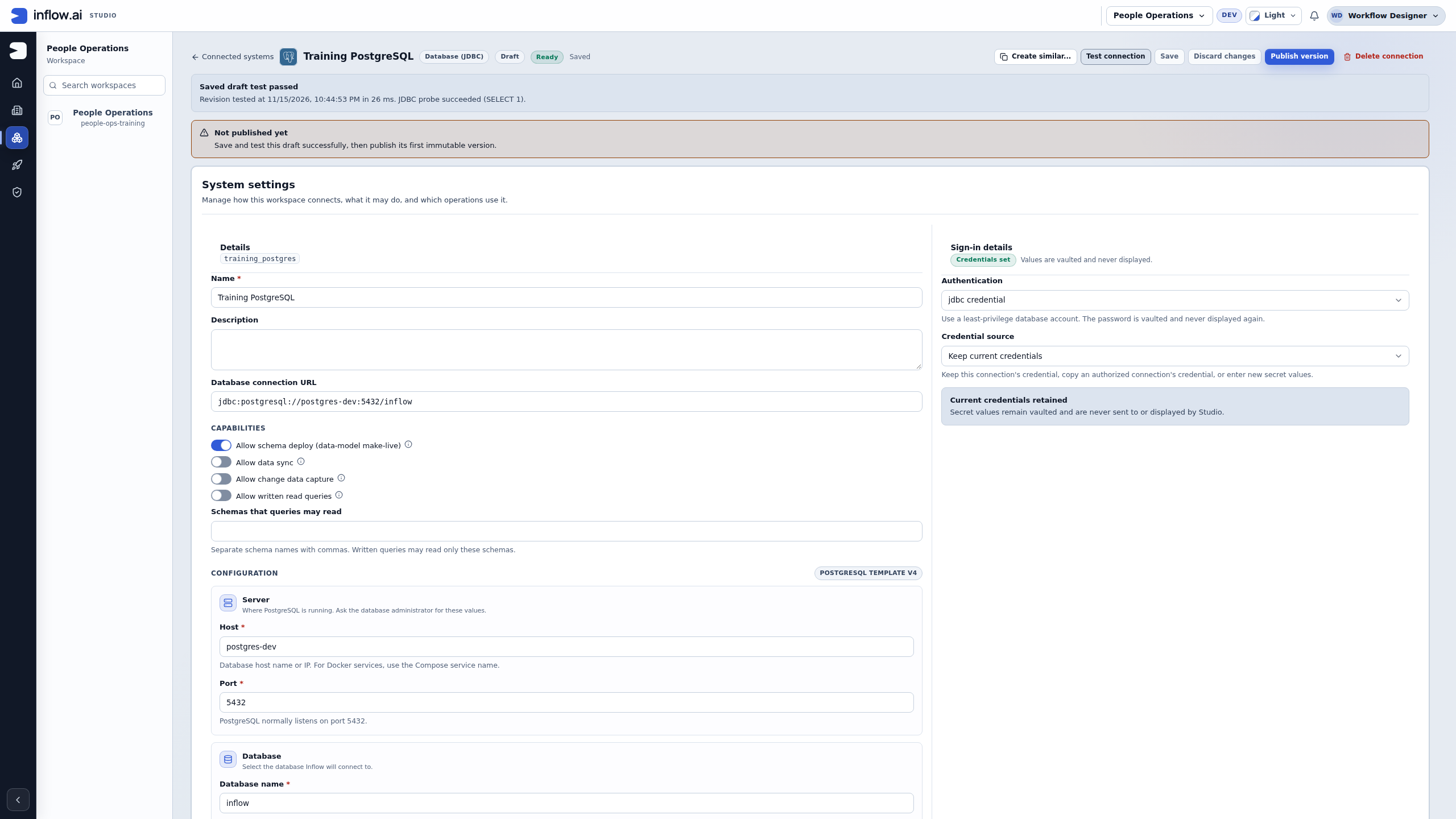
- Read the header as a set of facts. Draft, Ready and Saved appear together in this picture. Ready does not mean that the connection has a published version.
- Read Saved draft test passed and its detail. The observed result is JDBC probe succeeded (SELECT 1), completed in 26 ms for the saved revision shown. This demonstrates that probe's success for that revision at that time. It does not demonstrate that an employee table was queried, that a specific employee was found, or that the intended output mapping works.
- Read the warning Not published yet. The page still asks for a successfully saved and tested draft before its first immutable version can be published. A passed probe and a published connection are distinct milestones.
For Nadia's REST lookup, Test the request in the integration workbench is still required after she defines and saves the actual operation. That test must use the approved fictional input and inspect the returned business result. A connection test cannot substitute for it.
Do not run a test again just to reproduce this picture. First inspect the saved connection and available evidence. If settings or sign-in details have changed, an old test must not be treated as evidence for the changed saved revision. Have the authorized owner follow the connection's current save, test and publication procedure. If a test response was lost, reconcile its available result before deciding whether another request is appropriate.
Check your understanding: “SELECT 1 passed” answers a narrow connection-readiness question. “M014 returned the approved name and manager fields” would answer an operation-result question. Only the first result appears in this figure.
3. Distinguish a connection version from an integration version
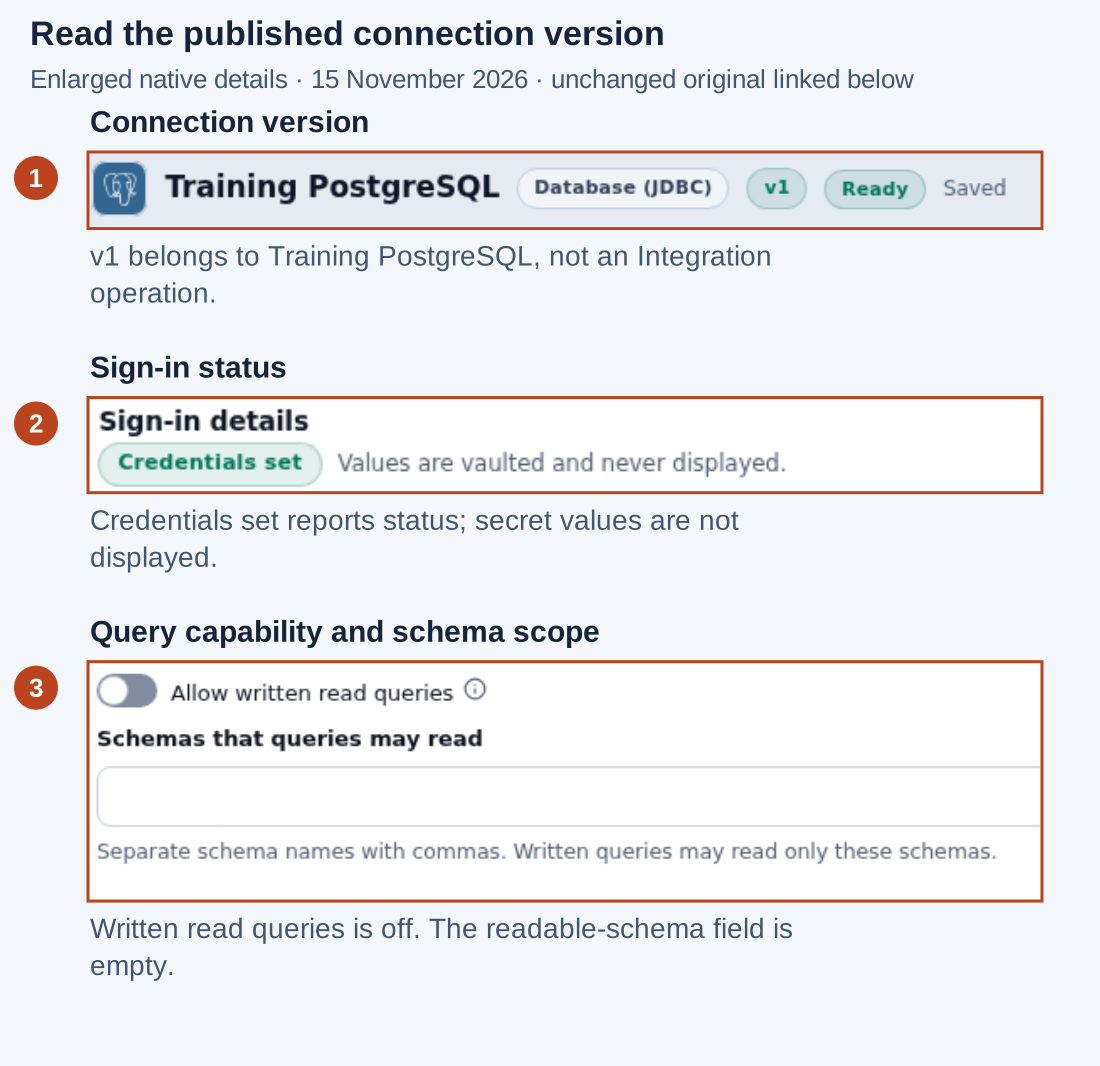
Open the unchanged native 2560×1440 screenshot
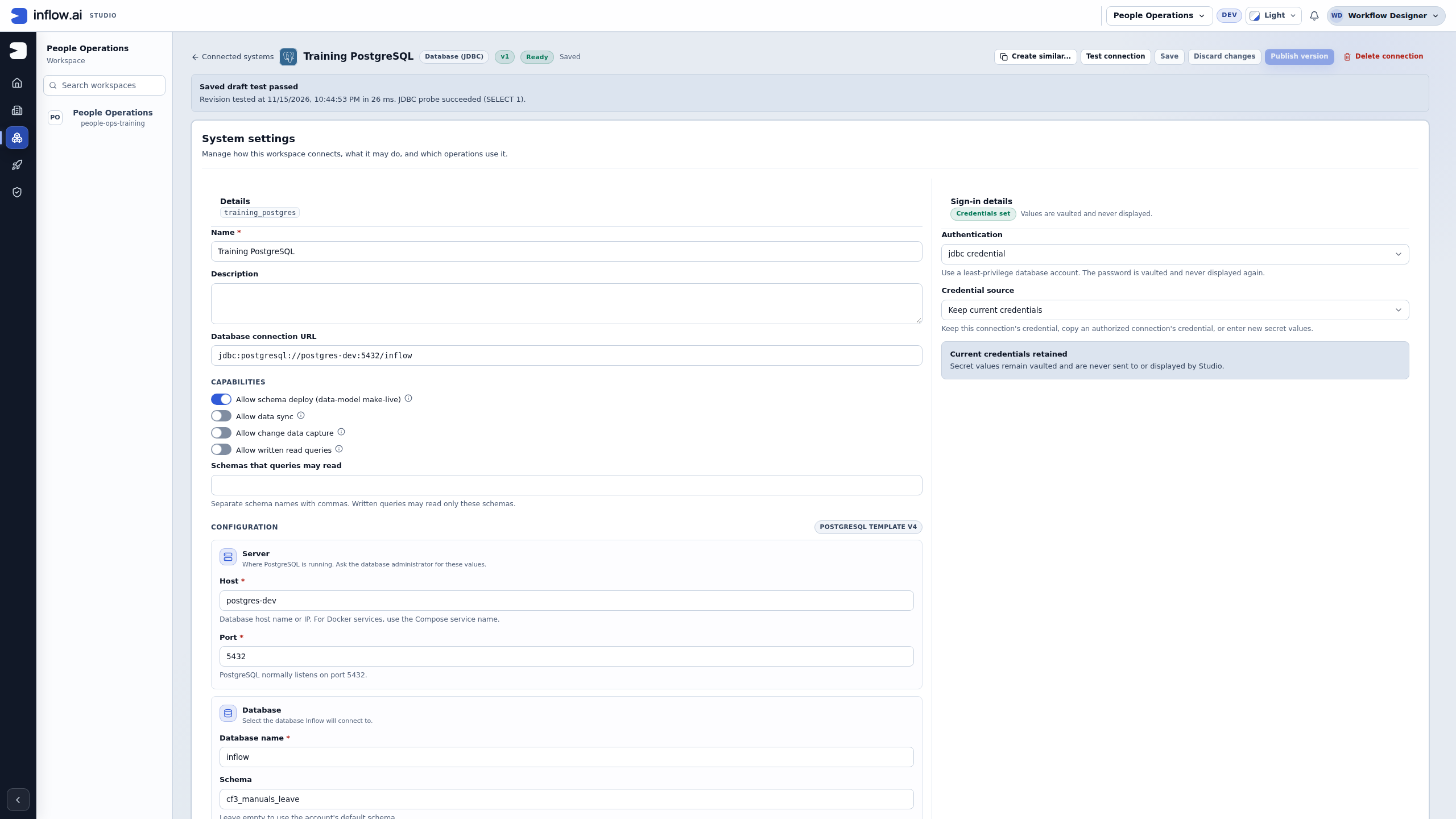
- Read v1 in the connection header. This is a published version of Training PostgreSQL. The earlier Not published yet warning is absent. It is not version 1 of the employee lookup integration.
- Read the sign-in status without trying to reveal its value. Credentials set and Current credentials retained explain that this connection has saved sign-in material. They do not grant the reader permission to copy credentials or use another connection's account. Keep a matching approved connection's sign-in arrangement unless its owner authorizes a change.
- Check the operation's actual prerequisites. Allow written read queries remains off and the allowed-schema field is empty in this database fixture. A published connection is not permission to submit arbitrary SQL. If you need the database Query variant later in this guide, use a connection whose owner has approved and configured the required query capability and readable schemas. Do not toggle capabilities to make this example appear to work.
The REST employee lookup needs its own published connection and a separately defined, tested and published Integration version. The consuming Rule or workflow then needs its own deliberate configuration and testing. Publishing a connection does not create the employee lookup, update every consumer, approve a vacation or grant employee-record access.
If a connection or action is absent for your account, ask the workspace or connection owner to confirm the intended access. Use the ordinary controls your account is offered; another user's screenshot is not a permission grant. A designer's connection view also does not prove what an employee or manager can access in the produced application.
Connection-readiness worksheet
Complete this with the connection owner before moving to Define the request. Keep the worksheet free of passwords, tokens and private employee data.
| Check | What Nadia records | What still needs its own check |
|---|---|---|
| Intended destination | Approved directory test service and its connection key | A similarly named connection may lead somewhere else |
| Connection publication | The selected connection's actual published version | The employee lookup Integration version |
| Test meaning | Saved revision, test time and the reported probe result | Correct business response for the saved operation |
| Allowed operation | Owner-approved read-only employee lookup | No permission to create, update or delete employees |
| Allowed result | Employee name and manager name for the approved sample | Which records each application user may access |
| Query variant, if used | Approved database query capability and readable schemas | The written query, bindings, result and no-match behavior |
| Uncertain reply | What was attempted and which result is observable | Reconciliation before another consequential request |
For the illustrated database connection, Nadia can record a saved-revision SELECT 1 success and connection v1. She cannot record a successful directory lookup from these screenshots. For the REST story, she fills the worksheet from the directory connection's actual details and continues below.
Database variant — check the query source before creating an operation
Nadia opens the existing Training PostgreSQL connection and chooses New integration to inspect the choices. That connection already has version 1, but its owner has left Allow written read queries off. Publishing a connection and allowing consultants to write SQL are separate decisions. This inspection does not require changing either decision.
First compare the connection version with the operations it contains. This current view was inspected after cancelling the creation dialog shown below. The two views are arranged to explain the relationship; they do not show a new connection being published between steps.
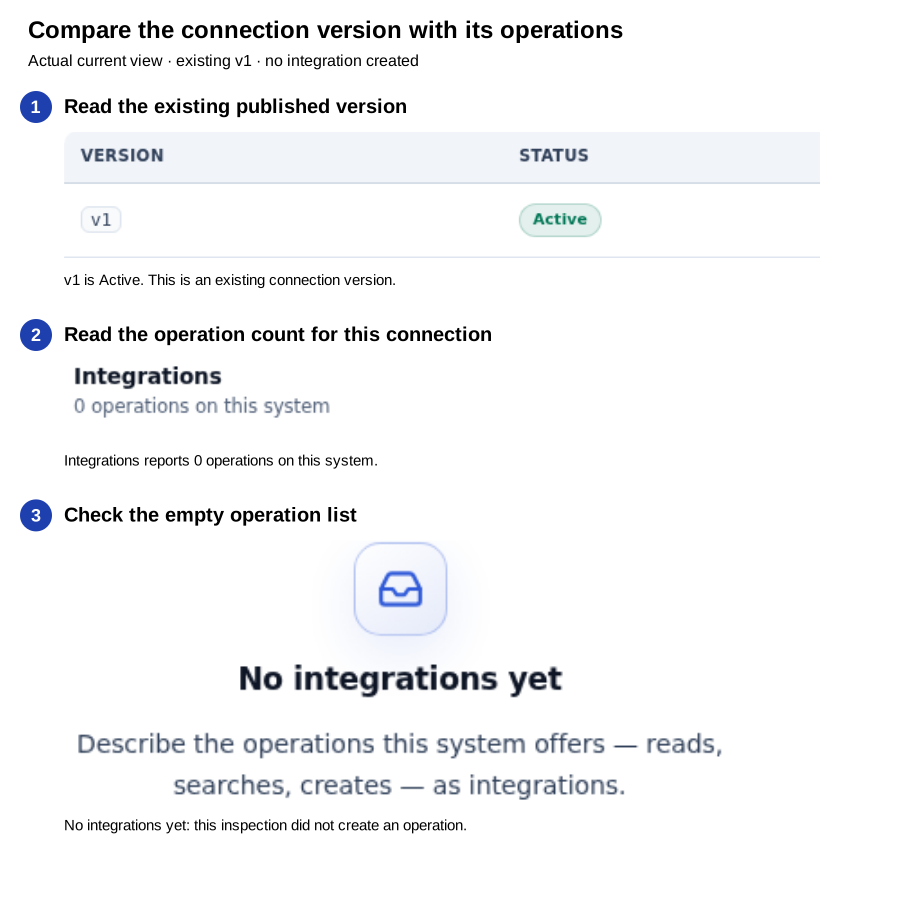
Open the unchanged native 2560×1440 connection screenshot
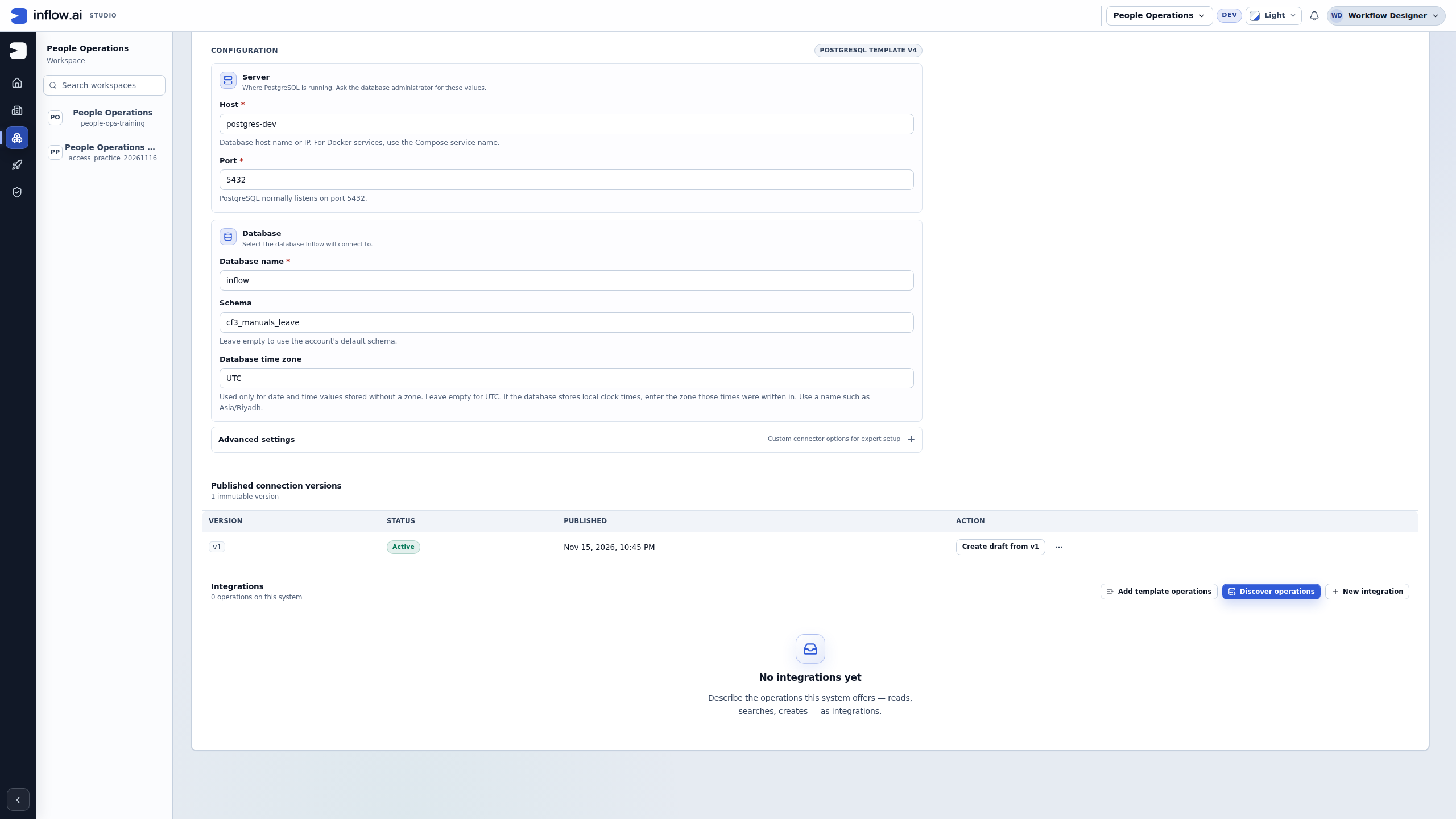
- Read Published connection versions and the existing v1 / Active row. This is a connection version, not an employee-lookup Integration version. The inspection does not publish another connection version.
- Read Integrations — 0 operations on this system. The count belongs to this connection; it is not a statement that every workspace or every connection has no integrations.
- Read No integrations yet. The creation dialog was cancelled without typing a name or pressing Create. The empty list is consistent with that inspection; it does not mean the database contains no employee records. Do not choose Add template operations or Discover operations just to replace the empty state with something plausible. Those actions need their own intended operation and approved scope.
The next figure is an actual 19 November 2026 development-environment view from the ordinary designer account. It shows the creation dialog, not a query editor or response. The connection header is outside this detail view; read the intended connection and its published version before opening the dialog. The three earlier connection figures remain their separately dated examples.
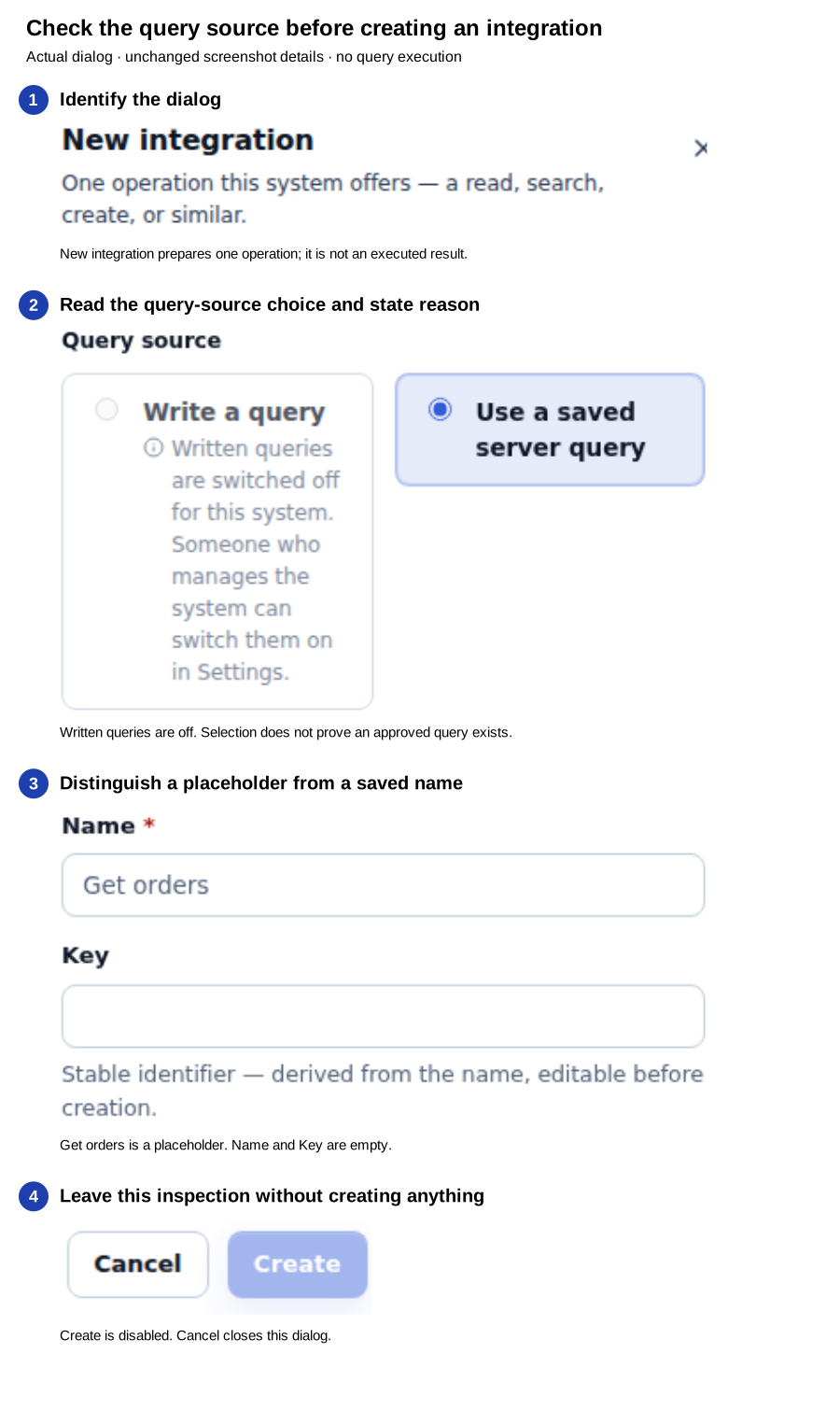
Open the unchanged native 2560×1440 screenshot
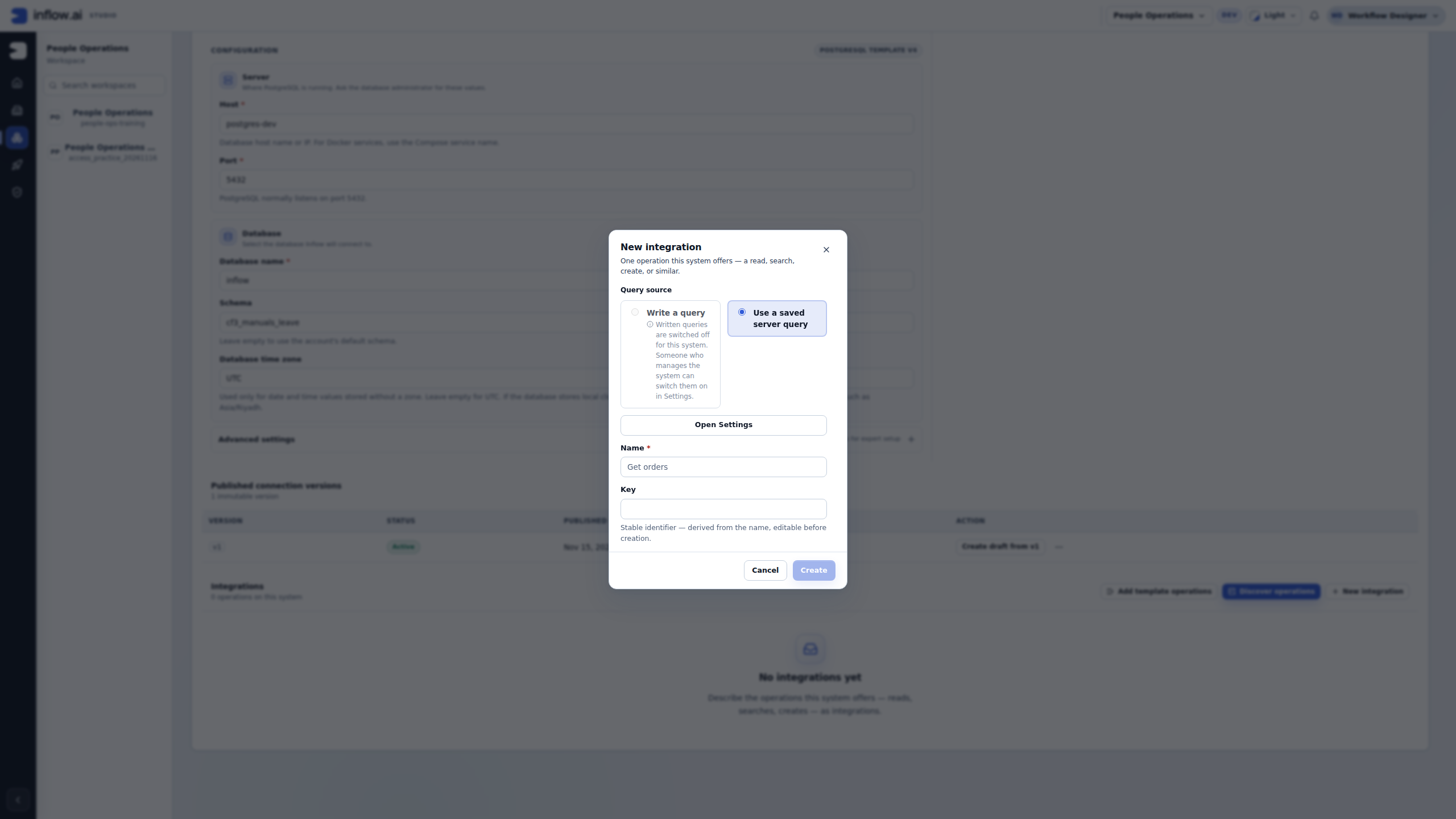
- Check New integration and Query source. This dialog prepares one operation for the connection you opened. It has not searched a directory or created an employee. If this is a REST connection, follow its request controls instead; these two query-source choices belong to the illustrated database connection.
- Read Write a query and its inline explanation. Written queries are switched off for this system. This is a connection setting that blocks this choice, not evidence of a failed SQL statement. Nadia does not choose Open Settings or switch on a capability just to follow a tutorial. She asks the connection owner whether an authored query is appropriate and which schemas it may read. A future setting change needs the owner's approved scope and its own normal review.
- Read Use a saved server query as the currently selected option. That selection does not prove that an approved server query has been prepared, that Nadia may execute it, or that it returns the employee fields the application needs. Obtain the exact approved query and input contract from the owner. Do not treat this option as an alternative way to submit arbitrary SQL when authored queries are off.
- Check the empty Name and Key fields. Get orders is a placeholder in the Name field; it was not typed or saved as a new integration. Create is disabled in this picture. Nadia chooses Cancel after the inspection. No integration, query, test response or published operation is produced by this exercise.
Check your understanding: the connection is published, a saved-query choice is visible, and written queries are off. Those facts can all be true together. Nadia can explain the available preparation path and request the right prerequisite without claiming that an employee lookup works.
| What Nadia needs next | What she asks the connection owner to confirm |
|---|---|
| A saved server query | Its exact approved identifier, input names and intended returned fields |
| Permission to author a read query | Whether written queries should be allowed and which schemas are approved |
| A meaningful test | The approved synthetic value, expected success and allowed no-match result |
| A handoff to the application | The checked Integration version and the consuming Rule or workflow's contract |
Keep the connection's existing settings and sign-in material unchanged while those prerequisites are resolved. When the owner supplies the intended path, prepare that operation, save it and perform its separately authorized test. The following employee example remains a REST story; the database dialog does not prove its request, response mapping or publication.
Example — Look up Mohammad's directory details
- Open the workspace's Build → Connected systems area and select the intended connection. In that connection, open its Integrations section.
- Use an appropriate supplied operation through Add template operations, choose a reviewed Discover operations result, or choose New integration when the owner has given you the operation details.
- Give the draft a readable name such as Find employee and a suitable short key. Confirm that the operation is the intended read.
- In Define the request, add the employee-number input with the correct type and required setting. Map it to the place the service expects, using the service owner's description.
- Choose Save and continue to test. This saves the request you will actually test.
- In Test the request, use the approved fictional employee number, run the test and inspect what came back. A successful connection test alone is not this operation's test.
- Save a useful example using the test panel's available example controls. Give it a name that explains the situation, such as Employee found.
- In Map the response, select the returned employee name and manager name. Give them clear business names and appropriate types. Do not return private fields just because they happened to be in the response.
- Choose Save and continue to publish. Review the current test, example and mapping, then choose Publish version.
What you should see: a published integration with a tested request and a clear result. The fictional lookup returns the selected details when the approved sample service supplies them. It does not create a person, grant access or automatically fill every form.
Example — Bind an employee number to a REST path
Use this only when the directory owner has confirmed that the read-only operation is GET /employees/{employeeNumber} and has approved the test environment and fictional sample. The path is an example contract, not a universal Inflow endpoint. The same procedure applies to another documented path after replacing its exact method, placeholder and input meaning.
- Open the integration draft at Define the request. Review the owner-approved operation and any saved inputs or bindings first; reuse a matching row instead of creating a duplicate.
- Set Method → GET and Path →
/employees/{employeeNumber}. Keep the braces around the path placeholder. - Under Business inputs, inspect the existing rows. If the employee-number input is missing, choose Add input and enter Key →
employeeNumber, Consultant label → Employee number, Type →string, turn on Required, and leave Default unset. The key is the stable name used by the binding; the label explains the value to another consultant. - Under Request bindings, inspect the saved mappings. If no mapping sends this input to the path placeholder, choose Add binding and set Destination → Path, Target →
{employeeNumber}, Source → Business input, and Value → Employee number. Keep one mapping for this placeholder. - Remember that declaring a business input does not send it by itself. The path placeholder and binding must agree, and the binding type must match the input type. Fix a missing placeholder, missing binding, duplicate target or type mismatch shown by validation before continuing.
- Choose Save and continue to test. This saves the request draft and opens its test stage; it does not prove the endpoint works. Use only the approved fictional test value, run the saved request, and inspect the actual response before choosing result fields.
What you should see: the request is ready for its own test when the method, path, required typed input and path binding agree. A successful result is a separate observation from this configuration and must come from the owner-approved test service. If a compatible saved operation already contains the input and binding, verify their meaning rather than adding a second copy.
Understand the workbench stages
| Stage | What you decide | Check before leaving |
|---|---|---|
| Define the request | Which action and inputs to send | Every required input is explained and mapped |
| Test the request | Whether this saved request works | Result matches the safe example |
| Map the response | Which returned business fields to keep | Names, types and missing-value behavior are appropriate |
| Publish a version | Which checked draft others can use | Current test/example and mapping are ready |
For a database integration, the first stage is Query. An incoming webhook uses event wording such as Describe the event and Try a sample event. Follow the wording for that kind of integration rather than forcing it into an outbound-call example.
Test more than the happy path
Prepare an ordinary success, an allowed no-match and a missing or invalid input. If the service returns partial information or warnings, decide whether the business can continue or should ask someone to review it.
For a change operation, confirm the permitted test environment and follow the supported confirmation step. A tutorial about a safe read is not permission to send a real delete or payment. If a reply is lost, check whether the original action completed before submitting it again.
Example — The directory changes a returned field
The directory owner renames its name field. Nadia wants to adapt the application without pretending that an old published integration has silently changed its meaning.
- Confirm the service change with its owner and read which existing applications use the integration.
- Open the editable draft. If discovery/import is the source of the operation, refresh and review the changes rather than automatically accepting everything.
- Update the response mapping to the current returned field while keeping the application's intended business meaning.
- Save and test the changed request with both a found employee and an allowed no-match example.
- Update the saved example as required by the current workbench and review the publication impact.
- Publish the checked version. Update each consuming rule or workflow through its own supported design and testing process.
What you should see: a deliberate new published version. Existing published versions remain part of the application history. Saving an unfinished draft is not the same as replacing every current consumer.
Example — Map one employee result
Continue only when the service owner has approved a saved synthetic response with the shape shown below. It is an example for teaching the controls, not a claim about the real directory response. If the approved sample differs, use its actual field names and nesting.
{"employee":{"name":"M014 Example","manager":{"name":"Jordan Example"}}}
- In Map the response, inspect any existing mappings before editing. Choose Business output → One record for a lookup that returns one employee. The other choices describe different contracts: A list of records for several employee rows, One value for one scalar result, and No business output only when the operation intentionally returns nothing. Set Target record type to the owner-approved output key expected by the consuming workflow or Rule; the mapping defines returned data and does not by itself save a record. If the shape is provider-owned and the control is locked, follow the connection owner’s rediscovery process; do not try to force a different shape in the draft.
- Choose Response root →
$.employeefor the example above. The root says which object represents this one output record. With that root, the mapper shows the relative source choicesnameandmanager.name(the corresponding paths in the sample JSON are$.employee.nameand$.employee.manager.name). Confirm the visible choices against the saved approved response; do not assume another service uses these names. - If From example response is unavailable, return to Test the request, run only the approved synthetic test and save its response with a clear example name. Come back to the mapping stage after the example is available. A connection test without a saved response does not provide fields for this mapper.
- Before using From example response, check whether current mappings need to be preserved: this action generates a fresh mapping list from the saved example. Review each suggested source path, remove fields the application does not need, and add only the approved output fields. For this example, set Target field →
employeeNamefornameand Target field →managerNameformanager.name; set each Type → Text. If mapping manually, use Add mapping, choose the source path, and enter the target and type. - Read Record preview as a map of configured paths, such as
employeeName ← name. It shows which source path points to each target field; it is not an executed integration result and does not prove values were transformed or persisted. - Resolve missing source paths, target names or field types shown in the mapper before continuing. A provider-owned shape must be corrected through the provider’s supported rediscovery flow. Then save and review the current test and example before publication.
What you should see: one output record contract with only the approved employee and manager name fields. The actual returned values remain those of the approved saved example and test; the mapping preview itself is not a successful live response.
Use the integration in an application
A published integration can be selected by the supported rule, workflow or interface features that accept its result. Check the chosen consumer's input and output needs.
For example, a form that needs one employee's name is different from a grid that expects a list of records. A rule may wrap the lookup so the rest of the application sees a small business result. See Choose the right kind of rule.
Do not add hidden calls for extra private data or assume the author can give every runtime user the same access. The application and external-system policies still apply.
Common mistakes
- Publish says test or example is missing: save the current request, run its required test and save the appropriate example. An old result from another draft is not enough.
- Mapping is blank although the service answered: inspect the returned structure and select its actual fields. Do not invent values to make the preview look complete.
- An operation disappears or changes: ask its owner, refresh the reviewed discovery where appropriate and inspect the affected drafts.
- Someone changed the draft: reload and compare before reapplying your edit.
- Credentials are unavailable: resolve them through the protected connection settings with their owner; never place a token in a sample input.
Continue
The integration and API tutorial walks through the wider business handoff. Developers and operators can use the optional technical workflow reference.