Check sign-in in an approved test environment
A sign-in test environment is a place for the identity or platform team to check login behavior without disturbing people's ordinary work. Building and operating that environment is specialist work. You do not need to install a test lab to configure a leave application.
For a consultant, the important question is whether the right person can enter the intended application and remains restricted from unrelated work.
Find the provider evidence before testing the employee journey
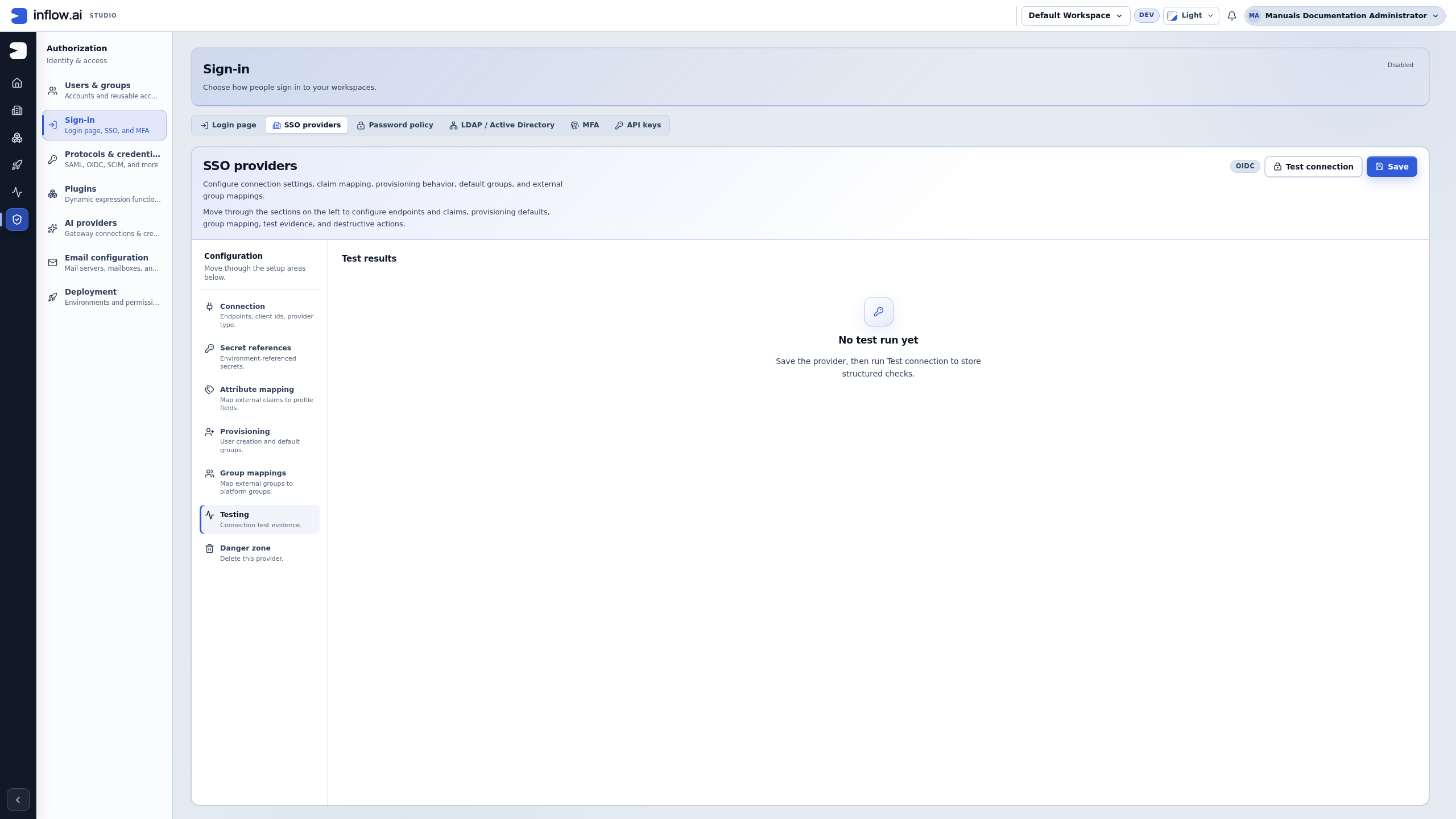
Nadia asks the identity administrator whether the company sign-in setup is ready for the Leave requests acceptance test. The administrator opens Authorization → Sign-in → SSO providers → Testing. The following authentic development-environment view shows No test run yet. It was read using a documentation administrator; it is not an employee sign-in or an external-provider test.
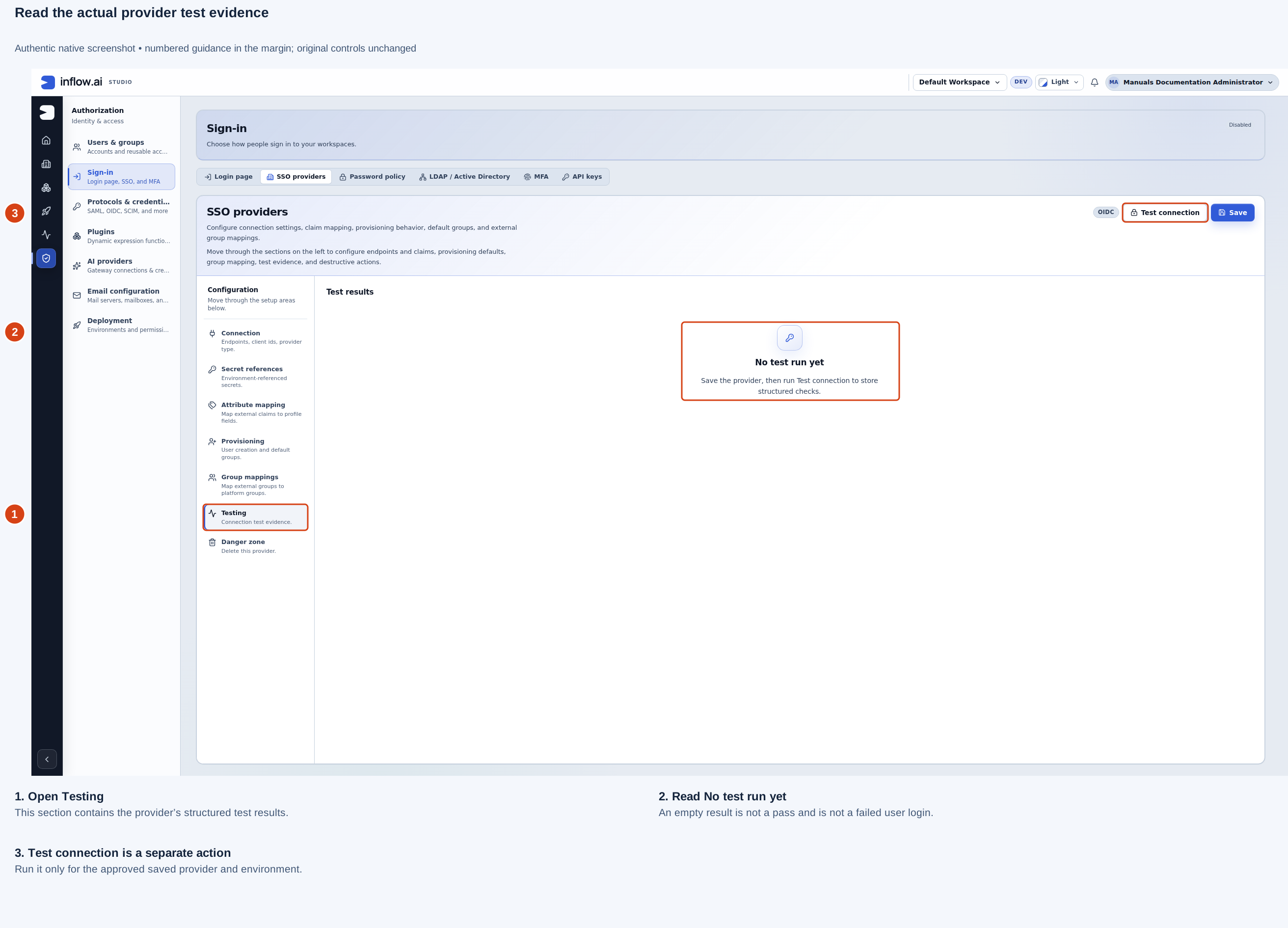
Read the three marks with the specialist:
- Testing is the provider’s results area. Check that this is the intended saved provider in the intended environment.
- No test run yet means there is no result displayed. Record provider test: not run for this observation. Do not infer “passed” from an available button, an existing provider or the administrator’s ability to open Studio.
- Test connection is a distinct action. The identity owner decides when the approved saved provider and environment are ready for that test. Its result still does not establish that an ordinary employee completed company sign-in or reached the application.
For this captured example, the honest worksheet is:
| Boundary | Recorded observation | Next responsible check |
|---|---|---|
| Provider evidence | No test run yet is displayed | Identity owner prepares and runs the approved provider check |
| Ordinary company sign-in | Not run in this illustration | Approved employee test account signs in normally |
| Leave requests access | Not established by the administrator screen | Application/access owner verifies that employee’s published app entry |
| Request or manager task | Not tested here | Record/workflow owners verify the intended case and task separately |
Keep the numbered screen guide beside the result sheet while checking readiness. If the administrator later reports a passing provider test, update that one boundary with its actual result and time. Keep the ordinary sign-in and business-access fields open until those journeys have their own evidence.
What to prepare with the specialist
- Agree the environment and approved ordinary test accounts with the identity administrator.
- Write the expected journey: employee signs in, reaches Leave requests and sees only permitted work.
- Include required extra verification and sign-out in that journey.
- Ask the administrator to prepare the sign-in service and any test-mail setup. Keep passwords and setup links private.
- Perform the agreed normal-user checks only when the environment is ready. Record the visible outcome, not a borrowed administrator session.
Keep the sign-in checks separate
A provider being reachable, a person completing sign-in, and that person being allowed to use Leave requests are three different results. Agree on each result before the specialist starts so a pass at one boundary is not reported as a pass for the whole employee journey.
| Check | What the approved test person does | What the result establishes | What remains to check |
|---|---|---|---|
| Provider connection | The identity administrator runs the provider's offered connection test | The configured provider checks returned their displayed result | An ordinary user can authenticate, map to the expected profile or open the application |
| Normal sign-in | Mohammad signs in through the intended company method and completes required verification | That approved account completed this sign-in flow in this environment | The account's groups, app contribution, starting page, record access or manager task |
| Application access | Mohammad opens the published Leave requests app using his ordinary account | That account can open the application and see the permitted starting page | That every record is readable or Sara's manager task is assigned to him |
| Negative access | Mohammad checks that an agreed unavailable control is absent from his ordinary application view | The tested action is not offered to this user in this scenario | Every other permission or workspace; one absent control does not prove all access boundaries |
| Recovery path | The identity owner confirms the named recovery administrator can still sign in | The tested recovery path works for that account and environment | That no other recovery factor or operator is available unless separately tested |
Test the same ordinary identity through the exact environment and route the team intends to use. A local test account, a provider connection test or an administrator login cannot stand in for Mohammad's normal company account. Do not probe a hidden or unavailable action, change production provider settings, or weaken a denial simply to complete a lab checklist.
Example: the provider connection passes but the employee has no application
The identity administrator sees a successful provider connection test. Mohammad completes company sign-in, but the Leave requests application is not offered.
- Record the provider result and the employee's separate normal-sign-in result. Do not rerun the provider test as if it were an application access test.
- Ask the application/access owner to check Mohammad's current group membership, the published application's group contribution and his selected starting page.
- If the app opens but the expected leave request or manager task is missing, keep that as another separate issue. The record owner checks row/field access; the workflow owner checks task assignment and eligibility.
- Preserve a permitted successful sign-in even when the later application step fails. Do not add an administrator group or borrow an administrator's session to make the employee journey appear successful.
Expected result: the handoff says “provider check passed; ordinary sign-in passed; application access unresolved” until the correct owner verifies the app contribution. A provider result does not prove group mapping, record access or task eligibility.
Example: an external group appears, but the expected role is not granted
An approved test person signs in and receives an external group claim, but the team expects a manager task or consultant capability that is not available.
- Ask the identity owner to verify which external groups the provider actually asserted and whether the mapped claim is current. Do not rely on the test person's display name alone.
- Ask the access owner to compare that claim with the intended Inflow group mapping, existing direct memberships and application contribution.
- Ask the workflow owner to confirm that this case assigned a task to an eligible participant. Membership in a group with “manager” in its name does not prove this specific task was assigned.
- If the person can open the app but cannot see another person's row, ask the record/access owner to inspect the current row and field policy; do not widen group access to make the test pass.
- Record the precise expected and observed boundary, then let its owner propose a change. Retest the same approved synthetic account only after the authorized configuration change is ready.
Expected result: group claims, Inflow groups, app access, record visibility and task eligibility have distinct owners and evidence. A missing task is not fixed by rerunning the login test.
Record a result without exposing credentials
Use this summary for an approved test run:
Environment and normal test account label:
Provider type and named connection (no secret values):
Provider test: passed / failed / not run
Normal sign-in and required verification: passed / failed / not run
Expected sign-in/profile and application outcome (non-sensitive):
Observed ordinary sign-in/application/starting-page outcome:
Mapped Inflow group outcome (approved non-sensitive label only):
Record or task result checked separately:
Expected denial tested:
Recovery account check:
Non-secret message and approximate time:
Owner of the next check:
Passwords, recovery links, tokens or raw provider claims included: none
If a login error, missing application or unavailable profile cannot be inspected with the test person's access, write not visible to this account and route it to the identity or access owner. Keep raw provider claims and detailed entitlement evidence in that owner's approved private review path; do not copy them into the consultant handoff. Do not include passwords, recovery codes, metadata secrets or raw tokens in the record.
Example: prepare a clear business check
Nadia needs to check that Mohammad can use the released employee page. She asks for an ordinary employee test account and the intended application address. The identity administrator prepares the approved setup. Nadia signs in normally and checks the visible application.
An administrator opening the same page is not the same test. If the employee cannot enter, Nadia reports the environment, account's intended role and the non-secret message. She does not install another lab or ask for somebody else's saved session.
Example: keep the responsibilities separate
The team changes the company login arrangement in a test environment. Sara must still reach her assigned manager work, and the recovery administrator must retain access. Nadia writes those two expected outcomes before the specialist changes settings.
If the connection test passes but Sara cannot handle the task, the team checks application access and task eligibility separately. They do not assume a login test proves the business workflow. The separate technical reference contains the lab setup for the responsible operator.
If the result is not clear
Keep the original result and explain what is missing. Ask the responsible owner to investigate before repeating an uncertain action or widening access. A missing control is not an instruction to use somebody else's account.
Continue with the consultant guides
Read prepare users and groups and company sign-in. The specialist reference below contains the detailed setup; it is not ordinary consultant preparation.
Further reading
Optional technical reference — detailed contracts and implementation information for your administrator or developer. You do not need it to follow this lesson.