Give a developer a clear custom-code brief
Java is a programming language developers may use for a supported extension. You do not need to write Java or code comments to contribute. The detailed commenting standard is a developer reference, not a prerequisite for consultants who build forms, rules and workflows.
Your contribution is a clear business brief and examples that show what the requested behavior must do. A developer must confirm that the proposed extension point exists, is supported in this deployment, and fits the consuming feature before anyone estimates implementation. A business need does not itself establish that Inflow has a built-in Java hook for it.
Worked example — check the catalogue before requesting custom code
Nadia has the spacing brief described below, but she has not established that custom Java is needed. She first checks what the current environment already offers. The pictures show the existing Leave working days Expression rule in People Operations. It is a convenient place to read the Functions reference, not the proposed consumer for the spacing change. Its networkDays(inputs:startDate, inputs:endDate) formula and published version 1 remain unchanged throughout this exercise.
Read the available contract, not just the name
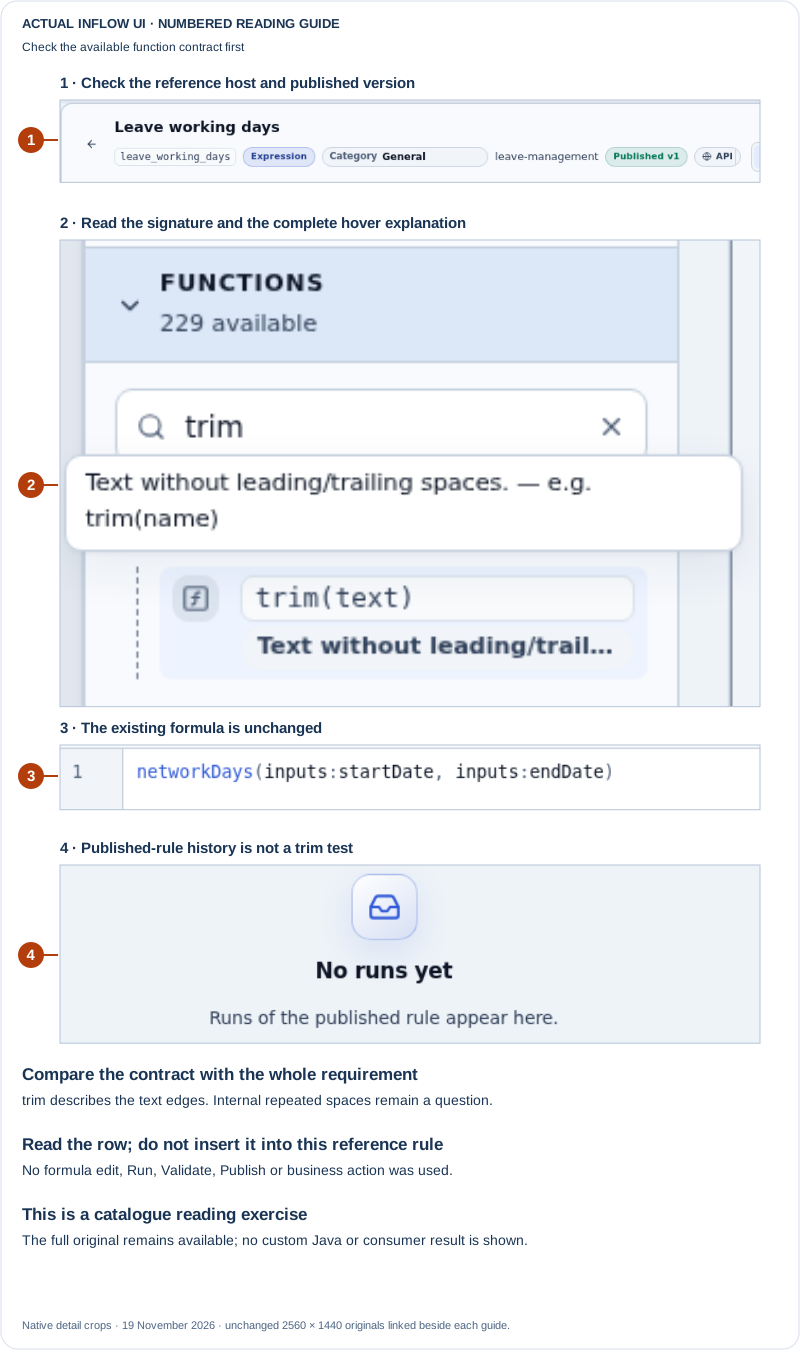
Open the unchanged native 2560×1440 function-contract screenshot
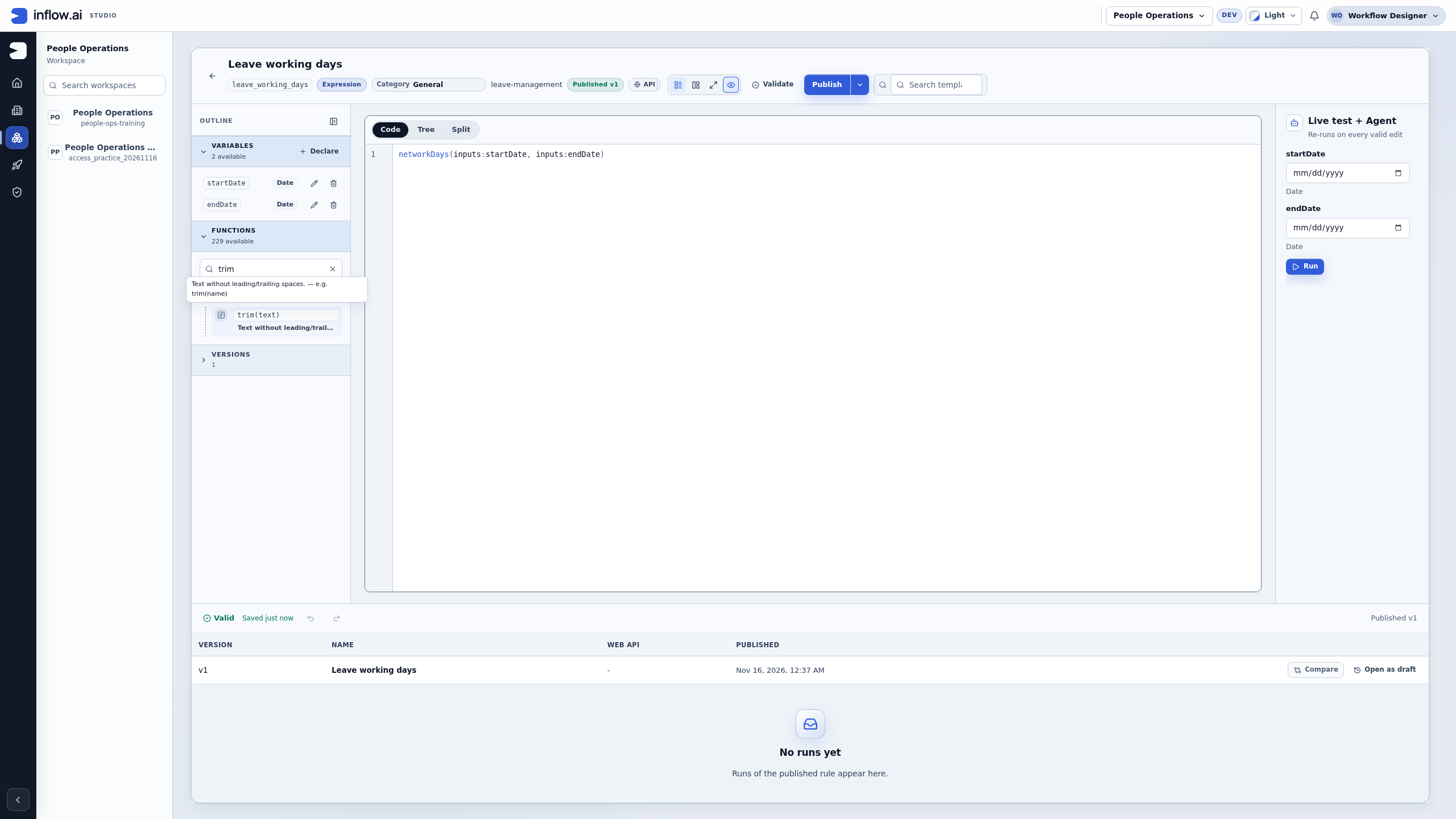
- Open an appropriate existing Expression rule in your intended workspace. In this example, Nadia uses Leave working days only to reach its reference panel. If the outline is collapsed, she chooses Open functions. She leaves the rule's formula, variables, category and publication alone. Do not repurpose an existing business rule merely to inspect a function.
- Use Search functions, then expand the matching category. Nadia searches for
trimand expands text. The heading says 229 available, while the filtered category has one match. Those are catalogue counts in this environment; neither number counts employee records or proves that every deployment has the same functions. - Read the signature and full explanation. The reference shows
trim(text). Hovering the entry reveals Text without leading/trailing spaces, withtrim(name)as an example. The row itself is an Insert function trim button. Hover reads its help; clicking would insert text into the rule. Nadia does not click it. - Compare the stated behavior with the whole brief. Removing leading and trailing spaces addresses the edges of
VN 007. This sample has two spaces at each end and three betweenVNand007; the visible spacing can collapse when inline code is displayed. The reference does not promise to collapse the repeated spaces inside it. Nadia keeps that requirement explicit and asks the specialist whether an existing supported expression or composition meets it. She does not infer a need for Java from a partial match, or mark the full spacing example accepted.
The right-hand Live test + Agent area belongs to this rule's test panel. Its presence is not an Ask Inflow conversation or an observed assistant run. Both date inputs remain blank; Run is untouched. No runs yet describes the visible published-rule history, not an execution test of trim. The status Saved just now and Published v1 do not say that the proposed spacing behavior was implemented.
Treat an unmatched proposed name as a question
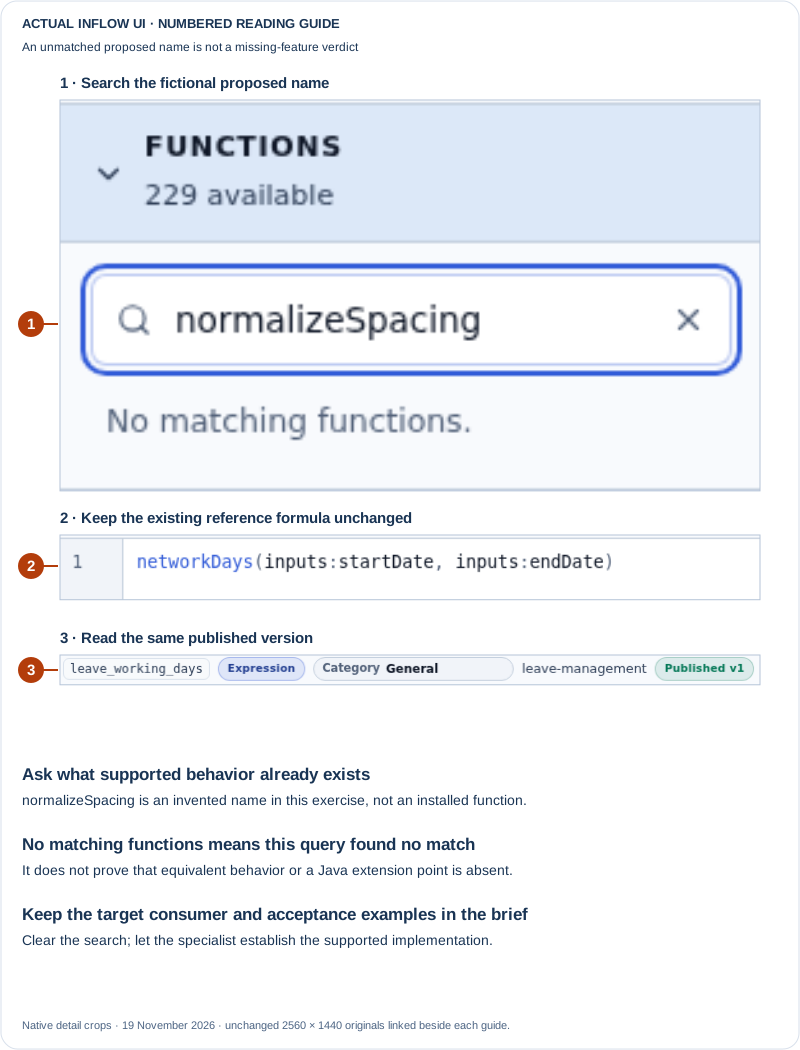
Open the unchanged native 2560×1440 proposed-name search screenshot
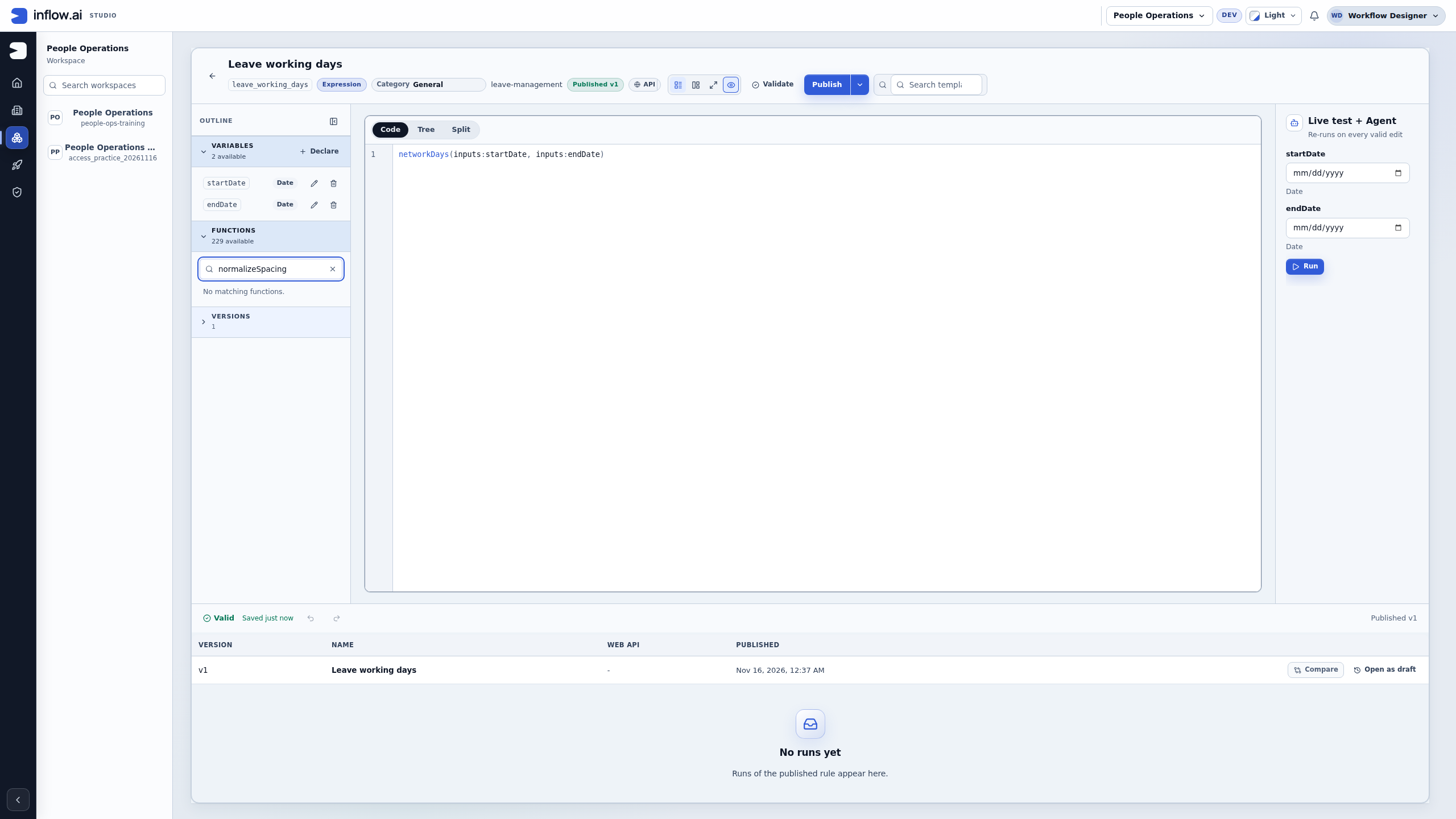
Nadia next tries normalizeSpacing, a fictional proposed name for this exercise, in the same local search. No matching functions means that this search did not match the current reference entries. It does not establish that equivalent behavior is unavailable under another name, that a plugin is missing, or that a Java extension point exists. The search matches reference text as well as names, so keep the exact query when reporting what you found.
She clears the search and gives the specialist a short, precise handoff:
| Brief evidence | What Nadia records |
|---|---|
| Available partial match | trim(text); the reference describes leading/trailing spaces only |
| Requirement still to establish | Collapse repeated internal spaces while preserving case, punctuation and the stored source |
| Proposed-name search | normalizeSpacing returned no matches in this environment; it is not an installed function claim |
| Consumer | The actual target field/page still needs to be named; Leave working days was only the reference host |
| Next owner action | Check supported functions/composition first; confirm the real extension point only if a gap remains |
| Acceptance still required | The agreed normal, blank, wrong-type and already-normal examples through the actual consumer |
Expected result: the team can explain what it learned from the catalogue and what remains undecided. No function was inserted or evaluated; no rule, employee record or business result changed. Continue with the business brief and acceptance examples below. A catalogue screenshot helps frame the request; it does not replace the consuming demonstration needed to accept the delivered behavior.
Write a brief the developer can verify
Before requesting custom behavior, check whether a supported rule, integration or ready-made expression function already meets the need. If a specialist confirms a gap, use the short example table below before anyone estimates or implements an extension. Keep business rules, caller context and expected results visible in one place.
| Brief item | What to write down | Why the developer needs it |
|---|---|---|
| Business question | What decision or user task needs the behavior? Name the accountable product owner. | The implementation can be compared with an outcome instead of a method name. |
| Inputs | Field or business meaning, type, whether it is required, and one fictional example. | A value entered in a form, a published record field and a secret credential have different owners and handling. |
| Output | Type, meaning, and what the caller is expected to show or do with it. | A display label, a validation result and a command to another system must not be confused. |
| Boundaries | Who may call it, which workspace/application it belongs to, and what information it may read or return. | A custom function must not become a shortcut around the application's data or access rules. |
| Effects | Whether it only calculates a value or changes/sends something outside Inflow. | A timeout after an external write needs reconciliation; it is not the same as a failed calculation. |
| Acceptance examples | Normal input, boundary input, missing/invalid input and the exact expected outcome for each. | The consultant and developer can compare the same behavior during review. |
| Recovery owner | Who decides what to do if the result is missing or uncertain. | A user should not repeat an action that may already have reached another system. |
Do not send passwords, tokens or real personal records in the brief. Use fictional values with the same shape. A connection owner enters protected credentials through the approved connection settings; a function input is not a safe place to transport a secret.
- Name the business behavior and its owner before choosing an implementation.
- Write down each input and output using business meaning, type and a fictional example.
- State who may invoke the behavior and what information it may return. Keep this separate from a form filter or a hidden button; those do not grant record access.
- Mark whether the behavior only calculates a value or sends/changes information outside Inflow.
- Agree the expected response for normal, boundary, missing and invalid inputs, then name the person who decides what happens when a result is uncertain.
Example: normalize spacing without changing a person's name
Nadia wants a display value that removes accidental leading, trailing and repeated spaces. She gives the developer this proposed contract:
| Input | Expected result |
|---|---|
" Amal Suleiman " |
"Amal Suleiman" |
"M014 Example" |
"M014 Example" |
| Empty or whitespace-only value | Return the application's approved missing-value result and do not invent a name. |
| A value of the wrong type | Refuse with a clear validation result; do not silently coerce an unrelated object into text. |
She specifies that the behavior may trim and collapse whitespace only. It must not infer a preferred spelling, change capitalization, split a name into assumed first/last parts, or change the stored source record. The developer confirms whether the extension mechanism and the consuming control support this exact input/output contract before implementation.
Acceptance check: in an approved fictional record, the visible label has the expected spacing, the source value remains unchanged, and the empty-value case follows the agreed validation behavior. A screenshot of the code editor or a comment describing the rule does not prove this application result.
Nadia then turns that small request into a handoff the product owner and developer can both review:
- State the user problem. A leave-request reference copied from an approved synthetic source sometimes includes accidental spaces. A reviewer wants a consistently readable display value. The requested change is formatting only; the business owner does not want an employee name or reference rewritten in stored data.
- Check the supported path. Nadia compares the request with the existing rule, integration and expression-function catalogues. If she cannot confirm a supported no-code option, she asks the Inflow specialist to identify the actual extension point and consuming control. She does not promise the customer that an arbitrary Java function can be installed into any form or workflow.
- Agree a precise contract. The product owner signs off that the input is a text value, the result is a display string, repeated whitespace collapses to one ordinary space, and no case, punctuation or characters are changed. Blank input follows the application's agreed missing-value state. Other types are rejected clearly. The output is not a new record identifier and is not used to authorize an action.
- Name the scope and owners. The application owner identifies the exact field and page; the developer confirms where the value can be formatted without changing the saved source; the product owner approves the boundary examples; and the test owner prepares a synthetic record. If the team cannot name the actual caller or supported extension point, the brief is not ready to estimate.
- Review examples before coding. The product owner checks the acceptance table below and resolves any disagreement about blank, malformed or already-normal values. The developer can propose a different implementation, but the visible business result and non-goals must stay explicit.
- Accept the delivered journey. The test owner compares the formatted label with the brief in the real consuming application, checks that the original value remains unchanged, and reports any missing or invalid-value result separately. The source comment can explain why the source is preserved; a green build does not establish what the user sees in the accepted display. Neither is evidence of that user-visible result.
| Synthetic source value | Expected display result | Additional assertion |
|---|---|---|
VN 007 |
VN 007 |
Stored source remains VN 007 . |
VN 007 |
VN 007 |
An already-normal value stays unchanged. |
| Whitespace only | Agreed missing-value state | Do not invent a reference or substitute another record. |
| A numeric/object value | Clear validation result | Do not silently stringify an unrelated type. |
Vn-007 |
Vn-007 |
Case and punctuation are preserved. |
Handoff readiness: name the business owner, actual caller, input and output types, supported extension point (confirmed by the specialist), no-side-effect boundary, expected missing/invalid behavior, and person responsible for acceptance. If one is unknown, record it as an open question; do not fill it with an implementation guess.
Example: describe an external lookup and its safe refusal
A leave form needs to display the manager name associated with an employee number. Nadia writes that the lookup is read-only, returns only the approved manager display name, and uses a fictional employee number. She asks the directory owner to confirm the allowed response fields and test environment before anyone connects it.
Her expected outcomes distinguish three cases:
- The directory finds a matching employee and an approved manager name: show that name to the permitted caller.
- The employee exists but no manager is assigned: show the agreed “not assigned” state; do not substitute a different employee's manager.
- The directory is unavailable or the reply is uncertain: show a neutral unavailable state and preserve the original lookup and its non-secret result reference for the owner to reconcile. Do not turn uncertainty into “no manager assigned”; that is a different business result.
She does not ask the function to return the full directory record, expose connection credentials, decide who may read the leave request, or update the employee's manager. If a later requirement adds a write, the owner must define that as a separate effect with its authorization, confirmation, duplicate/timeout handling and recovery evidence.
Example: state when a proposed calculation is not allowed to decide access
The team wants to label a request “within policy” when requested days are at or below the configured allowance. The brief includes examples on both sides of the boundary and says the calculation only supplies a label for a reviewer. It does not approve the request, complete the manager task, or grant the employee access to another person's record. The workflow's existing decision and access checks remain authoritative.
Review the delivered behavior
Before accepting the handoff, ask the developer to show the agreed examples through the real consuming application, using the approved test actor and fictional data. Compare the displayed result with the brief, including the missing or invalid case. For an external service, confirm the provider owner approved the test target and inspect the returned result rather than trusting the saved configuration alone. For an uncertain effect, keep the original request and receipt for its owner; do not ask the user to create a second request as a diagnostic.
- Confirm the demonstration uses the same consumer and expected input shape as the brief.
- Compare the ordinary example and the boundary case with the agreed results.
- Check that a refused or missing result does not accidentally become a successful value or decision.
- If another system may have received a change, stop and ask its owner to reconcile the original attempt before any retry.
Separate the evidence by claim:
- A comment can explain an invariant for the next developer.
- A successful build can show that source compiles.
- A configured service task can show that an owner saved a workflow step.
- Only the authorized consuming journey can show what an ordinary user actually receives.
Do not present one of these checks as evidence for another.
If the result is not clear
Keep the original result and explain what is missing. Ask the responsible owner to investigate before repeating an uncertain action or widening access. A missing control is not an instruction to use somebody else's account.
Continue with the consultant guides
Read ready-made expression functions and integration workflows. The specialist reference below contains the detailed setup; it is not ordinary consultant preparation.
Further reading
Optional technical reference — detailed contracts and implementation information for your administrator or developer. You do not need it to follow this lesson.