Query Builder: consultant guide and technical reference
Audience: consultant handoff to the query designer or developer.
To build a query in Studio, follow Find the records your application needs. It explains the actual Guided controls with pending-request and count examples. You do not need to read an engineering specification before using the builder.
A query asks a business question about available records. “Show pending requests” needs records. “How many are pending?” needs a count. Getting that question clear is more useful than beginning with the query's internal representation.
Story — hand over a question without creating the wrong rule
Sara wants a manager's page that shows pending leave requests. Nadia needs to hand the question to the designer who owns the shared queries. She should first establish what already exists, what the page needs and what remains unknown. A screenshot of a rule name alone cannot establish that contract.
Illustration context: These three guides come from the 18 November 2026 inspection of build-start master 9ebdd2fe. The normal designer is an Editor in the synthetic People Operations workspace. The first view shows four authored definitions and a workspace total of eleven; seven system-generated CRUD rules are hidden by the current filter. No Query was created or run. The handoff and expected business answers remain design exercises.
First, identify the workspace and the kind
- Open the intended workspace's Build → Rules catalogue. Record the workspace name and key so the next designer can find the same place.
- Inspect the function scope, search and selected kinds before deciding that a matching query is missing. A narrower view may omit an existing design.
- Read the Type, status and version beside a candidate's name. An Expression called Leave eligibility is not the same design as a Query that returns pending requests.
- Write what the view establishes. In the pictured practice workspace, there are four visible authored definitions, Query Rules (0) and a separate Rules 11 resource total. The unchecked CRUD Rules (System Generated) (7) filter explains why the authored view shows fewer rows than the total. These are design counts; none is a count of employee leave requests.
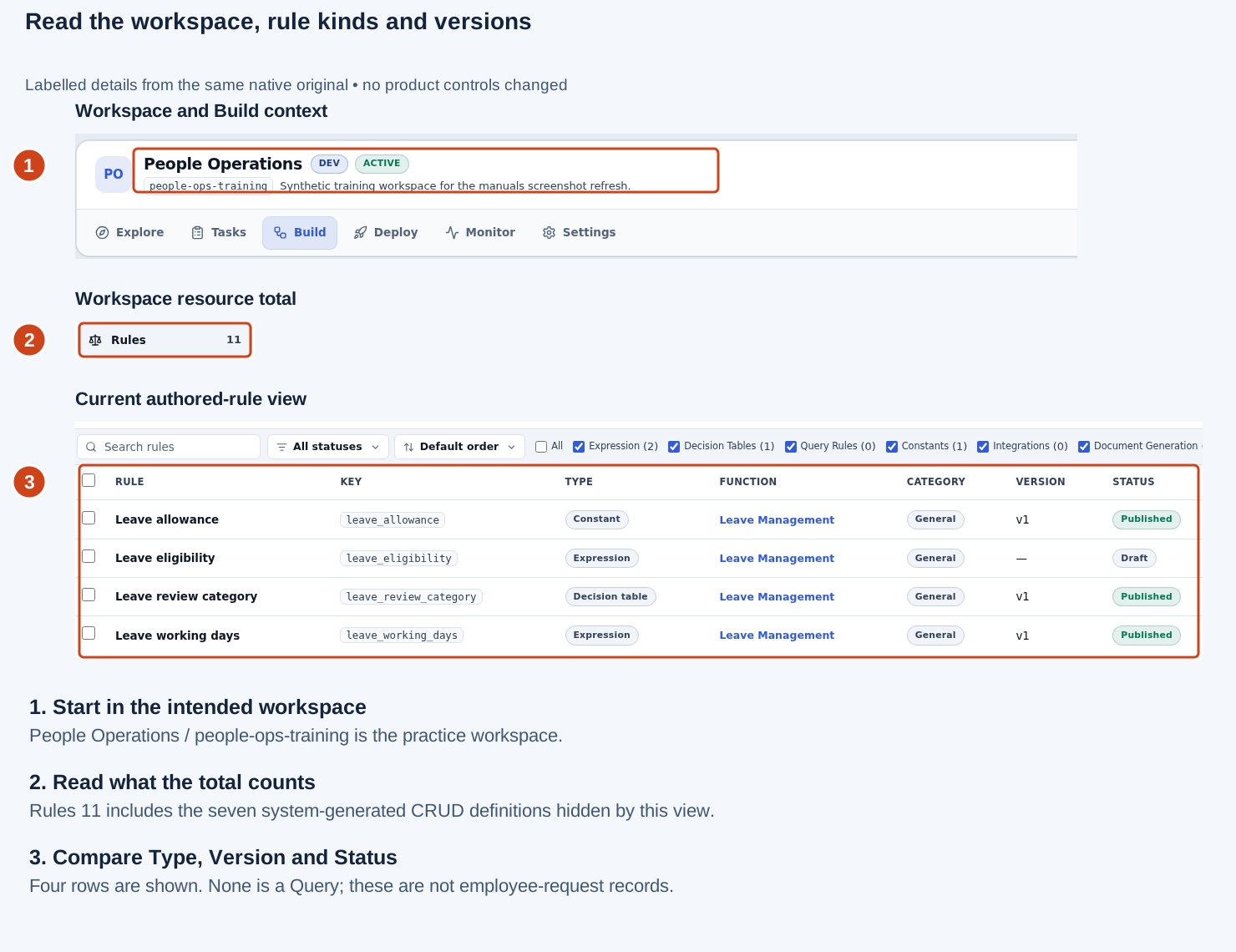
Open the original screenshot. The numbered guide uses labelled details from this unchanged native original. The earlier 16 November originals remain preserved in the repository.
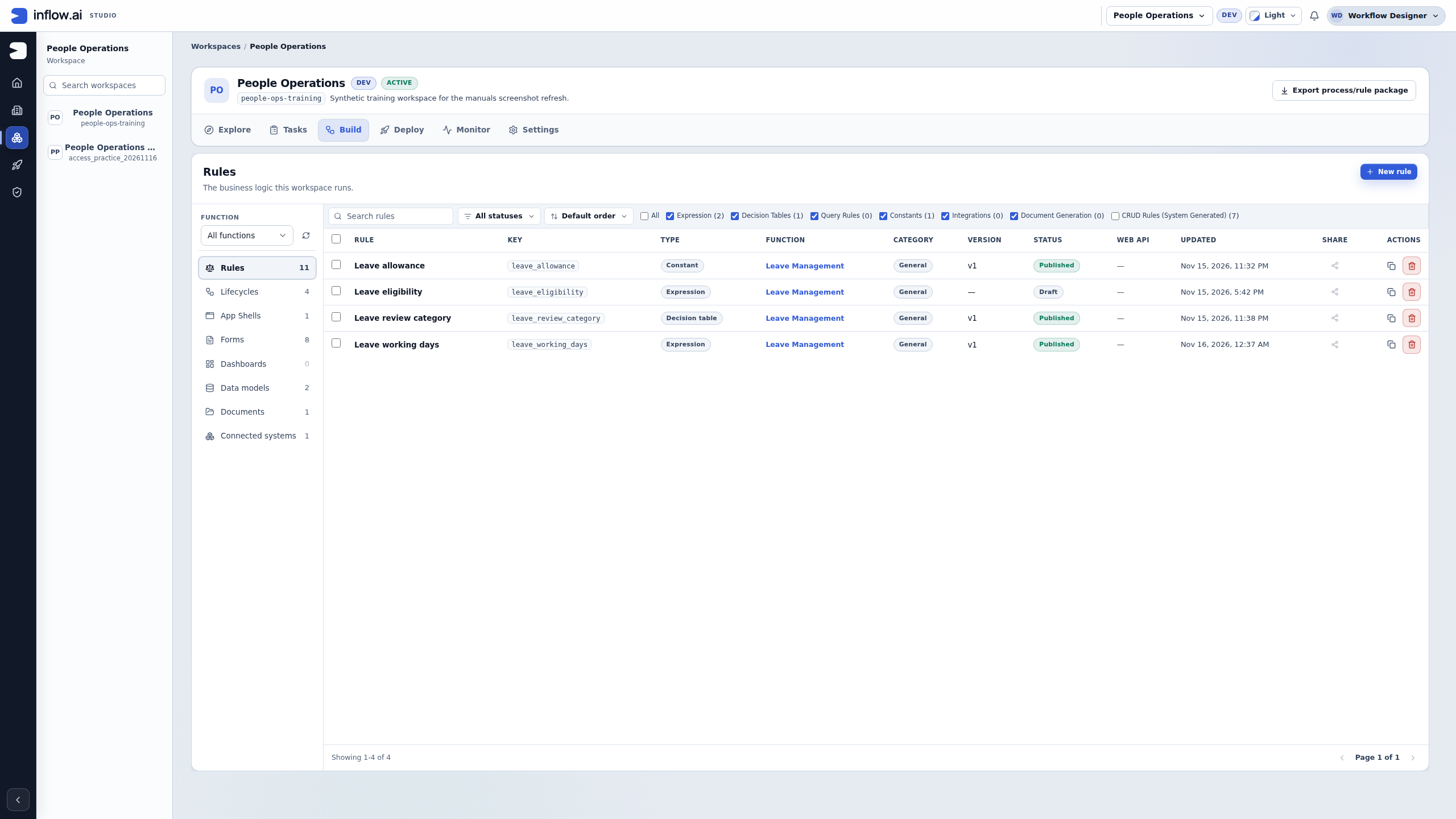
Nadia's note can say: “People Operations, key people-ops-training; All functions; the visible catalogue has no Query definitions in this inspection.” It should not say “the database has no pending requests” or “all managers can see this source.” Neither claim follows from this screen.
Next, distinguish a catalogue search from a result
- Note the existing filters before changing the list.
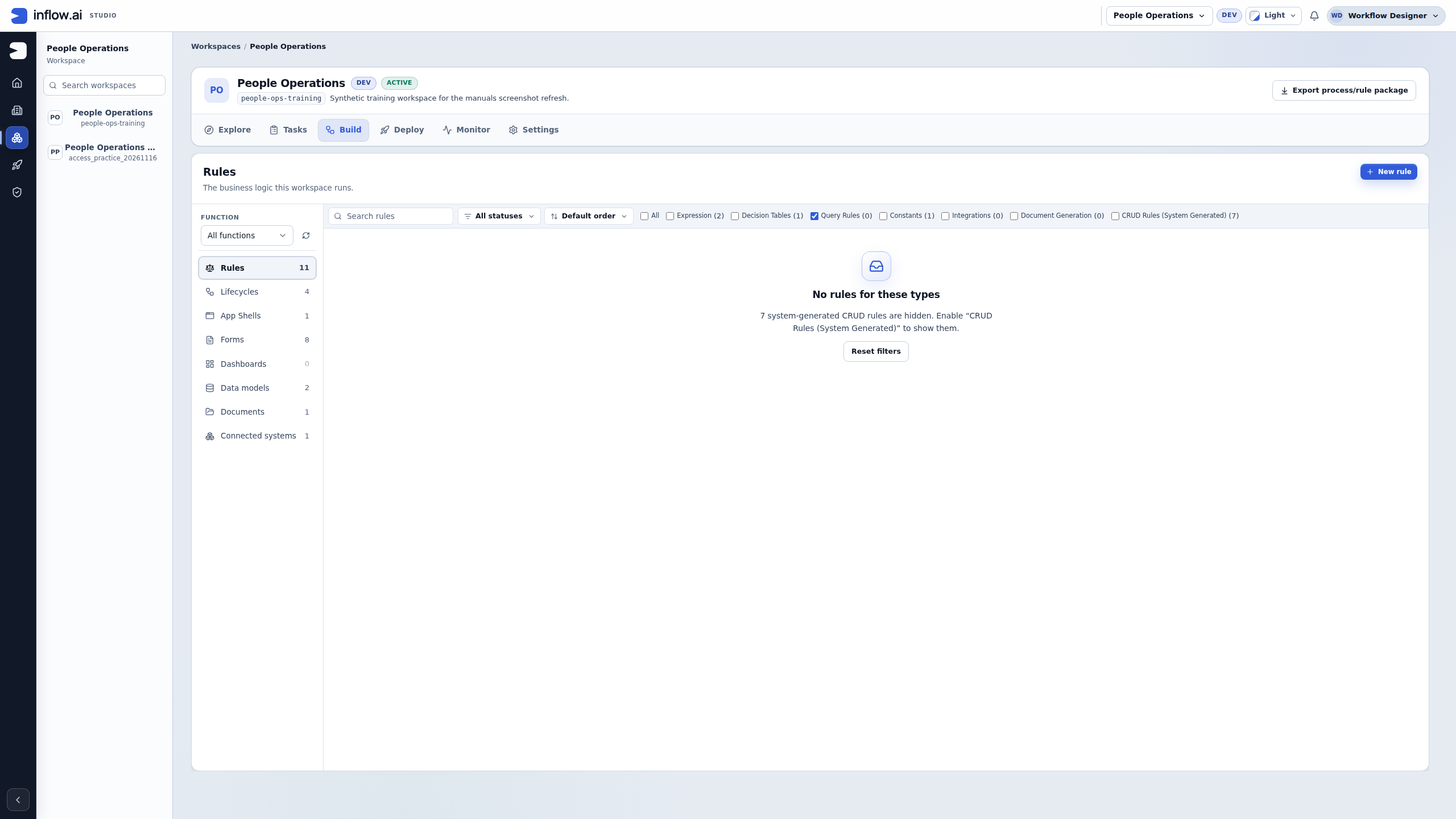
- For this inspection, leave only Query Rules selected. Read the visible message and the separate workspace Rules total.
- If the view says No rules for these types, describe the catalogue and filters in the handoff. Do not describe it as a Query that executed successfully and returned zero rows.
- Restore the original choices when finished. Ask the rule owner to check the intended design if it remains unavailable; do not create a duplicate merely to reproduce a picture.
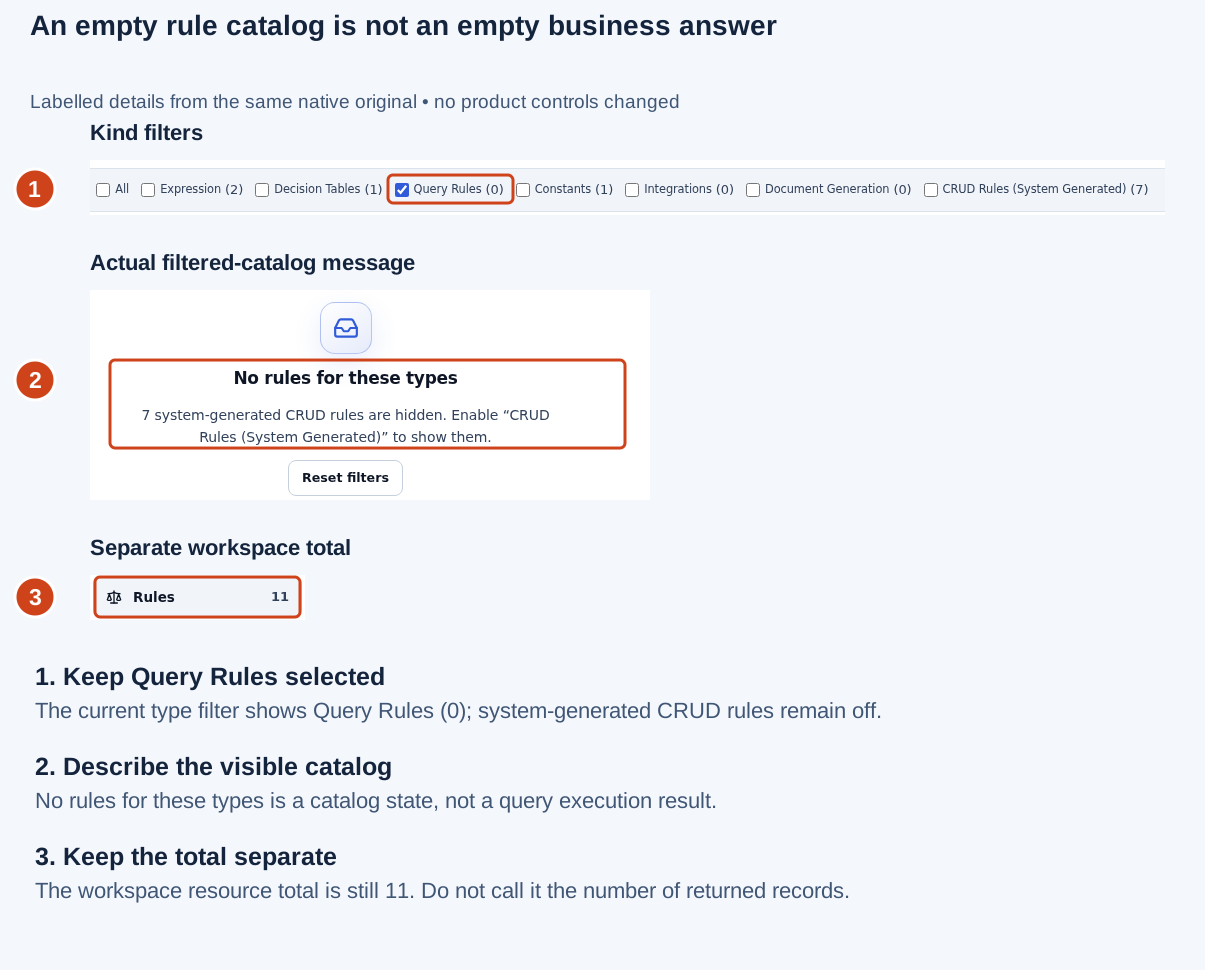
Open the original screenshot. The empty catalogue is not a business-record result.
Keep these three observations separate in a review:
| Observation | A precise note | What still needs checking |
|---|---|---|
| No Query definition appears in the filtered catalogue | “No matching definition visible in this workspace and view.” | Correct workspace, function, search, kind and intended design owner. |
| A configured Query returns an empty result | “No matching rows visible for this actor and these inputs.” | Source/version, inputs, filters and authorized access. |
| The intended source is unavailable | “The intended source is not available to this account.” | The source or access owner must check it; another similarly named source is not a substitute. |
Finally, separate the proposal from the saved contract
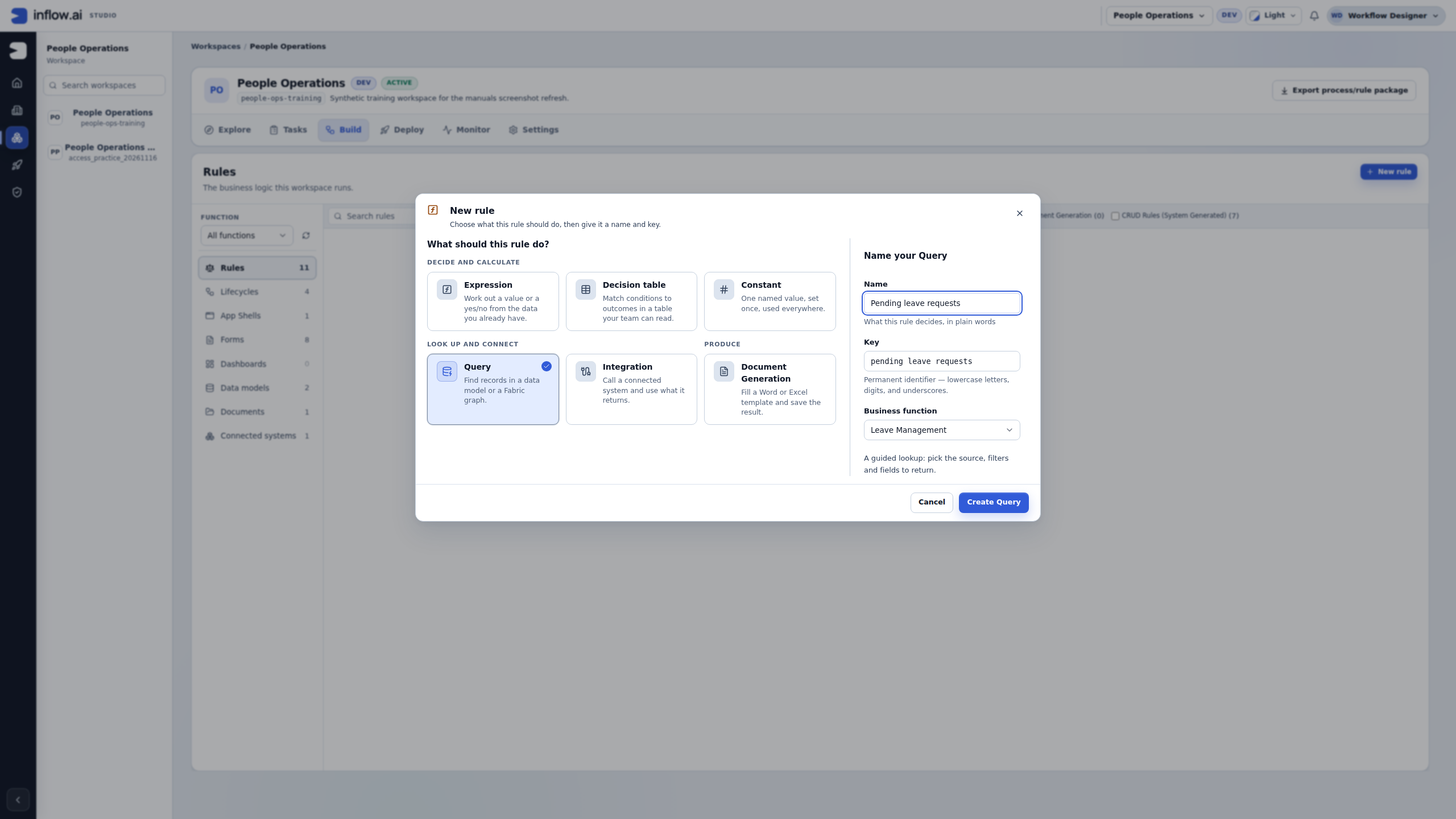
Nadia can propose the Name Pending leave requests, the generated Key pending_leave_requests and the existing business function Leave Management. The name explains the question, the key identifies the reusable design, and the function groups it. None selects the record source or grants access.
In the pictured inspection, Nadia reads those fields and chooses Cancel. She does not choose Create Query. Her handoff must therefore say “proposed name and key,” not “created Query,” “published query” or “ready for the manager's page.” When the team actually authorizes a new query, the designer creates the missing draft and deliberately configures its source, inputs and answer shape through the ordinary authoring steps.
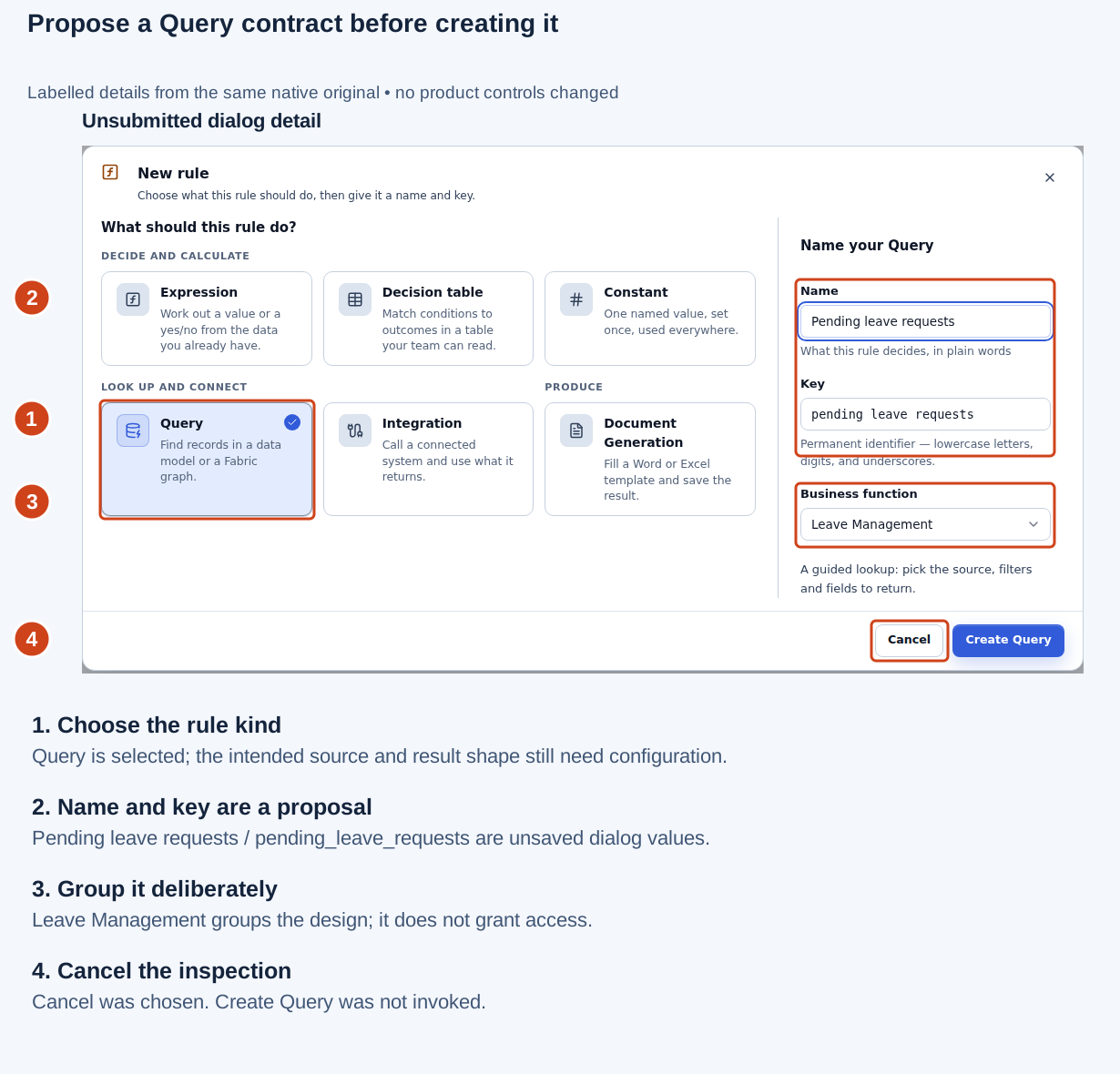
Open the original screenshot. These dialog values were inspected and cancelled; they were not saved as a Query.
Example — a handoff the next designer can use
The following worksheet is a fictional request, not evidence of a configured or executed query:
Business question: Which pending leave requests may this caller read?
Workspace: People Operations / people-ops-training
Proposed query name: Pending leave requests
Proposed generated key: pending_leave_requests
Business function: Leave Management
Intended consumer: Sara's read-only pending-request list
Source: the team's intended published Leave request model
Exact source version: owner to confirm before configuration
Answer shape: Records, with the agreed list fields
Fields: request number, employee reference, requested days, status
Condition: status is the text PENDING
Inputs: none for this first list question
Ordering: owner to agree meaningful fields and tie handling
Result bound: a bounded first page; designer to confirm its size
Expected paper fixture: requests 014 and 015; exclude approved 016
Current evidence: catalogue and unsubmitted dialog inspected only
Saved draft/published query version: not created in this inspection
Access: current caller's server-authorized rows; no access change
Workflow effect: none; listing requests does not approve leave
Next owner: query designer, then page owner for consumer checks
An unknown source version is an action for the owner, not a value to guess. Before creating or changing the design, the owner must establish whether a matching published query already exists and whether its contract fits the page. If an existing matching query is available, record its actual name, key and version instead of retaining the worksheet's proposed values.
Give each acceptance example an observable answer
Use the three fictional rows from the Query Builder lesson. For this paper exercise, requests 014 and 015 are pending and 016 is approved. The expected answers below assume the intended permitted training rows; no employee access test was performed for these examples.
| Consumer | Its question | Expected fictional answer | A useful failure to investigate |
|---|---|---|---|
| Manager list | Which requests are pending? | Records for 014 and 015, with agreed fields. |
A number appears where the page needs rows. |
| Pending-count tile | How many are pending? | The number 2. |
The browser counts one page of rows instead of reading the scalar result. |
| Employee check | Does M014 have a pending request? | Boolean true for the agreed training fixture. |
The caller omits or mis-maps the employee input. |
| Employee check | Does Y016 have a pending request? | Boolean false for the agreed training fixture. |
The approved-only training row is incorrectly included as pending. |
Record the actual actor, source version, inputs and outcome when an authorized test is eventually run. If that actor cannot read all intended fixture rows, do not compare the result with a broader owner's view as though both have the same contract. Ask the access owner to establish the permitted expectation without exposing private rows or widening access merely to make an example pass.
The page owner also needs to distinguish read results from actions. Showing 014 in a grid, reading a count of 2 or obtaining Boolean true does not approve a request or complete a workflow task. Decisions belong to the intended task flow and its own permission and confirmation checks.
Prepare a clear question
Before asking another consultant or developer for help, write down:
- The business records you want to read.
- The fields that should appear in the answer.
- The conditions, order and expected amount of information.
- Whether the answer should be records, one record, a number or yes/no.
- Two or three fictional inputs and the result you expect.
For example: “From the three training leave requests, show the two whose status is PENDING, including request number and requested days.” A separate question could be “Return the number 2 instead of the rows.”
Match the answer shape to the business question
The same source and condition can produce different answers. Agree what the next screen, rule or report expects before building the query. A page that needs a list cannot use a count as if it were rows, and a yes/no decision does not need to load a table just to check whether a match exists.
| Business question | Ask for | Fictional expected answer | Check before handing it over |
|---|---|---|---|
| “Which leave requests are pending?” | Records with the fields the page will display | Requests 014 and 015, each with a status and requested-day value |
Confirm the intended source, exact filter and bounded result size. A preview can show only records the current actor may read. |
| “How many are pending?” | Count / a number | 2 for the three-row training set |
Read the scalar value. A preview's table-row count is not the count result. |
| “Does M014 have a pending request?” | Exists / true or false | true for the training set |
Include the employee condition and still rely on server authorization; a supplied employee number is not permission. |
| “What is the latest pending request?” | Single record | One matching request after the owner chooses a meaningful ordering | Define the ordering and tie behavior. “First row” without an intentional sort is not the same as “latest.” |
| “What is the pending total by status?” | Aggregation / grouped measures | One group per present status with its agreed measure | Agree the group fields, measure, output aliases and consumer contract. Do not present a projection as a full editable record. |
| “Which status values occur in the matching records?” | Field values | Values from the selected field across the matching records | This is not a list of complete records. Agree whether repeated values are meaningful; do not assume the query removes duplicates. |
| “Give the API rows with paging information” | Envelope | Data together with the metadata agreed with the consumer | Confirm the result-size mode and required metadata; do not assume every count or paging property is always populated. |
Treat the answer kind as part of the query's contract. If a consumer needs a different shape, make that need explicit to its owner. Do not silently change a reusable query from Records to Count or Single record to satisfy one screen; another caller may depend on the current shape.
Example — One filter, three different answers
The training model contains three fictional requests: 014 and 015 are PENDING, and 016 is APPROVED. Nadia is asked to support an employee list, a dashboard tile and an “any work waiting?” check.
- For the list, the question is “show the pending requests I may read.” The expected result is two record rows with the agreed request fields.
- For the tile, the question is “how many pending requests are there?” The expected result is the number
2; it is not a list and it does not need a page of record rows to be counted in the browser. - For the check, the question is “is there at least one pending request for this employee?” The expected result is a Boolean. If the employee is M014, the training answer is
true; for Y016, it isfalsebecause the only training request for Y016 is approved. - Give each reusable query a name/key and output contract that makes its purpose recognizable. Reuse a matching published query when its source, conditions, inputs and answer shape already match.
Expected result: all three answers are correct for the same small fixture, but remain separate query contracts. A value of 2, two rows and true answer different questions. A successful authoring preview does not grant a future caller access to every row.
Example — Explain AND versus OR without changing the rule
The request says, “Show requests that are pending and ask for more than three days.” For this separate logic exercise, use a fictional set with request 014 pending for five days, request 015 pending for two days, and request 016 approved for four days.
Write the intended logic in ordinary language first: a matching row must satisfy both conditions. Under Match all / AND, the expected fictional result is request 014 only. Under Match any / OR, all three requests match: 014 and 015 satisfy the pending condition, while approved request 016 satisfies the day-count condition. That is a different business question.
Before changing an existing rule, compare its visible source, filters, grouping and current draft with the requested sentence. If the sentence is ambiguous—“pending or urgent,” for example—ask the business owner to define “urgent” and whether either or both conditions must hold. Do not switch the connector to make the preview return a preferred sample.
Expected result: the builder represents the agreed meaning, and Nadia can explain why each fictional row is included or excluded. If the existing expression has logic that Guided mode cannot represent without loss, preserve it and ask the rule owner; do not delete a condition to get a green validation state.
Example — No matching rows is not proof of missing or unauthorized data
The employee query returns no row for a fictional input. That observation alone does not distinguish an employee with no pending request from a mismatched identifier, a different published source, a filter that excludes the row, or a record the current actor is not allowed to read.
- Recheck the exact source and whether the current model/source is ready and published for the intended environment.
- Compare the declared input name and type with the caller's mapping.
employeeNumberandemployee_idare not automatically linked because their names look related. - Compare the literal/input value, filter operator and All/Any setting with the business sentence and the fictional fixture.
- Ask the data or access owner to inspect access when the source or record is not visible to the current account. Do not ask for broader permissions merely to make a preview show a row.
- Record an empty result as “no matching rows visible for these inputs and this account.” The owner can establish whether the underlying business reason is no match, publication or authorization.
Expected result: the handoff preserves what the preview actually establishes and assigns the next check to the correct owner. A successful query with zero visible rows is not a source-health check or an access grant.
Give the builder owner a complete handoff
Use a compact request before asking someone to change a shared query. Include fictional or approved non-sensitive examples only.
Business question:
Workspace and intended source:
Caller/page/report that consumes the answer:
Expected answer shape: Records / Count / Exists / Single record / projection
Fields and filters, in plain language:
For each filter: all (AND) or any (OR):
Ordering and result bound, if relevant:
Declared inputs and caller mappings:
Fictional sample rows and expected answer:
What the current preview actually shows:
Current draft or published version, if known:
What must remain unchanged for existing callers:
Owner to check next: source / publication / input mapping / access / unsupported logic
Sensitive data included: none
If the exact source, rule version or permission is not visible to you, write “unknown” or “not visible to this account.” Do not paste private rows, raw authorization errors, credentials, or guessed internal IDs into the handoff. The source owner can check an unavailable object without widening your access.
When a specialist is needed
Use Expression mode only when the intended logic and the editor's explanation make sense to you. If the builder says that a formula cannot be represented in Guided mode, keep that distinction and ask the rule owner for help. Do not remove conditions just to make the visual mode available.
Developers extending the builder can use the preserved Query Builder design and contract. That reference includes current behavior, design history and proposals. A proposed feature in that document is not automatically an available Studio control.
For everyday work, return to the Query Builder lesson or the query-driven page tutorial.