When a ready-made function is unavailable
Audience: consultant handoff to the platform administrator or plugin developer.
Use ready-made functions to learn how to find and use a function in a formula. The details of installing and running function extensions are platform responsibilities, not a normal step in building a consultant rule.
A function can be missing because of a spelling mistake, a different approved installation or a runtime problem. These situations need different responses.
Story — find the calculation before asking for an extension
Sara’s leave form needs a working-day count. Nadia expects a function called regionalBusinessDays, while the existing Leave working days rule uses networkDays. She checks the offered function contract before proposing a different calculation or package.
Illustration context: The following numbered details come from authentic native 2560 × 1440 screenshots of build-start master 9ebdd2fe, captured on 18 November 2026. The authoring scenes use the normal workspace Editor. The later Plugins scenes use the separately created documentation administrator, which is a Super Administrator; they show administrator inspection only. No formula, query, plugin or business operation was run or deployed for these pictures. Each guide labels its detail crops and links the unchanged full original.
Read the actual name and signature
- In the intended workspace, open the existing Leave working days Expression. Read its key and published-version label before comparing it with another rule of a similar name.
- Open Functions in the outline. Search that reference for
networkDays, then expand Calendar & Finance. The header’s 229 available describes the whole reference loaded in this environment; the filtered category shows one match. - Read
networkDays(startDate, endDate, holidays?). The question mark marks an optional third argument. The visible formula supplies the two date inputs and no holiday list. - Compare the business requirement with that contract. Reading the reference does not require choosing Insert function. Nadia leaves the expression and test inputs unchanged and does not choose Validate, Run or Publish.
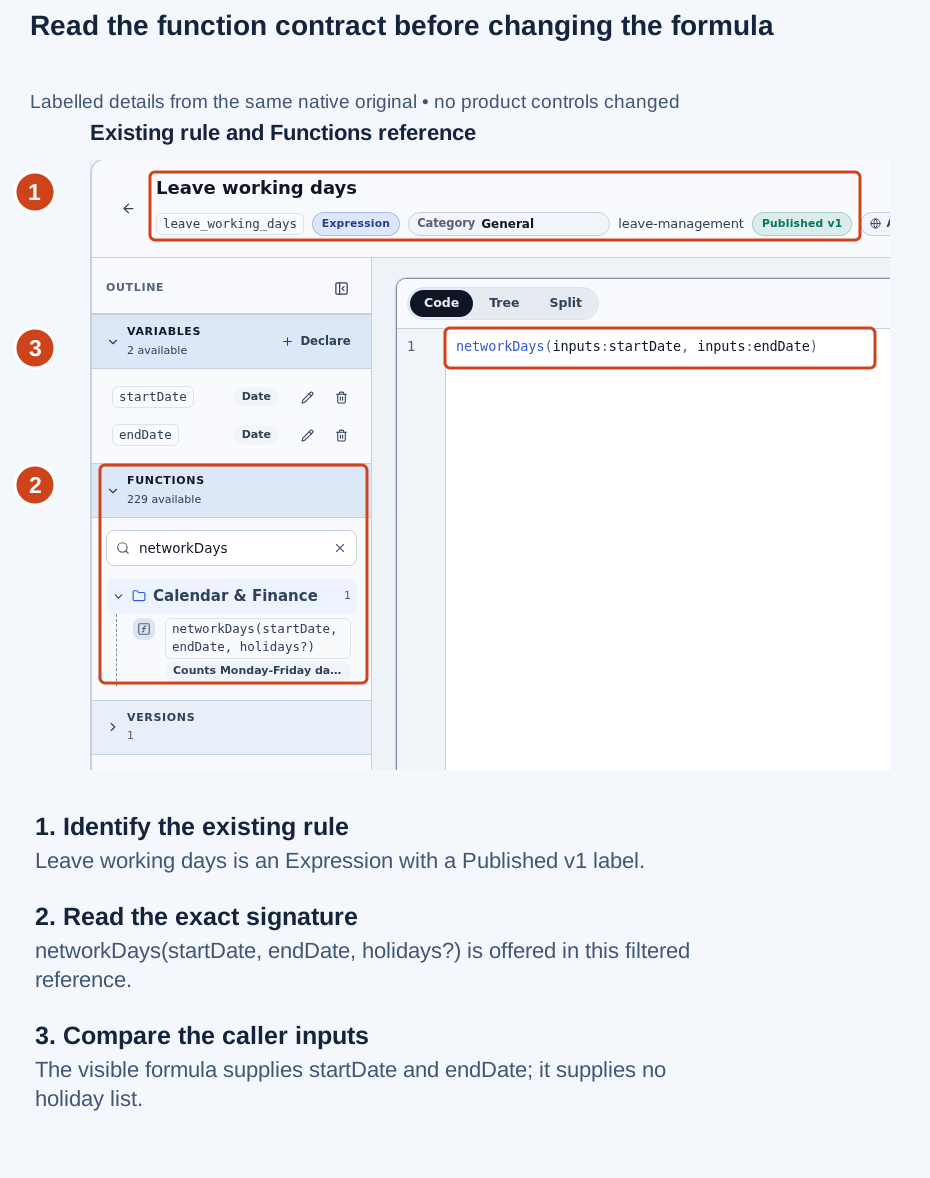
Open the original screenshot. The full native view retains the empty test dates, published-version label and “No runs yet” history. Those visible states do not establish a successful calculation or consumer journey.
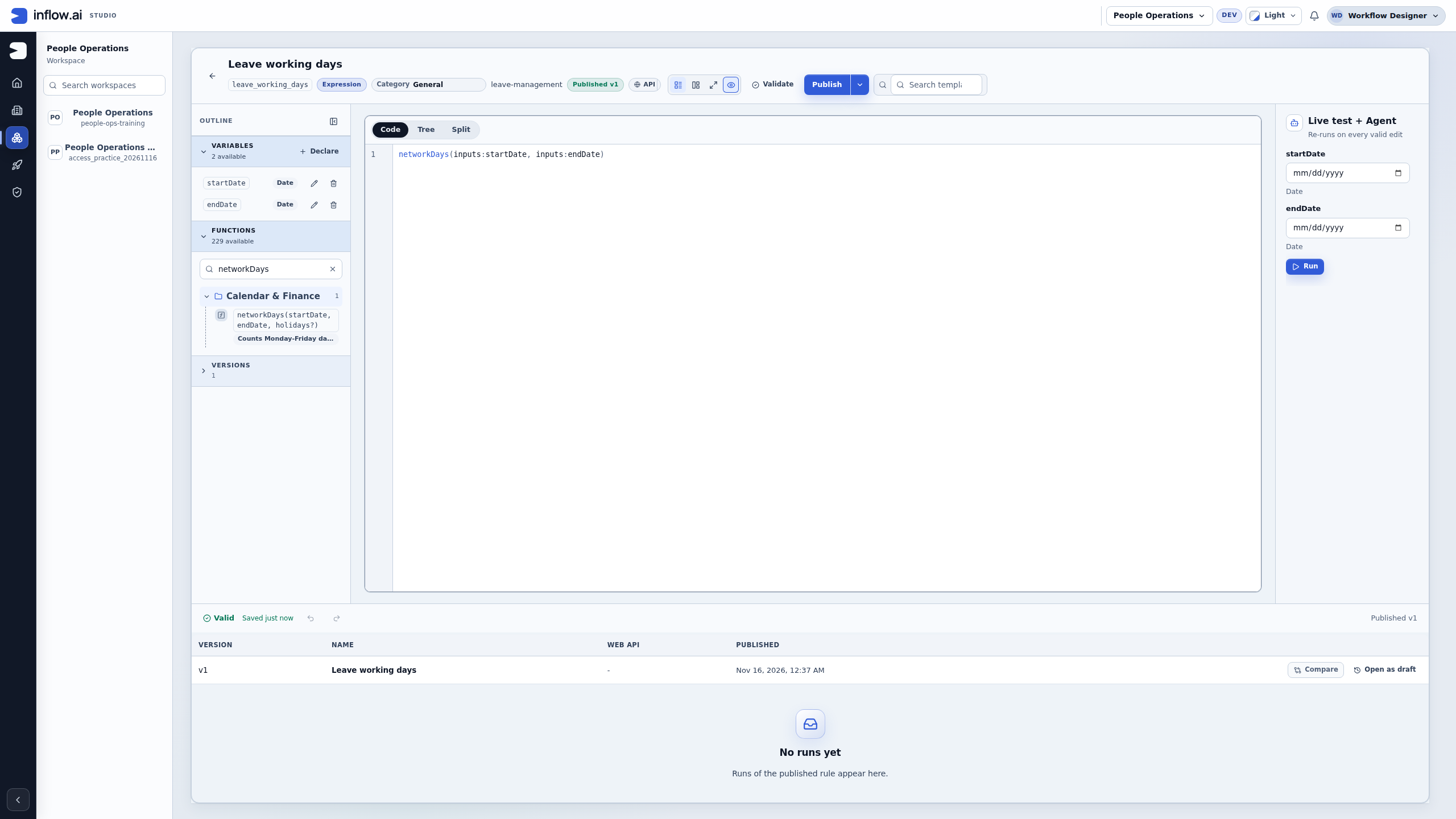
The reference’s compact summary is truncated in this actual layout. Use the exact function contract and the business examples below to prepare the handoff; do not infer a regional calendar from the short label. The application owner must decide whether the caller needs to supply holidays or whether the requested policy needs different logic.
Record a missing match precisely
- Keep the same workspace and rule open. Clear any broader editor search that could narrow the reference, then replace only the local Functions search with
regionalBusinessDays. - Read No matching functions. Record the exact searched name, environment and rule. This is a filtered reference observation; it is not proof about every installed package or another environment.
- Clear the search when finished. Do not replace the existing formula with an unlisted name, upload a package or change access to make the search return something.
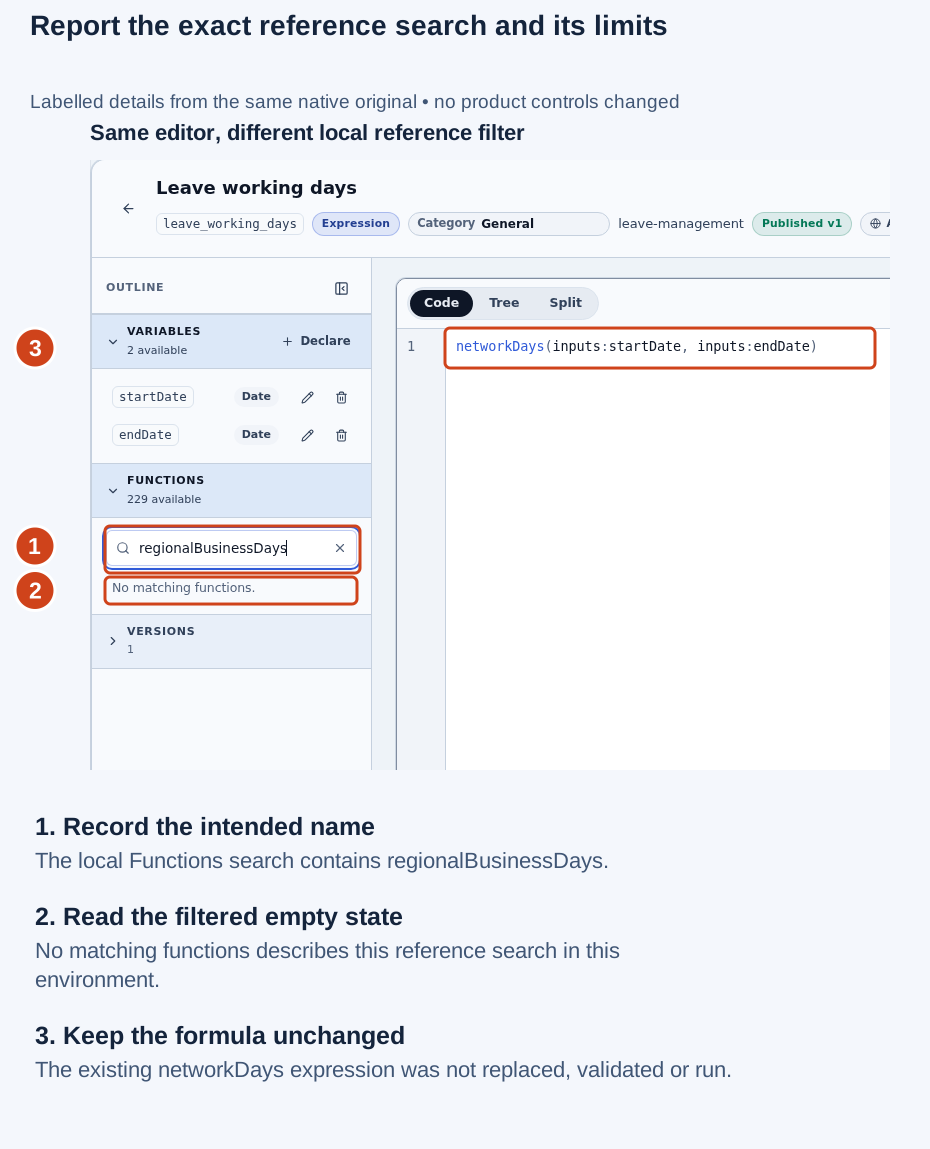
Open the original screenshot. This capture shows reference filtering only; the rule was not edited or executed.
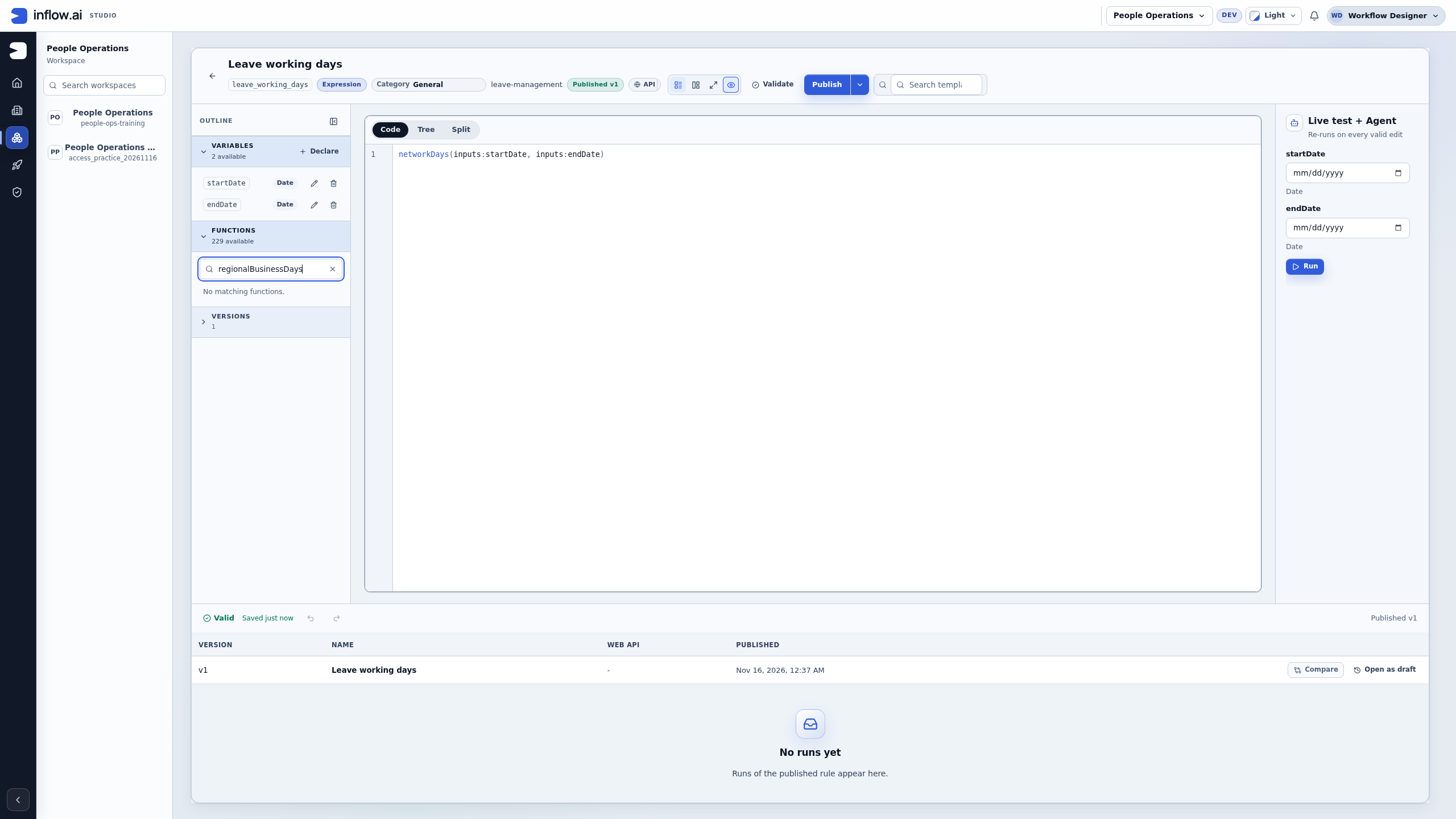
Nadia’s first note can now be useful: “In People Operations, leave_working_days shows Published v1 and uses networkDays(inputs:startDate, inputs:endDate). The Functions reference offers its optional holidays argument. Searching this reference for regionalBusinessDays gives no match. We need to agree whether the Monday–Friday calendar and a supplied holiday list meet the leave policy.” That note gives the owner a concrete question without inventing a runtime fault.
What a consultant can prepare
Check the function name and its listed inputs in the current Functions reference. Compare your formula with its description. A function that expects two dates will not necessarily accept an employee number or a third formatting option.
Give the administrator:
- The workspace and rule name.
- The function you intended to use.
- The safe visible message.
- A small fictional input and the expected business result.
- Whether the same approved example works elsewhere.
Keep credentials, private records and document contents out of the report. If the operation can change a business system, check what happened to the original attempt before running it again.
What the administrator handles
The administrator checks which reviewed extensions are available and investigates their execution. Plugin developers handle the implementation and compatibility. A consultant should not upload an unknown program, disable isolation or change server switches to make a formula run. In the current Plugins screen, an uploaded package that passes its checks is live immediately. There is no separate product approval queue after upload; the team must review the publisher and package before an administrator uploads it. Inflow’s own built-in packs are managed with the product rather than uploaded by the consultant.
Separate the four checks
When a function does not work, keep the last confirmed step visible. The Functions list, formula validation, a live preview and the real form or workflow are separate checks. A pass at one step does not prove the next step is ready.
| Check | What it answers | What it does not answer |
|---|---|---|
| Functions list | Is a documented function with this name and signature offered in this authoring environment? | Whether the current formula supplies compatible values or whether a different target environment has the same function. |
| Validate | Can this draft formula be checked against the function and rule inputs currently available to this editor? | Whether a real caller supplies the inputs or whether the plugin runner can complete a later invocation. |
| Live test | What did this test return for the exact inputs and current rule draft shown in the panel? | Which published version a separate form/workflow uses, or whether a business action happened. Ask the rule owner to identify a version when the preview does not show one. |
| Real consumer | Did the permitted form/workflow call its selected published rule and show or use the intended result? | Whether an external effect is safe to repeat if the response was lost or timed out. |
First read the function's exact listed name, signature and description. Compare each argument with the expected type, order, optional inputs and return type. Use a small fictional input that a rule owner can share safely. Do not change the formula or publish another version just to make the message disappear.
Example — The function is not in the list
Nadia expects regionalBusinessDays(startDate, endDate), but the current Functions reference shows networkDays(startDate, endDate, holidays?) and does not show regionalBusinessDays.
- Confirm the selected workspace and rule editor. Search the current Functions reference for the exact intended name and any documented alias.
- Compare the required business meaning.
networkDayscounts weekdays and only excludes holidays supplied to it; that does not automatically make it an organization's regional business-calendar function. - If the listed function is not equivalent, keep the expression unchanged and ask the administrator whether an approved implementation exists in this environment. Include the workspace, rule name/key, intended function, safe visible message and one fictional example with its expected answer.
- Let the administrator or function owner confirm whether this is a spelling/documentation issue, an unavailable approved extension, or a new product requirement. Do not select a similarly named function or claim that its answer follows an unconfigured regional calendar.
Expected result: the owner can decide whether the documented function is suitable. The absence of a name from one list is not evidence that an unknown package should be installed, nor does it authorize Nadia to stage or approve one.
Example — Validation passes but the consuming workflow fails
Nadia uses Live test on the current leave_eligibility draft with requestedDays = 5 and allowance = 10; the preview returns true. A form's later run reports that the rule or required input is unavailable. The successful draft preview does not establish which published version the form selected.
- Keep the successful preview result and its exact test inputs. Do not edit or republish the rule yet. The preview may not identify a published version; ask the rule owner to read the saved and published versions separately.
- Ask the form owner to compare the published rule version selected by the form, the names and types of mapped inputs, and the form's last visible error.
requestedDaysand the record fieldrequested_daysare different names; a rule declaration does not map one to the other automatically. - Ask the administrator to compare the current environment's function availability and safe runner state only if the failure points to execution rather than mapping or publication.
- Repeat the preview only with the same fictional inputs after the owner identifies what changed. If the actual workflow may have created a task or changed a business record before its response was lost, inspect that original request/task outcome before considering a retry.
Expected result: the handoff names the first boundary that differs: selected version, input mapping, function availability, execution, or the result shown by the consumer. A successful preview stays a preview; it does not prove the form completed or a request was approved.
Example — A function preview times out during a larger business journey
A Live test of a documented extension stops responding and shows a safe error. Do not infer that the plugin child changed an external system: the isolated runner does not grant plugin code general network access. If a separate form/workflow action also started and its response was lost, that host action has its own outcome to reconcile.
- Save the exact safe message, workspace/rule identity, version if shown or otherwise known, approximate time, fictional test inputs, and the last confirmed step.
- Ask the rule owner whether this function uses the isolated plugin runner or a separately declared host binding. Never infer an external action from the function name or plugin error, and do not copy private records, documents, secrets or the full sensitive payload into a ticket.
- Ask the administrator to interpret the safe failure through the approved operational path. A timeout, unhealthy runner or cleanup failure is not a successful result and does not make it safe to rerun the preview until its cause is understood.
- If a separate form/workflow host action was also submitted and its outcome is uncertain, have that action's owner reconcile its original intent/receipt and target state before any retry. Correct a test input only after separating it from that business-action result.
Expected result: the plugin preview failure remains a function-execution result; any separate host/business action remains pending or uncertain until its owner reads it back. Do not attribute a workflow effect to the isolated plugin child or replace an uncertain host outcome with a second call.
Agree what “business days” means
A function with a familiar name still needs an agreed business definition. The ready-made networkDays(startDate, endDate, holidays?) counts Monday through Friday including both ends. It excludes a supplied holiday only when that date is a weekday. Repeating the same holiday in the supplied list does not subtract it twice. A reversed date range returns a negative count.
Those rules may fit a leave calculation, but they do not automatically select the employer’s working week, obtain a national calendar or read a person’s work schedule. Nadia should first ask the policy owner which days count. A team that works Sunday through Thursday needs a different agreed rule; renaming a Monday–Friday answer does not change its meaning.
The following are paper examples for a handoff. They have not been run as part of this illustrated inspection:
| Fictional inputs | Expected answer under this function’s definition | What the example checks |
|---|---|---|
Start 2026-12-14, end 2026-12-18, no holidays |
5 |
Monday through Friday are counted, including both dates. |
The same dates; holidays 2026-12-16, 2026-12-16 |
4 |
One Wednesday holiday is excluded once, even when repeated. |
Start 2026-12-19, end 2026-12-20, no holidays |
0 |
A Saturday–Sunday range contains no weekdays. |
Start 2026-12-18, end 2026-12-14, no holidays |
-5 |
Reversing the endpoints changes the sign; it is not automatically corrected as user input. |
Before using an example in an application, agree whether its date fields are inclusive and how an invalid reversed request should be presented to the employee. The application may need to reject an end date before the start date even though the mathematical function can return a negative value. A function’s supported input is not an approval of every business use of it.
Example — The number is correct, but the policy is wrong
Sara requests leave from Monday 14 December through Friday 18 December. The formula returns 5. Her employer has a Wednesday holiday, but the caller supplied no holiday list. The function followed its documented contract; the application’s calendar mapping is incomplete.
- Keep the exact fictional dates and the actual supplied holiday values in the investigation note. “We have a company calendar” is not evidence that this call received it.
- Ask the rule owner to identify the approved source of holiday dates and how the caller maps that list into the optional third input.
- Agree the expected answer with the leave-policy owner:
4for this particular Monday–Friday calendar and one Wednesday holiday. - Test the corrected mapping through the intended permitted consumer after the owner authorizes it. A successful formula preview still does not create a leave request, reserve allowance or approve a task.
Expected result: the owner can separate the function’s calculation from the business calendar supplied by its caller. A new plugin is not the first conclusion when an existing function receives incomplete inputs.
Read plugin information without deploying a package
An administrator can use Authorization → Plugins to inspect the packages and runner state offered to that account. Consultants can send their function worksheet to that administrator without requesting broader platform access for themselves.
Keep three questions separate:
| Question | Evidence to request | A conclusion that would go beyond it |
|---|---|---|
| Which implementation is listed? | Package publisher, version and the function’s exact signature in its read-only details. | A similar display name proves the same calculation or regional calendar. |
| Is the execution dependency ready now? | The current runner status and the relevant safe error, if any. | A healthy runner proves a particular formula, workflow or business operation succeeded. |
| What changes deployment? | The target environment’s current upload, enablement and version rules. | Opening Details or reading a function installs or approves it. |
Walk through the administrator’s inspection
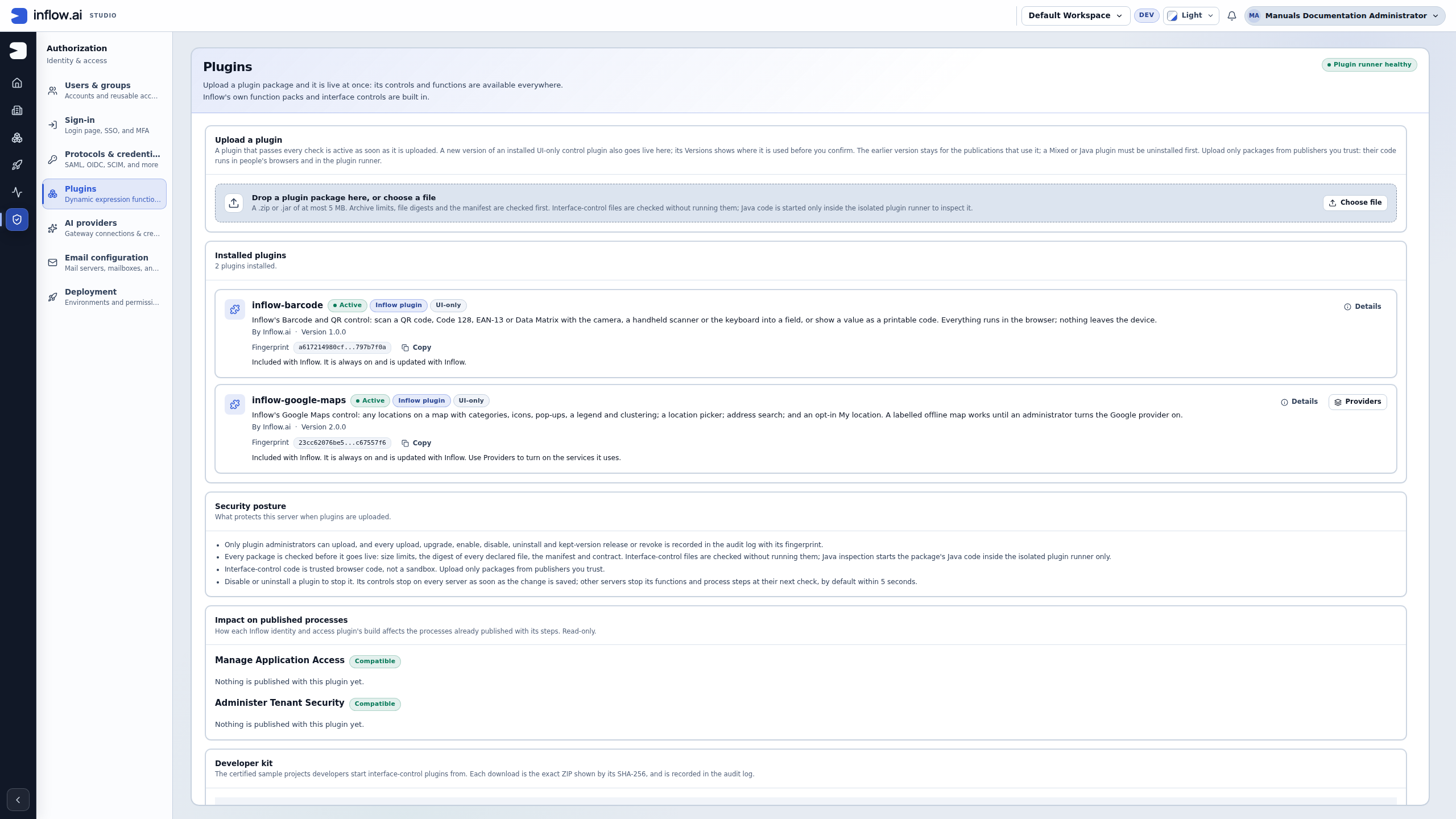
- The authorized administrator opens Authorization → Plugins. In this example the runner shows Plugin runner healthy. Treat that as the dependency’s current readiness, separately from the consultant’s formula and any workflow result.
- Read the page’s upload explanation before choosing a file: a package that passes the checks is live immediately. Nadia’s missing-name investigation requires no upload.
- Read the listed package kinds. This installation’s two listed packages are built-in UI controls. The number 2 plugins installed is not a count of all functions in the authoring reference, which showed 229 available.
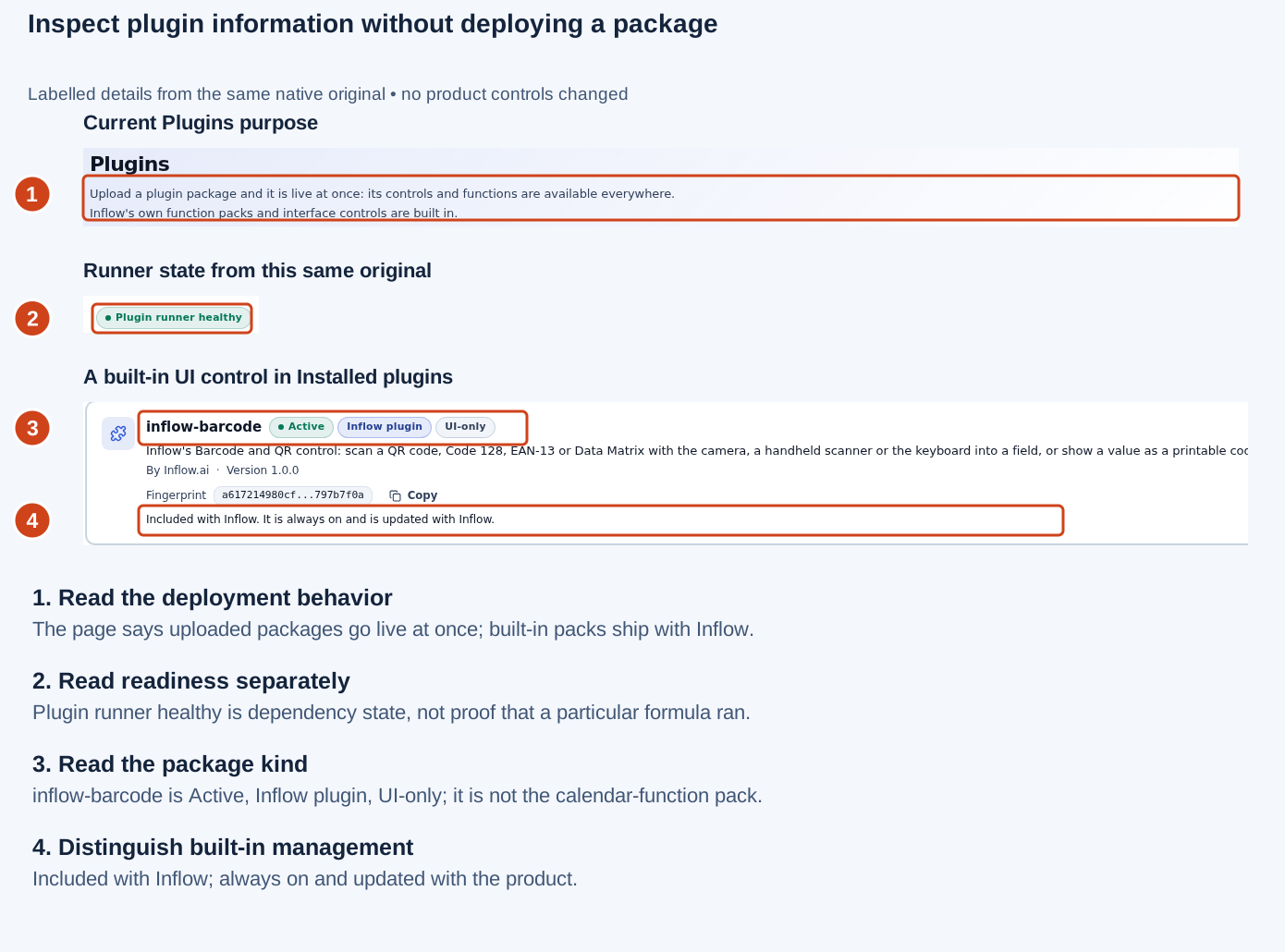
Open the original screenshot. The guide presents labelled detail strips from this one full native view. No package was selected for upload and no provider setting was opened.
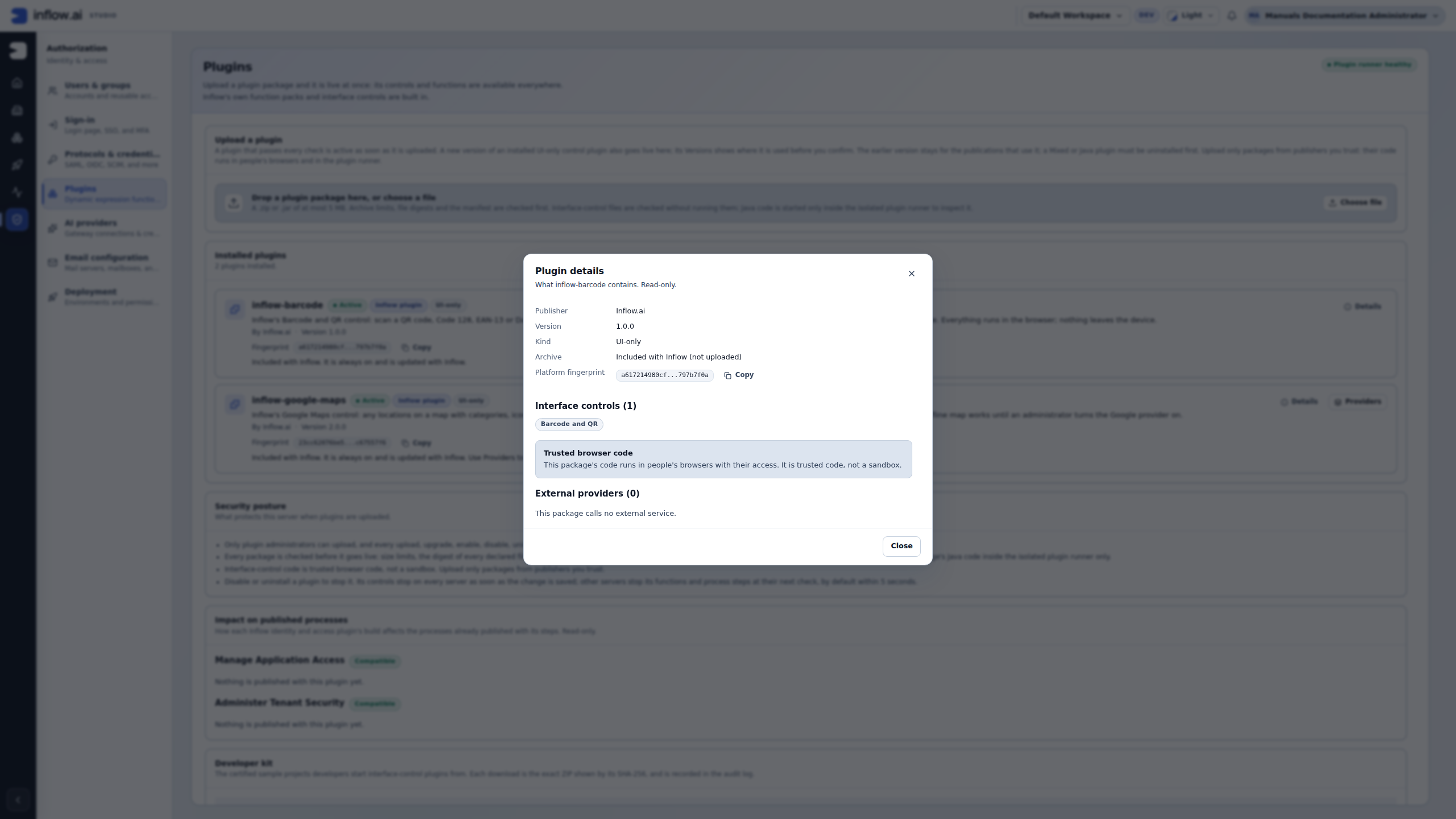
- Open Details for the package being investigated. The pictured example is
inflow-barcode: publisher Inflow.ai, version 1.0.0, kind UI-only, and Included with Inflow (not uploaded). - Read what it contains. Its one Barcode and QR interface control and External providers (0) describe this selected package. It is not evidence that
networkDaysis implemented by the barcode package, nor that another package has the same provider policy. - Choose Close after recording the relevant identity. There is no deployment or approval action in this read-only dialog.
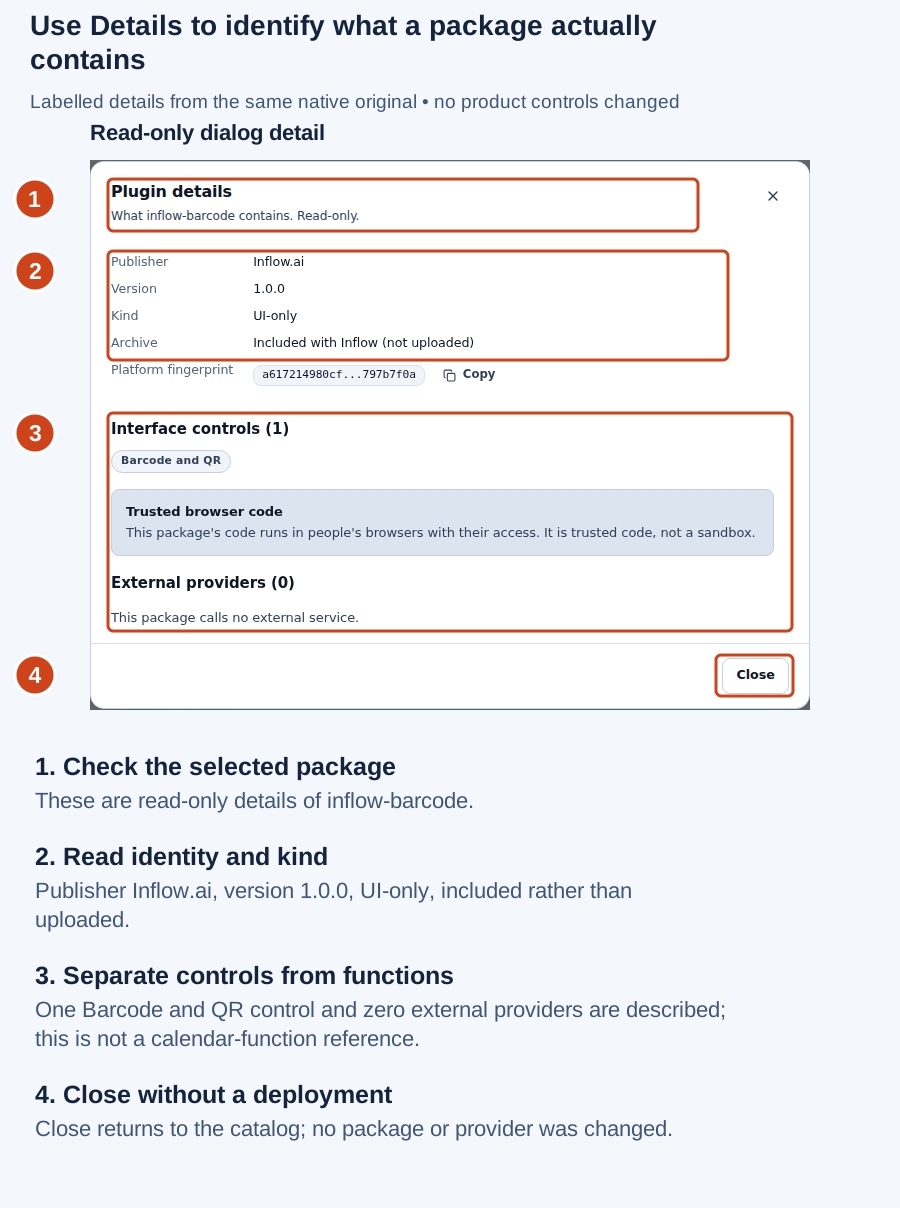
Open the original screenshot. This is a focused detail of the actual dialog; the unchanged full-screen original is available above.
Inflow’s built-in packs are included with the product and managed with Inflow. The Active plugin functions table describes functions contributed by uploaded plugins; it does not list the built-in packs. When there are no active uploaded-function entries, this section is absent. That absence is not proof that the Functions reference is empty.
For a custom package, upload is a deployment step: a package that passes the current screen’s checks becomes active immediately. A read-only investigation should stop at the package information. If a new or changed extension is actually needed, record its owner, intended environment, compatibility and release decision before uploading. Do not use an upload as a way to discover whether an unknown package is safe.
Give the owner a useful handoff
Use this short note when asking for help. Include only fictional or approved non-sensitive values.
Workspace and rule: People Operations / leave_eligibility
Function wanted: regionalBusinessDays(startDate, endDate)
Last confirmed step: formula validation passed; Live test did not return
Rule version: record if shown or otherwise known; the preview may not show a published version
Environment/build: record only the label visible to the administrator, if known
Safe message: copy the exact displayed text/code; do not interpret it
Fictional input: startDate 2026-12-14, endDate 2026-12-18
Expected business answer: 5 under the agreed Monday–Friday calendar, with no holidays in this range
Actual observed result: no answer; possible timeout
Possible effect: preview only / real workflow / unknown
What I changed or retried: none
Please check: availability, signature/version, runner result, and whether the original call completed
Remove anything that could identify a real person or reveal a secret before sharing the note. If you do not know whether a real workflow action began, write unknown and let the owner reconcile it. Do not put credentials, environment variable values, private invocation files or document contents in the handoff.
Know what this guide does not authorize
Administrators and plugin developers have a separate review and release responsibility. This guide does not prescribe an installation, upload, approval, enablement, restart or configuration change. The exact plugin package, its owner, allowed execution environment and target remain subject to that environment's approval and artifact-handling rules. Security isolation is not a substitute for trusting the plugin publisher, and a plugin's return value is not independent proof of a business result.
The complete expression-function execution reference remains available for those specialists. Continue with simple formulas when the required function is ready.