What happens when you close a running request
A business request can keep running after a person closes their browser. The application remembers its progress, and another authorized participant can continue the work. The server's detailed recovery mechanism is a platform-specialist topic.
The consultant's useful distinction
Closing a screen, saving unfinished form answers, stopping a Debug test, pausing a case and completing a task are different actions.
For example, Sara can leave an unfinished manager task and return later. That does not mean she declined Mohammad's leave or stopped the whole process. Whether her unsent answers are saved depends on the task page and its current saved-draft features; read the save indicator rather than relying on a closed tab.
Likewise, reopening a request is not starting another request. Use its existing business reference to find it in the application's task list or latest Live view.
| What happened | What it means | What to check next |
|---|---|---|
| The browser tab closed or refreshed | The visible page ended; this alone does not tell you whether a save, decision or outside action completed | Reopen the same task or request and read its current state |
| The full task page showed All changes saved | The unfinished form draft was saved, not submitted as a decision | Return to the same task and review the restored answers before continuing |
| A manager chose Submit decision and saw confirmation | The authored task action was submitted; it may advance the case according to the process | Read the same task/case outcome before repeating any action |
| Nadia chose Stop session in Debug | The selected test session was asked to stop; it is not an employee's business request | Reopen the same test session and inspect its state; reconcile any separate external action that may already have been sent |
| An authorized owner paused a Live case | Case execution was deliberately paused through its operational control | Ask the owner when and how it should resume; closing the case page does not pause it |
The full task page supports saved unfinished answers when the task, form and current permissions allow it. An embedded Task Viewer can have a different host experience and may not provide the same draft controls. Do not promise that typed answers survived unless the permitted page showed a saved state or the same task visibly restored them. A saved draft never substitutes for the task's actual submit/decision action.
Read a design default without treating it as a decision
Nadia opens Case variables while preparing the Leave requests process. This is the design's list of values that work can carry between steps. It is not Mohammad's saved request or Sara's task.
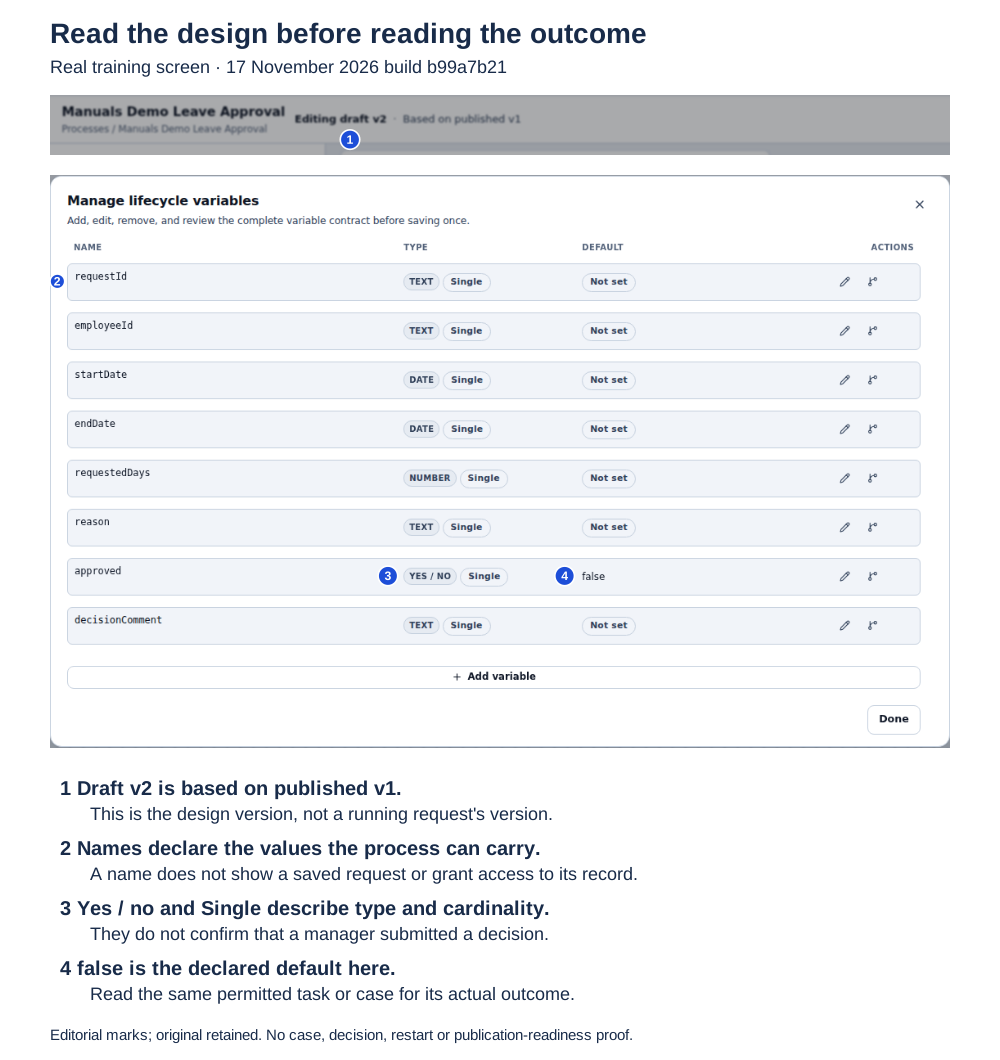
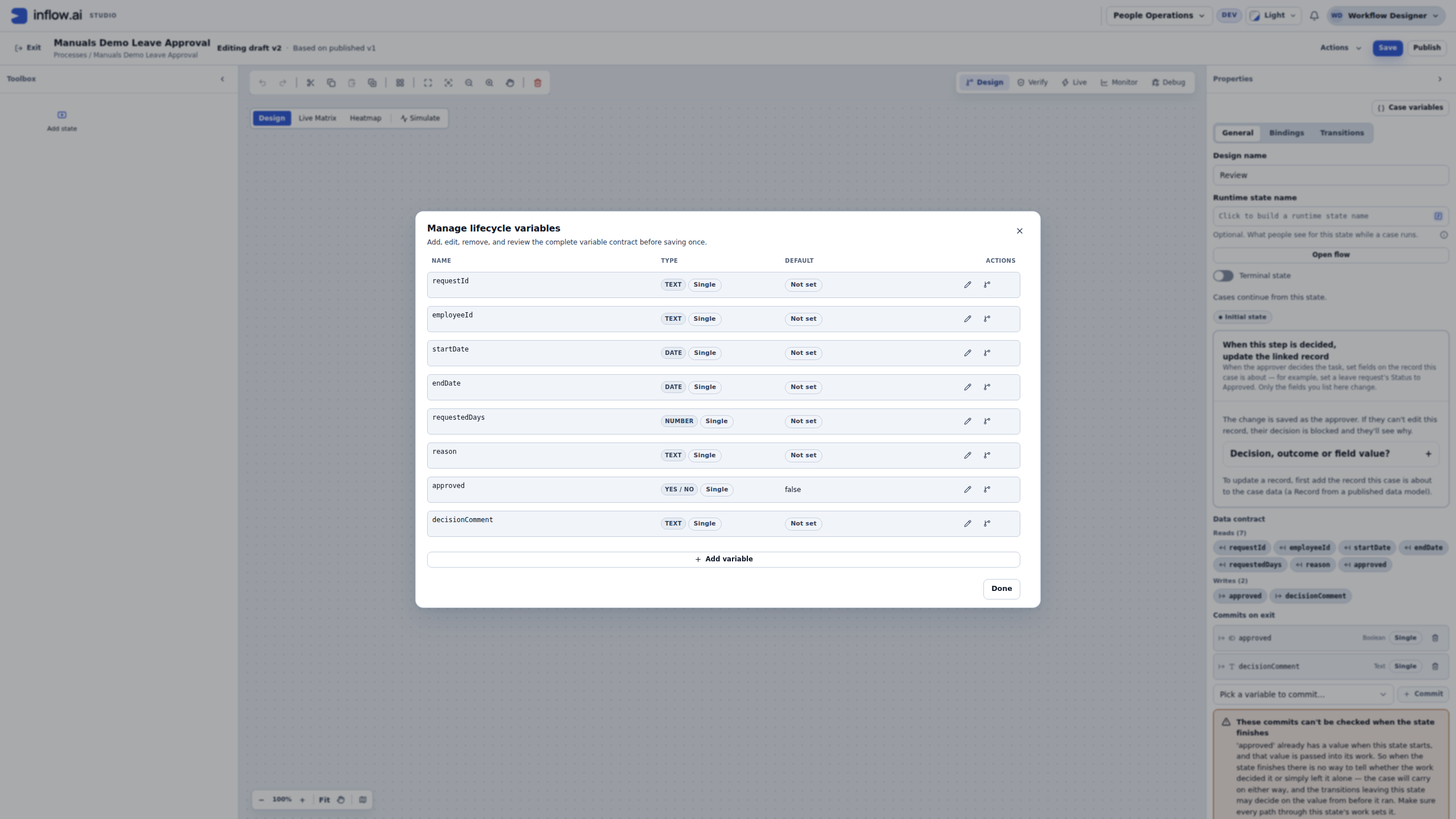
Design context from the 17 November training build (b99a7b21). The marked details come from one unchanged native 2560 × 1440 screenshot. The first strip shows the draft version; the larger detail shows the variables dialog. Numbered circles and the legend are editorial guidance. Open the complete original.
- Design version. The example says Editing draft v2 · Based on published v1. That describes Nadia's editor view. It does not reveal the version of any particular running request; read that request's version through its permitted runtime view.
- Name.
requestIdandemployeeIdname values in the process design. Their presence here does not show that a request exists, identify its current participant, or grant access to an employee's record. - Type.
approvedis Yes / no, with Single cardinality. That describes the kind and number of values expected, not whether Sara completed her task. - Default. The example's
approveddefault isfalse; other rows show Not set. These are design defaults. Seeingfalsehere is not evidence of a human rejection, and Not set does not establish that a running request lacks a value. A running case may carry or commit a value according to its state contract; inspect its actual outcome.
Suppose Mohammad has an existing request waiting for Sara. Nadia can still see the declared false default in this editor. The illustration does not establish that his request exists or is waiting. To answer his question, reopen the same permitted task or case and read its current state and recorded outcome. If the application also keeps a leave record, inspect that separately where allowed: committing a case variable does not by itself establish that the business row changed.
For unfinished answers, follow that task page's documented save and recovery states when provided. The full task page and an embedded Task Viewer can offer different features. Changing a design default, closing this editor, or reopening a browser does not submit a decision or reconcile an uncertain submission.
Illustration scope: a real design dialog with synthetic training values. The captured draft also has a contract warning; this is not validation or publication-readiness evidence. It does not show running case contents, saved unfinished answers, or persistence across a restart.
What the screen can and cannot confirm
Use the message on the same task page and the record for the same request. Similar-looking screens can belong to different records.
| Evidence you can see | What it confirms | What it does not confirm |
|---|---|---|
| All changes saved on an open, full task page | The page reports that its current unfinished answers are saved. | It does not mean the decision was submitted, the task completed or the process advanced. |
| Your saved work was restored on the full task page | A saved draft matching this task and its current form version was restored. Review the values before using them. | It does not establish that the current task is still assigned to the same person or that the restored values are still appropriate. |
| A completed task or a task withdrawn by a restart | The previous task is closed. | Its saved draft is not work to resume. Follow the new task/case state. |
| A confirmation after submitting the task | The task action reached its confirmation path. | Do not infer the next business outcome; inspect the same task or case for its current state. |
| Paused in Debug | The test session is paused before the next step. | It does not pause a Live request. |
| Paused in Live | The selected business case is deliberately suspended. | It does not save answers in an unrelated task or undo an action that already reached an external service. |
When evidence is missing, distinguish unknown to this screen/account from failed. A screen can be unavailable because of access, stale navigation, an ended task or a temporary read problem; none of those by itself proves that the request was rejected.
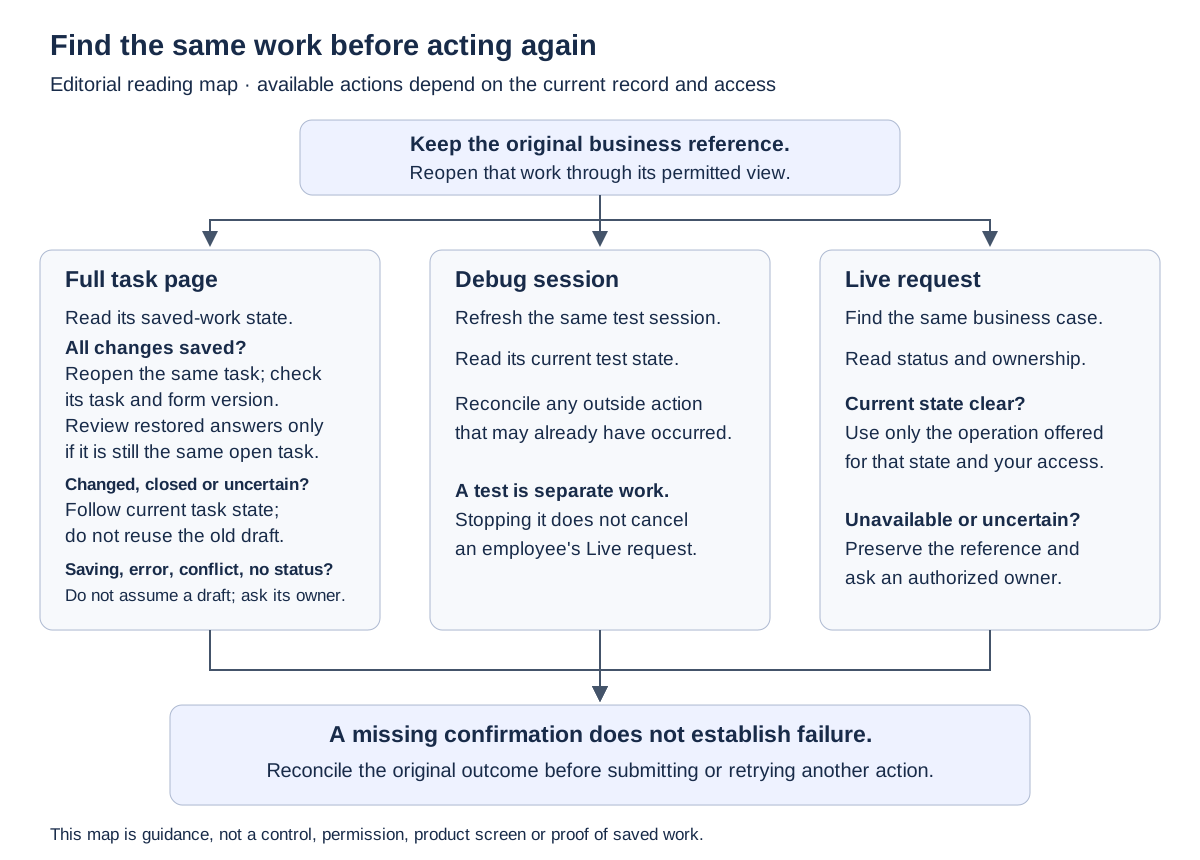
This diagram is a reading aid, not a screenshot or a control. The available actions depend on the current page, record state and your effective access. Do not use the diagram to bypass a missing permission or an unavailable record.
Example — Sara saved an unfinished answer but did not decide
Sara opens the full manager task for Mohammad's existing leave request and enters a comment. She sees All changes saved, then uses Save and close before choosing Submit decision.
- When she returns, she opens My work and finds the same task using the original request reference.
- She reads the task's current status and save message. If the page says Your saved work was restored, she checks the restored answers before proceeding.
- If the task was completed, reassigned or its saved work cannot be loaded, she stops and follows the current screen or asks the task owner. A prior draft does not override the task's current state or permission.
- Only when the same task remains available and she intends to make the decision does she complete its authored action and inspect the resulting case/task state.
Expected result: the unfinished comment can be resumed if the task page confirms it was saved and still belongs to Sara's current task. It is not yet a manager decision, a second task or a completed leave request.
Example — A Debug session ended, but the production case did not
Nadia runs an approved training test and later chooses Stop session. Separately, a real employee's request is still visible in Live. These are different execution records and different business journeys.
- Nadia returns to the same Debug session to read its current test status. She does not use the employee's case reference to infer that the test succeeded or stopped.
- If the test path reached a configured integration or other outside system before stopping, the owner reconciles that original action. Stopping the session cannot undo an effect already sent.
- To understand the real request, the authorized user opens that original request in Live and reads its current case, task and version details.
- If either result is uncertain, preserve both references and ask the appropriate owner before retrying. Do not submit another employee request to replace a missing test or confirmation.
Expected result: the Debug session's outcome and the production case's outcome are reported independently. A stopped test is not a cancelled business request, and an open test page is not evidence that a production case is running.
Example — The request was submitted but its confirmation disappeared
Mohammad chooses the form's submit action, then the browser loses its connection before the confirmation is displayed. The correct first step is to find that same request or check the same original submission through the application's supported view.
If the original request is present, continue from its current state. If the account cannot see the result, record it as unknown to this account and ask an authorized owner to reconcile the original submission. A closed tab, spinner or timeout does not prove that the server rejected it. Do not submit a second leave request until the owner establishes what happened to the first one.
If the work is not visible, preserve the approximate time, workspace and safe business reference. Do not ask for another person's login, copy a private request payload into a public issue or edit runtime storage to make the record appear.
Example — A task was reassigned while the browser was closed
Sara left a task page open overnight. When she returns, the original bookmark does not load the task. She does not assume that closing the tab cancelled the case or that her old draft can be submitted by someone else.
- She opens the approved My work view and searches by the original request reference.
- If the same task appears as reassigned, she reads the current owner and status; she does not continue editing an old browser copy.
- If it is completed or no longer available, she asks the task owner to confirm which current task or case to follow.
- The owner checks the current record and any saved-draft status through the supported view. If the form version changed or the task was withdrawn, the owner does not promise the old answers will carry forward.
Expected result: Sara knows whether the same task is still actionable and who owns it. The browser's age is not used as a substitute for current task state.
Find the existing work again
- Sign in normally and open the permitted application or work list.
- Find the same request or task using its business reference.
- Read its current stage, task ownership and recorded result before acting.
- If saved answers are shown, review them before continuing.
- If the expected work is unavailable or cannot be loaded, keep the reference and ask the responsible owner to investigate.
Do not submit another employee request solely because the first screen disappeared. Do not restart a server, clear stored work or change a process's underlying records as a consultant recovery step.
What to tell the administrator
Describe what you last did, what confirmation appeared, which request/task reference you were handling and what the current screen now shows. Distinguish I closed the tab from I chose Stop session in Debug, I paused this case in Live, or I submitted the manager decision. That information helps the administrator investigate without guessing that every missing confirmation is a failed action.
Use this short handoff and include only details your organization permits in support channels:
- Workspace:
people-ops-demo- Request reference:
LEAVE-204- Task reference (if visible):
manager-review-204- Last action: selected Submit decision
- Approximate time and time zone:
09:20 UTC- Confirmation: did not appear; browser showed a connection interruption
- Current supported view: request is not visible to my account
- What I have not done: I have not submitted another request or retried the outside action
Do not include passwords, API keys, session cookies, another person's login, private form answers or unrestricted screenshots. The administrator can request a safe reference or approved evidence if the first message is not enough.
Where to continue
Use human tasks for unfinished answers and decisions, Debug for test sessions and Live for actual requests.
The technical runtime-storage reference is for platform developers/operators investigating server recovery and saved execution state. Consultants do not need those internals to follow the ordinary workflow lessons.