Follow automatic steps and handle failures
An automatic step can be waiting to start, doing work, finished or unable to continue. Its state describes that operation. It does not necessarily describe the whole business request.
For example, Create approval PDF can finish while the request still waits for somebody to review or send the letter. Conversely, a request may be running while an automatic step waits for a prepared service.
Before you begin
For a lifecycle case, use Live and the actual request reference. Read the version that the case runs; the newest published design may be different. For a published process without a lifecycle, use Monitor to inspect the permitted version summary and problems; it does not offer Live's case-changing actions. You need permission to view the relevant work; retrying or changing it requires its own allowed action. Have a business explanation of what the step should do and which result the following work needs.
Read Choose automatic steps if you are still configuring the step. Server workers and database recovery are platform responsibilities, not part of this consultant inspection.
For a marked walkthrough of the real Live → Cases entry controls, see inspect a published process before the first request. Those native screenshots show a published training process with an empty case list. They do not show a service failure, an automatic retry or a successful PDF conversion. The examples below are procedures for appropriately prepared fictional work, not reports of operations performed in those screenshots.
Keep four results separate
Suppose Mohammad's fictional leave request needs a letter, manager review and a business-record update. Keep a short explanation for each result:
| Result | What would establish it | What it does not establish |
|---|---|---|
| Automatic operation | The selected operation's recorded result and intended output. | That every later activity or the whole case finished. |
| Outside effect | The permitted provider/delivery/document owner's evidence for this exact operation. | That a timeout or local failure prevented the effect. |
| Process progress | This case's current stage, timeline and next work. | That a separate leave record changed. |
| Business record | The intended record's current value, read through its allowed application view. | That an unrelated record with a similar employee name is the same request. |
For example: “The approval letter exists, the case is waiting for manager review, and the leave record still says Awaiting review.” That can be a correct intermediate result. Do not repair it by marking the record Approved yourself unless that separate business action is actually assigned and permitted.
Inspect a step's current work
- Open the published process in Live and find the intended case through Cases or the relevant state.
- Open the request and select the automatic step in its current work.
- Read its explanation and Details. In the opened case, Timeline explains its road and Work, when offered, shows the work and incidents you may read. When Whose work and incidents is offered, distinguish This state's run from The case itself; they can have different work. Do not infer that hidden work or incidents are empty.
- Check the business inputs you are allowed to see, such as the selected approval letter or requested days.
- Inspect the actual business result and the next step. If a PDF should have been created, check that permitted document rather than relying only on a success colour.
- If a prerequisite is missing, give its responsible administrator a concrete description of the request, step and displayed problem.
Check your result: you can say what the operation has and has not done. The PDF is ready, but the request still waits for review is a useful answer; everything completed may be false.
Read the words on the current road
In an opened case, a step can say here now, waiting …, stopped here or took …. The words belong to that case's recorded path. A finished visit can contribute a duration even when a loop returns to the same step later; the currently open visit takes priority in the displayed step story. A route drawn on the design is not evidence it was taken.
| Observation | What Nadia can say | Next useful check |
|---|---|---|
| Waiting, with no recorded failure | “This case is still at the step.” | Read its current prerequisite or waiting reason. |
| Stopped here, with an available failure explanation | “This case needs attention at this part of its path.” | Read the offered explanation and current incident/work scope. |
| A finished visit and the expected document are visible | “This operation produced this document.” | Check the original case's next stage and the correct document version. |
| The list loaded with no matching cases | “No case matches this selected scope.” | Check version, filters and reference before concluding the request is missing. |
| The read failed or the object is not available | “I cannot establish its current state from this view.” | Follow the offered read-recovery or owner handoff; do not report zero work. |
Refresh or Try again on a failed read rereads information. Retry the failed step, when offered for a case, changes execution. Read the complete action label before using it. Opening a recovery dialog, restarting from a step and moving a case to another version are also different operations; use the dedicated Live-work lesson when one is genuinely needed.
Example: a PDF step is waiting on its service
Nadia sees that the leave request has not reached the letter-review task.
- Open that request in Live and inspect Create approval PDF.
- Read whether the operation is waiting or has recorded a failure.
- Confirm that the intended source document is present and accessible through the permitted library view.
- If the conversion service is unavailable, ask its owner to restore the prepared service. Do not restart shared servers or change its engine settings as an application consultant.
- Once the owner resolves the prerequisite, use only the supported retry or continuation available for the original case and current state.
- Check the actual PDF and the following task after the operation finishes.
Do not start another employee request as a substitute for recovering this one. That can create two business requests without fixing the original cause.
Walk the same example through three observations
This is a fictional training worksheet. The process owner must prepare the actual case, conversion destination and document permissions before anybody performs it. Do not create a live request simply to obtain each row.
| Observation for Leave request 027 | Nadia's conclusion | Owner/action |
|---|---|---|
| Create approval PDF is waiting; the permitted source letter exists. | The source document is present, but a PDF result is not yet established. | Ask the conversion owner to check the selected dependency; retain the same case/reference. |
| The owner confirms the earlier call was refused before acceptance. | A known refusal is different from a lost reply after acceptance. | Review the supported recovery offered for this original case and confirm it is safe before using it once. |
| The selected PDF version is now readable and the case shows manager review. | The conversion result is present; manager work is next. | Hand the review to the intended eligible participant. Do not approve on the manager's behalf. |
If the owner cannot determine whether the first conversion happened, stop at outcome unknown. Do not advance the worksheet to the success row or repeatedly regenerate letters. The worksheet describes possible observations, not a promise that every conversion exposes the same controls or evidence.
Understand automatic retries
The step's Reliability settings depend on the selected activity. For an ordinary automatic task, the section can show Timeout (seconds), Retry attempts, Retry delay, Base backoff (seconds), Maximum backoff (seconds) when exponential backoff is selected, On failure, and an Idempotency key expression. Do not expect every control on every activity.
An Integration action has an important exception: its retry policy belongs to the published Integration. The process step shows the Integration's actual policy instead of letting you set a second process-level retry count. Check the linked Integration version and its policy with the owner; changing a process-level value will not override it.
The On failure choice applies after configured retries are exhausted, or immediately when no retries are configured. It selects what the process does next: Fail the instance (incident), Continue with a marker variable, or Route to an attached boundary event. These are different business paths. Confirm what later steps do with the marker or boundary route before changing the choice. An Idempotency key expression supplies a stable identifier for an operation when the activity and receiving service support it; the field by itself does not prove that a repeated outside request is safe.
A timeout limits how long an attempt is allowed to wait. Retry settings describe when the process may try again after a problem. A delay between attempts gives a service time to recover. These are business choices because another attempt may send another request outside Inflow.
Read the settings before explaining an incident
Nadia's retained Automatic step practice gives a concrete example of the settings an owner might discuss before publication. It is a separate fictional authoring exercise, not Mohammad's running request. These numbered guides reuse two native views from that practice; they do not show a timeout, a repeated outside call or an operational incident.
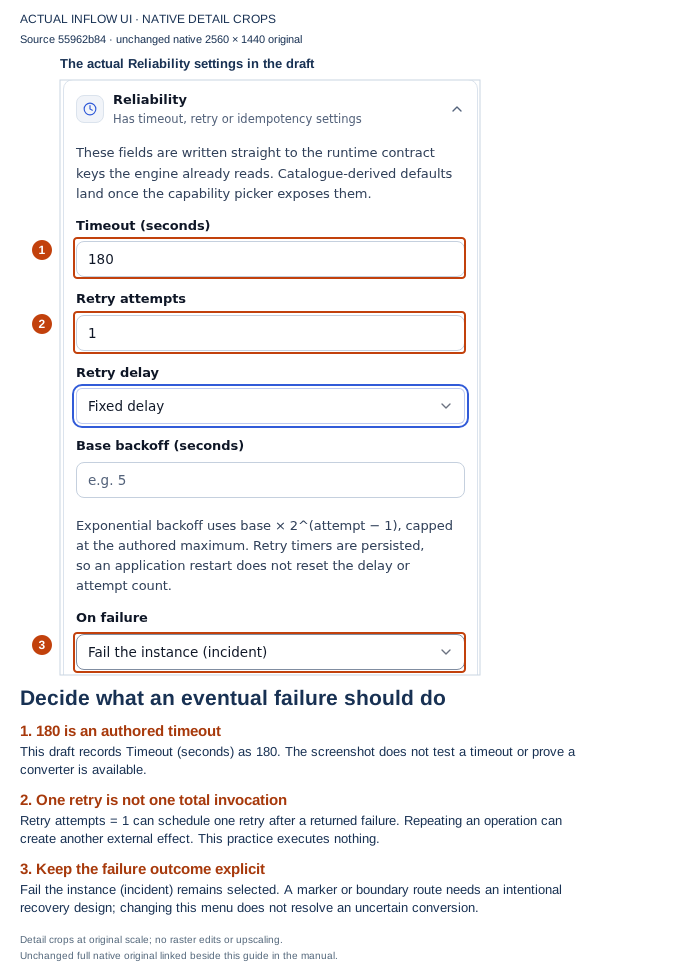
In the full view, the design is Editing draft v1, Not published yet, with Unsaved changes. The selected activity is Prepare approval PDF. Read 180 as the displayed timeout setting and 1 as the draft retry setting; neither is a measurement of an attempt that happened. Fixed delay is selected, but Base backoff is empty. Do not invent a delay duration from the placeholder. Open the unmarked Reliability screenshot.
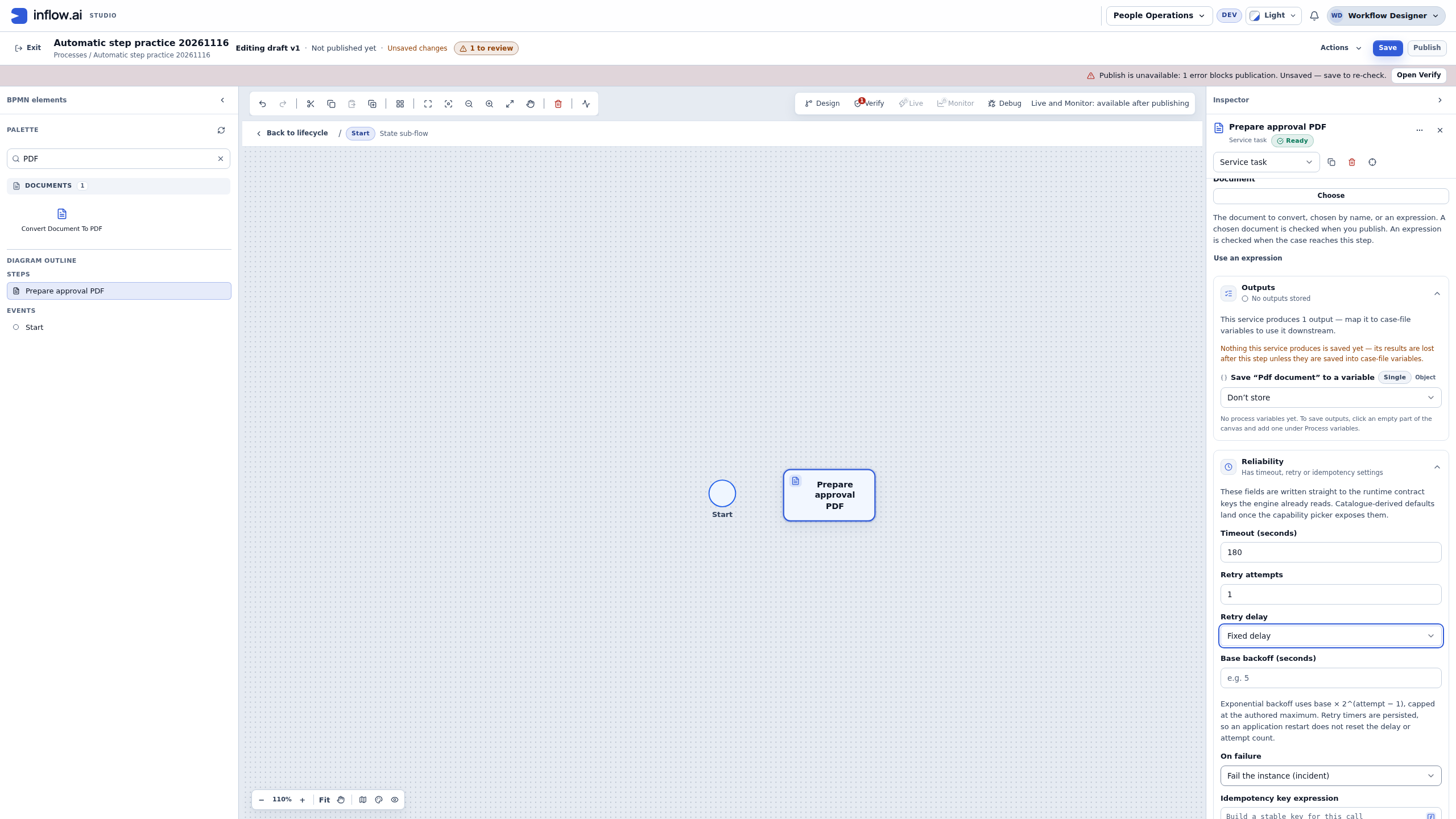
Before Nadia recommends a retry for an existing case, she asks its owner: “Which published process version does this request use, what result was already recorded, and could another call create another document?” The draft shown here cannot answer those questions for an existing case. Use that case's permitted Live view and the destination owner's evidence, rather than changing the draft to make an incident disappear.
The second view is the same practice after saving and opening Verify. It reports 5 errors, 0 warnings and 7 checks passed.
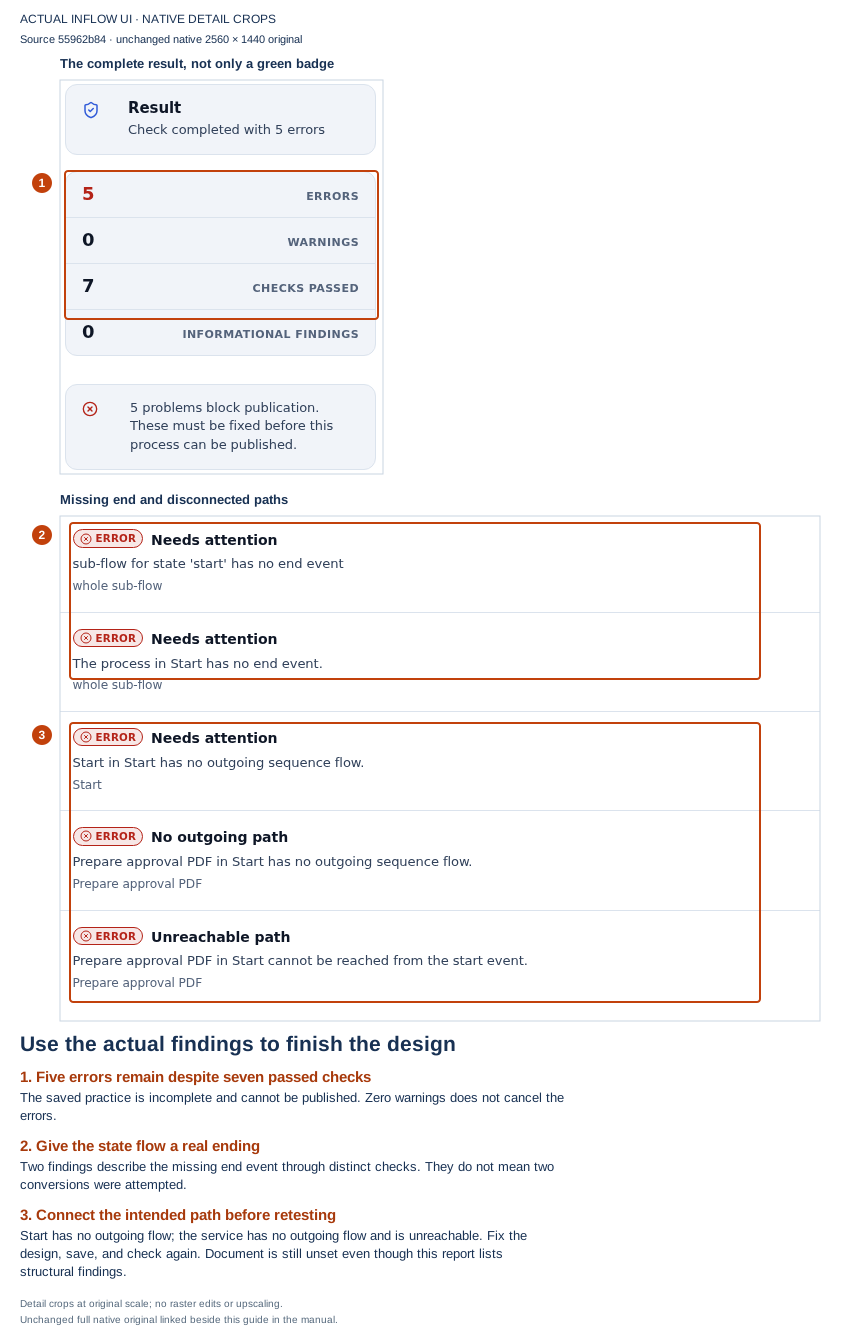
All changes saved means the intended draft changes persisted. The five structural findings still block publication: the flow is missing its end and outgoing connections, and the conversion activity cannot be reached from Start. Seven passed checks do not cancel those errors. Open the unmarked Verify screenshot.
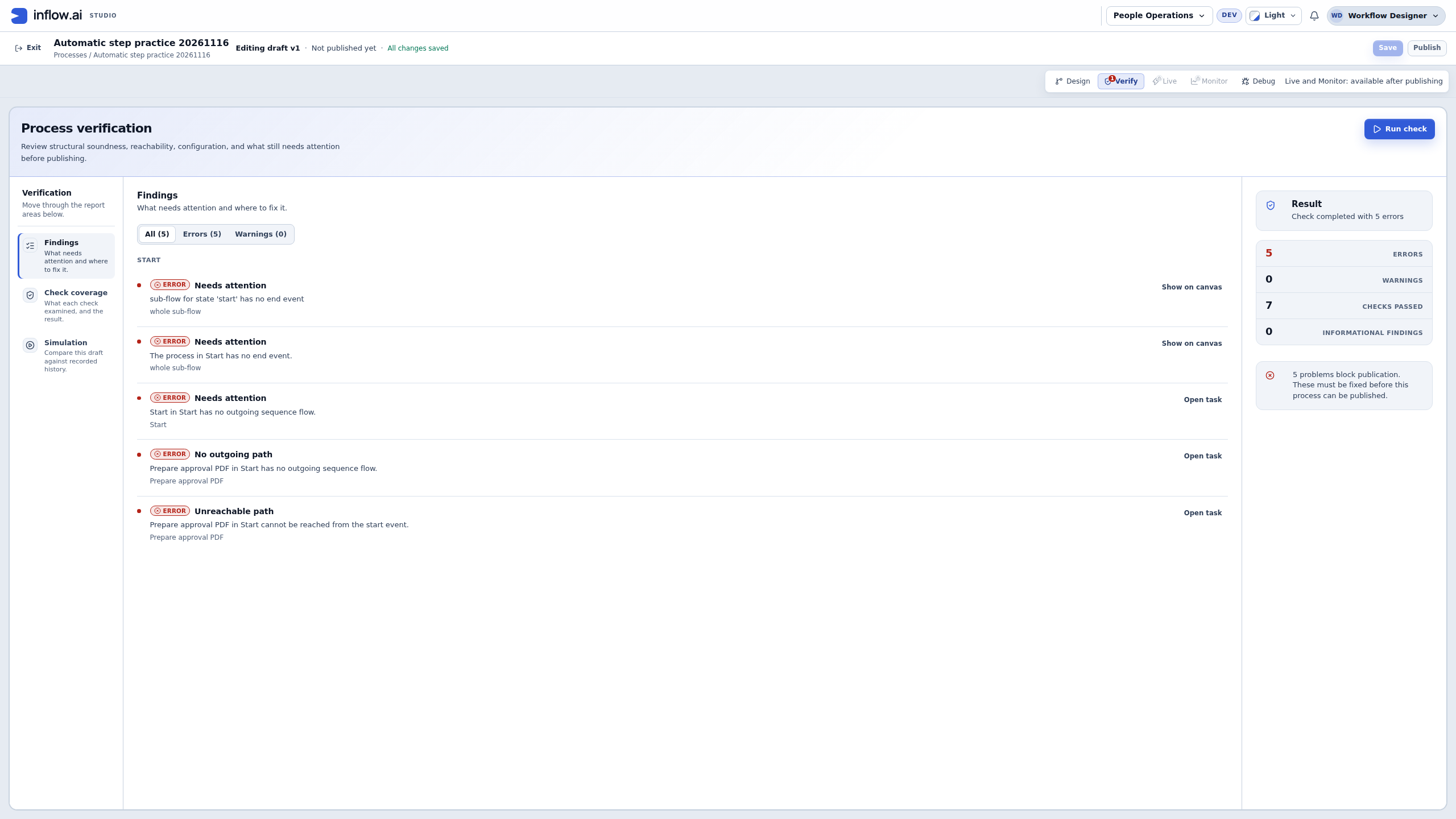
Nadia hands these authoring findings to the process owner, who must complete the intended graph and required inputs before planning an approved test. There is no running failed case to retry in this view. Keep three outcomes separate: saving a design, passing its checks and observing its permitted execution. These screenshots establish the first outcome and show unfinished authoring checks; they establish no PDF conversion, service readiness or recovery success.
Read a proposed reliability setup before publishing it
For an ordinary activity, Nadia can explain the displayed settings using a worksheet like this. These are teaching values, not production defaults or a guarantee of a particular execution schedule.
| Displayed setting | Example to discuss with the owner | Question to settle |
|---|---|---|
| Timeout (seconds) | 30 |
Can the destination finish within this time, and how is a late/unknown result reconciled? |
| Retry attempts | A value actually offered for this ordinary activity. | What does the selected activity count, and what side effects can another dispatch repeat? Do not confuse it with the current run's observed attempt count. |
| Retry delay | Exponential backoff, when appropriate. | Is delaying another attempt useful for this failure? Fixed delay is a different choice. |
| Base / Maximum backoff | For example, 5 / 60 seconds. |
Are these permitted values suitable for the service's limits? A policy is not an observed wall-clock schedule. |
| On failure | Fail the instance (incident). | Who owns the incident, and what must be checked before recovery? |
| Idempotency key expression | A stable business reference plus the operation's purpose. | Does this exact activity pass the key to a receiver that honors it, with the intended scope? |
If the chosen step is an Integration action, replace the process retry rows with the policy shown for the exact published Integration. Not yet bound to a published Integration version is a missing binding to resolve, not evidence that the Integration has no retries. A policy read that cannot complete is likewise not a confirmed no-retry policy.
Changing a retry setting in a draft does not rewrite a past attempt or prove that an already running case uses that setting. Review and publish the intended design normally, and investigate the existing case using its own version and recorded history.
When configuring them:
- Read the selected activity's behavior with its owner or connection administrator.
- For an Integration action, review the retry policy on the exact published Integration version. For another activity, read the retry controls displayed in the process step.
- Confirm whether the operation supports repetition and how it handles an idempotency key. A read-only lookup, a notification, a document creation and an external financial operation can have very different effects.
- Choose an On failure path only after checking the real downstream business behavior: Does the instance stop with an incident? Does a marker reach the next step? Does the attached boundary event route to an owner who can repair the problem?
- Test a permitted failure scenario only in an owner-approved non-production setup where external effects are disabled or safely intercepted, using synthetic data. If that isolation is unavailable, do not run the scenario; ask the owner to review its configured behavior. Then inspect whether the expected effect happened, what the case did next, and which result was retained.
- Publish the change through the ordinary process review. Editing these settings is not a repair of every existing attempt.
Before recommending a repeated attempt, use questions like these:
| Operation in the step | What to confirm before repeating it |
|---|---|
| Read-only lookup | Confirm the original read failed or returned no usable result, and check the service owner's rate limit guidance. |
| Send a notice or create a document | Check the delivery or document record for the original request. Confirm whether a stable idempotency key prevents duplicate effects. |
| External financial or payroll action | Ask its owner to verify the provider's recorded status and the exact business reference. Do not infer that a timeout means the provider did nothing. |
These examples are prompts for the activity owner, not universal guarantees. If the provider's recorded status is unavailable, keep the outcome unknown and use the stop-and-handoff path above.
Avoid teaching a generic “three retries fixes it” rule. Some failures need a business correction, some need the external owner and some require checking whether the first effect already happened.
Example: a notification has an uncertain outcome
A service call appeared to lose its reply. The manager wants to retry immediately.
- Open the original request and inspect the notification step's available result/history.
- Check the external delivery or business record through the approved owner route where available. A missing confirmation alone does not prove nothing was sent.
- Distinguish a known refusal from an unknown result.
- If the send is confirmed successful, keep that result and inspect downstream progress; do not send it again.
- If the provider confirms refusal or that nothing was sent, consider a retry only when the supported action is offered and the responsible owner confirms it is safe. Review its scope and confirm once.
- Refresh the original request and read its recorded result. If the outcome is still unknown, stop before retrying and preserve that uncertainty for the owner.
If the original outcome cannot be determined, preserve that uncertainty and ask the responsible owner for the next supported action. Repeated clicking is not a recovery strategy.
Choose the next step from the evidence
Use the recorded result and the outside delivery evidence that the responsible owner is allowed to inspect. A missing reply or a spinner that stopped is not proof that an external effect did not happen.
| What you can establish | Safe next step | Example wording |
|---|---|---|
| The step recorded success, and the expected output is present. | Keep the recorded result and inspect the next business stage. | “The notification step completed. I’m checking whether the manager’s review task is now open.” |
| The provider or record owner confirms that the request was refused or never accepted. | Ask whether the original case offers a supported retry, and confirm the retry is safe for this specific operation. | “The provider confirmed that it did not accept this send. I’ll use the recovery offered for this case after its owner confirms the recipient and scope.” |
| The step is still waiting, and there is no recorded failure. | Check its current prerequisite and responsible service owner; do not start another case to imitate progress. | “The step is still waiting on the conversion service. No failed attempt is recorded yet.” |
| The reply was lost and no authorized source can establish whether the effect happened. | Keep the result unknown, stop before retrying, and ask the responsible owner to resolve the uncertainty. | “I can’t confirm whether the message was sent, so I’m preserving the unknown result and checking with the delivery owner.” |
This is a reading guide, not an interface screenshot. The available action and the case's current state decide what a person can do; the diagram cannot grant retry permission. If you cannot establish the result or the permitted scope, stop and hand off instead of guessing.
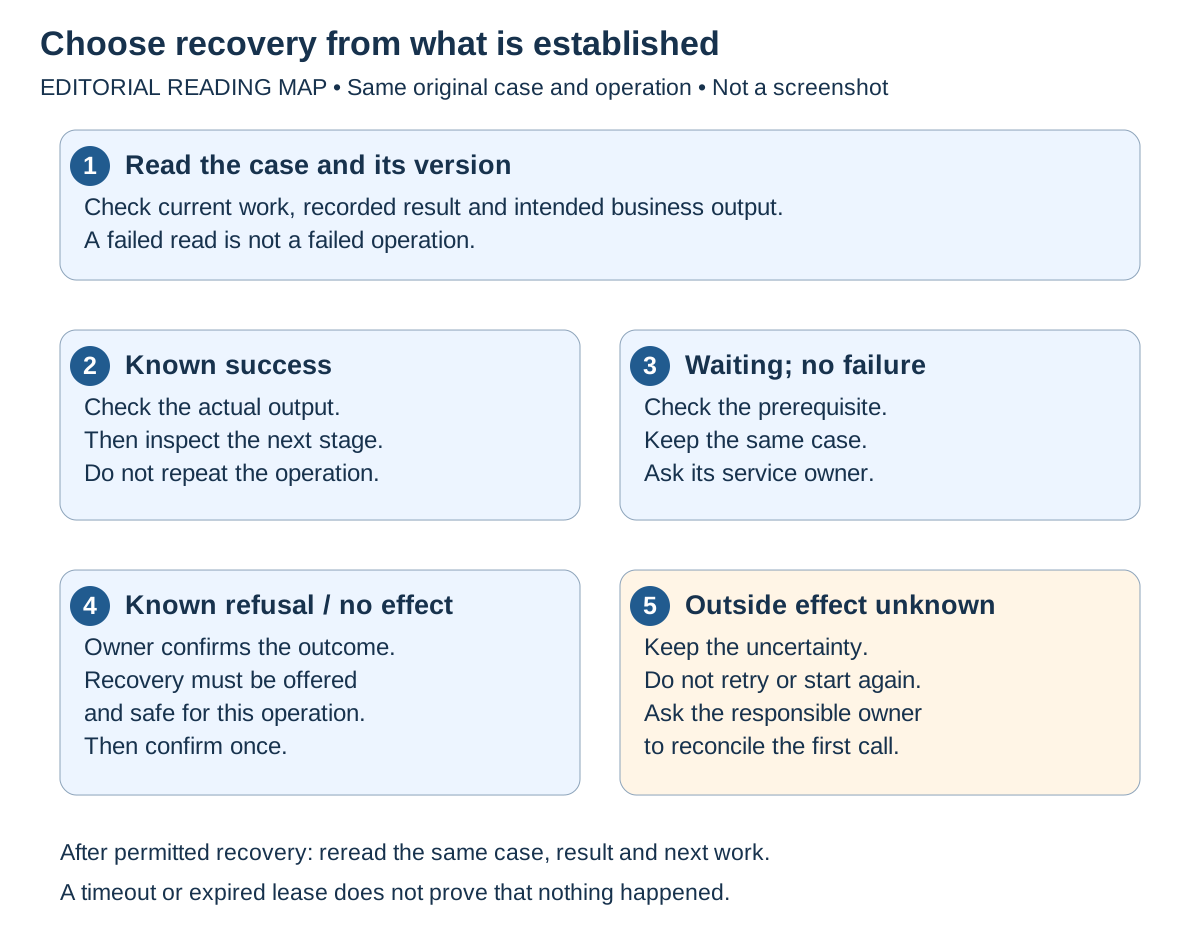
Reading map, not an Inflow screenshot. Follow the numbered questions with the case and evidence available to your own role. A known refusal still needs a supported recovery and an operation-specific repeat-safety check. The unknown branch deliberately ends with the responsible owner rather than a retry button.
Keep business results separate from operational messages
The next business stage should receive the values you deliberately mapped in the step's Outputs settings. An internal status or an operational diagnostic is not automatically part of the case file.
For example, the approval workflow might need a PDF document value and a yes/no rule answer. It does not need every detail about how the underlying service was run. If the next task cannot see its expected value, inspect the declared destination and the mapping rather than asking an employee to type a technical log field into a form.
Example: a rule finished but the next form has no answer
Nadia's fictional eligibility rule produces an answer, but the later review form shows no eligibility context. Use the actual declared output type; a business label alone is insufficient to choose a mapping.
- Open the case's current version and confirm which rule/activity ran. Keep the selected rule version in the investigation.
- Inspect the permitted result. For the current Evaluate Rule catalog contract,
ruleMatchedis Boolean, whileruleResultis an Object. An answer nested inside an Object is not automatically a separate Boolean field. - Inspect the step's Outputs mapping in the intended design. If later work needs a yes/no match, map the actual Boolean output to an appropriately declared Boolean field. If it needs the rule's result object, use a compatible destination and the supported expression/mapping for the needed value.
- Check any state results that must carry the value into the parent case, then the human form's declared inputs and their mapping. A local state value is not automatically the parent case's retained result.
- Validate the intended path with synthetic values in an approved test environment before normal publication. Do not repair a live case by inventing a rule result or completing an unrelated task.
| Handoff | Fictional intention | What to inspect |
|---|---|---|
| Rule output → state field | Match flag → Boolean eligibilityMatched. |
Actual offered ruleMatched output, compatible type and mapped target. |
| State result → case field | Retain that Boolean after the state ends. | The state's declared result and corresponding case destination. |
| Case field → review-form input | Show eligibility as read-only context. | The captured published form's declared input and the task mapping. |
| Form decision → later work | Manager supplies their own decision. | Authored form output and process route; the rule's match is not the manager's approval. |
Expected result: Nadia can trace the same value through each declared boundary and distinguish it from a manager decision. Correct mappings are a design result; a successful approved test with the intended versions is separate execution evidence.
Some automatic activities complete inline; others create durable service work, wait on a callback, or have their own durable agent-run boundary. Do not require every step to have a service-run row before believing its actual result. An ordinary consultant should follow the business view and ask the execution owner to correlate technical run/attempt identifiers when necessary.
Give the owner a useful handoff
Send the smallest permitted description that identifies the work. Use a protected support route for anything confidential; do not paste raw form answers, document contents, provider headers, passwords or tokens into a general channel.
| Item | Fictional example |
|---|---|
| Workspace/application/process | People Operations / Leave application / Leave approval. |
| Case reference and observed version | Leave request 027, version shown by this case. |
| Current step and time | Create approval PDF; waiting observed at 10:20 UTC. |
| Established fact | The permitted source letter exists; no PDF output is established in this view. |
| External outcome | Unknown; conversion owner has not confirmed acceptance. |
| Actions already taken | Opened the same case, checked its current work and read the source-document version. No retry or second case. |
| Requested next action | Conversion owner to check the original operation and advise the supported recovery for this case. |
Keep a failed read separate from an operation failure in the handoff. If you cannot see the case or incident, record that limitation rather than guessing an internal identifier, a hidden failure reason or a zero count. The recipient must use their own permitted access; your reference does not grant them access.
Common mistakes
| What happens | Safe interpretation and next step |
|---|---|
| The request is running but an automated step has not finished. | Read whether it is legitimately waiting or has failed; do not assume the case is broken. |
| A step reports success but the next form lacks its answer. | Check Outputs and state/case result declarations. |
| A service is not available. | Ask its administrator to resolve that dependency; do not fabricate a result. |
| Somebody suggests restarting all workers. | That is platform operations, not a consultant's ordinary case action. Provide the exact step/problem to its owner. |
| A reply was lost. | Check the original operation and any approved outside delivery evidence before repeating it. |
| A manual retry is absent. | Your role or the current case state may not allow it. Use the supported owner handoff. |
Where to go next
Continue with Understand and manage live work. For implementation contracts and administrator/developer details, read the optional current recovery qualifications beside the preserved technical reference. You do not need that reference to follow this lesson.