When a record field is missing from the picker
Audience: consultant handoff to the data-model owner or developer.
Most consultants do not need to manage Inflow's internal record catalogue. Use Connect a screen to data to choose the source and fields offered for the selected control. The catalogue is the technical information behind those choices.
A record type describes an item such as a leave request. A field is one part of it, such as status. A related list can contain several items, such as the requests belonging to an employee. These are different choices; a table expecting records cannot use a single name or number in their place.
What to check before asking for help
Confirm the workspace, source name and published design you intended to use. Check whether the field was added only to a draft, renamed or removed. A published model also needs to be usable on its selected destination for the relevant record view.
Keep four questions separate while you investigate:
- Which business source is selected? Check the workspace, model name, record type and the screen/control using it. Similar labels in different workspaces may refer to different models.
- Which published design is the screen using? A field that exists in an unsaved model draft may not be available to a screen using an earlier published version.
- Is the source ready for this use? The model's release and destination/readiness state must support the record view. A name in a picker does not prove records are available to the running application.
- Is this field appropriate for this control and account? A table row needs record fields; a related list needs a collection of records. A user may see only fields or rows permitted by the server.
Do not change the selected source or access policy until the owner has identified which of those boundaries is failing. A catalog or field list describes available metadata; it does not provide business rows and does not grant permission to read them.
Example — The field exists, but the first table does not show it
In the current illustrated worksheet, the Leave request model has nine business fields plus its system ID. Its compact Records table shows references and dates, but omits Requested days and Business state. Nadia should not infer that those omitted fields were lost.
- Confirm that Records names the intended live connection and schema. A similarly named model on another destination is a different investigation.
- Compare the saved request with the agreed worksheet through the supported record view. If opening Edit only to inspect it, cancel without saving. Do not add an update just to make an existing field visible.
- Select the Data Grid in the intended saved Form and open its supported connection's field chooser. Inspect which fields that source actually offers.
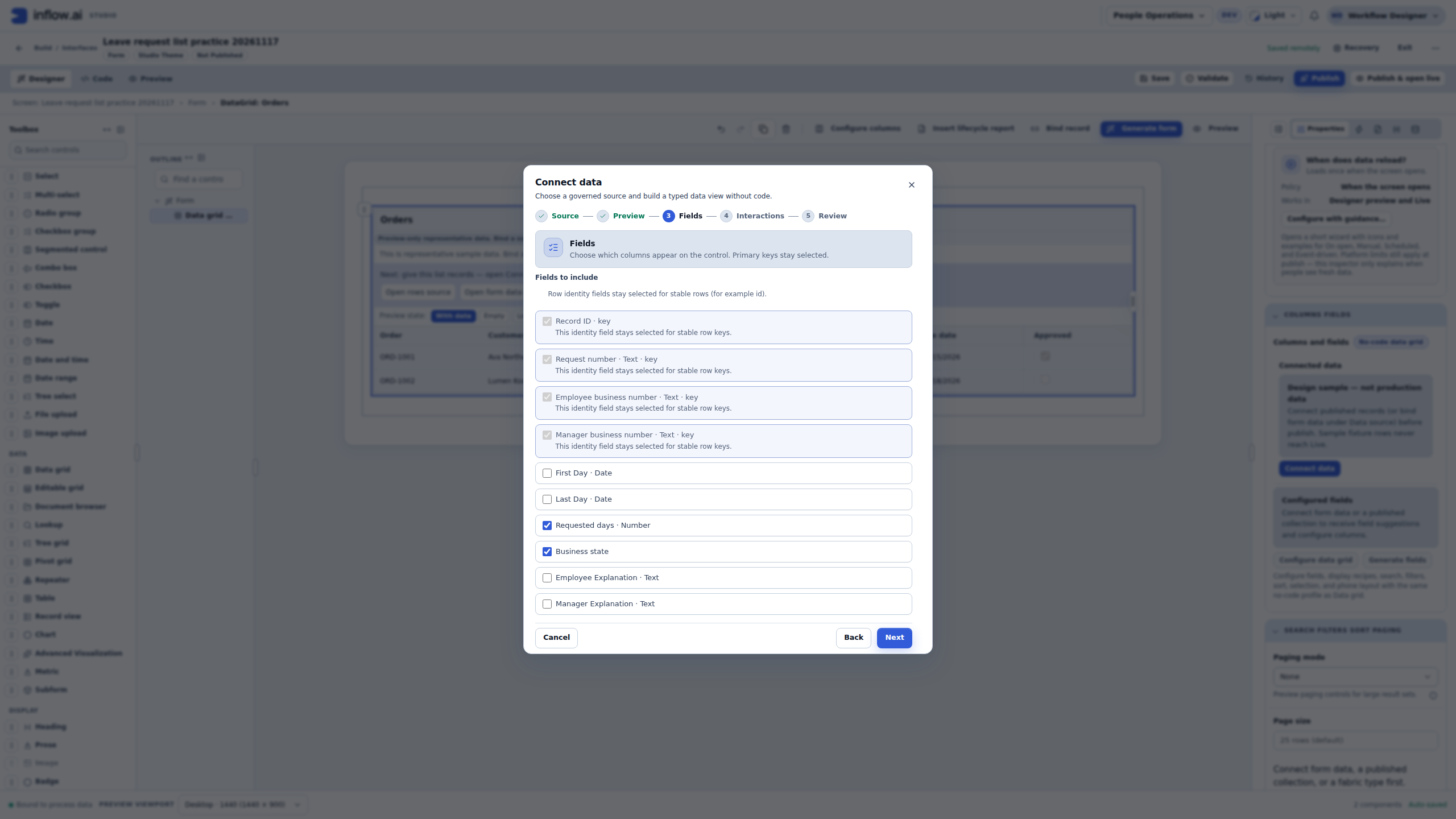
- In the captured Fields step, Requested days is a Number and Business state is offered separately. Selecting them adds columns to this list; it does not add fields to the model or change the records.
- Save the intentionally configured draft and check its preview. The compact model table and this six-column screen are different presentations of the same source; they need not show identical columns.
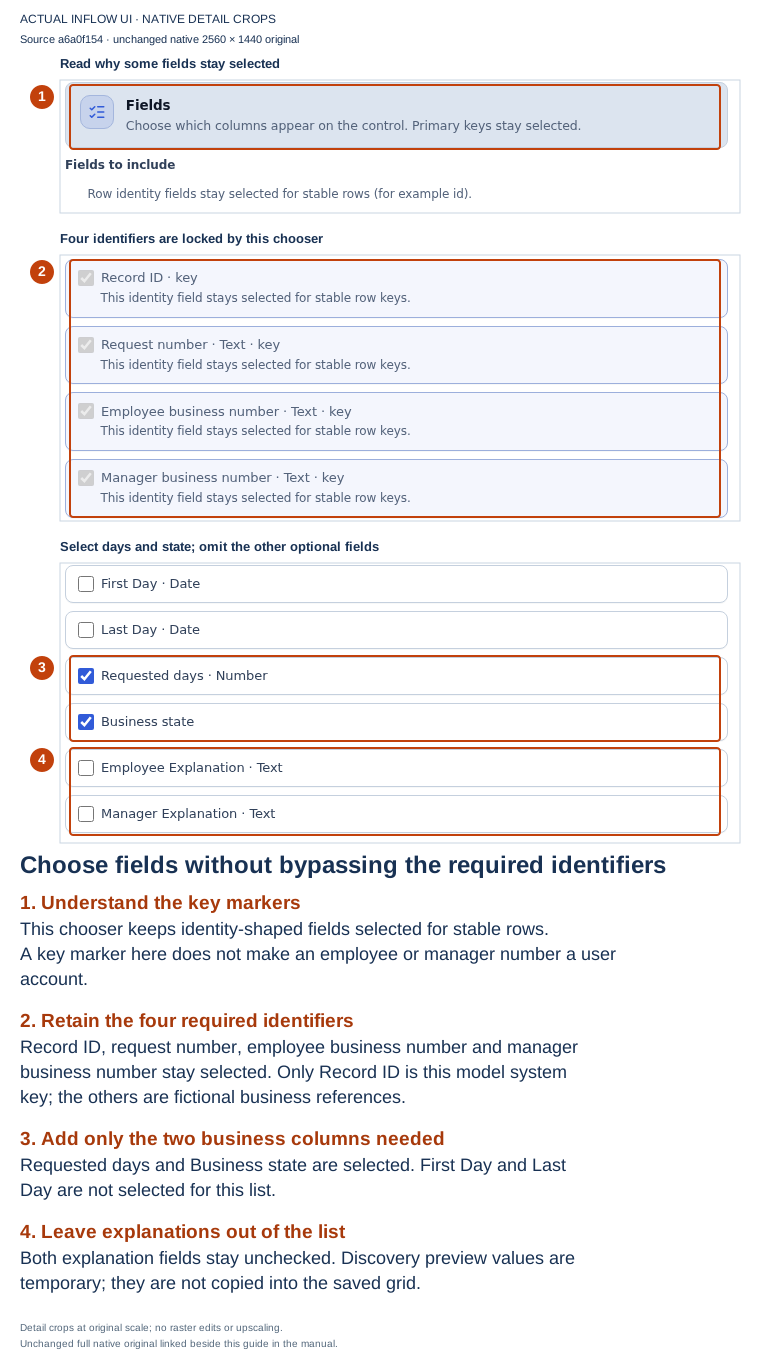
17 November, source a6a0f15454. This is the same native field-selection observation used in the connection lesson, applied here to the metadata-versus-presentation question. The full 2560×1440 original is unchanged. The three source records and all business numbers are fictional.
Expected result: Nadia can name the boundary. “The Records table does not display Business state” is a presentation observation. “The selected published source does not offer Business state” is a different metadata observation. “This ordinary viewer is not allowed to receive Business state” is a third, access-related question requiring that viewer's permitted experience. None of those statements alone proves data loss.
Why are several identifier fields marked key?
The illustrated chooser keeps Record ID, request number, employee business number and manager business number selected. The current field chooser treats several non-null identifier-shaped fields as identity candidates and locks those choices. Read the actual help text rather than assuming that every key marker names a physical database primary key.
In this model, Record ID is the system-generated record identity. The request number is a business reference, and the employee/manager numbers are business values. The chooser's key label does not establish that those references are unique, turn MGR-001 into an authenticated manager account or assign a task. Do not change a model key, field nullability or user access merely to make a checkbox editable.
For the fictional list, Nadia retains those required fields, adds days and state and excludes both dates and both explanations. In a real application, the owner must review whether a required disclosure fits the intended audience. If it does not, stop that configuration and have the source/projection and access design reviewed through their supported paths. Hiding a column later is not a substitute for restricting data the server may return.
A useful completed handoff note
Suppose a production lesson cannot offer its expected handover-notes field. Keep the note about metadata and purpose, not copied employee records:
Workspace and screen: intended People Operations request list
Control: existing Data Grid
Selected source: Leave request, model version 1, approved practice destination
Expected field: handover notes
Observed boundary: added in the model draft; absent from the selected published source
Wanted shape: one optional text value on each leave-request row
Current data: no private rows or credentials attached
Next owner action: model owner compares the draft with the selected published design;
app owner reviews any intentional source/field update before the screen changes
A model owner may conclude that the field should remain draft-only, that a different published version is intended, or that a reviewed release is needed. The consultant should not manufacture a field identifier or choose another workspace's similarly named field to complete the screenshot.
Example — A newly added field appears in the model draft but not the screen
Nadia adds decision_comment to a Leave request model draft. When she edits a manager grid, the field is not in the offered columns. The grid is connected to a published model version that does not yet include that field.
- Nadia records the selected workspace, source and record type, plus the screen and control she is editing.
- She asks the model owner to compare the saved draft with the published model version and the screen's selected source. She does not recreate the column under a guessed name.
- The owner decides whether the field should be part of the reviewed model release and checks the affected screens and consumers before publishing.
- After the owner makes the intended release available, Nadia reopens the supported field chooser and verifies whether the field is offered for this control.
- If the column can be configured but a viewer cannot receive its value, treat that as a separate runtime authorization/sensitivity question. Do not widen field access just because the designer can select a column.
Expected result: the report distinguishes draft metadata, published source metadata, control configuration and viewer authorization. A field absent from one chooser is not evidence that the database lost its values.
Example — The screen needs related records, not a field
Sara asks for a manager page that shows each employee and the employee's leave requests. Nadia searches for a single requests field and expects it to contain an entire table.
An employee's name is one field value. The employee's leave requests are a related collection of records. Nadia explains the expected shape to the data-model owner: one employee row with a relationship to zero or more leave-request rows. The owner checks whether that published relationship and its cardinality are present. The application designer then uses a supported record-list control or collection plan that accepts the related records.
Expected result: the data model exposes a governed relationship/collection where one is intended. A scalar field name is not a substitute for a child record type, and showing related rows still requires the normal record and field authorization checks.
Example — The author can select a column, but an employee cannot see it
Nadia can select employee_id in the designer preview, but Sara's published application shows fewer rows or omits a value. Design-time visibility is not proof of runtime access.
- Nadia notes the exact selected model/version, control and field without copying private row values.
- The app owner checks the intended employee's own permitted application experience and whether the difference is a business filter, row access or field disclosure rule.
- The data-model/security owner reviews the relevant access policy through the authorized path. Nadia does not borrow an administrator session or add a broad role to make the value appear.
- If access is correctly denied, the application should continue to hide that data. If a policy change is intended, its owner reviews the business purpose and affected users before changing it.
Expected result: the visible difference is classified as filtering, row-level visibility, field disclosure, source readiness or an actual application defect. It is not “fixed” by substituting a similarly named source from another workspace.
Prepare a short description for the owner:
- Which screen and control you are editing.
- Which business source and field you expected.
- What the picker or validation actually says.
- A fictional example of the result you want, such as “show each request's status.”
Use this expanded note if the first description does not identify the failing boundary:
Workspace and screen:
Control and selected source/record type:
Published model/version or destination, if visible:
Field or relationship expected:
Where it was expected: model draft / published model / designer picker / viewer result
What the current screen actually shows:
Fictional example and expected shape:
Which account/view was used (no credentials):
Who can check next: model owner / app owner / access owner / platform developer
Sensitive rows or secrets included: none
Do not copy private sample rows, credentials or a raw technical response into a shared issue. If access changed, ask the owner to review that access; choosing a similarly named field from a different workspace is not a repair.
Who handles the deeper investigation?
The model owner checks the intended fields, relationships and published design. A platform developer investigates problems in the metadata and field-selection implementation. A consultant should not manufacture internal field identifiers to make a missing choice appear.
The full record member catalogue reference is preserved for that specialist investigation. For ordinary design work, continue with data connections or field types.