Assistant memory: what a consultant needs to know
Memory is information an assistant may reuse later. It can save repeated explanation, but it also needs care: a useful reusable project preference is very different from a private employee note.
This page explains the consultant's choices. The platform's generic memory storage is an integration feature, not a personal notebook you should configure. Its detailed setup belongs to a specialist.
Walkthrough: review one integration-proposed memory
Nadia has just discussed a fictional leave-request form in her own People Operations conversation. A connected integration supplies a candidate fact: “In this synthetic training form, Last day must not be before First day.” She wants to review that exact sentence before allowing it to become an approved memory.
How this example was prepared: the candidate was hand-authored through the supported conversation-memory API as a synthetic integration fixture and linked to the real assistant message in the supervised chat walkthrough. It was not generated by the model. The pictures demonstrate the actual proposal-review and approval interface; they do not demonstrate that typing “Remember…” creates a candidate or that an accepted memory is later retrieved or used in another answer. The normal signed-in owner and workspace checks still applied to the proposal and its decision.
The captured consultant is Workflow Designer, an administrator-class Studio account with Editor access to People Operations and no platform superadministrator privileges. These are consultant Studio screens, separate from an ordinary employee or manager's published application. The administrator's provider setup is shown separately in the linked chat walkthrough.
1. Open the right saved discussion
Nadia checks the People Operations context, History saved, and the saved conversation title beginning “For a synthetic training example, explain a leave-request form…”. The prompt and answer identify the discussion she expects. Auto Mode remains off in this isolated training browser.
Conversation history stores the discussion. A proposed memory is a distinct candidate with its own subject, content and decision. The saved transcript is not a blanket approval to reuse every sentence it contains.
2. Read the whole candidate
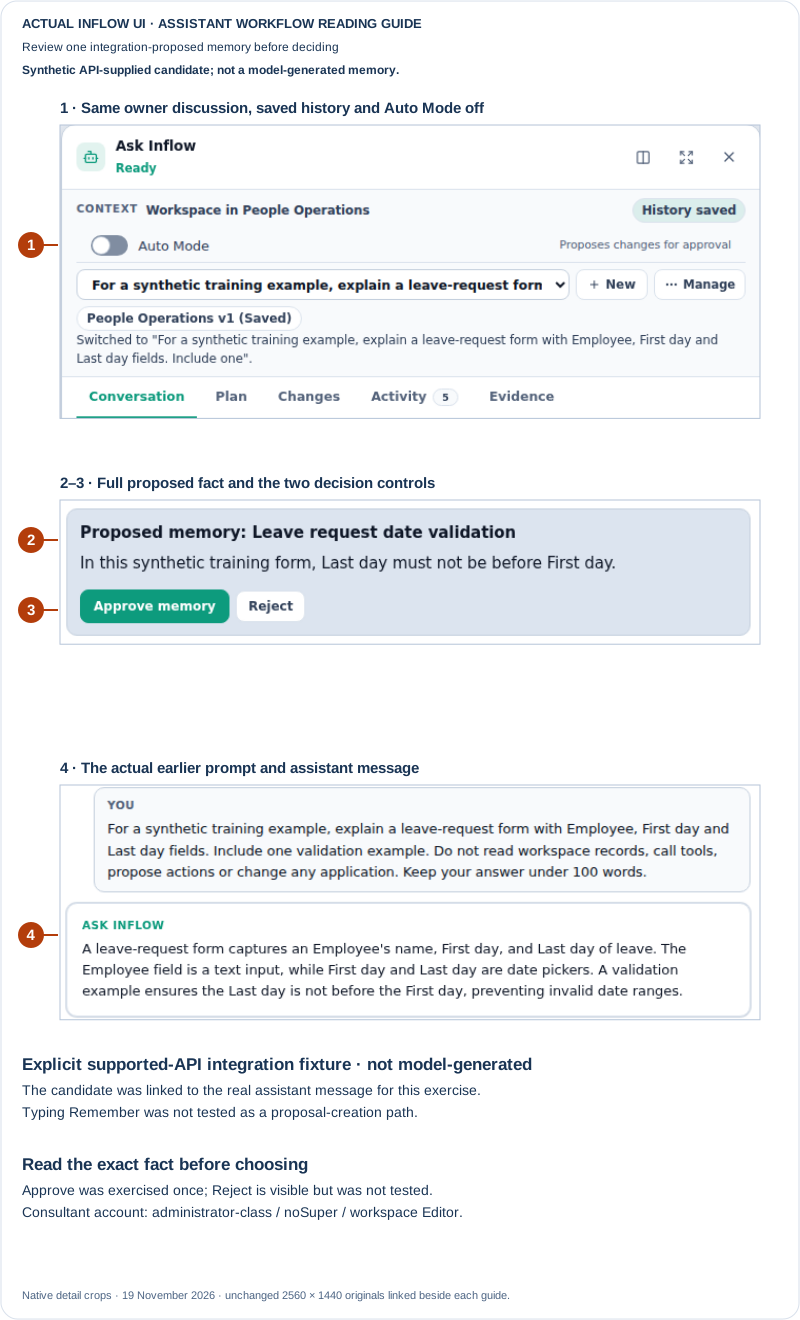
A real pending review card. The subject is Leave request date validation. Its complete content is “In this synthetic training form, Last day must not be before First day.” The candidate was supplied through the supported API integration fixture described above, not generated by the preceding model answer. Both Approve memory and Reject are present; this walkthrough exercises approval only. The pictured consultant is administrator-class, has no platform superadministrator privileges and has workspace Editor access. Open the unchanged full 2560 × 1440 screenshot.
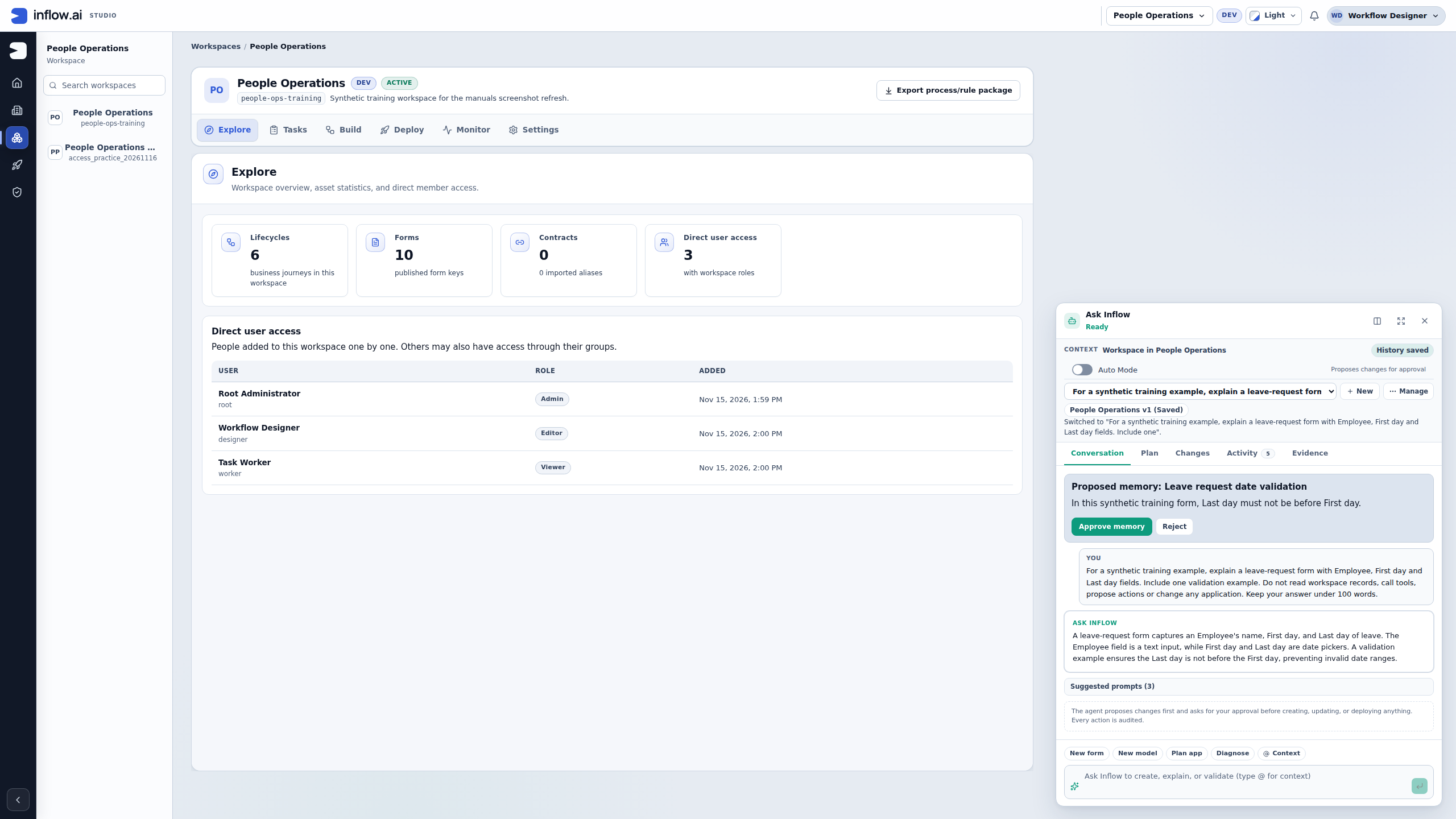
Nadia checks three things before choosing:
- Meaning: the sentence expresses the intended relationship between the two dates. It does not add an entitlement, a balance or an approval rule.
- Scope: it explicitly concerns the synthetic training form. It does not claim to be company-wide leave policy or a fact about a real employee.
- Suitability for reuse: the candidate contains a small design fact she wants approved for this discussion. A private personnel detail, an uncertain guess or an outdated policy claim would need a different decision and its normal information-owner process.
If the wording is unsuitable, use Reject when that is the decision you intend. This card does not introduce an inline editor for rewriting the proposal. A missing candidate is not a successful rejection, and copying its text into a generic memory store does not substitute for reviewing the original item.
3. Approve the exact item once
Nadia chooses Approve memory for this one fact. The pending card disappears after the successful decision. The same owner-scoped item was separately read back as ACCEPTED, revision 2, with the consultant recorded as the approving actor. This saved readback supports the state change; the missing card alone is not the evidence of acceptance.
If a decision returns an error or its outcome is unclear, check the same conversation and candidate before acting again. Preserve the workspace, title and item wording in the handoff. Do not interpret an interrupted view as proof that the decision failed, and do not repeatedly click Approve to repair the display.
4. Check the recorded outcome
Nadia can choose New and then return through the saved-conversation selector to refresh that discussion's view. Its Activity tab records Workspace memory reviewed. That label reports a review event; by itself it does not distinguish approval from rejection or count model tool calls.
For the captured approval, Nadia opens Manage and chooses Export transcript. The interface reports Exported 2 messages (1 approved memories). The two messages are her original question and the assistant's answer. The one approved memory is the reviewed date-validation fact.
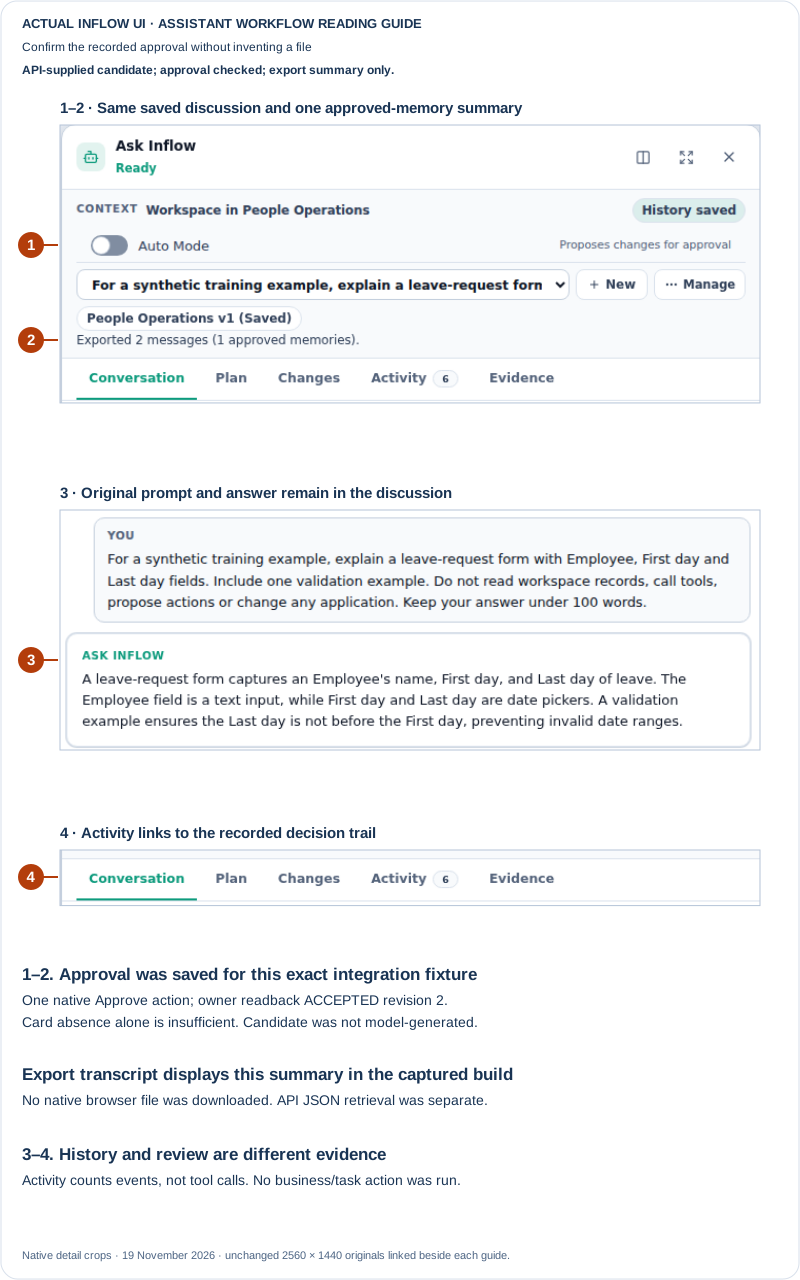
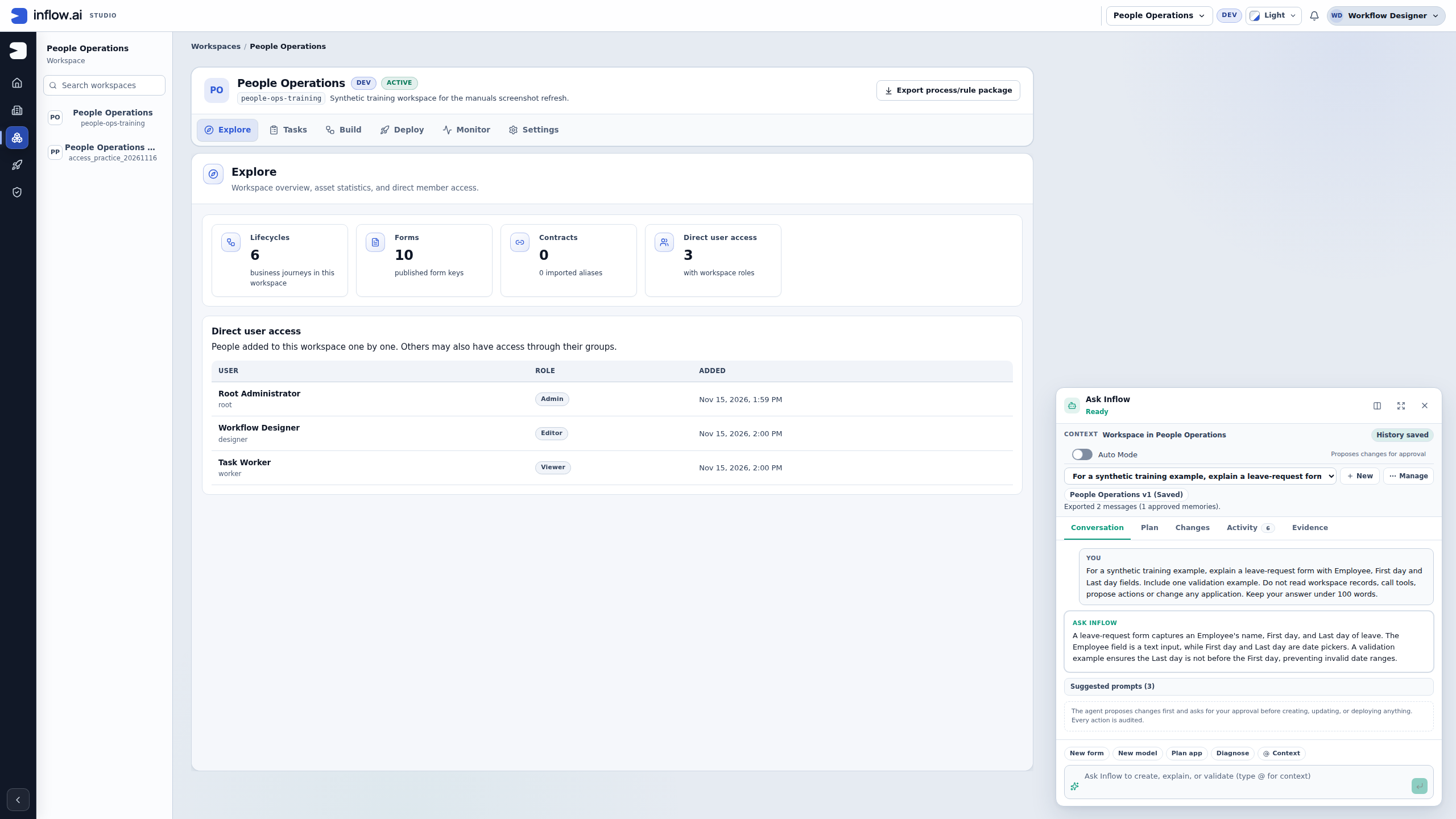
A saved approval with a visible summary. The native Approve action and the separate owner-scoped readback established ACCEPTED, revision 2. The export summary confirms one approved memory in this discussion. This remains the same administrator-class, non-superadministrator consultant with workspace Editor access. In this captured build, Export transcript displays that summary and does not create a browser download. A separately retrieved supported API export confirmed its content; that technical retrieval is not a downloaded file from this UI. If a file is needed, use the organization's supported integration/export route. Open the unchanged full 2560 × 1440 screenshot.
5. Keep the business decision in its normal workflow
Approving this fact records a reusable design item in the consultant's discussion. It does not publish the form, enforce the date rule in a running application, approve Mohammad's vacation or expand anyone's record permissions. The form's actual validation and the manager's task still follow their ordinary implementation, testing and approval routes.
The training environment has conversation history enabled with a 30-day retention setting. This exercise did not wait for expiry, delete a conversation or test erasure. An accepted memory also does not prove that every later answer will use it correctly. Check the current permitted record or published guidance when a business decision needs an authoritative source.
Expected result: one precisely worded synthetic candidate has a recorded owner decision, while the original two-message discussion remains available. No additional model turn was needed for creating this integration fixture, deciding it or checking its export summary. Rejection, automatic candidate generation and later retrieval remain separate behaviors to check in their own properly scoped exercises.
The unchanged originals were captured on 19 November 2026 from source 359e55b9. Crops enlarge their details for reading and do not redact the linked full screenshots, which also show synthetic account and workspace context. The earlier readiness-only example below preserves the environment's previous unconfigured state.
First check that an assistant can offer a memory
Earlier pre-setup state. This readiness example preserves the environment before the approved provider was configured. The working memory-review walkthrough above shows the later setup and a separately supplied integration candidate.
Nadia wants Ask Inflow to remember a useful writing preference for the fictional Leave requests project. Before looking for Approve memory, she first checks that she can actually use the assistant. A history setting is not itself a memory proposal, and a missing card is not a successful memory decision.
In the recorded training environment, Nadia's consultant-side Studio view opened normally but had no Ask Inflow launcher. The existing designer account was separately checked as administrator-class, not a platform superadministrator, with Editor access to People Operations. It is not ordinary end-user evidence. The illustrated Ask Inflow readiness example preserves that complete native view and distinguishes it from the administrator's setup.
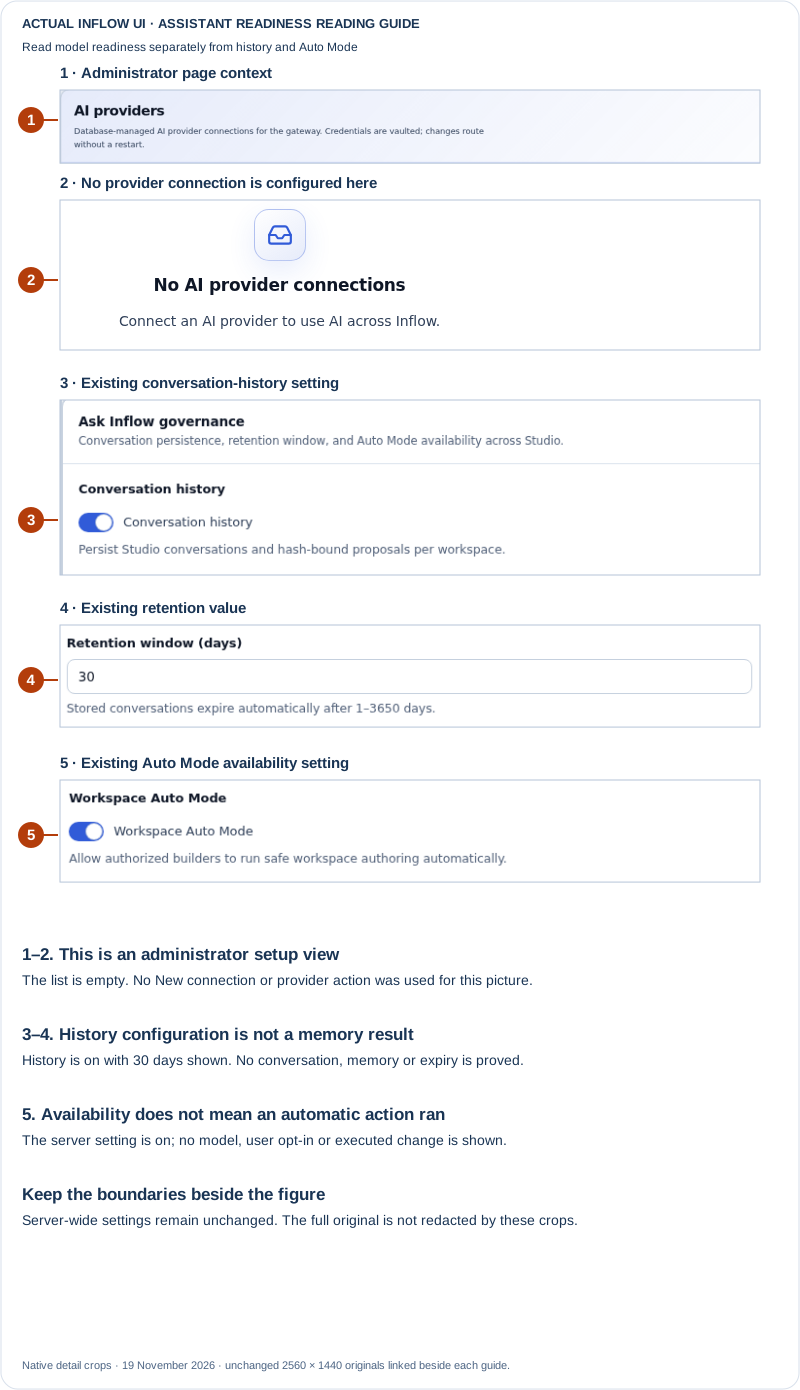
A setup view, not a memory card. This authorized superadministrator is reading existing server settings: No AI provider connections, history on, retention 30 days and Workspace Auto Mode on. The top workspace selector does not scope these server settings to one workspace. No switch, New connection or Save Ask Inflow settings action was used. No conversation, Proposed memory, approve/reject decision, retention deletion or automatic authoring result is shown. Open the unchanged full 2560 × 1440 screenshot.
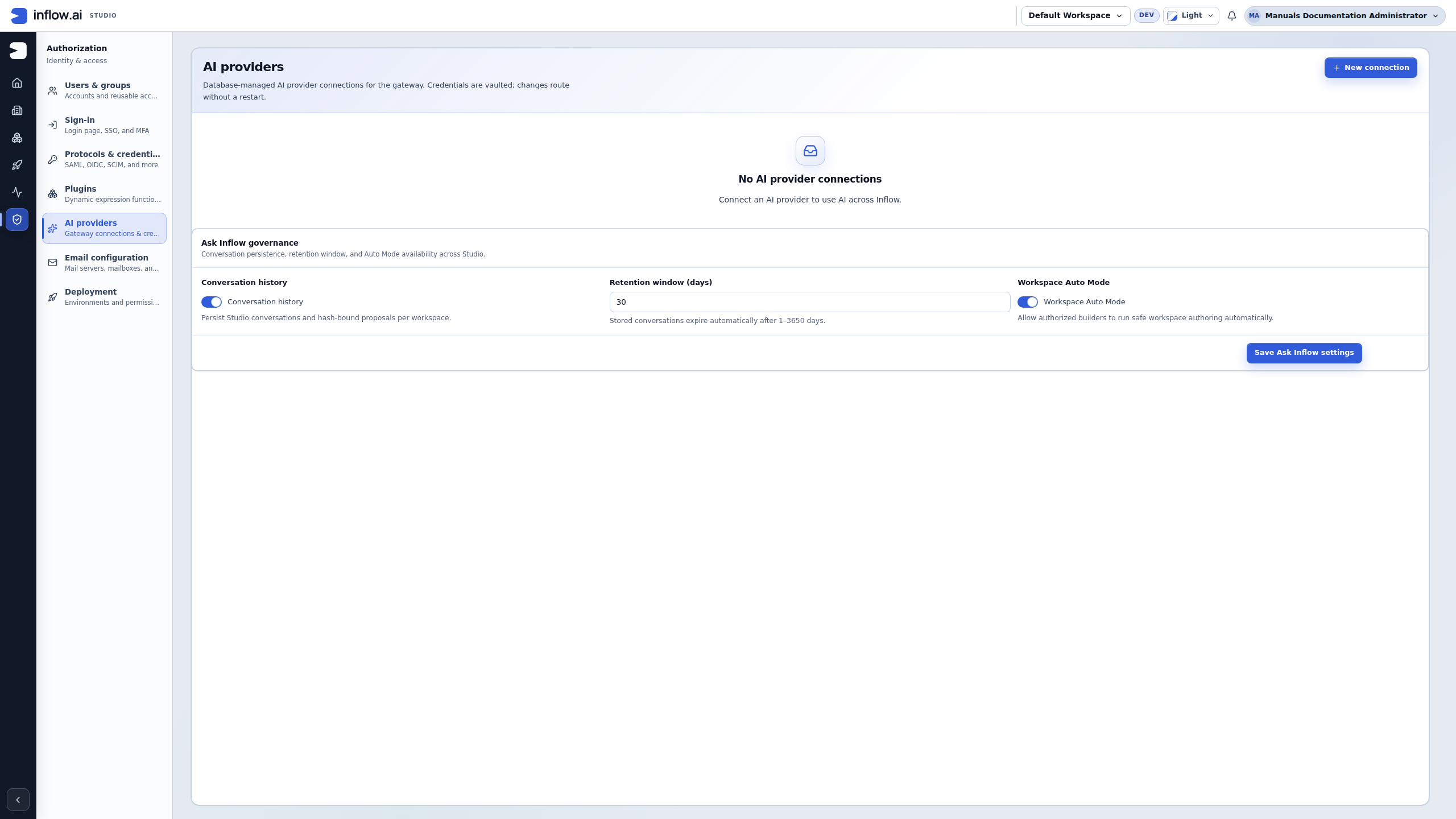
Read the example as three separate questions:
- Can Nadia use Ask Inflow now? For this recorded environment, the configuration and the consultant's actual assistant state were checked together: no model was enabled, so the launcher was unavailable. The screenshot's empty connection list is not a general diagnosis of every missing launcher or evidence of an external provider outage.
- Is conversation history configured? Yes, the pictured administrator settings have history on and a 30-day retention value. That is a configuration observation. It does not show that Nadia has sent a message, that any transcript exists, that a memory was approved or that every retained copy has expired.
- Has a particular preference been offered for review? No Proposed memory card is pictured in this exercise. Nadia therefore has nothing to approve or reject here. She does not create a generic memory-store entry or paste the preference into another person's conversation to imitate that decision.
Expected result: the team records the assistant-readiness dependency accurately and leaves the proposed preference unsubmitted. The environment's AI owner handles any separate model setup. Nadia can continue the ordinary governed business process without representing a missing card as an accepted memory.
When an approved assistant later offers a real Proposed memory, Nadia checks its exact subject and wording in her own permitted conversation, then uses the actual Approve memory or Reject control. The worked examples below teach those decisions conditionally; this setup screenshot does not demonstrate them. Workspace Auto Mode availability does not make a reusable preference into a business approval, and it does not prove that any autonomous action ran.
This unchanged native screenshot was captured on 19 November 2026 from source/build revision f9e3131f. It is bounded readiness evidence only. All visible names and workspace data are synthetic training context. The labelled details do not redact the linked full original; handle real conversation and account screenshots through the approved support route.
Example 1: remember a useful project preference
Nadia often asks for short explanations in the Leave requests project. If Ask Inflow offers a Proposed memory card saying “Prefer concise explanations for this project,” she reads the wording and decides whether it is useful. She chooses Approve memory only when she wants that proposal reused; otherwise she chooses Reject.
The controls are taught in Work with Ask Inflow. A saved conversation and an approved memory serve different purposes: history lets you return to a discussion, while a memory is a specific proposed fact or preference for reuse. Do not assume that every sentence you type is automatically an approved memory.
Example 2: do not reuse a private personnel detail
Suppose Sara notices that a conversation contains a private detail about an employee's absence and Ask Inflow offers to remember it. This example is for handling an already-shared detail, not a training setup: use fictional details such as “Annual leave” for training. Do not enter real personnel information into Ask Inflow unless the information owner and applicable security and privacy policy explicitly approve that processing.
- Read the exact proposed subject and wording. If it includes an employee's health, family or other private absence detail, or claims a fact should be reused outside its approved purpose, choose Reject. Do not approve it merely because it could make a later answer more convenient.
- If the business process needs a fact for a real case, ask the process and information owners to identify the approved record or task field, who may read it, and its retention. A memory proposal is not a substitute for that governed business record.
- Rejecting the memory proposal does not delete the original conversation or establish that its transcript was erased. Follow the organization's separate conversation-history and retention process; do not copy the text into a generic memory, another workspace or App Chat guidance to keep using it.
- For a training walkthrough, start with a fictional example such as “Annual leave.” A real approval or decline must still be recorded through the actual authorized task or case process.
Expected result: the sensitive detail is not accepted as reusable memory. The original conversation remains subject to its own history rules, and business decisions remain in their ordinary governed workflow.
Do not confuse memory with App Chat's sources
Ask Inflow and App Chat solve different user problems. A memory proposal is reusable context for an assistant. App Chat is a separate optional feature on a published App Shell; its publisher chooses the approved sources and actions for people using that application. Approving an Ask Inflow memory does not make a record readable, add a source to an App Shell or authorize a business action.
| What the user needs | Where it belongs | What must still be true |
|---|---|---|
| “Remember that I prefer concise explanations.” | A proposed Ask Inflow memory, if that preference is appropriate and the user approves it | The memory is specifically shown and approved; it is not a transcript of every conversation. |
| “What does the published leave policy say?” | App Chat's explicitly connected published guidance source | Check the actual rule through an available permitted source link or the ordinary permitted published guidance page; an old memory or short source chip is not the passage itself. |
| “How many pending requests can I read?” | App Chat's configured record source and supported aggregate operation | The signed-in person's current row/field access applies. A memory or an excerpt count is not an exact record total. |
| “Submit this leave request.” | An enabled, approved App Chat action; otherwise the ordinary published form outside the chat | A chat proposal must be permitted for this user and explicitly reviewed/confirmed. If no such action is enabled, the user submits through the ordinary form. A memory approval is never an action confirmation. |
Example 3 — Answer a policy question, a record question and an action request
Mohammad uses the published Leave requests app. He asks, “How much notice does our leave policy require?”, then “What is the status of my request?”, and later asks the assistant to submit a new request.
- For the policy question, the application owner must have connected the approved published guidance source. If the citation has an available permitted page link, Mohammad follows it to check the relevant passage. Otherwise he treats the answer as a summary and checks the ordinary permitted guidance page or asks its owner before relying on the rule. A remembered phrase alone is not policy evidence and cannot replace the source's current access check.
- For the request-status question, the app must have the relevant record source. The assistant must use the currently permitted record and fields for Mohammad's signed-in identity. If the request is unavailable, he opens the ordinary permitted request page or asks its owner; he does not use Sara's account or a remembered status.
- If the App Shell has an enabled approved published action for creating the request, Mohammad reads the conversational proposal's target and values and confirms only when they are correct; afterward he checks the result in the usual app. If that action is not enabled, he opens the ordinary published form outside the chat and follows its normal submit flow. The form is not a conversational action proposal.
- If any source or action is not configured, that is an App Shell setup question for its owner. Creating a generic memory with the missing policy or request details does not repair the configuration or prove that the information is current.
Expected result: the answer uses current authorized guidance for policy, current permitted records for status and either an explicitly confirmed App Chat proposal or the ordinary form flow for submission. Each path has its own evidence. The end-to-end App Chat setup is described in the App Shell and App Chat lesson.
Questions for an integration specialist
If a project proposes a separate memory store, ask who can read it, how ownership is enforced, how old information expires and how corrections or removal work. A label containing a person's name does not establish privacy. The generic platform memory feature must not be presented as an alternative to the application's actual conversation ownership rules. For App Chat, ask its App Shell owner which published guidance, record types, fields, task inbox and actions were approved and how normal permissions and confirmation apply; see application access for the user-facing boundaries.
Explain the business requirement with an example: “Sara must be able to return to her own conversation, and Mohammad must not receive it by choosing a different name.” Let the responsible specialist select an appropriate implementation and demonstrate the access behavior.
Read the proposal before deciding what may be reused
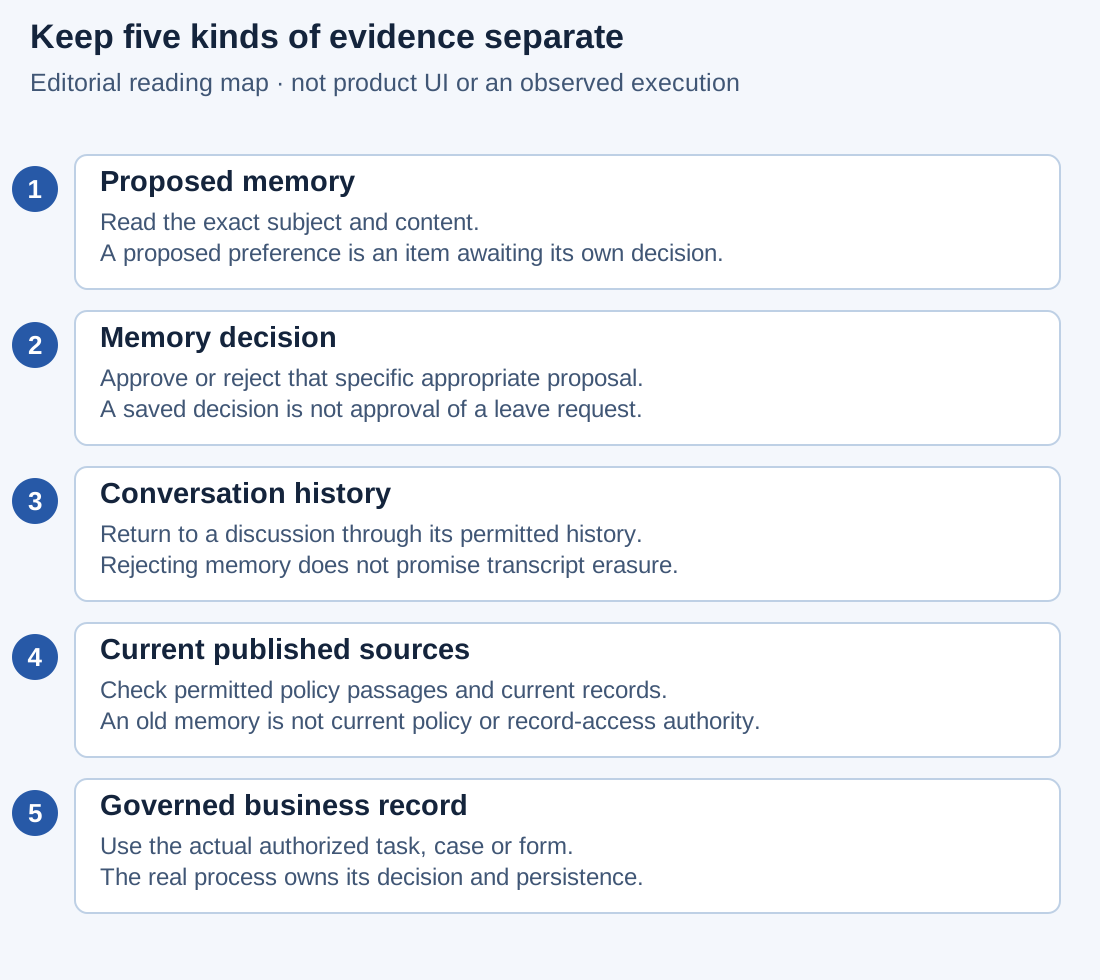
This reading map explains different kinds of information. It is not a screenshot, a memory-management screen or proof that a preference was saved.
Treat a proposed memory as a specific item to review. A conversation may contain useful discussion, temporary guesses, rejected ideas and private information. Approving one carefully worded preference does not approve all of that material for future reuse.
Worked example: keep a useful preference narrow
Nadia is using her own permitted Ask Inflow conversation in the Leave requests workspace. The following fictional proposal is appropriate to inspect if the application actually offers it:
Subject: Explanation style. Content: Prefer concise explanations when discussing this project.
- Confirm the active workspace and conversation. If you return through conversation history, use your own available conversation. A similar title is not proof that it is the intended discussion.
- Read the Proposed memory subject and the full content below it. Confirm that the proposal expresses Nadia's actual preference and does not add a claim about employee data, company policy or business approval.
- Decide whether the wording is useful at the proposed scope. “Prefer concise explanations” is a writing preference. “Always approve leave under five days” would be a business decision rule and does not belong in this preference.
- Choose Approve memory only for the specific useful proposal. Choose Reject for an inaccurate, unnecessarily broad or inappropriate proposal. Use the controls actually present; this guide does not introduce an editor for rewriting the card.
- Observe the response. After a successful decision, that item no longer appears as a pending Proposed memory card. Its disappearance alone is not a general confirmation that all history was erased or that the assistant will obey the preference in every later answer.
- If Memory decision could not be saved or another safe error appears, keep the exact workspace, conversation and proposed item in your handoff. Check the same item's current state through the supported conversation/owner route before clicking again or creating a replacement proposal.
Expected result: the selected proposal receives its own approve or reject decision. The conversation, business records, App Shell sources and task approvals retain their separate meanings. A later answer still needs a fact check even if its style matches the preference.
Worked example: reject a preference that changes the business rule
Suppose the proposal instead says, “Requests for five days are automatically approved.” The team has not approved such a business rule. Sara's manager task is still required by the actual process.
- Read the proposed claim against the published process and guidance you may access. Do not infer a policy from earlier conversation wording.
- Choose Reject for this proposed memory. Tell the process owner that the proposal confused a convenience suggestion with an approval rule.
- Continue the real request through its ordinary form and manager task. Rejecting a memory does not submit, approve or decline the request.
- If the business does want an automatic rule, that is a separate governed design change. The owner must define, implement, test and publish it through the supported design process. A memory card is not that change.
Expected result: an unapproved claim is not accepted as reusable assistant context. The team can explain the difference between a preference and a published business rule without relying on the assistant's confidence.
Keep correction, retention and access questions separate
When a remembered fact becomes stale, identify the particular fact and the source that changed. Do not assume that an old approved memory is an up-to-date source of policy or record status. Ask the conversation or information owner which supported correction and retention process applies.
| What changed? | What to check | What does not follow automatically |
|---|---|---|
| Nadia now wants detailed explanations | The specific preference and the supported correction route | Every historical answer is rewritten |
| The published leave policy changed | Its current permitted published guidance | An old memory becomes the new policy |
| Sara decided a request | The real task/case/record result | Every saved conversation now contains that result |
| A person lost access to a record | Current authorized source access | Old quoted text grants continuing permission |
| A memory proposal was rejected | The proposal's actual decision | The original transcript or all retained copies were erased |
| A conversation is absent from a view | The supported ownership, availability and retention explanation | It was definitely deleted or its contents are safe to recreate elsewhere |
For an uncertain memory decision, record the proposed subject, approximate time, intended approve/reject choice and the nonconfidential outcome you observed. Do not paste a private memory's full content into a widely shared support channel. A missing card can have more than one explanation; let the owner reconcile the original item rather than treating absence as proof of approval.
Questions to settle before adding a separate memory store
A team may propose a specialist memory integration for a background assistant. Prepare a small example and ask for concrete answers before relying on it:
| Design question | Useful example to discuss | Evidence the specialist should supply |
|---|---|---|
| Purpose | Reuse a reviewed project terminology note | Which assistant uses it and for what task |
| Ownership and scope | Sara's own discussion must remain unavailable to Mohammad | The actual access boundary and ordinary-user demonstration |
| Source and freshness | A policy note has an owner and revision | How the current permitted source is checked before reuse |
| Expiry | A temporary note should stop being reused after its intended period | The configured expiry/search behavior and its limitations |
| Correction | A note is inaccurate | The supported way to replace or stop using that exact item |
| Retention | A reusable item should be deactivated | What happens to stored content, history and any separate retained evidence |
| Unknown outcome | A write or removal reply is lost | How to inspect the original item before another operation |
The generic platform memory API is not the Ask Inflow proposal card. The specialist's storage may have its own scope, agent, subject and expiry fields. A subject string containing a person's name is still just a label; it is not evidence that other people cannot read the content. Ask for proof through the real consuming application and identities.
Similarly, “deactivate” must be explained precisely. In the generic feature it marks an item inactive for normal use; it must not be presented as a promise that every stored byte, transcript, audit entry or backup was physically erased. Keep actual retention questions with the responsible information owner and specialist.
For training, use a harmless fictional preference or terminology note. Do not create a real sensitive example simply to test whether it can be removed later. The detailed storage procedures remain in the technical reference; this chapter helps the consultant ask the right questions and assess the result.
Common misunderstandings
- Approving memory is approving leave. It is not. Sara responds through the real manager task.
- Deleting a memory erases every record of the discussion. Retention and conversation history have their own rules; ask the owner rather than promising complete erasure.
- Old information is always current. Check changed policies, source access and business facts before relying on a remembered answer.
Continue with Ask Inflow conversations and proposed memories or see the App Chat source-evidence examples. Integration developers can read the optional generic memory technical reference.