Understand delayed background work
Some application actions are processed in the background. A user may submit work while another service sends a notification, performs an integration or advances an automatic step. The platform's messaging setup coordinates that delivery.
A consultant designs and checks the business behavior. Broker connections, worker capacity and message recovery are platform-operator responsibilities; there is no messaging-server setup required for every form.
What to prepare with the specialist
- Identify the original request or automatic step and what result the business expects.
- Use the permitted application or current Live view to inspect that same work.
- Distinguish still processing, completed and failed from the messages actually shown. An unavailable status is not an empty successful result.
- If an external action may already have happened, check its original result with the owner before starting another one.
- Give the administrator the environment, time and non-secret work reference if background processing needs investigation.
Example: prepare a clear business check
Mohammad submits a leave request, but the expected notification has not arrived. Nadia checks whether the request exists and whether the relevant configured step is pending or failed. She keeps the request's business result separate from notification delivery.
If the application accepted the request, she does not create a second leave request simply to send the email again. The platform or notification owner investigates the original delivery and its supported recovery.
Example: keep the responsibilities separate
An integration sends information to another system and then loses its confirmation. Nadia checks the existing integration result and asks the receiving-system owner whether the original action took effect.
A timeout does not prove nothing happened. Starting a new run could repeat a real external action. The consultant reports the observed state and uses the supported recovery route with the owner; raw message edits or competing workers are not part of the lesson.
Trace the business result before asking for a retry
Use the business object that started the work as your anchor. In the leave example, that is Mohammad's original request, not a new request with similar values. Then check the next result the application promised: an active case, Sara's task, an updated record field, or a notification. These results belong to different parts of the journey.
- Read the last confirmed user result. Did the employee receive a save confirmation? Can the original request be found in the permitted list? If not, report that uncertainty before moving on.
- Name the expected next step. Be specific: “a manager task assigned to Sara” is clearer than “the workflow is broken.”
- Inspect the same item using your allowed view. Check its current case/task state in Live or the relevant application page. Do not infer a task from a record or infer a saved record from a notification.
- Compare only the business states you can see. Record what is pending, complete, failed or unavailable as the app presents it. If the state is missing or restricted, ask its owner to inspect it rather than requesting broader access.
- Preserve the original reference. Give the platform or integration owner the environment, approximate time and non-secret reference to the original work. Let that owner inspect the supported delivery receipt and recovery options.
- Retry only after the owner resolves the original outcome. A lost confirmation can follow a successful remote action. Do not replay a notification or integration just to test whether it might work now.
Example: the record saved, but Sara has no task
Mohammad submits the sample leave form and sees that it saved. Sara's task list has no matching item. Nadia confirms the employee record is present, then reports the missing task as the next unconfirmed step. She asks the application owner to inspect the configured process start and assignment for that same request. She does not submit the form again: the first save already happened, and another request would create different work rather than recover the first task.
Example: the task is complete, but no notification arrived
Sara opens the expected task and completes its approved decision. The case now shows its expected outcome, but Mohammad has not received a notification. Nadia records the process result and notification result separately. She shares the original request reference with the notification owner, who can inspect the original delivery attempt. Nadia does not reverse Sara's decision or create a second request to trigger another message.
Example: the integration result is uncertain
The application says it sent an approved sample update to a connected system, but the page timed out before showing the final receipt. Nadia records the exact sample and last visible result. The integration owner checks the original request with the receiving-system owner before deciding whether the supported recovery is safe. A timeout alone does not mean the receiver did nothing.
Example: a dead-letter replay is pending, but the business result is not confirmed
An administrator confirms that the original inbox item was eligible for an approved replay and that the same item now appears as pending. Nadia treats that as a message-processing state, not proof that the workflow step, notification or external update completed. She checks the original request in the permitted application view and asks the responsible owner to confirm the next business result after the normal handler runs. If that result is still unknown, she keeps it unknown and does not submit another request to “help” the replay.
For specialist mechanics—including the prior failure detail that the replay audit does not retain and the fields the inbox row resets—see the current dead-letter replay clarification. A consultant should provide the original request reference and observed result; message administration is not an end-user recovery button.
Read business evidence before asking about delivery
A business page and a message-delivery receipt answer different questions. Nadia can make a useful handoff by showing the original request context and a later confirmed task result, while leaving unobserved broker or notification delivery unconfirmed. She does not need a worker account to explain those observations.
The retained example below is one already completed training request, CF3-LEAVE-20261119-02, for 21–23 December 2026 / three whole days. It is not a recording of a broker failure or missing notification. Keep it separate from the fictional delayed-notification stories earlier in this guide; no email-delivery result is shown here.
Retained completed training case. Read these images; do not resubmit or replay it. The first picture is the filled form before Submit, not an acceptance receipt. The button instructions inside its unchanged guide belong to the original exercise.
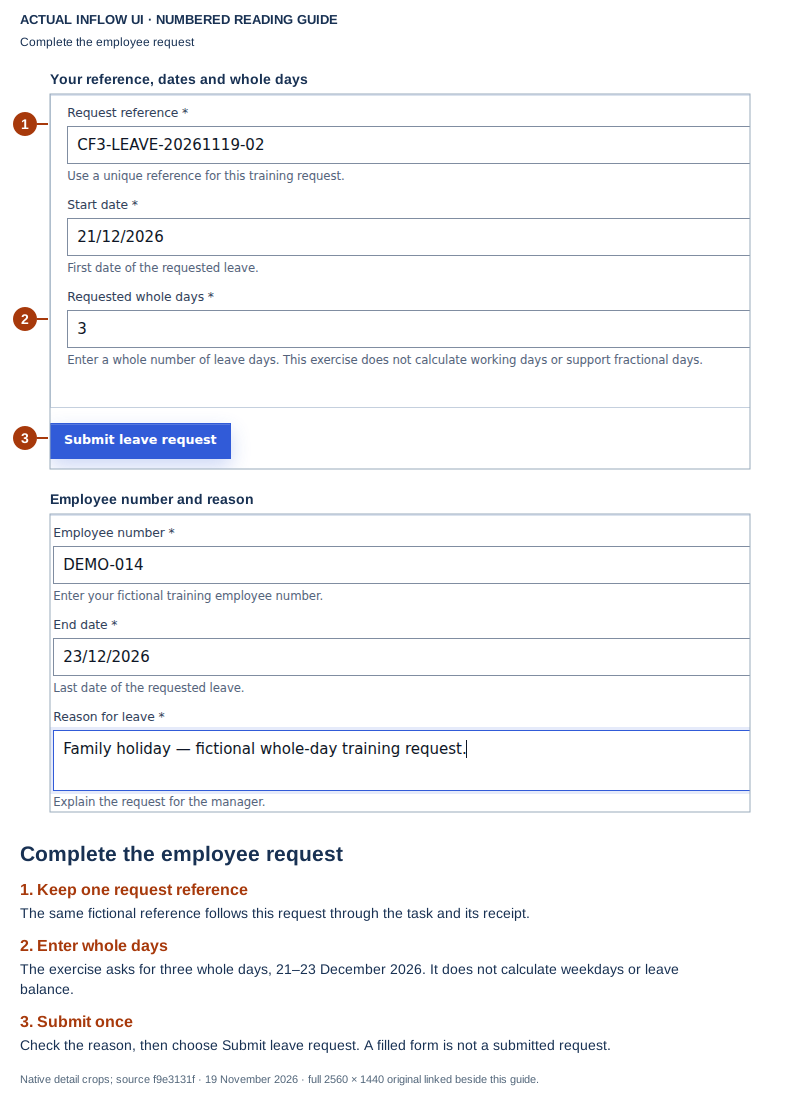
Open the unchanged native 2560×1440 employee screenshot
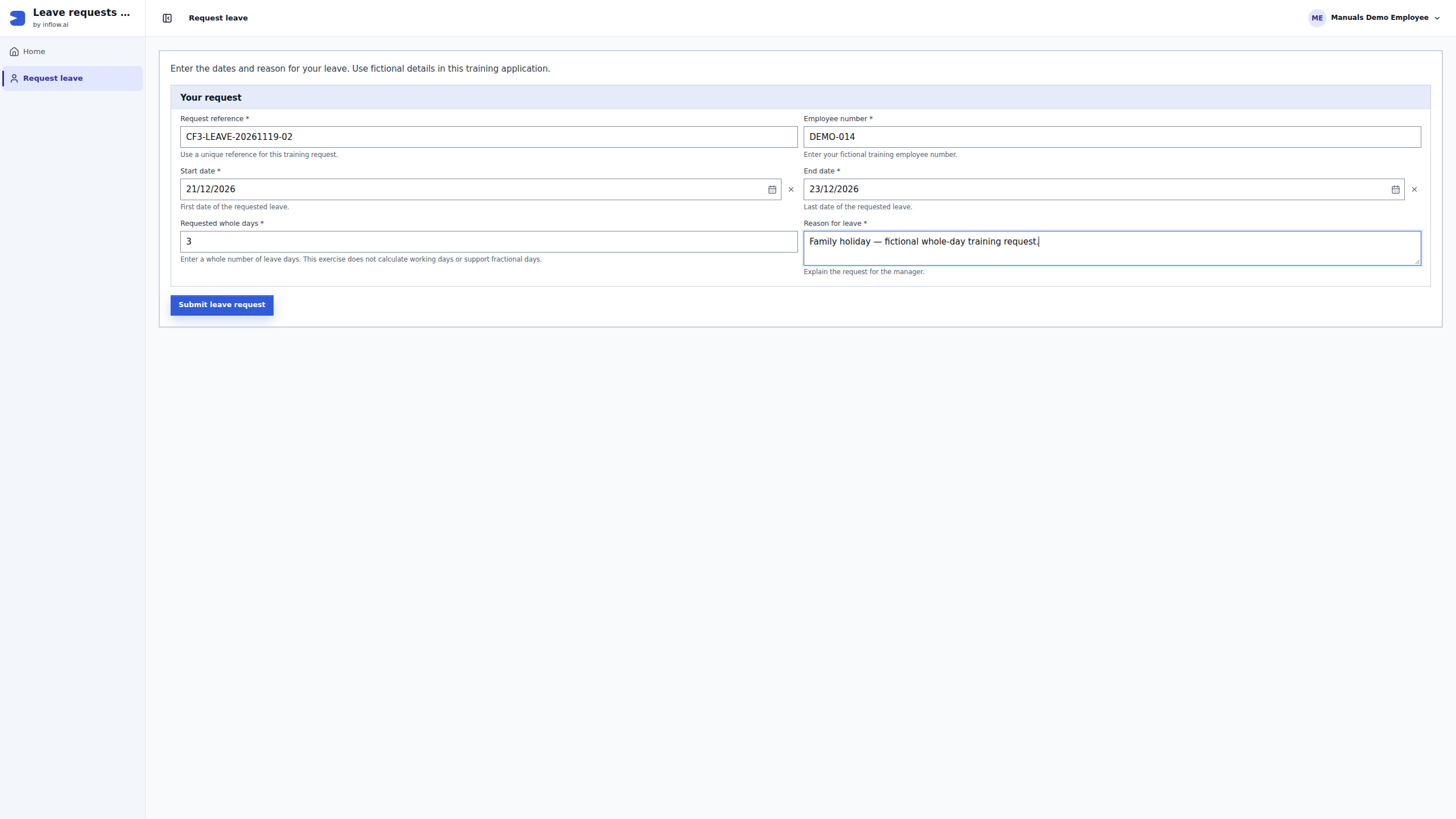
The first guide gives Nadia a reference and the intended input. It does not show that a message was accepted by a broker, that a workflow started, or even that the employee has pressed Submit yet. An entered reference is useful for identifying planned work; it is not a delivery receipt. If a real user loses the later response, start the investigation from that original attempt rather than submitting a replacement request.
Retained completed training case. Read this later receipt; do not complete or replay the task again. This is the manager's result, not the employee's earlier submission page.
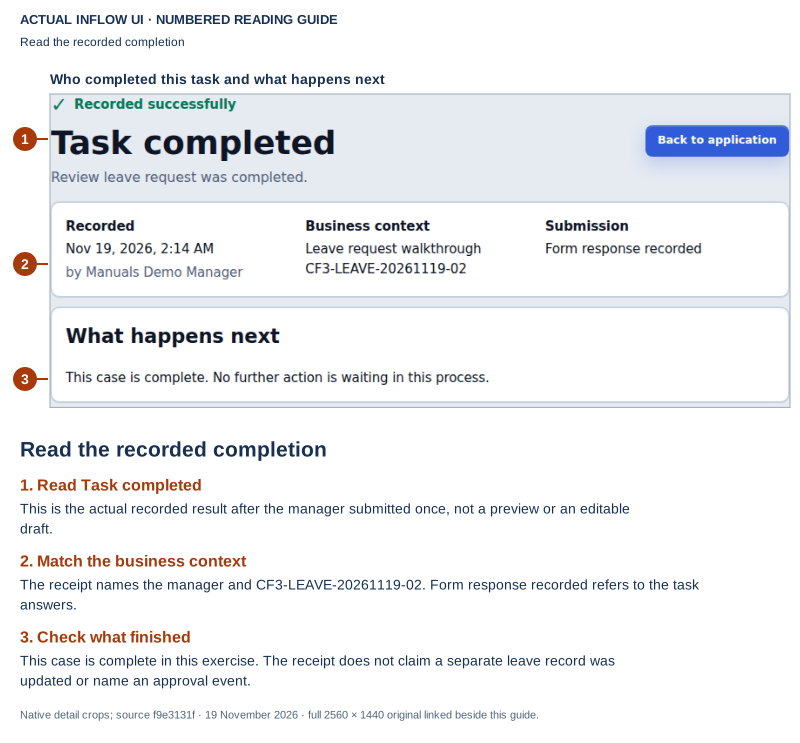
Open the unchanged native 2560×1440 manager screenshot
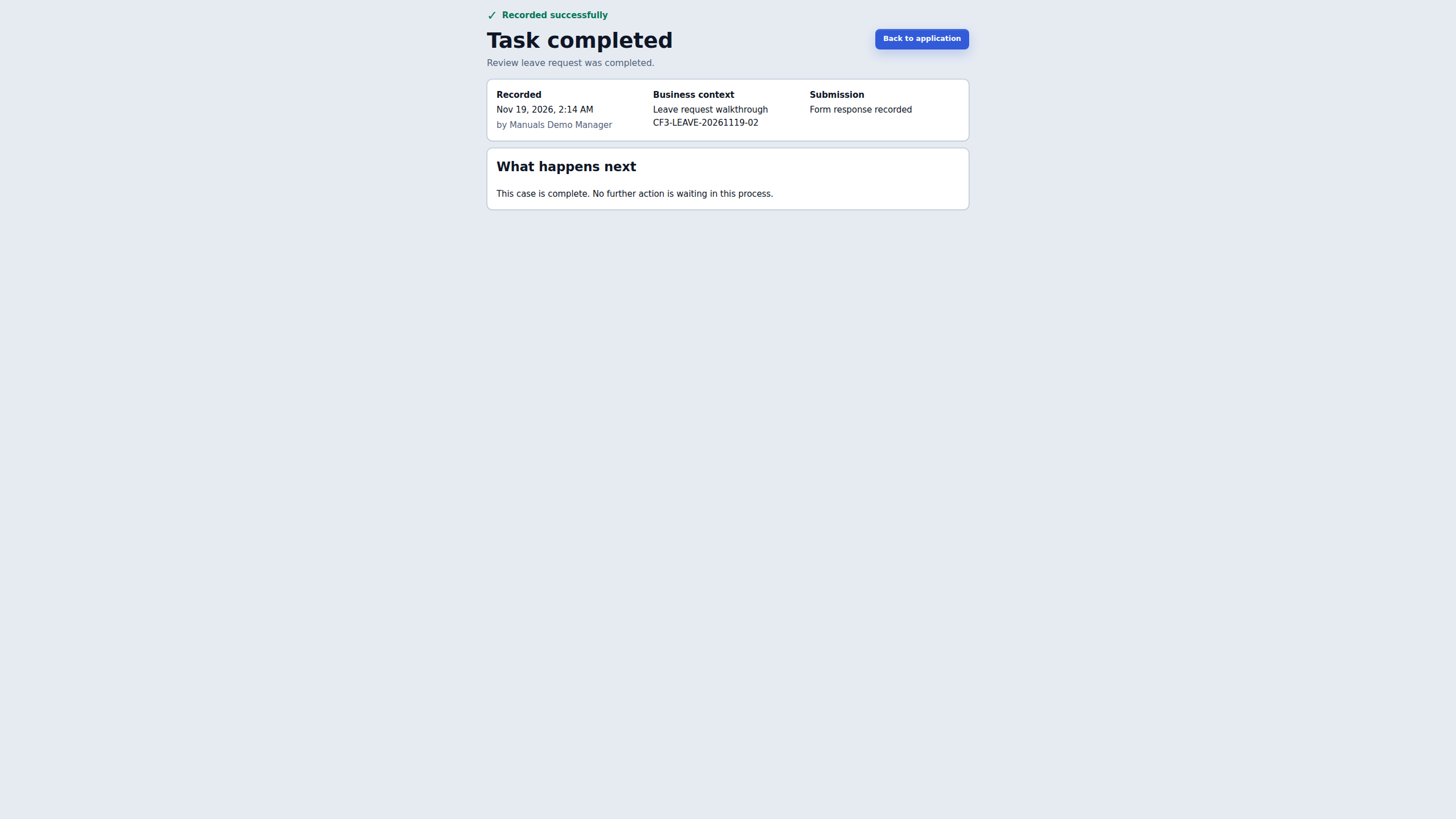
The later guide shows a different fact: the matching manager task completed, the form response was recorded and the case-complete message is visible. This is an application result. It does not show an inbox acknowledgement, consumer offset, notification attempt, delivered email or external-system update. The business reference connects the two views; it is not a broker message identifier or HTTP trace.
Use the pair to practice a precise handoff:
- Name the exact original reference and the last business state that is actually visible. Do not change it to a similar new reference for convenience.
- Read Task completed as task completion. Do not rename it a named approval event, record write or successful notification.
- State the separate delivery question the real application promises to answer. In this retained example, notification delivery is not demonstrated, rather than known to be missing or failed.
- Give the responsible owner the approved environment, time and business reference. Let that owner find the original delivery in the system they administer.
- Keep retries, dead-letter replay, manual task creation and a second business request out of this reading exercise. None is needed to read an existing result.
| Statement | Appropriate conclusion |
|---|---|
| The employee form is filled | The intended values are visible before submission; later acceptance still needs evidence |
| The matching manager receipt says Task completed | That task result is recorded in the application view |
| No notification receipt is included | Delivery is not demonstrated by these pictures; a missing receipt here is not a failed delivery |
| A business reference appears in both views | The two views concern the same fictional request, not proof of a broker acknowledgement |
| A platform owner later confirms a replay is pending | That is a separate processing state; read the promised business outcome after its normal handler runs |
The original employee submission, case creation and manager task handoff are omitted between these two views. Read the complete ordinary-user pilot before using it as a wider application exercise. Its task link was supplied through an authorized handoff; these pictures do not demonstrate a working App Shell task list. When a real delivery issue occurs, use the factual report below and ask its owner to inspect the original action. Do not manufacture an incident or replay completed work merely to reproduce this lesson.
Use this handoff when work is delayed
Environment and app:
Original record/request reference:
Action and approximate time:
Expected next business result:
Last confirmed result:
What is still pending, missing or uncertain:
External system involved (if any):
Owner asked to inspect the original delivery:
Retry performed: no, pending original-outcome review
Use the approved internal channel and omit credentials, private payloads and unrelated personal data. If the user cannot see a status because of their role, say “not visible to this account” rather than “not processed.” An owner can distinguish an access boundary from a delivery failure without giving the consultant worker or broker access.
If the result is not clear
Keep the original result and explain what is missing. Ask the responsible owner to investigate before repeating an uncertain action or widening access. A missing control is not an instruction to use somebody else's account.
Continue with the consultant guides
Read follow automatic steps and build integrations. The specialist reference below contains the detailed setup; it is not ordinary consultant preparation.
Further reading
Optional technical reference — detailed contracts and implementation information for your administrator or developer. You do not need it to follow this lesson.