
Optional technical reference. This material is for developers, integration specialists and platform administrators. For the consultant lesson, read the practical guide.
Preserved from source baseline
d4587c7c0e073e58c2d430342f65ac55dd701bf4; source/static examples retain their stated scope. They are not new runtime verification or required consultant setup steps.
Current operator notice — 17 November 2026
Authenticate through the deployment's approved operator route before inspecting administrative message state. An actor name or workspace identifier is not a credential, and a familiar message ID is not permission to read its payload. The current message controller requires * on its message resource for its administrative routes, including the GET routes. Permission to view general operational status does not automatically authorize those message reads.
Development examples elsewhere in the retained documentation may use a trusted actor header. Production policy disables trusted-header and HTTP Basic conveniences. Do not enable development mode or borrow another person's session to make an administrative sample succeed. When the development trusted-header branch is explicitly enabled, a browser's carried login-session cookie determines the identity in that branch; an invalid cookie does not fall back to the header. A nonblank X-Api-Key header is checked before the trusted-header branch; API-key dispatch through Authorization: Bearer follows it. Do not assume a bearer API key takes precedence over a development actor header, or that a cookie overrides all credentials.
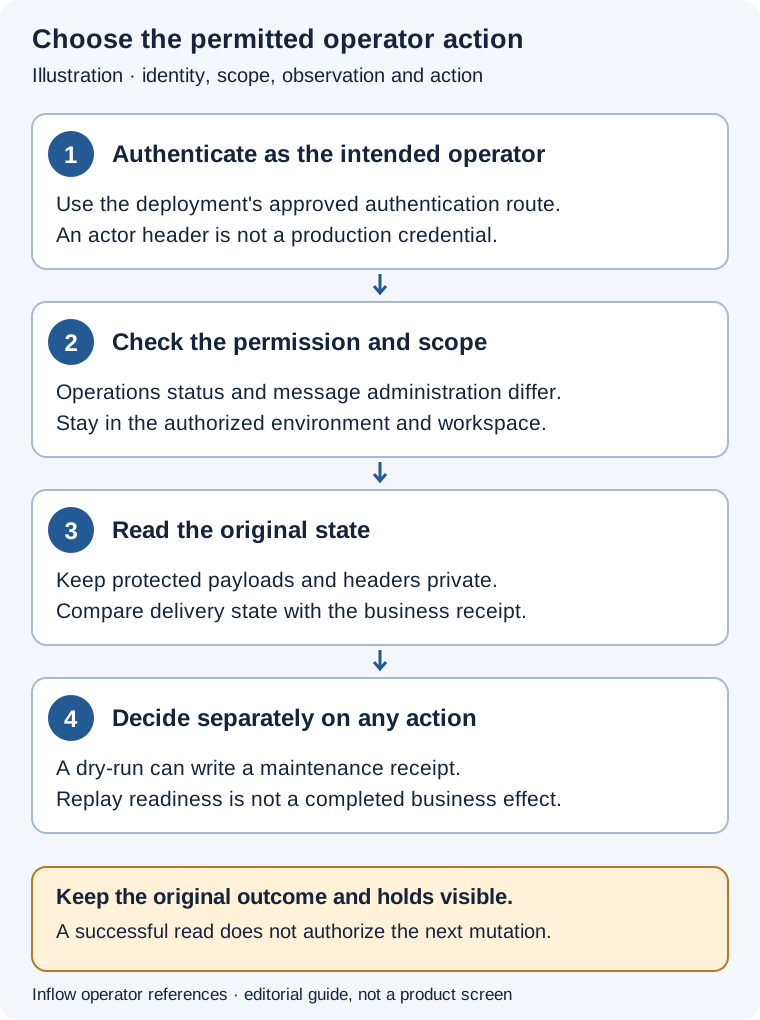
Editorial guide, not a message administration screen. The administrative message read itself needs message access; a successful read does not authorize replay or prove a business effect.
Read the original message in its actual workspace
- Identify the admitted environment, original business reference and intended workspace. Use the exact message identifier already associated with that work; do not create an event to obtain a cleaner example.
- Verify the approved operator identity and message-administration authority. Use the authorized workspace context. Do not try other workspaces until an identifier becomes visible.
- Read the permitted original outbox or inbox state. Record only the diagnostic metadata needed by the accountable owner. An administrative response can contain business payload or headers; keep the full response in its protected location rather than pasting it into a broad channel.
- Compare transport/processing state with the owning domain's receipt.
PUBLISHEDis not proof that a consumer completed a business action. An inbox item made pending for replay is not a completed task or a confirmed external update. - Keep any mutation separate. An owner must resolve the original business outcome, current claim/state and applicable recovery authorization before a replay or other administrative action is attempted.
Example: a status viewer needs a message owner
An operations viewer can inspect a general service status but cannot inspect the administrative inbox. They give the message owner the approved environment, time and safe original business reference. The message owner uses their own authorized identity and workspace to inspect the original delivery. The viewer does not add an actor header or ask to use the owner's cookie.
If the requested item is unavailable in the admitted workspace, the owner records that observation and checks the reference through the approved process. It is not permission to probe other workspaces, and it does not prove the item was deleted. Keep the business user on their normal permitted task or request view.
Example: replay admission is not delivery success
The responsible owner has separately admitted replay of an exact dead-letter inbox item after investigating its original outcome. The current replay route requires a nonblank reason and operates on that workspace's item. Its resulting ready state means the item can be processed again; it is not a receipt that the handler, workflow or receiving system completed the intended action.
Preserve the original reference and failure evidence needed for the investigation before recovery. The replay audit records the previous status and attempts but does not preserve the prior failure reason. After the supported handler runs, read the owning business result separately. If the outcome remains uncertain, keep that uncertainty rather than sending a new event or manually marking the original processed to make the list look clear. The dead-letter clarification below explains the retained/reset fields in detail.
The retained Remaining Production Work list below is historical planning, not a current backlog. In particular, the current dead-letter replay route exists as described in this notice and the dated clarification. This does not establish that every other item in that older list is complete.
Current source: authentication policy, credential dispatch, message administrative routes, and workspace-scoped inbox service. These instructions do not report an executed login, message read, claim, replay, delivery or business mutation. The historical body below is retained unchanged.
Scalable Messaging Manual
Practical guide and worked examples
Follow delivery state before deciding to retry
Outbox publication, broker delivery, inbox processing, a workflow command and a remote business effect are separate state transitions. The local database can durably retain intent while a network reply is lost. A worker claim/lease limits who can settle local work, but it cannot recall an already dispatched remote request or prove that an arbitrary provider effect happened exactly once.
Administrative message routes require platform * and use their actual workspace-scoped service operations. They are not an end-user way to bypass a task or integration API. Internally trusted routing carries server-owned workspace attribution; merely subscribing to an external topic does not give its publisher authority to choose another tenant/workspace.
| Evidence | What it answers | What it cannot establish alone |
|---|---|---|
| Outbox row/status | Stored local publish intent and attempts | That a consumer completed its business effect. |
| Broker acknowledgement | Accepted transport delivery | That no duplicate delivery or consumer retry can occur. |
| Inbox source/external ID | Stored deduplication identity in the actual workspace | Universal deduplication across unrelated workspaces or systems. |
| Lease owner/expiry | Who currently owns a claim | That an old remote request was undone when the lease expired. |
| Native business receipt | Owning domain's accepted outcome | A fabricated replacement key for a different operation. |
Use normal domain entry points for business work. These operator examples explain safe diagnosis and current administrative contracts; this documentation program does not enqueue, claim, acknowledge or replay any actual message.
The examples below use synthetic teaching data. They are grounded in the cited source contracts; this documentation change did not execute these operations against a running Inflow deployment. Use normal authenticated sessions and the actual returned identifiers, revisions and versions from an authorized environment.
Example ROOT-MSG-01 — Trace one outbox message through a publication delay
Scenario and inputs. A leave-process event has a known outbox ID, and its intended consumer has not observed the expected state. The operator has message-administration authority and the correct workspace context. The first question is where delivery stopped, not whether sending another business event would make the UI appear current.
Procedure. Read GET /api/messages/outbox/<message-id> and retain safe delivery metadata. This illustrative JSON is a response projection, not a full returned row or a new enqueue request:
{"id":"<message-id>","status":"PENDING","attempts":0,"lockedBy":null,"lockedUntil":null,"publishedAt":null}
Compare actual current status, attempt/lease fields and publisher evidence with the configured topic and partition key. Inspect worker role, broker reachability and the exact original domain event before considering any authorized recovery.
Expected result. The stored row identifies an intended publication and its actual local progress. A PENDING projection does not mean that a separate external system has no related effect, while PUBLISHED does not prove inbox processing or a completed task. The actual returned fields and source timestamps remain the authoritative local evidence.
Failure and recovery. Do not enqueue a second event with a new business identity just because delivery is delayed. Diagnose the known publisher/lease/broker boundary and preserve uncertain outcomes. If the row belongs to another workspace or is not visible, resolve authorized attribution rather than editing supplied workspace headers to inspect unrelated messages.
Sources. MessageController.java:66, OutboxMessage.java:1, JdbcMessageOutboxRepository.java:1.
Example ROOT-MSG-02 — Recognize a duplicate inbox delivery within its actual workspace
Scenario and inputs. An external system redelivers the same event after losing its acknowledgement. The event has a stable source and external message ID, and Inflow receives it in a particular admitted workspace. A different business event or another workspace must not be silently treated as the same effect merely because its display label looks similar.
Procedure. Trace the receiver's existing source/external ID and read the stored inbox evidence through the authorized administrative surface. The service sets workspace attribution from its actual context; the JDBC save-if-absent path looks up the retained row using workspace, source and external message ID. Preserve that identity when interpreting redelivery. Inspect the native handler's business receipt separately if it has already dispatched or completed a remote action.
Expected result. Repeated delivery under the same actual deduplication tuple retains the stored inbox identity instead of creating a fresh unrelated processing intent. That protects the local intake boundary. It does not establish exactly-once arbitrary business effects, merge different sources, or make a caller-supplied workspace header trusted across an external broker route.
Failure and recovery. If the source changed the external ID for a retry, investigate with that system's accountable owner before calling the second record a harmless duplicate. Do not delete the first inbox row, rewrite its ID or replay both records to see which succeeds. Preserve uncertain delivery and verify which business outcome, if any, was accepted.
Sources. DefaultMessageInboxService.java:41, DefaultMessageInboxService.java:72, JdbcMessageInboxRepository.java:63.
Example ROOT-MSG-03 — Handle an expired lease without settling another worker’s claim
Scenario and inputs. A publisher or inbox worker held a claim, then its response became slow and the lease may have expired. The operator has the original message ID and actual lockedBy/expiry evidence. A second live worker may now own the row; an old worker identity must not renew or settle the new owner's claim.
Procedure. Read the current row and compare its actual owner/expiry before any lease operation. The supported renewal request shape is illustrated here for an outbox lease:
POST /api/messages/outbox/<message-id>/renew-lease
Content-Type: application/json
{"ownerId":"<actual-current-owner>","lockDuration":"PT2M"}
Use the actual admitted worker identity and native lease service only within the authorized operating plan. The inbox counterpart is a distinct route. Retain any failure rather than substituting a guessed owner or a longer lease.
Expected result. Current JDBC lease/settlement operations require the appropriate current unexpired owner. A successful renewal extends that local ownership boundary; it does not determine whether an earlier remote request completed. A lost/expired claim is not repaired by acknowledging the row on behalf of a different worker.
Failure and recovery. When ownership changed, stop using the old claim and inspect the new owner's original work/receipt according to the handler's protocol. Do not reclaim the message manually, mark it published/processed from an unrelated account or delete its failure history. Resolve uncertain external effects before any independently admitted retry.
Sources. MessageController.java:213, MessageController.java:83, JdbcMessageOutboxRepository.java:1, JdbcMessageInboxRepository.java:1.
Example ROOT-MSG-04 — Assess a dead letter before an explicitly authorized replay
Scenario and inputs. An inbox message reached its dead-letter state after repeated failure. The operator can inspect message administration, but the original consumer's external effect or receipt may still be uncertain. A replay is a consequential attempt; the availability of an API button does not establish that retrying the business effect is safe or authorized.
Procedure. Read the dead-letter list and exact original message, then inspect failure/attempt metadata and the owning handler's accepted-effect evidence. Establish the cause and the accountable replay decision before using any mutation. If that separate decision admits replay, the native route is POST /api/messages/inbox/<message-id>/replay with its actual required reason; it runs through the workspace-scoped replay service and append-only audit. Preserve the original reason, previous status/attempts and resulting receipt.
Expected result. The native administrative replay records its reason and previous local state through MESSAGE_INBOX_DEAD_LETTER_REPLAYED. It does not erase the original failure, prove a remote effect never happened or authorize reopening held historical consumer/CI proofs. The domain handler's idempotency and current authorization remain applicable.
Failure and recovery. If the safe original discriminator or receipt is absent, keep that outcome unknown and request the authorized owner's concrete reconciliation action. Do not repeatedly press Replay, invent a new event ID, reset attempts in SQL or adopt an old private validation message. Fix the actual underlying cause and retain the original evidence before another admitted attempt.
Sources. MessageController.java:140, DefaultMessageInboxService.java:94, JdbcMessageInboxRepository.java:1.
Current JDBC inbox/outbox repositories claim work with SKIP LOCKED and require
the current unexpired lease owner for settlement/lease operations. This prevents
competing live claims; it does not make arbitrary broker or external effects
exactly once. Consumers must retain their documented idempotency/reconciliation
contracts. Production topology and evidence below remain conditional on the
actual deployed worker and broker configuration.
Document status: Current durable messaging reference. Verified against
origin/masteron 2026-08-14.
Inflow uses durable messaging to scale workflow execution beyond a single API process. The database remains the source of truth; the broker is used for delivery, fan-out, replay, and worker scaling.
Architecture
flowchart TD
    API["API / Message Controller"]
    SERVICE["Workflow, Task, AI, Integration Services"]
    DB["Database Transaction"]
    OUTBOX["message_outbox"]
    PUBLISHER["Outbox Publisher Workers"]
    BROKER["Kafka-Compatible Broker / Redpanda"]
    INBOX["message_inbox"]
    WORKERS["Runtime, Task, Timer, AI, Integration Workers"]

    API --> SERVICE
    SERVICE --> DB
    DB --> OUTBOX
    OUTBOX --> PUBLISHER
    PUBLISHER --> BROKER
    BROKER --> INBOX
    INBOX --> WORKERS
    WORKERS --> SERVICE
The service layer should write business state and an outbox message in the same database transaction. A separate publisher claims pending outbox rows and sends them to Kafka/Redpanda. Consumers store received broker messages in the inbox before processing them, which gives every worker idempotency and retry tracking.
Why Outbox And Inbox
Directly publishing to a broker from business logic can lose events when the database commit succeeds but broker publishing fails. The outbox avoids that by making the pending message part of the same durable commit as workflow state.
The inbox protects the opposite side. Brokers can redeliver messages, workers can
restart mid-processing, and network calls can time out after succeeding. The
inbox stores (source, externalMessageId) as a unique key so the same external
message is processed once.
Tables
message_outbox stores messages produced by Inflow:
topic: logical broker topic, such asinflow.process.eventsmessage_key: partitioning key; usuallyprocessInstanceIdaggregate_typeandaggregate_id: the business aggregate affectedmessage_name: event or command namepayload_jsonandheaders_json: message body and metadatastatus:PENDING,PROCESSING,PUBLISHED,FAILED,DEAD_LETTERattemptsandmax_attempts: retry accountinglocked_byandlocked_until: safe multi-worker claiming
message_inbox stores messages received from outside Inflow:
sourceandexternal_message_id: idempotency keytopic,message_key,aggregate_type,aggregate_id,message_namepayload_jsonandheaders_jsonstatus:PENDING,PROCESSING,PROCESSED,FAILED,DEAD_LETTER- retry and lock columns matching the outbox
Topics
The initial topic constants are:
inflow.process.commands
inflow.process.events
inflow.task.commands
inflow.task.events
inflow.timer.commands
inflow.escalation.events
inflow.ai.commands
inflow.integration.commands
inflow.notification.commands
inflow.audit.events
inflow.deadletter
For process and task execution, use processInstanceId as the message key. In a
Kafka-compatible broker this keeps messages for the same process instance on the
same partition, preserving order while still allowing different instances to run
in parallel.
REST Operations
The message controller is administrative and currently requires root/admin access.
Create an outbox message:
POST /api/messages/outbox
Claim messages for a publisher:
POST /api/messages/outbox/claim?publisherId=publisher-1&limit=50&lockSeconds=120
Renew a publisher lease:
POST /api/messages/outbox/{messageId}/renew-lease
Content-Type: application/json

{
  "ownerId": "publisher-1",
  "lockDuration": "PT2M"
}
Release a publisher lease without marking the message failed:
POST /api/messages/outbox/{messageId}/release-lease
Content-Type: application/json

{
  "ownerId": "publisher-1"
}
Mark publishing success:
POST /api/messages/outbox/{messageId}/published
Mark publishing failure:
POST /api/messages/outbox/{messageId}/failed
Receive an inbound message:
POST /api/messages/inbox
Claim inbound messages for processing:
POST /api/messages/inbox/claim?workerId=runtime-worker-1&limit=50&lockSeconds=300
Renew a processor lease:
POST /api/messages/inbox/{messageId}/renew-lease
Content-Type: application/json

{
  "ownerId": "runtime-worker-1",
  "lockDuration": "PT5M"
}
Release a processor lease without marking the message failed:
POST /api/messages/inbox/{messageId}/release-lease
Content-Type: application/json

{
  "ownerId": "runtime-worker-1"
}
Mark processing success:
POST /api/messages/inbox/{messageId}/processed
Mark processing failure:
POST /api/messages/inbox/{messageId}/failed
Local Broker
Docker Compose includes Redpanda as the local Kafka-compatible broker.
docker compose up -d --build
Default local broker endpoint inside Docker:
redpanda-dev:9092
Configuration lives in:
conf/messaging.properties
Scaling Workers
Workers should be stateless. Scale by running more replicas of each worker type:
- runtime workers
- task workers
- timer workers
- escalation workers
- AI workers
- integration workers
- notification workers
- outbox publisher workers
Each worker claims rows with a lock. If the worker dies, the lock expires and
another worker can retry the message. When attempts reach max_attempts, the
message moves to DEAD_LETTER for operator review.
Worker-driven completion and failure updates are owner-aware. A worker can only mark a message published, processed, failed, or dead-lettered while it still owns the current non-expired lock. This prevents a stale worker from updating a row after another worker has reclaimed it.
Workers can also renew a long-running lease or release it cleanly during
shutdown. A renew or release request must use the same ownerId that claimed
the row. Releasing a lease returns the message to PENDING so another publisher
or dispatcher can pick it up without waiting for the original lock timeout.
Next Implementation Steps
The platform includes the first Kafka-compatible Java adapter layer:
KafkaMessageBrokerPublishersends anOutboxMessageto Redpanda/Kafka.DefaultOutboxPublisherWorkerclaims outbox rows, publishes them, and marks them published or failed.KafkaInboxConsumerAdapterpolls Redpanda/Kafka records and stores them inmessage_inboxwith idempotent external message IDs.DefaultInboxMessageDispatcherclaims inbox rows and routes them to registeredInboxMessageHandlerimplementations.
These classes are deliberately not started as infinite loops by the API process. Production deployments should run them in dedicated worker processes or scheduled jobs so API capacity and execution capacity can scale independently.
Worker Entry Points
Drain pending outbox messages once:
outboxPublisherWorker.drainOnce("publisher-1", 100);
Poll Kafka/Redpanda once into the inbox:
kafkaInboxConsumer.pollOnce(Duration.ofSeconds(1));
Dispatch pending inbox messages once:
inboxMessageDispatcher.dispatchOnce("runtime-worker-1", 100);
Inbox Message Handlers
The dispatcher routes each claimed inbox row to an InboxMessageHandler by
message_name. The first concrete handlers connect broker messages to the
service layer:
| Message name | Handler | Service action |
|---|---|---|
ProcessStartRequested |
RuntimeInboxMessageHandler |
WorkflowRuntimeService.startProcess |
ProcessResumeRequested |
RuntimeInboxMessageHandler |
WorkflowRuntimeService.resumeProcess |
ProcessSignalRequested |
RuntimeInboxMessageHandler |
WorkflowRuntimeService.signalProcess |
ProcessCancelRequested |
RuntimeInboxMessageHandler |
WorkflowRuntimeService.cancelProcess |
TaskCreateRequested |
TaskInboxMessageHandler |
TaskService.requireStepForm, then TaskService.createTask (a form pin that is not the step's own form is refused with TASK_FORM_NOT_STEP_FORM; the message is retried and then dead-lettered like any other refusal) |
TaskClaimRequested |
TaskInboxMessageHandler |
TaskService.claimTask |
TaskAssignRequested |
TaskInboxMessageHandler |
TaskService.assignTask |
TaskCompleteRequested |
TaskInboxMessageHandler |
TaskService.completeTask |
TaskDelegateRequested |
TaskInboxMessageHandler |
TaskService.delegateTask |
TaskCommentRequested |
TaskInboxMessageHandler |
TaskService.addComment |
NotificationSendRequested |
NotificationInboxMessageHandler |
NotificationService.send |
AuditRecordRequested |
AuditInboxMessageHandler |
AuditService.record |
For command-style messages, the payload should match the corresponding service command record. Example:
{
  "messageName": "ProcessStartRequested",
  "payload": {
    "processDefinitionKey": "approval",
    "version": 1,
    "businessKey": "REQ-1001",
    "variables": {
      "values": {
        "amount": 2500
      }
    },
    "startedBy": {
      "id": "root",
      "type": "USER",
      "displayName": "Root Administrator"
    }
  }
}
The dispatcher marks the inbox message as PROCESSED only after the handler
returns successfully. Runtime failures are recorded back to the inbox row so the
message can be retried or moved to dead letter after its retry budget is
exhausted.
Remaining Production Work
The next production hardening items are:
- Dedicated worker applications/commands for publisher, consumer, and dispatcher loops.
- Concrete
InboxMessageHandlerimplementations for timer, AI, and integration messages. - Metrics for lag, retries, dead letters, and processing latency.
- Operator APIs or dashboards for replaying and inspecting dead-letter records.
Current source clarification — dead-letter replay state (2026-11-10)
This dated clarification supplements the preserved examples above. It corrects the implication in ROOT-MSG-04 that replay leaves the original failure reason on the inbox row. Because replay clears the same current-workspace row's failure text and the replay audit omits that text, an authorized operator must, before replay, either preserve the original failure detail and necessary receipt in the approved durable incident record or confirm an existing approved durable receipt already retains them. Copy only the minimum necessary evidence, redacted to exclude credentials, secrets and unrelated personal data.
The current POST /api/messages/inbox/<message-id>/replay route requires platform *, a current workspace context and a nonblank reason. It accepts an item only when its current status is DEAD_LETTER. The service returns previous and ready snapshots; the controller records an append-only MESSAGE_INBOX_DEAD_LETTER_REPLAYED audit event with workspace, replay reason, previous status, previous attempts and maximum attempts. The audit metadata does not include the prior failureReason.
The repository updates the existing row only if it remains DEAD_LETTER in that workspace. It sets status to PENDING, resets attempts to 0, sets the availability time to now, clears lock owner/expiry, clears processedAt, and clears failureReason. It retains the row identity and message payload. If another operation changes the row before the conditional update, replay fails with a conflict instead of overriding the new state. The normal inbox dispatcher may later claim the pending row; the replay request does not itself call the handler or prove a workflow, notification or external effect succeeded.
Before any separately authorized replay, the accountable operator must satisfy that evidence-retention precondition, confirm the same message and workspace, resolve the cause, and check the handler's external-effect/idempotency contract. After replay, follow the same message ID through normal processing and confirm the owning business result. Keep the original external result UNKNOWN until its owner establishes the outcome. Do not treat the cleared row field as evidence that the earlier attempt had no effect.
Current source references: MessageController.java:140, DefaultMessageInboxService.java:94, JdbcMessageInboxRepository.java:110, and InboxDeadLetterReplay.java.