Working with Hijri dates
Nadia is building a leave form for people who enter dates in the Hijri calendar. The application must still pass one unambiguous Date value to its rules and records. Inflow supports Umm al-Qura presentation: a person can type or pick a Hijri date while the underlying Date stays Gregorian.
This lesson builds a separate Leave date practice form, checks a real conversion, deliberately enters an impossible date, and repairs it. The screenshots show a saved, unpublished training draft and its interactive Preview. They do not show a submitted leave request or a database record being saved.
Choose the right date surface
| Where you are working | What to use | What remains the same |
|---|---|---|
| A form's Date question | Set Calendar to UmmAlQura and explicitly choose Display format. | The answer remains a Date with a Gregorian value. |
| A business calendar's holiday or exception editor | Choose Hijri (Umm al-Qura) for date entry, then enter the day, named month and year. | The calendar holds the corresponding Gregorian dates. Review and confirmation are separate tasks. |
| A formula that needs a Hijri year, month, name or conversion | Use the built-in Hijri functions described below. | Converting a date or formatting text does not create a holiday or change working time. |
These are built-in capabilities. You do not install a Hijri plugin or supply an external provider key to change a Date question's calendar. Umm al-Qura supports years 1300–1600 AH. A calendar presentation is not a Timestamp time-zone setting, an official holiday declaration, or permission to edit someone else's request.
Prepare the practice form and its answer
Use a training workspace where you are allowed to design forms. Keep the exercise separate from a published business application.
- Open the workspace's Build tab and choose Forms, then New form.
- Keep Form as the interface type. Choose an appropriate Placement; the illustrated workspace uses Leave Management.
- Set Title to Leave date practice and Key to
hijri_date_practice. Review the details and choose Create interface. - In Designer, add a Date control from the toolbox. Select it in the canvas or outline. Set its Name to
requested_start_dateand Label to Requested start date. - Open Inputs, choose Add input, and name the answer
requested_start_date. Set Type to Date and Cardinality to Single. Leave Default empty and Required off for this practice. A production form can have different required-field rules; those must be tested separately.
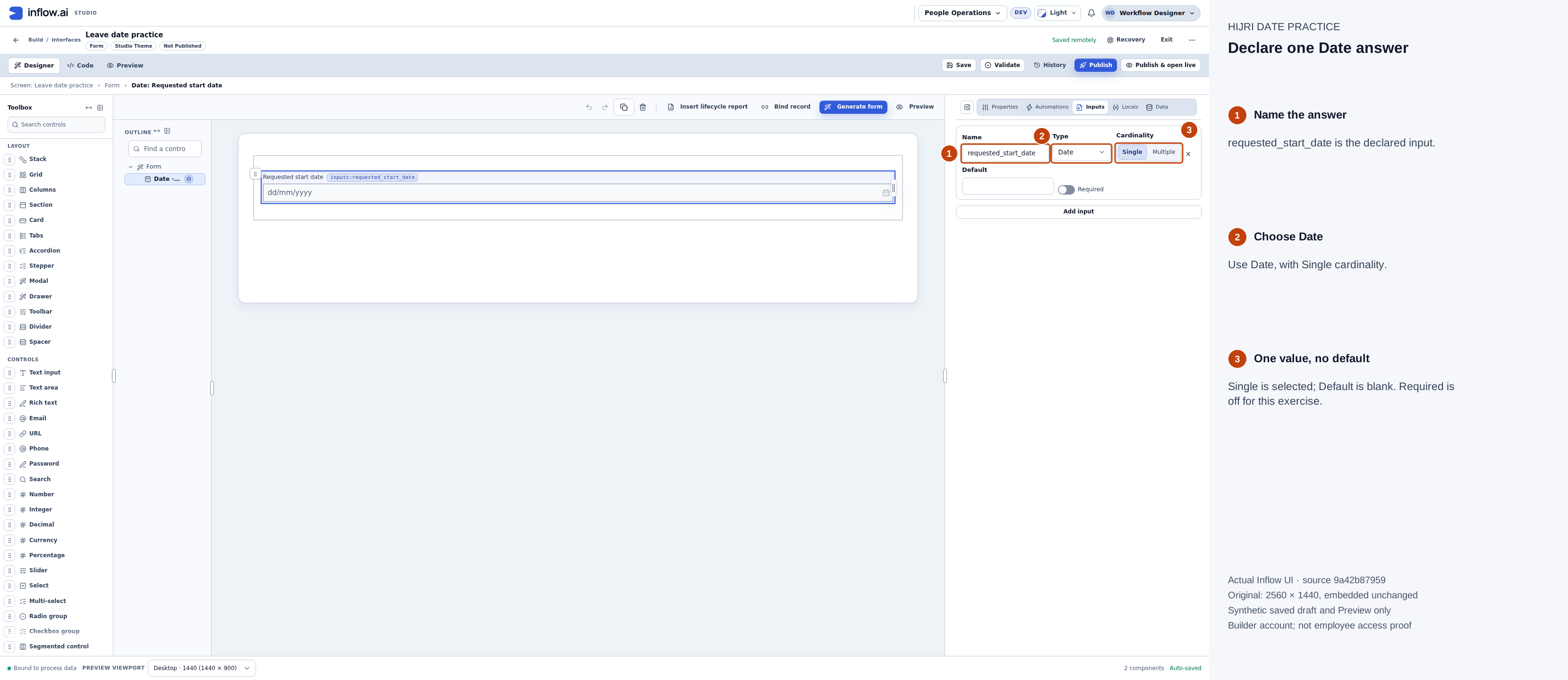
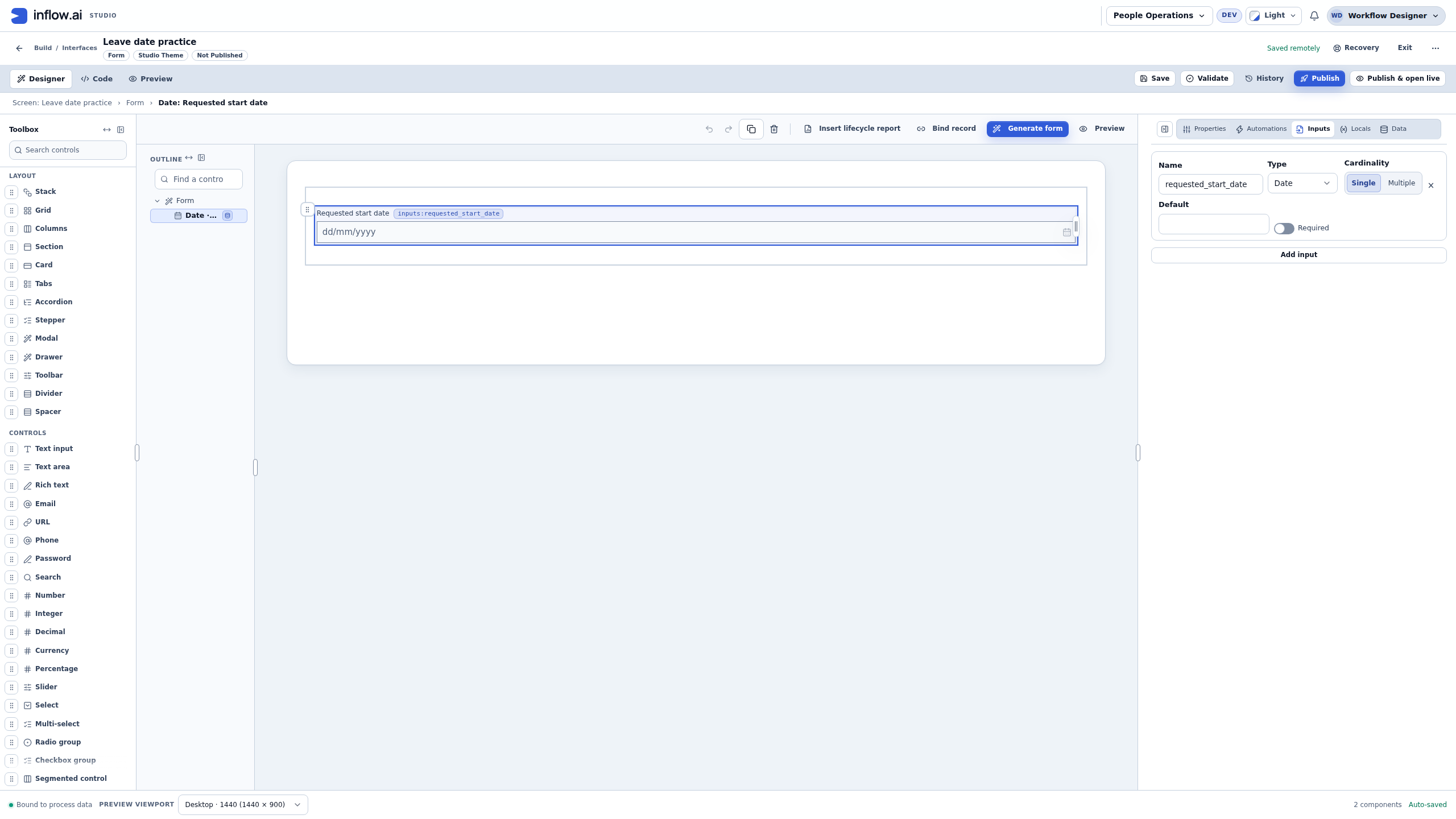
The saved training form has one Date input. Open the original screenshot to inspect the controls without guidance marks.
Set the calendar, format and answer binding
- Select Requested start date and open Properties.
- Set Calendar to UmmAlQura.
- Explicitly set Display format to dd/mm/yyyy for this exercise. If the displayed default already reads that way, select another format and then select dd/mm/yyyy again before saving. An unset format follows the format locale; do not rely on the dropdown's initial label to establish the typing order.
- Optionally set Placeholder to dd/mm/yyyy (Hijri). This is a hint; it does not configure parsing or replace the Calendar and Display format settings.
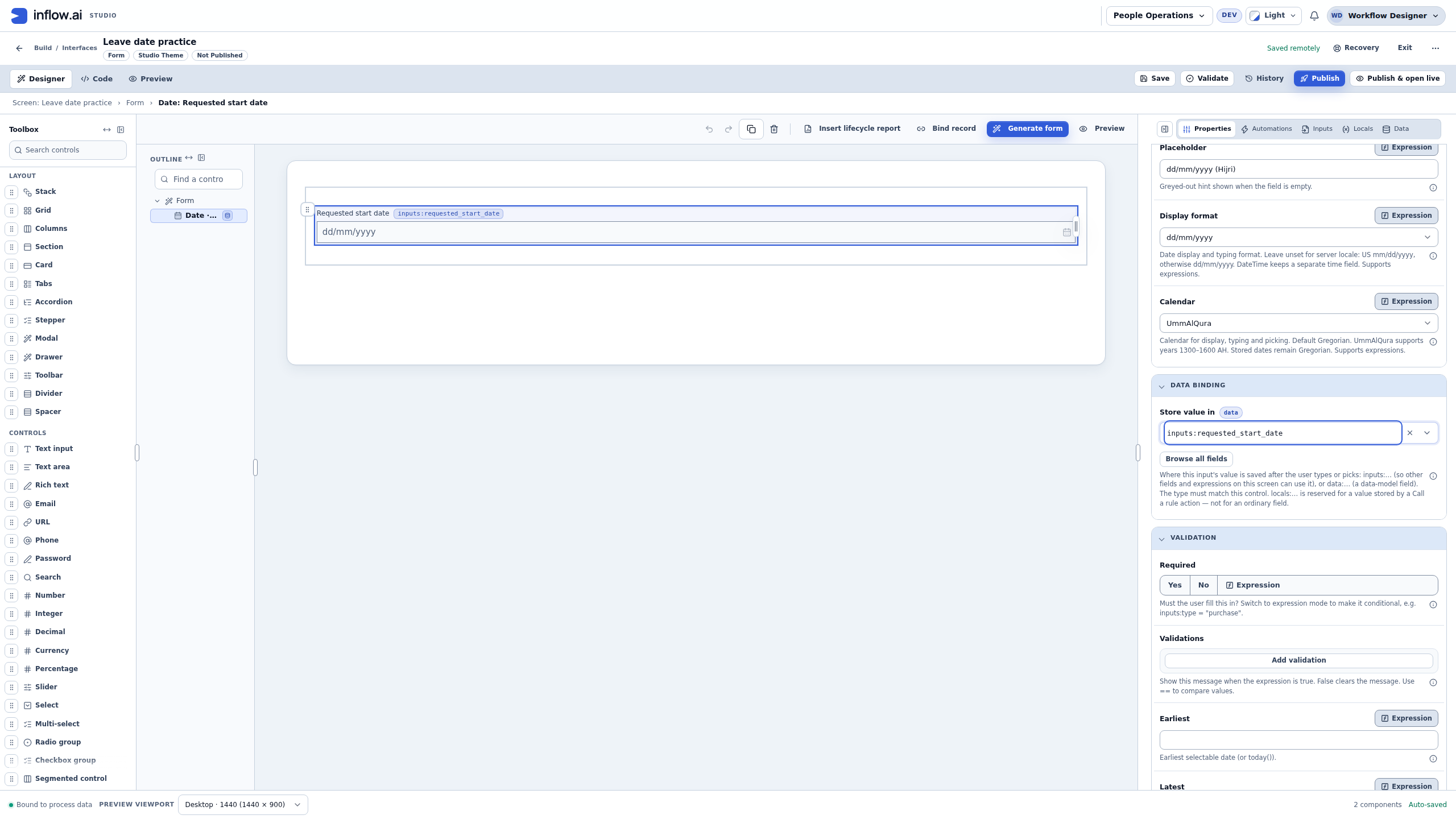
- Under Store value in, choose the declared Requested Start Date input, whose binding is
inputs:requested_start_date. Check that it is the Date input you created, rather than creating an unrelated text value. - Choose Save and Validate. Resolve any reported problem. Reload the saved draft and recheck the calendar, format and binding before testing it.
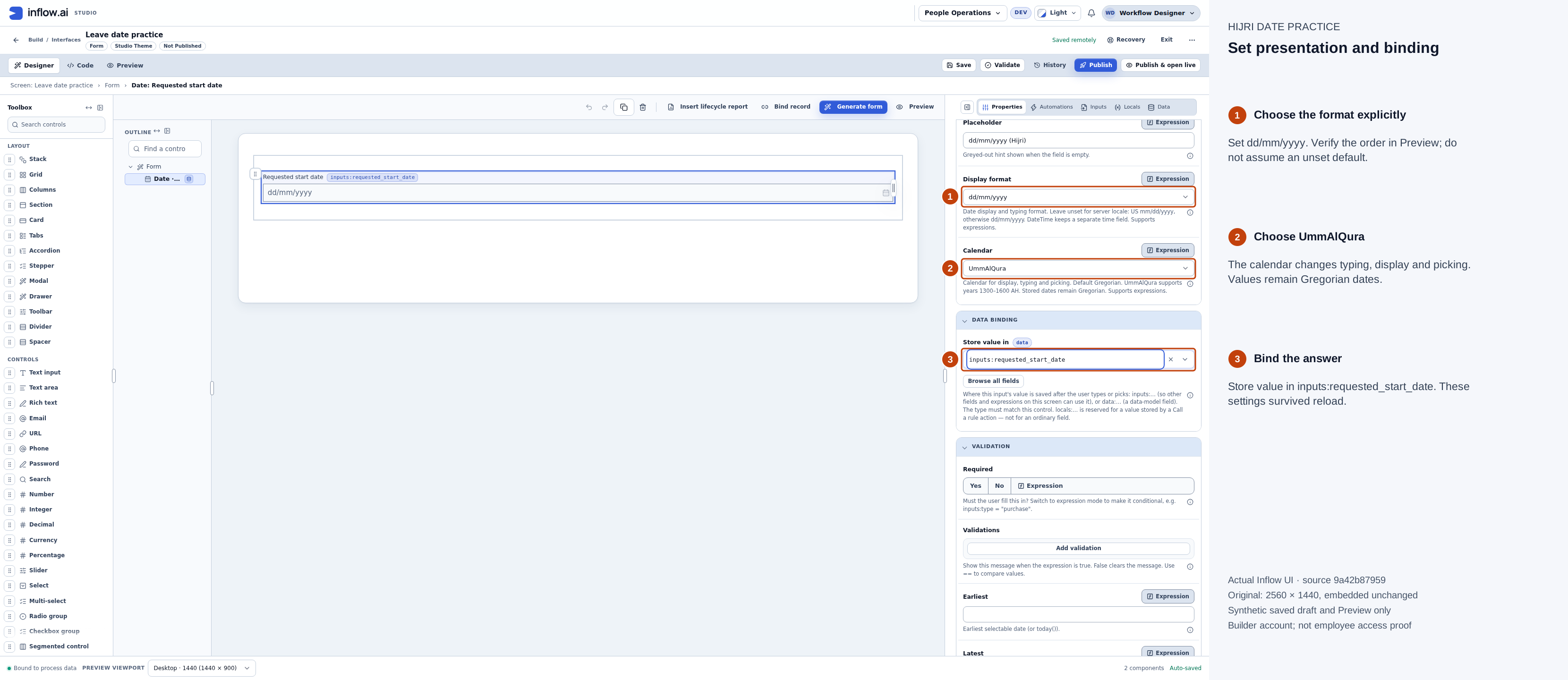
These settings were read again after reloading the saved draft. The Properties panel was widened to make the values readable. Open the original screenshot.
The format check matters. In the initial training attempt, the dropdown displayed dd/mm/yyyy while the unset format followed a month-first locale. Typing 01/09/1447 then meant 9 Muharram, rather than 1 Ramadan. Explicitly choosing the format corrected the practice form. Check the popup's month name and the resulting Date value; a plausible-looking numeric date alone is insufficient.
Compare Hijri entry with the Gregorian Date value
- Open Preview, keeping Interactive selected.
- Type
01/09/1447into Requested start date. With the explicit day-first format, this is 1 Ramadan 1447 AH. - Choose Form state. The training answer appears under
riasrequested_start_date: "2026-02-18". This is the Gregorian Date value for the selected Umm al-Qura date. - Open the field's calendar button. Check that its heading says Ramadan 1447 AH and that day 1 is selected. Close the calendar when finished.
- Choose Check form to check the practice entry. Keep its result separate from a business submission: this form has no submission action, and Preview says that entries stay in this session.
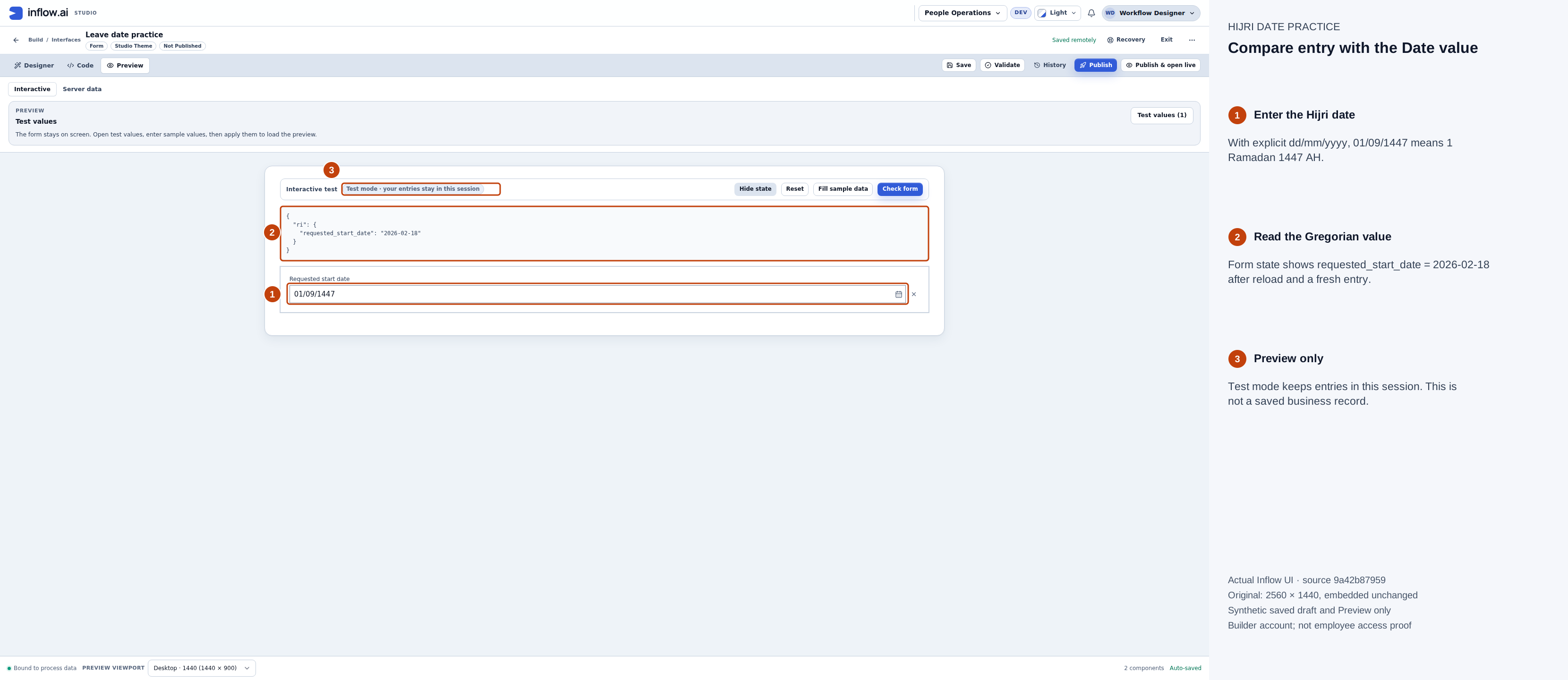
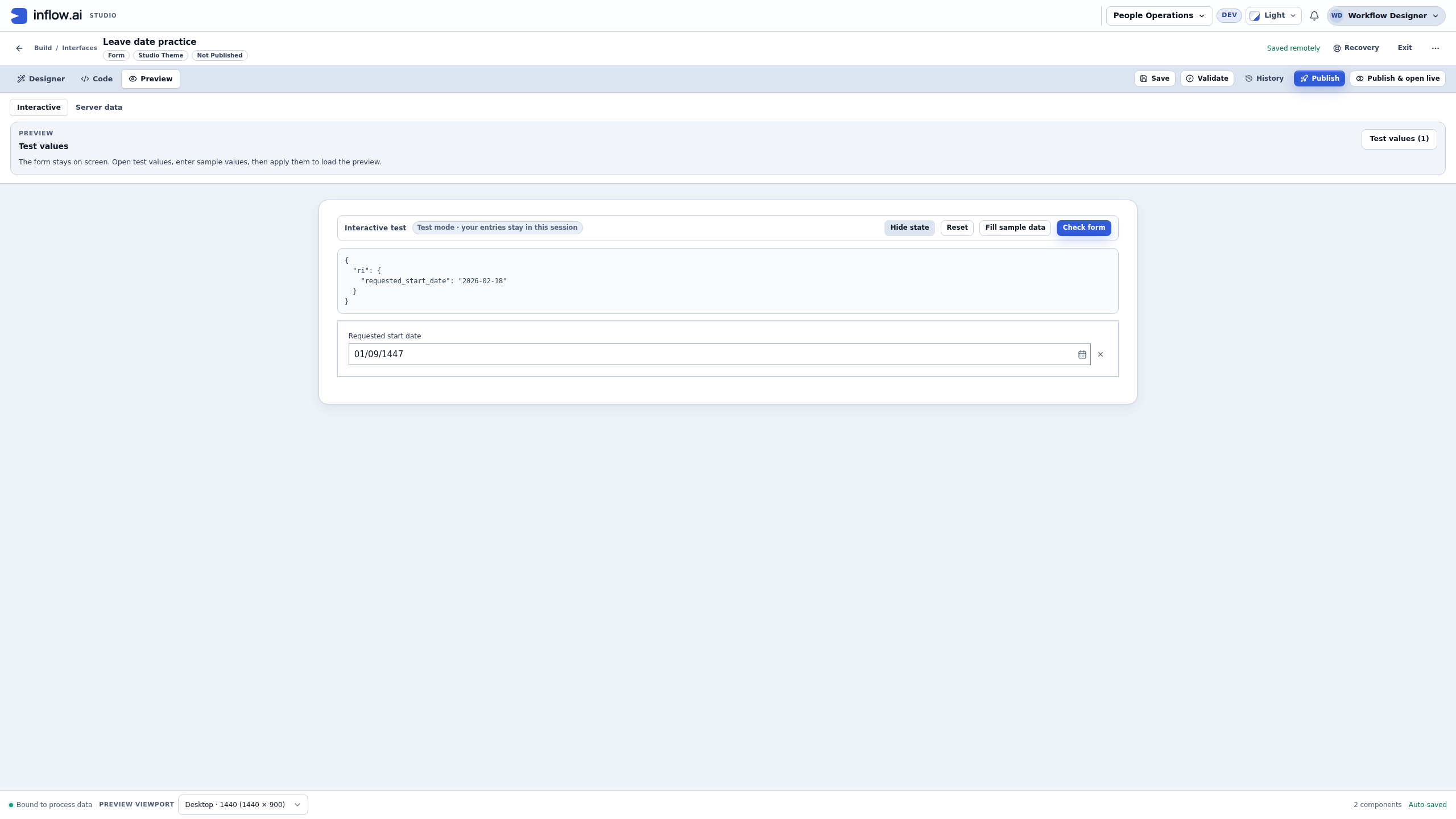
After reload and a fresh entry, the visible Hijri date is 01/09/1447 and the Date value is 2026-02-18. Open the original screenshot.
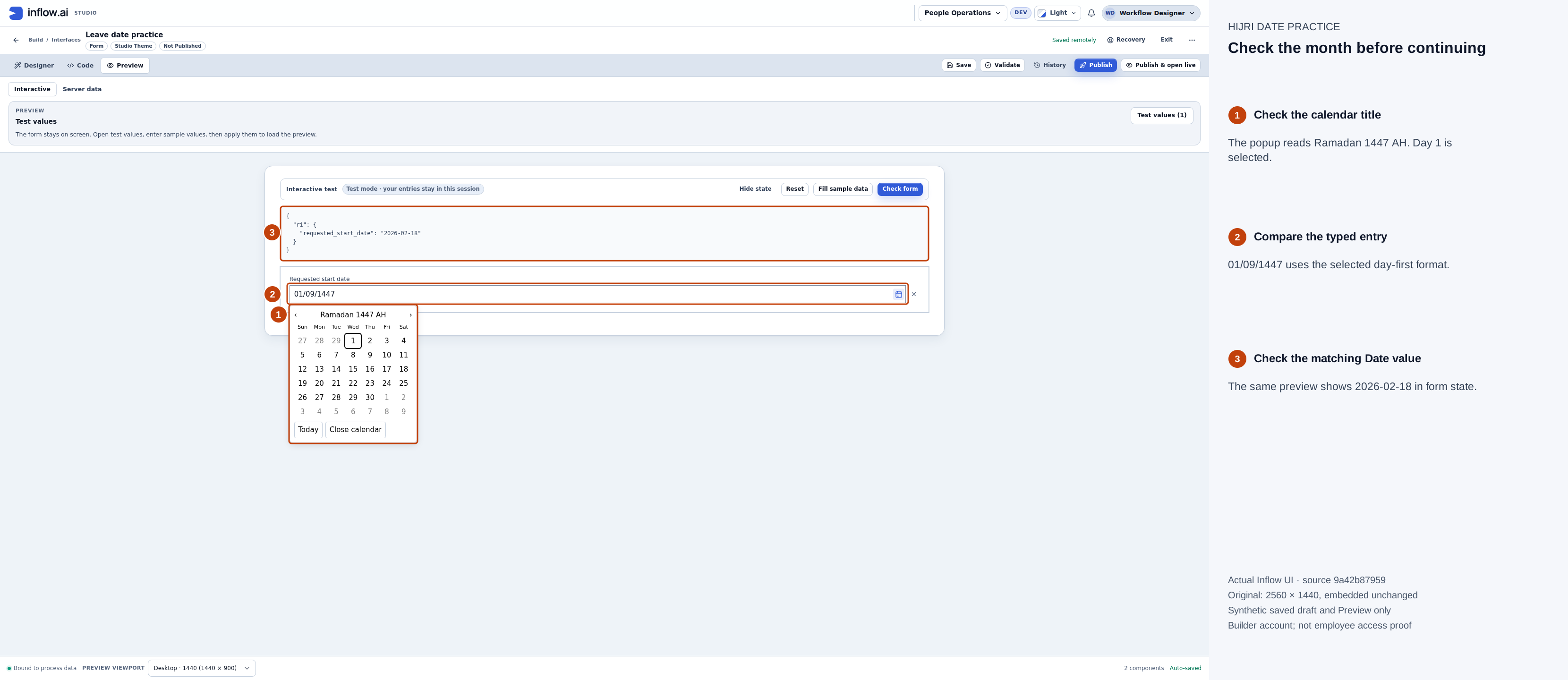
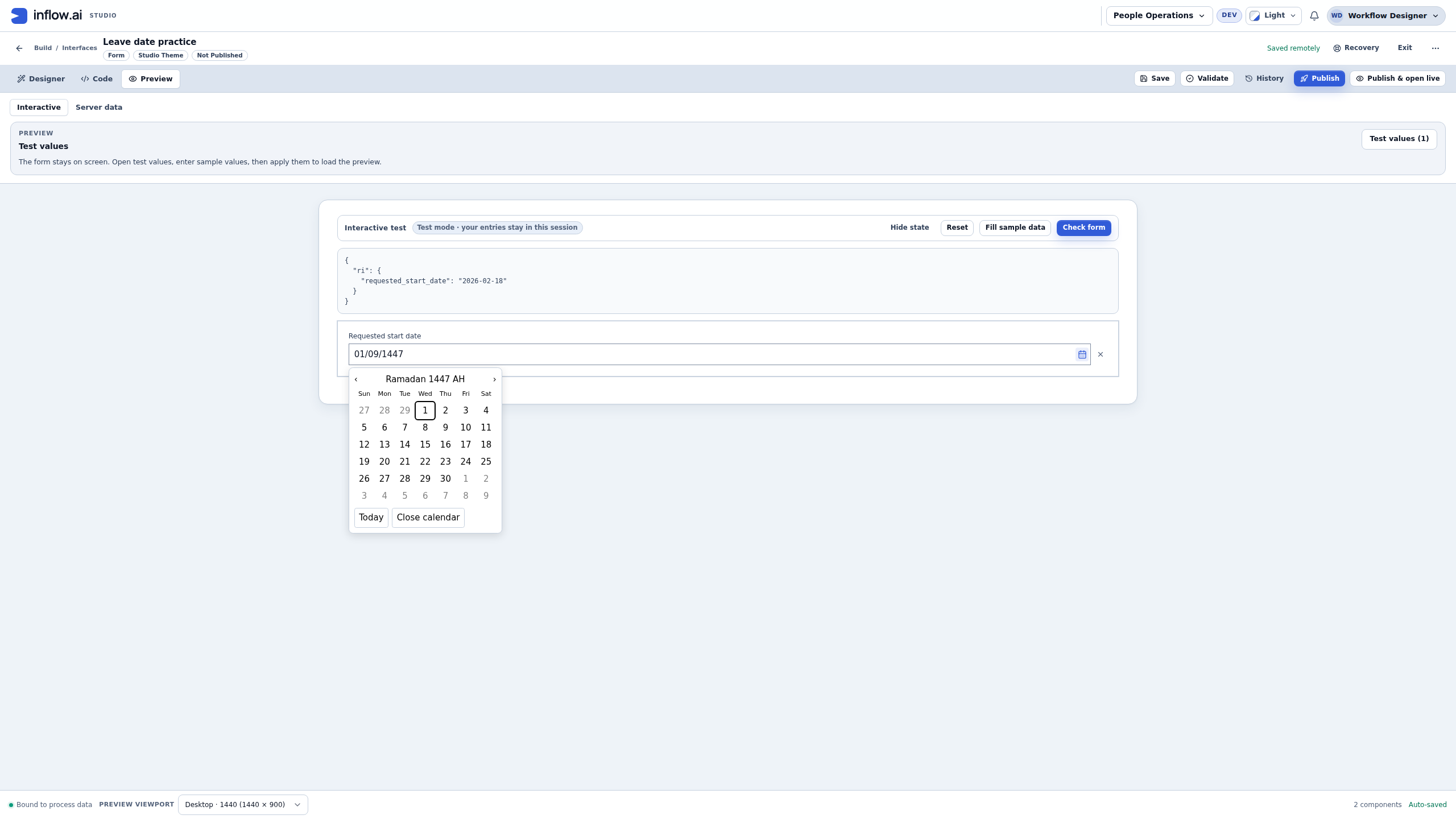
Use the month name to catch a reversed day/month interpretation. Open the original screenshot.
Do not replace the Date answer with a text label such as “1 Ramadan.” The label can be useful for display, but a downstream rule or record field expecting a Date needs the Date value. Saving the form definition saves its configuration; it does not save the sample Preview answer as an employee's request.
Enter an impossible date, then repair it
- Replace the field with
31/09/1447and choose Check form. - Read the issue summary and the message under the field. In this exercise, the field says Enter a valid UmmAlQura date as dd/mm/yyyy. There is no day 31 in this month.
- Notice that the state panel can still show the preceding valid value,
2026-02-18. That is not acceptance of the visible invalid entry. Follow the field error and repair the question before continuing. - Replace the entry with
02/09/1447and choose Check form again. - Confirm that All checks pass appears, the error summary is gone, and the Date value has changed to
2026-02-19.
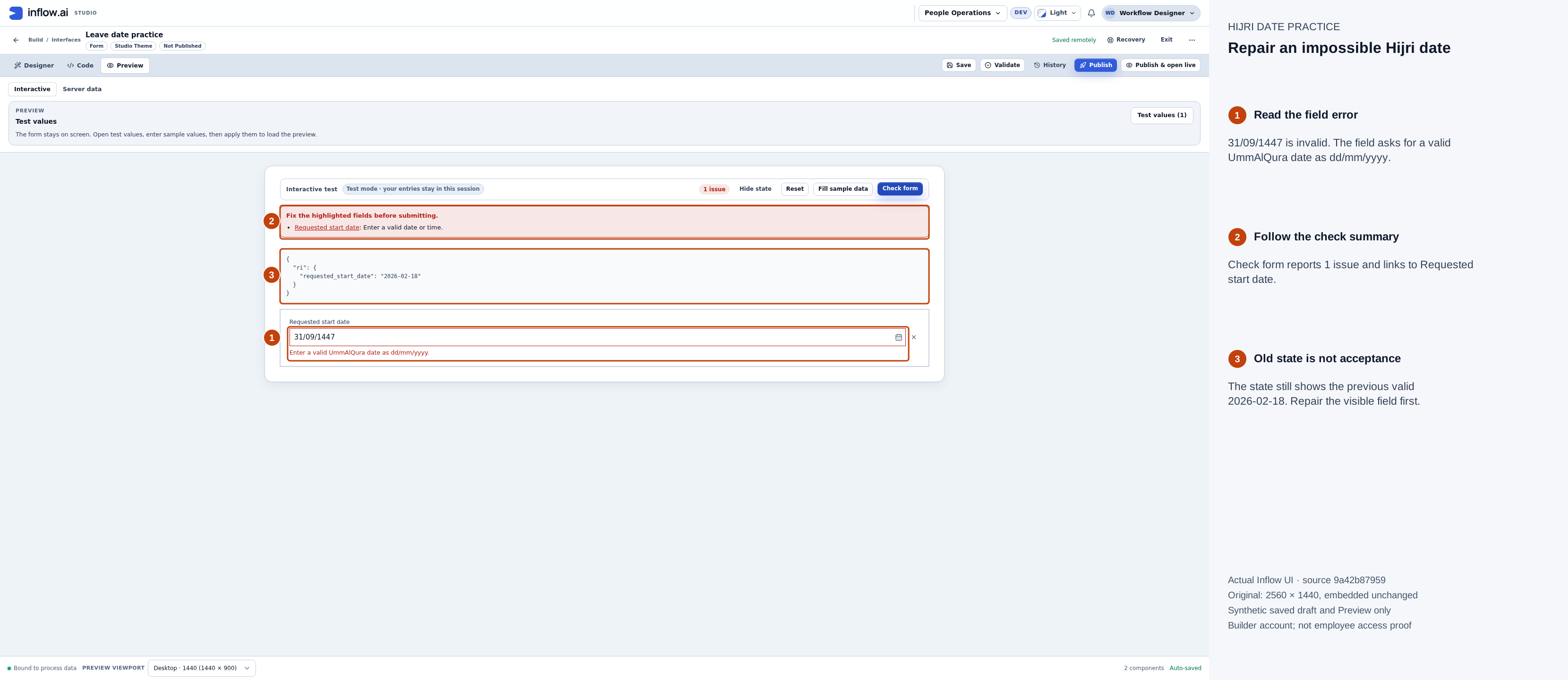
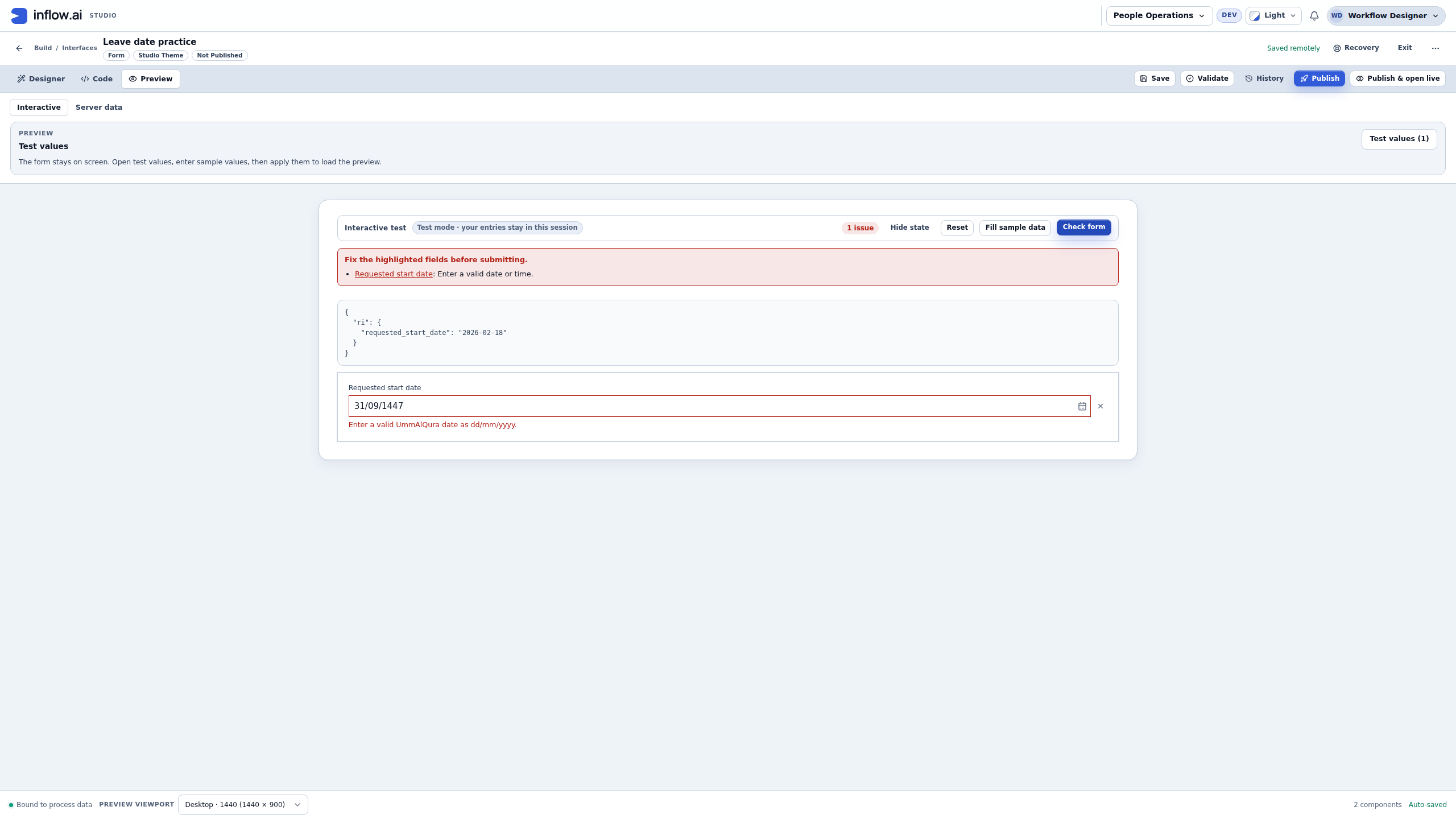
The highlighted field is invalid even though a previous valid Date remains visible in state. Open the original screenshot.
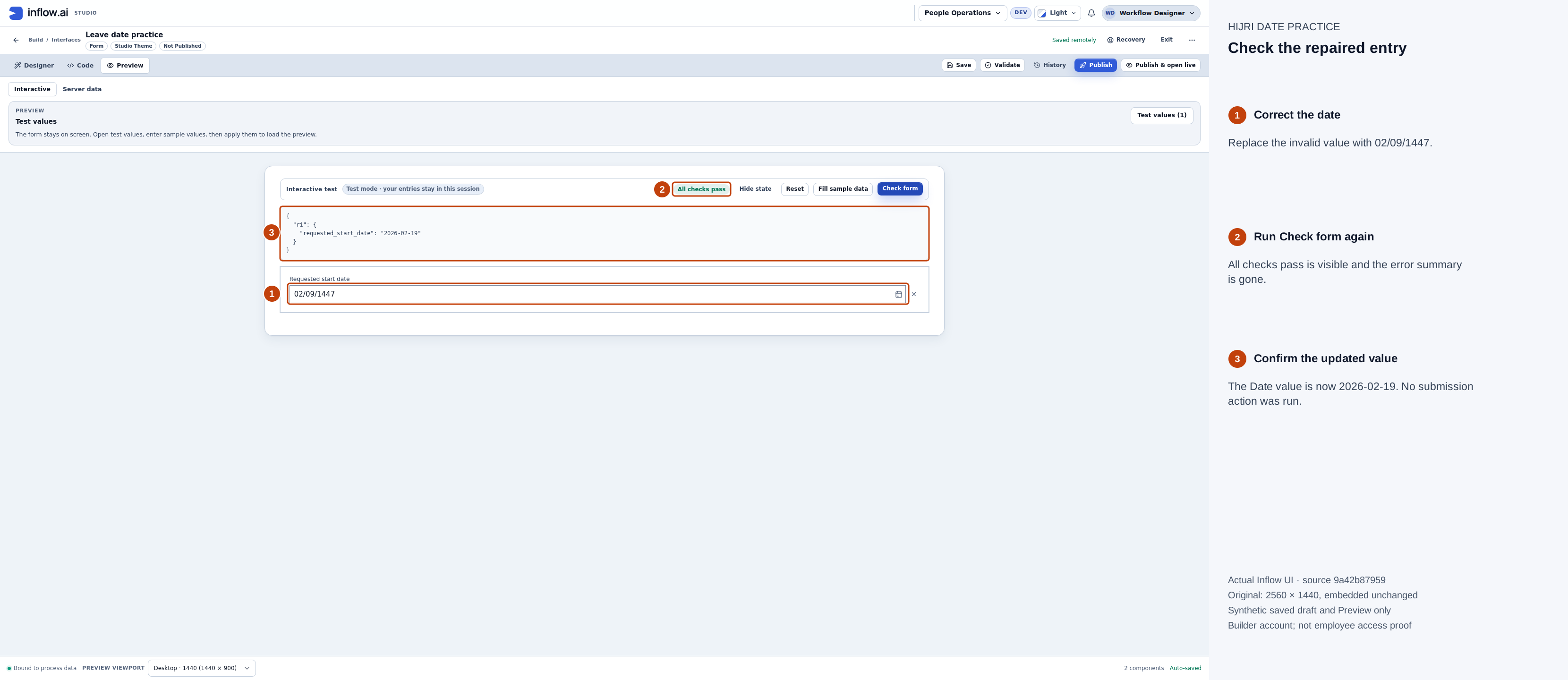
The repaired entry updates the Date value and passes the local form check. This does not establish a published form, saved business record or workflow result. Open the original screenshot.
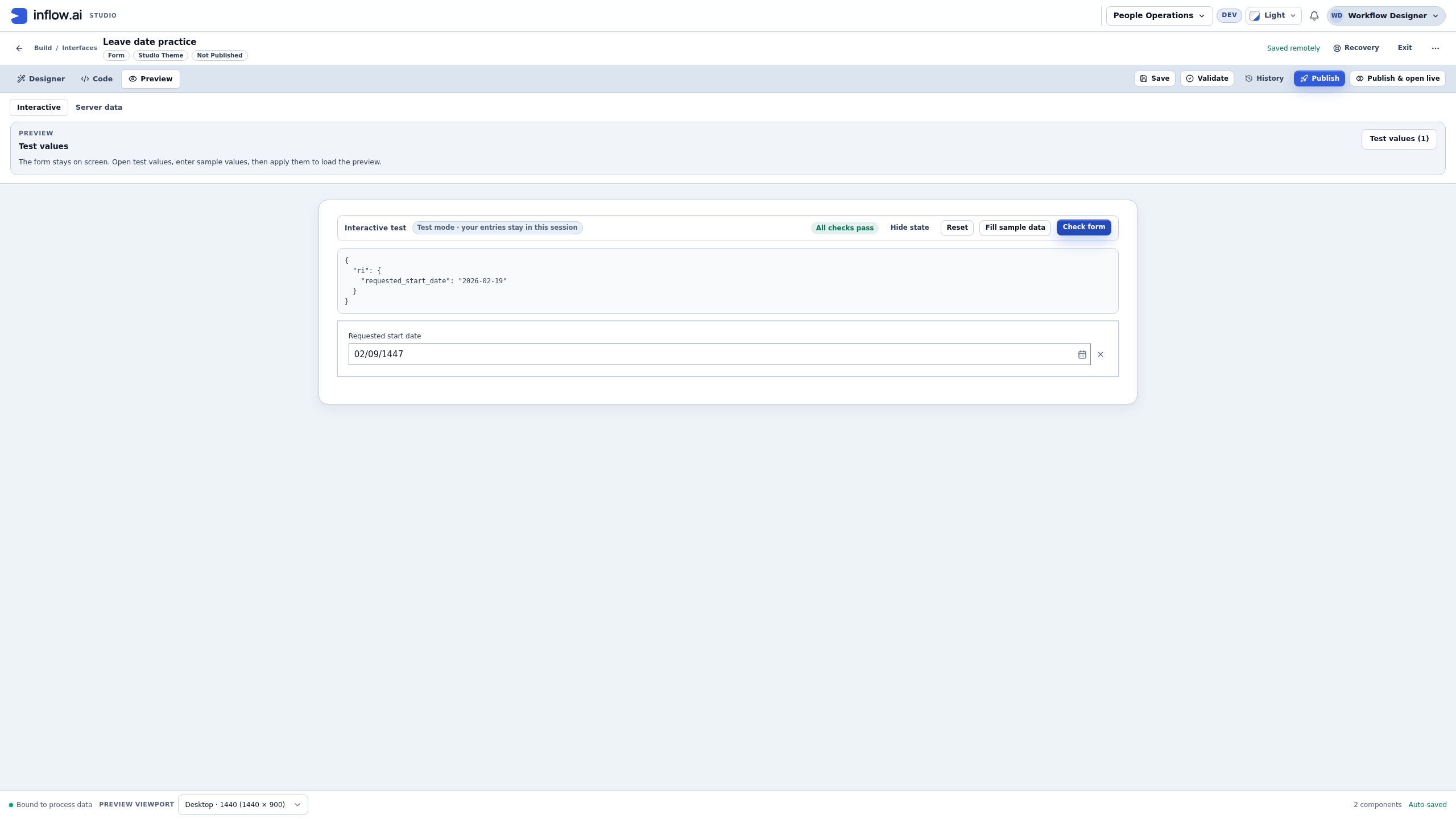
Before handing over a real form, also test its own required-field rule, earliest/latest dates, document language, intended users and normal save/submit workflow. The example's passing check covers this one training control and value, not every date or every application.
Use Hijri dates in a business calendar
A business-calendar maintainer has a different task from someone entering leave. The maintainer defines working periods, holidays and exceptions used by the configured business-time calculations.
- Open the intended calendar that you are authorized to maintain, then its Holidays or Exceptions section.
- When entering a date row, choose Hijri (Umm al-Qura) under Date entry calendar. Enter the From and To day, named month and year. Check the displayed Gregorian equivalent. An impossible day or a year outside 1300–1600 AH must be corrected before saving.
- To import offered public holidays, use Import public holidays, select the country and year, and review the preview before importing. Merely opening the preview does not save dates.
- Imported dates are marked To review. Check each intended date against your organization's approved calendar, edit it where necessary, and use the offered confirmation controls after review. Confirmed records a review decision; an imported date should not be treated as reviewed merely because it appeared in the list.
- Review Islamic holiday dates every year. The interface warns that moon-sighting dates can move by a day. Umm al-Qura conversion alone does not establish your organization's observed holiday.
- Read any in-use/default-calendar warning before applying changes. Business times in reports, including past lifecycle instances, can be recalculated with that calendar. Coordinate a real calendar change with its owner.
The form screenshots above do not illustrate importing, confirming or changing a business calendar. Those operations need their own permissions and review. Do not change a shared calendar just to make a training form's date look right.
Use the built-in Hijri expression functions
The expression language includes 16 Hijri functions. They are core date functions, present on every deployment, separate from installed function packs, and nothing needs to be installed or enabled. Start with a literal example in a test rule, then use declared Date inputs in the finished rule; see writing and testing formulas.
Each function that takes a date accepts either a Date (or ISO date text) or a Hijri record from toHijri, hijriDate, addHijriMonths or addHijriYears.
Convert and read
| Function | What it returns | Small example |
|---|---|---|
toHijri(date) |
A Hijri record containing calendar, year, month and day. | toHijri(date('2026-02-18')) represents 1 Ramadan 1447. |
hijriDate(year, month, day) |
A Hijri record for the specified Umm al-Qura date. A date that does not exist is an error. | hijriDate(1447, 9, 1) creates the record for that Hijri date. |
toGregorian(hijriRecord) |
A Gregorian Date. | toGregorian(hijriDate(1447, 9, 1)) produces 2026-02-18. |
hijriYear(date) |
The Hijri year as a number. | hijriYear(date('2026-02-18')) gives 1447. |
hijriMonth(date) |
The Hijri month number, 1–12. | hijriMonth(hijriDate(1447, 9, 1)) gives 9. |
hijriDay(date) |
The Hijri day of the month. | hijriDay(hijriDate(1447, 9, 1)) gives 1. |
isHijriDate(year, month, day) |
true when the Hijri date exists in the tables, otherwise false. It never raises an error, so it is the check to use on typed parts before hijriDate. |
isHijriDate(1447, 8, 30) gives false, because Shaban 1447 has 29 days. |
Month boundaries and arithmetic
| Function | What it returns | Small example |
|---|---|---|
hijriStartOfMonth(date) |
The Gregorian Date of the first day of the date's Hijri month. | hijriStartOfMonth(date('2026-02-25')) gives 2026-02-18 (1 Ramadan 1447). |
hijriEndOfMonth(date) |
The Gregorian Date of the last day of the date's Hijri month. | hijriEndOfMonth(hijriDate(1447, 8, 1)) gives the Date of 29 Shaban 1447. |
hijriMonthLength(date) |
29 or 30. | hijriMonthLength(hijriDate(1447, 8, 1)) gives 29. |
addHijriMonths(date, months) |
A Hijri record after adding (or, with a negative number, subtracting) calendar months. | addHijriMonths(hijriDate(1447, 11, 10), 3) reaches month 2 of the following Hijri year. |
addHijriYears(date, years) |
A Hijri record after adding calendar years. | addHijriYears(hijriDate(1447, 9, 1), 1) gives 1 Ramadan 1448. |
hijriDiff(from, to, unit) |
The whole number of Hijri "years", "months" or "days" (in any letter case) from one date to another; negative when to is earlier. Part units are dropped. |
hijriDiff(contractStart, today(), "months") counts completed Hijri months. |
hijriAge(birthDate[, onDate]) |
Completed Hijri years on onDate, or today when it is omitted. Because it can read today's date, Inflow treats it like today(): it is not deterministic, so a surface that requires a deterministic expression refuses it. |
hijriAge(birthDate) >= 18 checks the age today. |
The month-end rule. Hijri months have 29 or 30 days. When adding months or years lands on a day the target month does not have, the result is the last day of that month: 30 Rajab 1447 plus one month is 29 Shaban 1447, because Shaban 1447 has 29 days. A contract that must end "on the same day number" should check hijriMonthLength of the target month and decide what its policy wants.
An age on a fixed date. hijriDiff(birthDate, applicationDate, "years") gives exactly the same number as hijriAge(birthDate, applicationDate) and is deterministic, so use it wherever the date is known, for example hijriDiff(birthDate, applicationDate, "years") >= 18.
Which calendar for age. hijriAge counts Hijri years, and the Gregorian dateDiff(birthDate, onDate, "years") counts Gregorian years. A Hijri year is about 11 days shorter, so the two can disagree for people near a threshold. Use the calendar that the regulation or policy names; if it does not say, ask its owner rather than choosing.
Names and display text
| Function | What it returns | Small example |
|---|---|---|
hijriMonthName(date[, locale[, digits]]) |
A month name as text. Arabic is the default locale. | hijriMonthName(hijriDate(1447, 9, 1), 'en') gives Ramadan. |
formatHijri(date, pattern[, locale[, digits]]) |
Formatted text, Arabic by default. | formatHijri(hijriDate(1448, 5, 15), 'd MMMM yyyy') gives 15 جمادى الأولى 1448. |
- Locales. Inflow reads the language of the locale tag, so
"ar-SA"is Arabic and"EN"or"en-US"is English with the names above. Another language the server knows, such as"fr", uses its own names. A tag that is not a language, such as"xx"or an empty text, gives the older English names (Jumada I), as it always has; check the spelling if you see them."ar"(the default) gives Arabic names such as «جمادى الأولى»."en"gives the English names used by Saudi government sites: Muharram, Safar, Rabi al-Awwal, Rabi al-Thani, Jumada al-Ula, Jumada al-Akhirah, Rajab, Shaban, Ramadan, Shawwal, Dhu al-Qadah and Dhu al-Hijjah."en-jdk"keeps the older English names (for exampleJumada I) for a rule that already depends on them;"en"gave those names before November 2026. - Digits. Numbers are written with Western digits (
15 … 1448) unless you ask for Arabic-Indic digits with"arab":formatHijri(hijriDate(1448, 5, 15), 'd MMMM yyyy', 'ar', 'arab')gives١٥ جمادى الأولى ١٤٤٨. Where thecastfunction is available (it comes with a function pack), the option can also be an Object,cast([["digits", "arab"]], "Object"); otherwise use the text"arab"."latn"asks for Western digits explicitly. Any other value is an error. - Patterns. Common letters are
d/dd(day),M/MM(month number),MMMM(month name),yyyyoryy(year),G(era: «هـ» orAH) andEEEE(weekday name). Put fixed words in single quotes:formatHijri(d, "d 'of' MMMM yyyy G", "en")gives15 of Jumada al-Ula 1448 AH. A pattern that asks for a time, such asHH:mm, is an error, and so is a pattern longer than 1,000 characters. The pad letterppads the next value to its width (ppdgives7and15); a value wider than the pad is an error, sopdworks for days 1 to 9 and fails from the 10th. Use as manypletters as the widest value needs, or none. Avoid the narrow month lettersMMMMM: in Arabic they print the month number in Arabic-Indic digits even when you did not ask for them.
hijriDate returns a record, not the application's Date type. Use toGregorian when a Date input or record field needs the converted result. formatHijri returns display text; it is not a replacement for a Date in comparisons or persistence. Adding a Hijri month is calendar arithmetic, not adding a fixed number of days.
Range and moon sighting. Every function covers Umm al-Qura years 1300–1600 AH (about 1882–2174). A date or a result outside that range is an error saying so, except isHijriDate, which answers false. A day the month does not have is explained as such: hijriDate(1447, 8, 30) says that Hijri month 8 of 1447 has 29 days. Month and year counts must be whole numbers. Umm al-Qura is the official tabular calendar. Dates that depend on moon sighting, such as the first day of Eid, can differ from it by a day; keep observed holidays in a business calendar, as described above.
The same answer in Studio and on the server. The rule editor's local preview evaluates all 16 functions with the same results as the server, and a test compares Studio's calendar with the server's for every day from 1300 to 1600 AH. The local preview formats the pattern letters listed above in Arabic, English and "en-jdk". For another letter or language it says the expression is evaluated on the server; use the rule's server-backed Test for those. A browser without Umm al-Qura calendar data gets the same message rather than a date from another calendar.
Recover from common surprises
| What you notice | What to check |
|---|---|
| A typed date opens in the wrong Hijri month. | Explicitly choose the format, save, reload and repeat Preview. Check the month name and Date value, not just the numeric spelling. |
| The field reports an invalid UmmAlQura date. | Check the selected format, actual days in the month and the supported year range. Correct the field even if state still shows an older valid value. |
| The form displays a Hijri date but a rule or record shows a Gregorian date. | That is the Date storage contract. Compare the calendar conversion; do not assume the value was corrupted or convert it a second time. |
| A date is valid but is blocked by the form. | Check the form's own earliest/latest, past/future and required-field rules. Calendar support does not override them. |
| A local expression preview says a pattern is evaluated on the server. | The preview formats the common pattern letters in ar, en and en-jdk. Test the rule through its server-backed Test for any other letter or locale. |
An English month name changed, for example from Jumada I to Jumada al-Ula. |
"en" (and "EN" or "en-US") now gives the agreed names. Use "en-jdk" where a document must keep the older names. |
| An Arabic letter shows English month names. | Check the locale text. "ar" and "ar-SA" are Arabic; a misspelt tag falls back to the older English names. |
| A day 30 is refused, or a contract end date lands on day 29. | The Hijri month has 29 days. Use isHijriDate to check typed parts, and the month-end rule above for arithmetic. |
| Holiday import says the workspace is being changed by a deployment. | Keep your intended changes and retry after the deployment finishes, or ask a deployment administrator. A deployment hold is different from another person editing the calendar; do not reload or overwrite a draft just to bypass it. |
| An imported Islamic holiday is still To review. | Check the approved observed date for that year and confirm it through the calendar's authorized review flow. A conversion result does not confirm a holiday. |
Hand over a date feature people can trust
Show the form owner one valid entry, one invalid entry and a repaired entry. Have them verify the typing order, month name, Gregorian Date value, language and normal business save/submit result using the intended users. For business calendars, include the owner who confirms observed holidays. For formulas, record which evaluator and test path were used.
The six figures are actual 15 November 2026 captures of source 9a42b87959, with the original 2560×1440 screenshots embedded unchanged in the numbered guidance. The capture used a normal-login builder with workspace Editor access and an administrator-class account. It does not prove ordinary employee access controls. Capture metadata and image hashes preserve that scope.