App Shell Chat Guide (SCRUM-4885)
This guide covers publisher configuration, end-user workflows, and operator governance for App Shell Chat (SCRUM-4885 / SCRUM-4886–SCRUM-4897).
For provider capability routing, the six server-validated record/task tools, request bounds and fallback behavior, see the App Chat tool-calling technical reference.
1. Publisher Guide: Enabling & Configuring App Shell Chat (SCRUM-4887 / C01)
App Shell Chat is configured per App Shell under appShell.chat and is disabled by default:
- Legacy App Shells without
appShell.chator withenabled: falserender no chat launcher and issue zero chat requests. - Saving a draft in the Studio Interface Designer does not expose chat to live application users until the App Shell is explicitly published.
- Publishers can configure (
conf/screen-language/screen.schema.json$defs.appShellChat,AppShellChatConfiginstudio/frontend/src/features/screens/types.ts):- Enable Chat (
enabled): Toggle whether the published App Shell exposes the floating[App] Chatlauncher (default: false). - Launcher Label (
label, or legacy aliaslauncherLabel): Optional business display name (maxLength: 80) validated byDisplayNamePolicyand stripped of bidi/control characters (defaults to<App Title> Chat). - Welcome Message (
welcomeMessage): Optional introductory guidance (maxLength: 500, stripped of bidi/control characters). - Allowed Source Bindings (
sourceBindings, or legacy aliassources): Explicit allowlist of publishedRECORD_TYPE,GUIDANCE_DOCUMENT,PROCESS_GUIDANCE,INTERFACE_HELP,TASK_INBOX(or legacy aliasesREPORT_DEFINITION,TASK_QUEUE) sources (bindingId/sourceId,sourceKind,targetRef/targetKey,displayLabel,operations: ["READ" | "SEARCH" | "RETRIEVE" | "AGGREGATE" | "ACT"], and optionalpinnedVersion/publicationVersioninteger>= 1). Source bindings only narrow what chat may consult; they never grant permissions beyond the signed-in user's domain access. - Allowed Action Bindings (
actionBindings, or legacy aliasactions): Explicit allowlist of published actions (actionId,actionKind:TASK_COMPLETE/TASK_DECISION,TASK_COMMENT,RECORD_CREATE,RECORD_UPDATE,PROCESS_START,FORM_SUBMIT/PUBLISHED_FORM_SUBMIT,targetRef/targetKey,displayLabel, andconfirmationRequired: true). Every mutating action requires explicit confirmation (confirmationRequired: true).
- Enable Chat (
Publisher setup visual
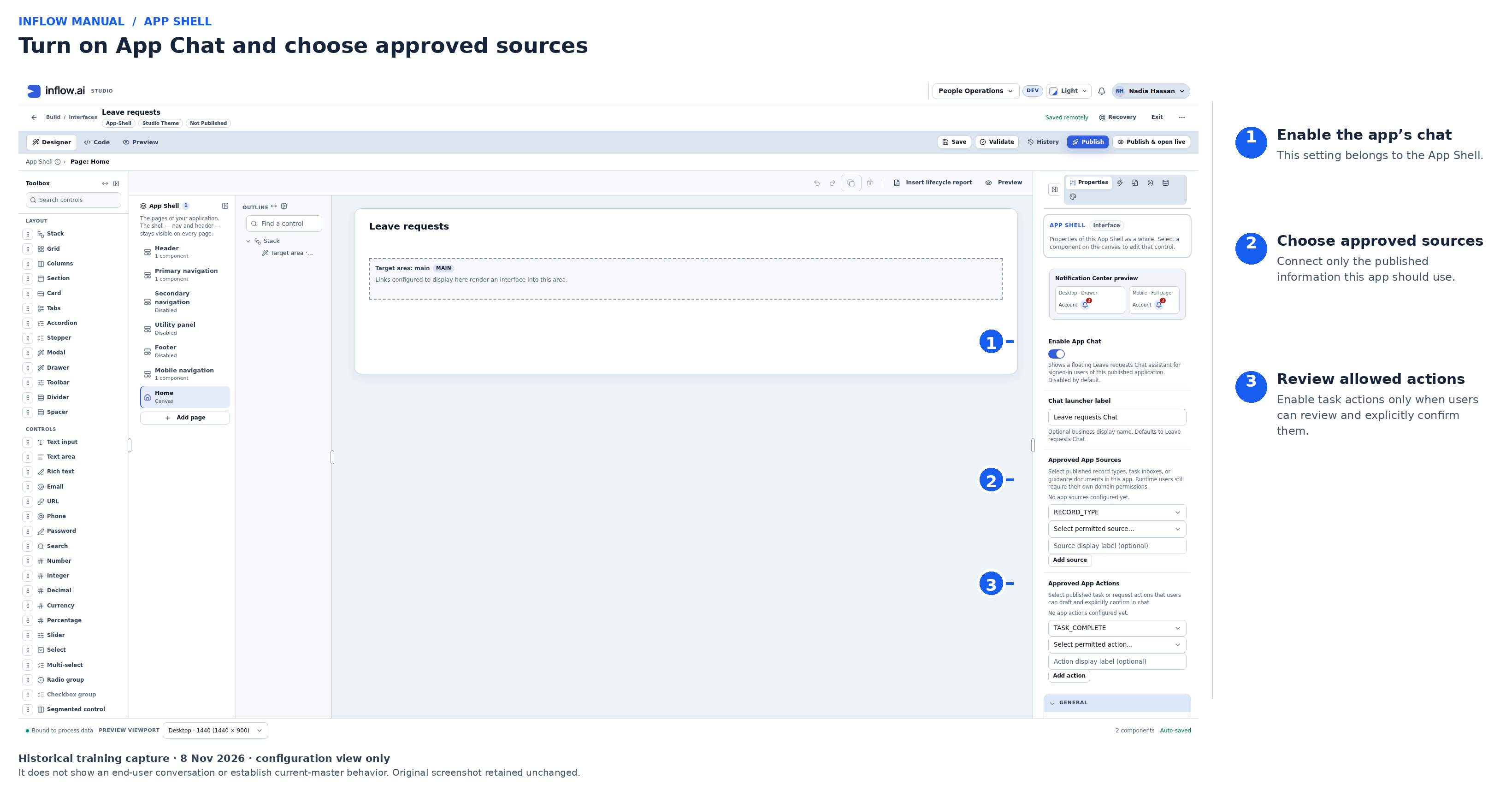
Historical Studio configuration capture from 8 November 2026; the original screenshot is unchanged and the numbered overlay is an editorial annotation. It is not current-master or end-user chat evidence. In this draft, (1) turns on the App Shell's launcher, (2) is where the publisher selects information the app may consult, and (3) is where the publisher selects actions that users may propose for explicit confirmation. The displayed draft is not published and has no sources or actions configured, so this image does not show a usable chat experience.
2. End-User Guide: Using [App] Chat (SCRUM-4888–SCRUM-4896)
Opening, Navigating, and Preserving Work (C02)
- Permitted signed-in users see a single floating
[App] Chatbutton in the bottom corner of an enabled published App Shell. - Opening, expanding, or closing the chat overlay panel preserves the current page route and any unsaved form edits.
- Navigating between pages inside the same published App Shell keeps the active conversation intact; switching workspace, application, publication, or user account clears the panel context immediately.
Record Questions, Guidance & Source Citations (C04, C07, C08)
- Questions about current records, balances, and totals use publication-pinned
DataRecordReadServicereads and exact aggregates (AppRecordTools), never vector approximations. - With a tool-capable provider, App Chat can choose among six bounded operations: search matching records, count matches, aggregate a disclosed numeric field, read one record by key, list the signed-in person's open tasks, or prepare a configured action proposal. Calls execute against current App Shell source bindings and the signed-in person's authorization; they are not arbitrary database access. Search accepts at most 20 requested results and the model sees at most 40 record/task rows across one turn. If more rows exist, the result is marked as incomplete rather than silently presented as a complete list. Exact count/aggregate requires the source's AGGREGATE operation. An action proposal is draft-only and still requires explicit user confirmation.
- Search filters use fields and declared values from the bound source schema. The server rejects undeclared fields or values, unsupported operators and non-disclosable fields before a read. A routing refusal before provider dispatch uses the earlier conservative query path. A model's first reply may instead be plain or unfinished when it does not follow the tool protocol; a repeat refusal pauses tool use and routes that turn through the conservative path. Users may need to clarify a field or value. Do not describe a fallback as a complete search unless its admitted evidence supports that claim.
- App Chat can carry a clear follow-up from the prior answer forward. If the first answer was an exact count, however, that scalar does not contain the rows: “Which request is longest?” requires a new bounded search of the same connected source and filter, under current permissions. The assistant answers from the newly returned rows, states when the result is partial and asks only when two interpretations remain equally likely. Prior context never grants access to a different record.
- Action-target follow-ups use a stricter rule than ordinary questions. When a current record is open, “Approve this request” stays unresolved if that record does not support the configured action; the assistant must not substitute another task or older answer. For “approve it” after an answer about one record, a task action can match the record to the signed-in person's open task through access-checked lookup results from bound readable sources. A unique result may contribute a link; an ambiguous or failed source lookup contributes no match and does not prove that no competing record exists. One matching task in a complete task list can be used to prepare a draft. Multiple linked tasks, or even one linked task from a possibly incomplete list, require the user to choose; if no link is returned, App Chat uses the usual open-task candidates. The server—not model inference—resolves that task/record link and rechecks current authorization. Review the exact proposed task before confirming.
- Questions about published policies and handbooks retrieve bounded evidence (
<= 50candidates,<= 8chunks,<= 4,000chars/chunk,<= 20,000total chars) from the active derived index generation (AppGuidanceRetriever). - Factual claims may include a compact Sources row of short source chips (
AppChatSources.tsx). A chip label identifies the cited source; the row does not display a pinned version/revision or the retrieved passage. As of is the latest observation time among currently available citations, not a publication or policy revision date. Selecting an available chip rechecks source availability and follows a permitted destination when one is returned. If the source is no longer available, the chip changes to the neutral Not available label; do not treat the label or timestamp as proof that the source is current or applicable. - A task citation chip can use the task subject, such as an employee name, when that value is among the task's AI-disclosable fields. It remains a short evidence label, not a unique task identifier or a full list: two task references from the same inbox with the same label may be collapsed into one chip. Use Your tasks and the current task card to identify and review the exact task before deciding.
Human Tasks & Confirmed Request Drafts (C09, C10, C11)
- Authorized task notifications appear as a badge on
[App] Chatwithout stealing focus or auto-opening the panel. - Task cards (
AppTaskCard.tsx) project the pinned task form (PinnedTaskForm.projectForChat), preserving0andfalsevalues, showing up to 40 fields by default with explicitShow remaining fieldscontinuation, listing attachments as references only, and routing unsupported required controls to the ordinary task form. - Task decisions and conversational request drafts (
AppActionDraftService) require explicit user confirmation of the exact action, target, revision, and required fields (including required decision reasons), enforce one-flight deduplication, and reconcile canonical completion receipts. - Confirmation has two different failure states. Not sent. Nothing was changed. Try again. means the server reports no dispatch; the same proposal remains confirmable. Recheck the target and values before retrying. Outcome not confirmed means an action may already have been sent: choose Check status, then verify the ordinary permitted task or record and its receipt before taking another action. Do not blindly confirm an uncertain proposal again.
- For a task comment, the same proposal carries one stable comment identity. If the comment was saved but its App Chat receipt failed, status checking happens first; recovery of that unchanged operation returns the existing comment instead of adding another. Do not alter the target or text or create a replacement proposal while the original outcome is uncertain.
- If the same comment identity is presented with changed text, App Chat reports Outcome not confirmed, not Not sent. Check the task and status; that conflict does not establish that nothing was written.
- After a confirmed task decision or comment, the receipt uses a human-readable outcome and, when available, the person/task labels—for example, Approved: Huda Nasser · Approve leave request or Comment added: Huda Nasser · Approve leave request. It does not show an action ID or task ID; use the task's authoritative state to verify the business result.
3. Operator & Security Guide (SCRUM-4886, SCRUM-4891, SCRUM-4892, SCRUM-4897)
- Trusted Context & AI Disclosure (
C03,C05): Server context (DefaultAppChatService,AppChatExecutionScope) resolves actor, workspace, App Shell key, and publication version exclusively from authenticated server state.AppChatDisclosurePolicystrips PII, secret, and non-exportable fields before any prompt, embedding, rerank, index write, or log event. - Derived Source Index & Retention (
C06): Managed via migration000419_app_chat_source_index.up.sql(app_chat_source_index_generations,app_chat_source_index_chunks). Runtime auto-DDL is disabled. Tombstoned and superseded generations are tracked with monotonic revision watermarks and purged after retention expiry. - Conservative History Lineage (
C08): Every assistant turn records both cited and uncited contributing sources (AppChatLineageService). If any contributing source is later revoked or deleted, the entire dependent historical turn block is withheld before display or model reuse. - Outage & Kill Switch (
FR-031): Operators or publishers can disable chat per App Shell immediately; embedding/index or provider outages degrade gracefully with truthful notices while keeping the ordinary application and exact record views operational. - Observability & Audit Redaction (
FR-030): Append-only audit events (AI_GATEWAY_CALL_SUCCEEDED,AI_GATEWAY_CALL_FAILED,TASK_COMPLETED,FORM_SUBMITTED) log workspace, App Shell key, publication version, source pins, and operation/proposal IDs — never secrets, credentials, or restricted field values.