
Optional technical reference. This material is for developers, integration specialists and platform administrators. For the consultant lesson, read the practical guide.
Preserved from source baseline
d4587c7c0e073e58c2d430342f65ac55dd701bf4; source/static examples retain their stated scope. They are not new runtime verification or required consultant setup steps.
Current operator notice — 17 November 2026
Use your deployment's approved authenticated operator identity for the current routes below. The retained X-Actor-Id: root samples further down are isolated development examples. That header names an actor only when the explicit development trusted-header mode is enabled; it is not a production credential or an authorization grant. Production authentication policy disables trusted-header and HTTP Basic conveniences. Do not change that policy to make a historical sample work.
In the development trusted-header branch, a login-session cookie already carried by the browser determines the identity. An invalid cookie is refused rather than replaced by the actor named in the header. This is a rule for that branch, not a claim that cookies override every credential. A nonblank X-Api-Key header is checked before the trusted-header branch; API-key dispatch through Authorization: Bearer follows that branch. Do not assume a bearer API key takes precedence over a development actor header. Keep one intended approved authentication route and verify the resulting identity. Do not try to switch people by adding an actor header to a signed-in browser.
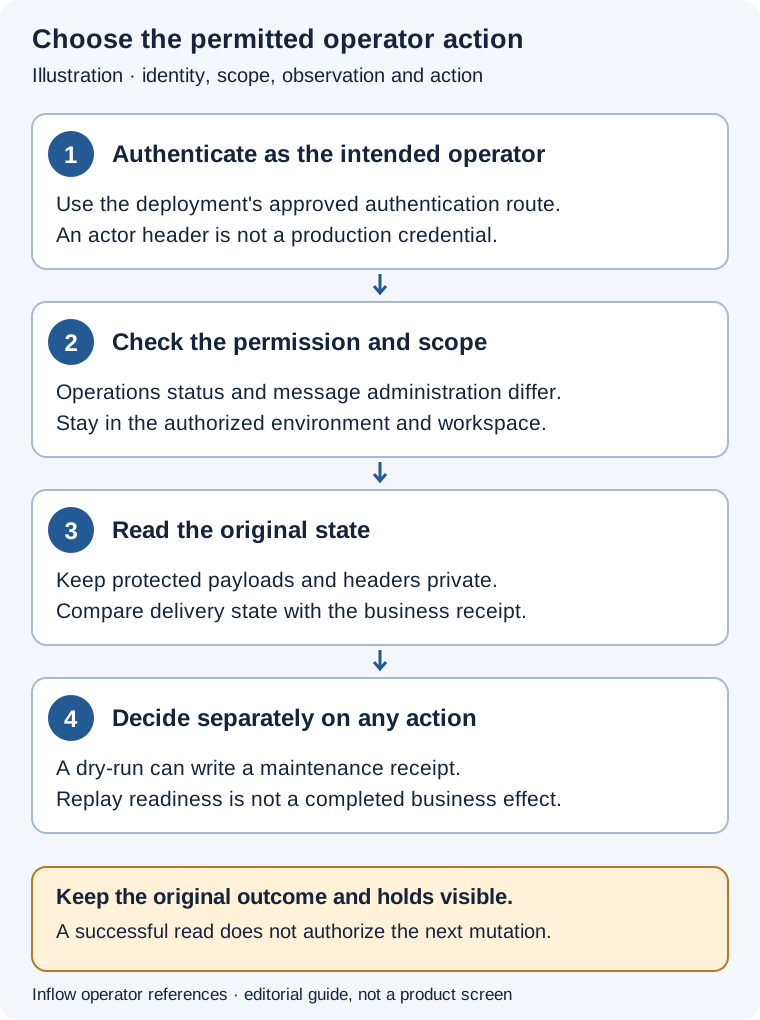
Editorial guide, not an administration screen. Reading a policy, running a maintenance dry-run and deleting archives are distinct operations.
Choose the operation by its actual effect
Use these routes through the approved authenticated operator client:
- Policy read:
GET /api/operations/maintenance/log-retention/policy - Last-run read:
GET /api/operations/maintenance/log-retention - Archive dry-run:
POST /api/operations/maintenance/log-retention?dryRun=true - Archive deletion:
POST /api/operations/maintenance/log-retention?dryRun=false
| Operation | Required access | What the result means |
|---|---|---|
| Policy read | OPERATIONS_VIEW |
Read the policy held by this service instance. |
| Last-run read | OPERATIONS_VIEW |
Read the recorded last maintenance run, if one exists. |
| Archive dry-run | * plus the applicable maintenance authorization |
Count eligible archive files without deleting them; persist a maintenance-run receipt. |
| Archive deletion | * plus the applicable deletion authorization and hold review |
Attempt deletion of eligible archives; inspect the resulting receipt and any failure. |
The POST defaults to dryRun=true when the parameter is omitted. That default does not make it a policy read. The dry-run result uses DRY_RUN; its candidate count does not authorize deletion or promise that a later run will find the same files. The service loads its policy when constructed. Editing a configuration file alone does not establish that a running instance has adopted the new policy. Logback rolling and other stores' retention rules remain separate.
Example: read access does not authorize a dry-run
An operator has permission to inspect operational status. They read the current retention policy and the last recorded run through their approved session. They record the environment, service/node context returned by the actual receipt and the observation time. They do not infer a maintenance permission from the successful GET or copy a development actor header to obtain it.
If a candidate-file estimate is needed, the accountable maintenance owner first checks authorization and applicable evidence holds. A separately authorized dry-run then has its own receipt. A missing last run means there is no recorded result available from that read; it is not evidence that the archive is empty. Keep a failed or uncertain maintenance attempt distinct from a successful no-op.
Example: prepare a change without deleting investigation evidence
The team proposes a shorter operational archive period. The operator identifies the exact configuration, affected archive category and any open investigation. They compare the proposed values with the live service policy and agree how the deployment owner will activate the change. The checked-in defaults are not the organization's retention decision.
The owner retains the required evidence and decides whether any subsequent scan or deletion is allowed. The operator does not delete business audit, application records or documents as a substitute for archive maintenance. They also do not turn a failed cleanup receipt into a statement that no files changed; they investigate the actual outcome. For the consultant's incident report, use the illustrated handoff lesson.
Current source: authentication policy, credential dispatch, operations routes, and archive retention service. These are source-based instructions; this notice does not report an executed authentication, maintenance or cleanup operation. The historical body below is retained unchanged.
Logging And Retention Manual
Practical guide and worked examples
Diagnose with identifiers and preserve evidence
Operational logs, durable business audit records, published-API request logs and retention-maintenance runs are different stores with different owners. A quiet operational logger does not disable append-only business audit. Removing rotated files is not a way to repair an audit row or erase a failed verification result.
Begin with a safe symptom record: time range, trace/correlation identifier, actual actor classification, workspace/object identifier where allowed, API outcome and exact candidate/environment. Inspect the relevant service file and errors.log before enabling more detail. Avoid exporting full request/response payloads, cookies, secret references resolved to values or confidential document contents.
The checked-in configuration illustrates normal archive retention of30days, error archives365days, file limits and WARN defaults. These are current source settings, not permission to delete any retained evidence. The retention service captures its policy from its configured file at construction; an edited property file is not proof that a live service has adopted it. Logback's own rolling policy and other domain retention services remain separate.
| Action | Native boundary | Important effect |
|---|---|---|
| Read policy/status | GET operations retention surfaces with OPERATIONS_VIEW |
Observe current configured policy and last maintenance receipt. |
| Dry-run cleanup | POST maintenance with dryRun=true, requiring * |
Counts candidates without deleting files, but records a maintenance run. It is not a pure read. |
| Real cleanup | POST with dryRun=false, requiring * and execution authority |
Deletes admitted expired archive candidates; current evidence/retention holds still apply. |
| Change detail level | Supported deployment logging configuration | Scope it to the subsystem; preserve secret sanitization and activation rules. |
The worked cases below are source-based operator instructions, not a record that this documentation task scanned, deleted or reconfigured a running environment.
The examples below use synthetic teaching data. They are grounded in the cited source contracts; this documentation change did not execute these operations against a running Inflow deployment. Use normal authenticated sessions and the actual returned identifiers, revisions and versions from an authorized environment.
Example ROOT-LOG-01 — Correlate a failed leave action without dumping its payload
Scenario and inputs. Sara reports that a leave-task action failed. The operator is allowed to inspect the relevant operational evidence but not disclose the employee's full form, attachment or authentication material. The useful starting inputs are the event time, safe request/correlation identifier, response status and exact environment/candidate.
Procedure. Locate the corresponding user-interaction entry and the relevant task/runtime service entries within the authorized log boundary. Follow the same trace/correlation information into errors.log where an error was recorded. Compare the operation name and outcome with the native task/publication contract before diagnosing a permission, stale state, dependency or payload issue. Share only safe identifiers and sanitized error codes needed by the accountable owner; keep private request bodies and authentication headers outside the shared report.
Expected result. A focused diagnostic chain links the reported action to the actual service failure without exposing business content. Operational service logging and durable task/audit receipts can be compared as different evidence sources. Neither a missing INFO line under WARN defaults nor a generic error banner is proof that the business mutation did not occur.
Failure and recovery. If the network result is uncertain, reconcile the original native task/intent/receipt rather than submitting a new action to obtain a cleaner log. If evidence access is unavailable, report that boundary and request the authorized owner's safe readback. Do not enable broad payload logging, print tokens or use another person's session to fill the gap.
Sources. UserInteractionLoggingFilter.java:1, ServiceLoggingAspect.java:1, logging.properties:1.
Example ROOT-LOG-02 — Prepare narrow temporary logging for an owned diagnosis
Scenario and inputs. An admitted environment needs more task-service detail for a bounded diagnostic window. The operator has the correct logging source and activation procedure and will restore the intended normal level afterward. This is not an invitation to set every subsystem to DEBUG or to restart a shared API during a documentation exercise.
Procedure. Read the actual logging.properties and deployment logging assembly. Prepare only the relevant setting, for example the source-format configuration fragment:
logging.task.level=INFO
logging.runtime.level=WARN
logging.audit.level=WARN
Have the authorized environment owner apply it through the actual supported activation path and confirm the live level. Retain the old/new intended setting and diagnostic interval. Keep the configured safe message/MDC/throwable converters and the required exception word in the logging pattern; changing detail must not remove control-character or secret sanitization.
Expected result. The task logger can emit its supported normal-operation information while unrelated runtime/audit operational files keep their selected levels. The source file describes intent; the owner must separately establish the live activated state. Persistent business audit remains independent of the operational audit logger level.
Failure and recovery. If the expected line is absent, check live configuration, routing and log level before broadening collection. Do not remove safe converters, log full commands or treat a setting edit as an already observed runtime result. Revert the temporary detail through the same accountable operating process once the bounded diagnosis is complete.
Sources. logging.properties:1, logback-spring.xml:1, ServiceLoggingAspect.java:1.
Example ROOT-LOG-03 — Distinguish operational audit output from durable audit history
Scenario and inputs. A developer notices that audit-service.log contains fewer entries than expected and proposes changing logging.audit.level. The business question is whether a grant or task mutation left durable append-only evidence. Operational file verbosity and the audit database are different boundaries and must not be used as substitutes for one another.
Procedure. Inspect the actual operational logger configuration, then read the authorized native audit history for the specific mutation using its identifiers and receipt. Correlate actor, scope, old/new state and outcome through that service's actual schema. Keep any request-log retention or execution-diagnostic cursor evidence separate. If the authorized audit read cannot be performed, record that limitation rather than inferring a missing business event solely from a quiet file.
Expected result. Changing logging.audit.level controls operational file output only; durable audit event persistence is independent. A lower file verbosity does not authorize deleting or rewriting audit history. An audit row's actual candidate/transaction boundary still matters, so a historical pass count or unrelated logger line cannot certify a new operation.
Failure and recovery. If the durable record is unexpectedly absent, investigate the owning mutation/transaction and actual source before changing logging. Do not manufacture an audit event, turn OFF into a cleanup mechanism or copy a private payload into a replacement note. Preserve both the original file evidence and the unresolved business-state question for accountable diagnosis.
Sources. logging.properties:12, ServiceLoggingAspect.java:1, compliance-readiness.md:1.
Example ROOT-LOG-04 — Read retention policy before an authorized dry-run
Scenario and inputs. The operator needs to estimate expired operational archives in an owned environment. Existing evidence/retention holds have been reviewed with their owners. A dry-run avoids deleting archive files, but the current implementation still persists a maintenance-run receipt, so it requires the mutation authority and is not equivalent to reading policy.
Procedure. Start with GET /api/operations/maintenance/log-retention/policy and GET /api/operations/maintenance/log-retention, using current OPERATIONS_VIEW. If a dry-run is independently admitted and the caller has *, the route is:
POST /api/operations/maintenance/log-retention?dryRun=true
It has no invented JSON plan body. Inspect the returned maintenance run's status, node, interval, cutoff and counted candidates using its actual response contract. Preserve the receipt and keep a separate owner decision for any real deletion.
Expected result. A successful dry-run records DRY_RUN and counts files that the service considers expired without deleting them. The service also records maintenance history. Its policy and bounded workspace-path checks do not automatically know every external human evidence hold, and they do not govern API-request, data-model or Fabric retention stores.
Failure and recovery. If policy/status reads fail, diagnose access or service availability instead of assuming zero candidates. Do not toggle dryRun=false, delete log directories manually or remove held artifacts to obtain disk space. Failed maintenance receipts and original files remain evidence; a real cleanup requires its own existing execution/retention authority.
Sources. OperationsController.java:149, FileSystemLogRetentionService.java:54, FileSystemLogRetentionService.java:74.
The current log-retention owner is FileSystemLogRetentionService in
platform-operations, configured by conf/logging.properties. It is separate
from data-model and Fabric retention services. Cleanup commands below are
operator procedures, not authorization to run cleanup during a documentation
change; archived evidence follows its applicable retention/ownership policy.
Document status: Current application logging and retention reference. Verified against
origin/masteron 2026-08-14. Published-API request logs have their own lifecycle in API Management.
Inflow writes operational logs under:
logs/
Logging is controlled by:
conf/logging.properties
Every logger has a status level:
DEBUG = detailed diagnostics, normal operations, warnings, and errors
INFO  = normal operations, warnings, and errors
WARN  = warnings and errors only
ERROR = errors only
OFF   = disabled
The platform defaults to WARN, so normal operation records warnings and errors
without high-volume operation-start/operation-success messages. Temporarily set a
specific logger to INFO or DEBUG only while diagnosing that subsystem.
For example, Hikari connection-pool diagnostics can be enabled for one run with
LOGGING_LEVEL_COM_ZAXXER_HIKARI=DEBUG; its default is WARN.
logging.audit.level controls only the operational audit-service.log output.
Durable audit events continue to be persisted in audit_events at every log level.
For example:
logging.task.level=WARN
logging.message.level=WARN
logging.notification.level=OFF
The active log files are:
logs/api.log
logs/user-interactions.log
logs/users/<actorId>.log
logs/identity-service.log
logs/runtime-service.log
logs/task-service.log
logs/form-service.log
logs/process-definition-service.log
logs/message-service.log
logs/audit-service.log
logs/notification-service.log
logs/ai-gateway-service.log
logs/agent-service.log
logs/connector-service.log
logs/ai-fabric-service.log
logs/node-service.log
logs/operations-service.log
logs/assignment-service.log
logs/escalation-service.log
logs/rule-service.log
logs/errors.log
Rolled logs are compressed under:
logs/archive/<yyyy-MM-dd>/
What Is Logged
The API logs every user interaction with:
- trace id
- actor id when authenticated
- HTTP method and path
- query string, safely shortened and masked
- response status
- outcome
- duration
- client address
- user agent
Each interaction is written to the global logs/user-interactions.log file and
to an actor-specific file under logs/users/<actorId>.log.
Service, repository, controller, worker, publisher, and consumer calls are logged through the service logging aspect. Each operation records:
- method
- sanitized argument summary
- success or failure
- duration
- sanitized result summary
- error type and message on failure
The logger routing sends entries to service-specific files based on package.
Sensitive Data
The logging layer masks obvious secret-bearing values such as:
password
secret
token
api-key
authorization
cookie
credential
privatekey
clientsecret
The policy is to log operational metadata, not raw secrets or full user payloads.
Trace Ids
Clients may send:
X-Request-Id
If omitted, the API generates a trace id and returns it in the response. The same trace id is placed in MDC so service logs and user interaction logs can be correlated.
A supplied id is used only if it is 1 to 128 characters from A-Z a-z 0-9 . _ : -.
Any other value (spaces, =, control characters, longer ids) is replaced by a
generated UUID, and that UUID is the one returned in X-Request-Id and written to
the logs. This keeps a client from appending forged key=value fields, such as a
second actorId=, to a log record (SCRUM-4403).
An outbound webhook, Slack, Teams or SMS gateway may return its own id in
X-Message-Id, X-Request-Id or Message-Id (checked in that order). One
enclosing <...> pair is removed, and the id is kept as the delivery receipt's
provider id only if it is 1 to 128 characters from A-Z a-z 0-9 . _ : - @ + /
(no spaces, =, quotes or control characters). A header that does not match is
skipped and the next one tried; if none matches, the platform's own
X-Inflow-Message-Id, which the receiver was also sent, is used. For a
single-endpoint delivery (webhook, Slack, Teams) that id is also logged as
messageId= in communicationsHttpDelivered (SCRUM-4409).
Environment Options
The preferred configuration path is conf/logging.properties. Logback also
accepts these environment fallbacks:
LOG_DIR=logs
LOG_MAX_HISTORY=30
LOG_TOTAL_SIZE_CAP=2GB
Log pattern (logging.pattern):
- Every message, MDC value and exception message is written on one line.
Control characters, the line and paragraph separators U+2028/U+2029 and every
bidi control (U+061C, U+200E, U+200F, U+202A to U+202E and U+2066 to U+2069)
are written as
six-character
\uXXXXescapes. A multi-line message, such as a Spring Boot startup failure report or a Flyway migration message, therefore appears as one line with\u000awhere the line breaks were. Stack-frame lines of an exception are still printed one per line after the record. - A custom pattern must keep a throwable word: end it in
%n%exas the shipped pattern does (%exception,%throwable,%xEx,%rExand their long forms are also escaped;%nopexprints no exception). Without one, logback appends its own converter, which writes exception messages unescaped. A word that only starts like one, such as%ex1or%ex_x, is a different (unknown) word. A throwable word inside a composite, such as%replace(%ex){...}, counts. Spring Boot's%wEx/%wexis also unescaped and must not be used. - These words are escaped only because
logback-spring.xmlmaps them to the escaping converters with itsconversionRulelines. A replacement configuration (logging.config) must copy thoseconversionRulelines; without them%exis logback's raw converter. - At startup the application resolves each conversion word of every appender
with a pattern layout (a
<pattern>encoder or an explicitPatternLayout) to the converter that will actually run, and reports a pattern whose exceptions would be written by a non-escaping converter. Other layouts and encoders (JSON, XML, custom) are not checked. It checks appenders attached to loggers, appenders nested in a wrapper such asAsyncAppender, and the per-user files aSiftingAppenderhas already opened; per-user files opened later use the same pattern but are not checked again. For an unsafe pattern it writes a WARN line fromcom.inflowai.platform.api.logging.LogPatternGuardnaming the appender (and a logback WARN status). Startup continues; if the check itself fails, a WARN line says so and startup still continues. Without logback on the classpath the check does nothing.
Common properties:
logging.dir=logs
logging.maxHistory=30
logging.totalSizeCap=2GB
logging.maxFileSize=100MB
logging.retention.archiveDays=30
logging.retention.errorArchiveDays=365
logging.errors.threshold=ERROR

logging.root.level=WARN
logging.api.level=WARN
logging.userInteractions.level=WARN
logging.identity.level=WARN
logging.runtime.level=WARN
logging.engine.level=WARN
logging.task.level=WARN
logging.form.level=WARN
logging.process.level=WARN
logging.message.level=WARN
logging.audit.level=WARN
logging.notification.level=WARN
logging.ai.level=WARN
logging.agent.level=WARN
logging.connector.level=WARN
logging.aiFabric.level=WARN
logging.node.level=WARN
logging.operations.level=WARN
logging.assignment.level=WARN
logging.escalation.level=WARN
logging.rule.level=WARN
Package routing:
| Package | Log file |
|---|---|
com.inflowai.platform.api |
logs/api.log |
com.inflowai.platform.userinteraction |
logs/user-interactions.log, logs/users/<actorId>.log |
com.inflowai.platform.identity |
logs/identity-service.log |
com.inflowai.platform.runtime, com.inflowai.platform.engine |
logs/runtime-service.log |
com.inflowai.platform.task |
logs/task-service.log |
com.inflowai.platform.form |
logs/form-service.log |
com.inflowai.platform.process |
logs/process-definition-service.log |
com.inflowai.platform.message |
logs/message-service.log |
com.inflowai.platform.audit |
logs/audit-service.log |
com.inflowai.platform.notification |
logs/notification-service.log |
com.inflowai.platform.ai |
logs/ai-gateway-service.log |
com.inflowai.platform.agent |
logs/agent-service.log |
com.inflowai.platform.connector |
logs/connector-service.log |
com.inflowai.platform.aifabric |
logs/ai-fabric-service.log |
com.inflowai.platform.node |
logs/node-service.log |
com.inflowai.platform.operations |
logs/operations-service.log |
com.inflowai.platform.assignment |
logs/assignment-service.log |
com.inflowai.platform.escalation |
logs/escalation-service.log |
com.inflowai.platform.rule |
logs/rule-service.log |
Set any package level to WARN, ERROR, or OFF when a deployment needs less
detail. logs/errors.log still receives every event at or above
logging.errors.threshold.
Manual Archive
PowerShell:
.\scripts\log-archive.ps1 -OlderThanDays 1
Bash:
./scripts/log-archive.sh logs logs/archive/manual 1
Cleanup
PowerShell dry run:
.\scripts\log-clean.ps1 -DryRun
PowerShell cleanup:
.\scripts\log-clean.ps1 -ArchiveRetentionDays 30 -ErrorArchiveRetentionDays 365
Bash dry run:
./scripts/log-clean.sh logs 30 365 true
Bash cleanup:
./scripts/log-clean.sh logs 30 365 false
Cleanup API
Admins can inspect and run log archive cleanup through the operations API. The cleanup endpoint defaults to dry-run and only counts expired archives:
GET /api/operations/maintenance/log-retention/policy
X-Actor-Id: root
POST /api/operations/maintenance/log-retention?dryRun=true
X-Actor-Id: root
GET /api/operations/maintenance/log-retention
X-Actor-Id: root
To delete expired archives, call:
POST /api/operations/maintenance/log-retention?dryRun=false
X-Actor-Id: root
The service reads logging.dir, logging.retention.archiveDays, and
logging.retention.errorArchiveDays from conf/logging.properties. It cleans
only files under logging.dir/archive, only .gz and .log archives, and
refuses to operate outside the resolved workspace log directory. Runs are
stored in operations_maintenance_runs with maintenance type
log-archive-retention.
Retention Policy
Default policy:
- Normal service log archives: 30 days
- Error and audit archives: 365 days
- Active files are rolled by Logback using size and date policy
Production deployments should align these values with legal, privacy, and operational requirements.
Data Model Retention Enforcement (PostgreSQL-Only)
Distinct from log retention: datamodel/governance/RetentionService enforces
metadata-declared record retention policies against the destinations of the
latest APPLIED publications. Its batch SQL is PostgreSQL-only by design (it
addresses rows by ctid and uses now() / make_interval); the platform
runs it only against PostgreSQL publication targets. Publications deployed to
another dialect are never probed with this SQL — each retention-bearing type
is skipped up front with an audited SKIPPED_UNSUPPORTED_DIALECT outcome
instead of failing every sweep. The Fabric counterpart
(fabric/governance/RetentionService) is dialect-neutral because it only
touches Fabric-owned materialized data, which lives in the platform
PostgreSQL.