
Optional technical reference. This material is for developers, integration specialists and platform administrators. For the consultant lesson, read the practical guide.
Preserved from source baseline
d4587c7c0e073e58c2d430342f65ac55dd701bf4; source/static examples retain their stated scope. They are not new runtime verification or required consultant setup steps.
Current product update — 9 November 2026. App Chat is an implemented optional App Shell-level feature. It has its own Designer settings and approved source/action bindings; the older manual below predates those settings. References below to “separately planned” App Chat are historical. The existing shell and Studio Agent controls described here do not enable the separate App Chat setting. Follow the current App Shell and App Chat lesson for the supported configuration and user journey. This note does not establish runtime verification of a particular app.
Interface Builder — Manual
A practical reading path
Use the first six chapters to create and refine an interface visually; use the coding/reference chapters when you need exact stored keys and supported options. Read the connected App Shell tutorial when assembling a multi-page application. Data persistence, rules, tasks and identity are distinct contracts linked from the feature manuals, not hidden behavior of a text field.
For the shared teaching story, people-ops is a fictional workspace; Mohammad is an employee, Sara a manager and Nadia a builder. Account IDs, target objects, publication versions and revisions must come from your actual authorized environment. The scenarios below are documented procedures with source evidence, not a claim that an app or provider was executed.
Example UIAI-CH00-01 — Choose a route through the builder manual
Scenario and inputs. Nadia has never used the Interface Builder and needs an employee leave-entry form. She has the intended workspace and authoring rights but should not begin by copying a large generated property table or a private production screen.
Procedure. Read Getting started to distinguish the Form, App Shell and Dashboard kinds. Follow Building interfaces to create a Form and arrange a few typed inputs. Use Properties & data to declare the destinations and validation. Read Templates, preview & publish before saving/reviewing a release. Consult the generated Node reference only for the exact control properties you need; use the data/rule manuals when the form must persist a record.
Expected result. The learning path produces explicit decisions about interface kind, inputs, layout and publication. A captured browser value is not silently equated with a saved leave request. Nadia can identify which additional service contract is required for the next business milestone.
Failure and recovery. When a required workspace capability or target object is unavailable, stop that branch and resolve its actual owner/prerequisite. Do not replace it with synthetic rows that appear live, a borrowed administrator session or a guessed API field merely to advance the tutorial.
Sources. Kind/wizard, current property contract.
Example UIAI-CH00-02 — Maintain an existing application without rewriting its evidence
Scenario and inputs. Sara reports a confusing label in an existing leave shell. Nadia has permission to author the relevant interface, but must preserve the currently published behavior, another person's draft edits and the original verification evidence.
Procedure. Identify the actual screen key, current draft/revision and published target before editing. Read the pertinent property in the generated reference and inspect the existing native configuration. Change the intended label through the supported surface, compare the saved revision and review publication impact. Verify the resulting user journey at its actual runtime boundary when authorized; record source checks separately from any browser recording.
Expected result. A small supported change remains tied to a definite artifact and review. Old screenshots and test results retain their original candidate scope instead of being relabeled as new proof. The manual helps identify contracts and procedures, while the running application supplies actual acceptance evidence.
Failure and recovery. A conflicting draft needs reconciliation, and a denied target stays unavailable. Do not reset another author's work, skip impact review or call a page-load screenshot a completed regression. An unexecuted runtime check remains NOT_RUN even when source and links are correct.
Sources. Conditional save, reviewed publication.
A guide to the inflow.ai Studio interface designer — the visual tool for building forms, App Shells, and dashboards that your workspace presents to users.
This manual explains the current builder workflow. The node-property appendix is generated from the current authorable source contract; use its exact property/options/default/event inventory alongside the worked examples. Screenshots illustrate the recorded designer and are not new runtime verification. It has two tracks:
Part I — User Guide (for builders)
No code required. How to create an interface and assemble it visually.
- Getting started — concepts & the designer tour
- Building interfaces — create, add, arrange
- The control library
- Properties & data
- Tracking controls
- Templates, preview & publish
Part II — Coding Reference (for developers)
The underlying screen-language (ISL) document you edit in the Code tab.
Appendix
At a glance
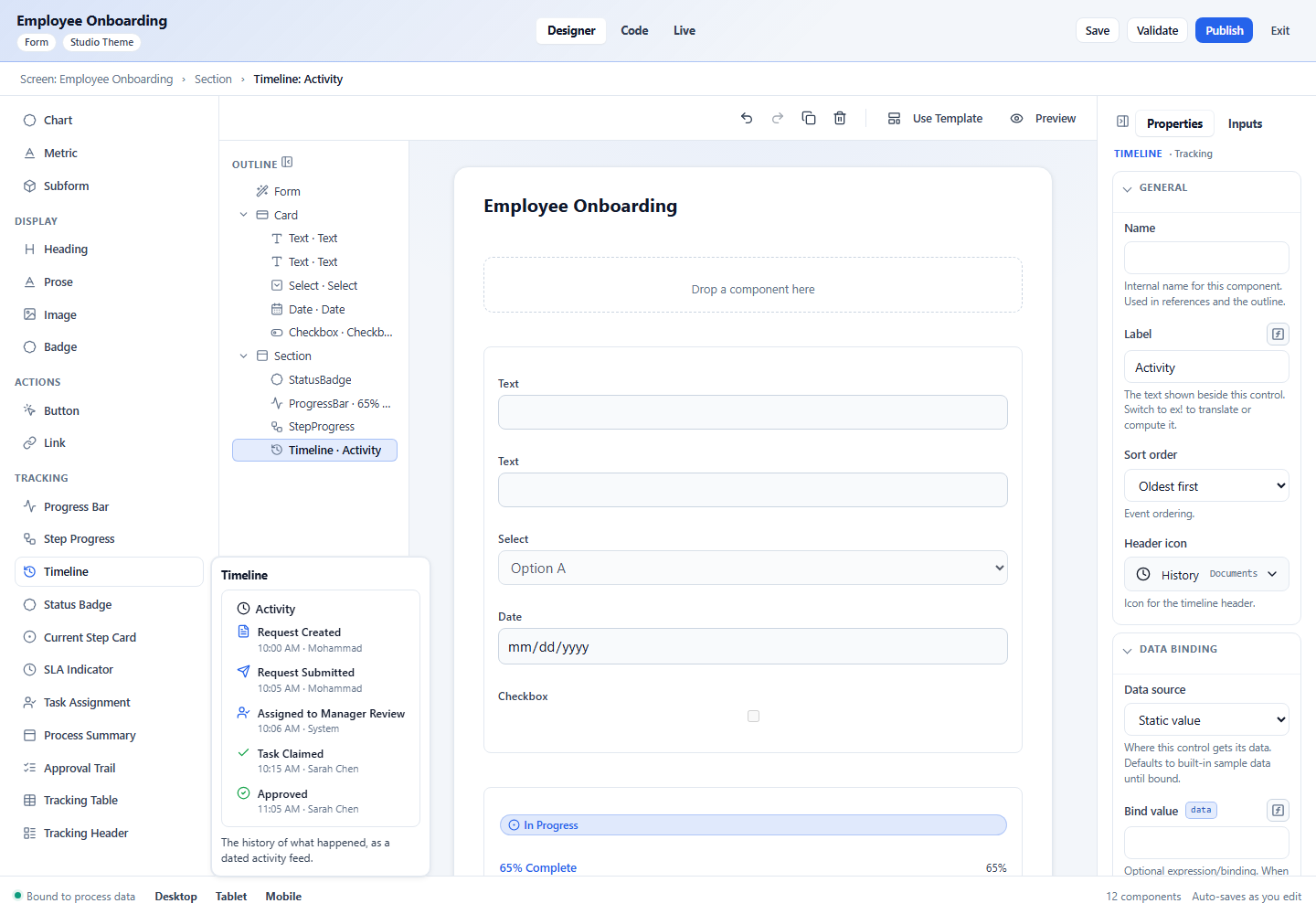
The designer has four working areas — Toolbox (left), Outline, Canvas (center), and Properties (right) — plus a Designer / Code / Preview switch in the header and Save / Validate / Publish actions. Every one of these is covered in the designer tour.
Current detailed references: toolbox controls, governed data sources, data-control capabilities, and App Shell account/notification placement. The separately planned floating App Chat is not enabled by these existing shell or Studio Agent controls.